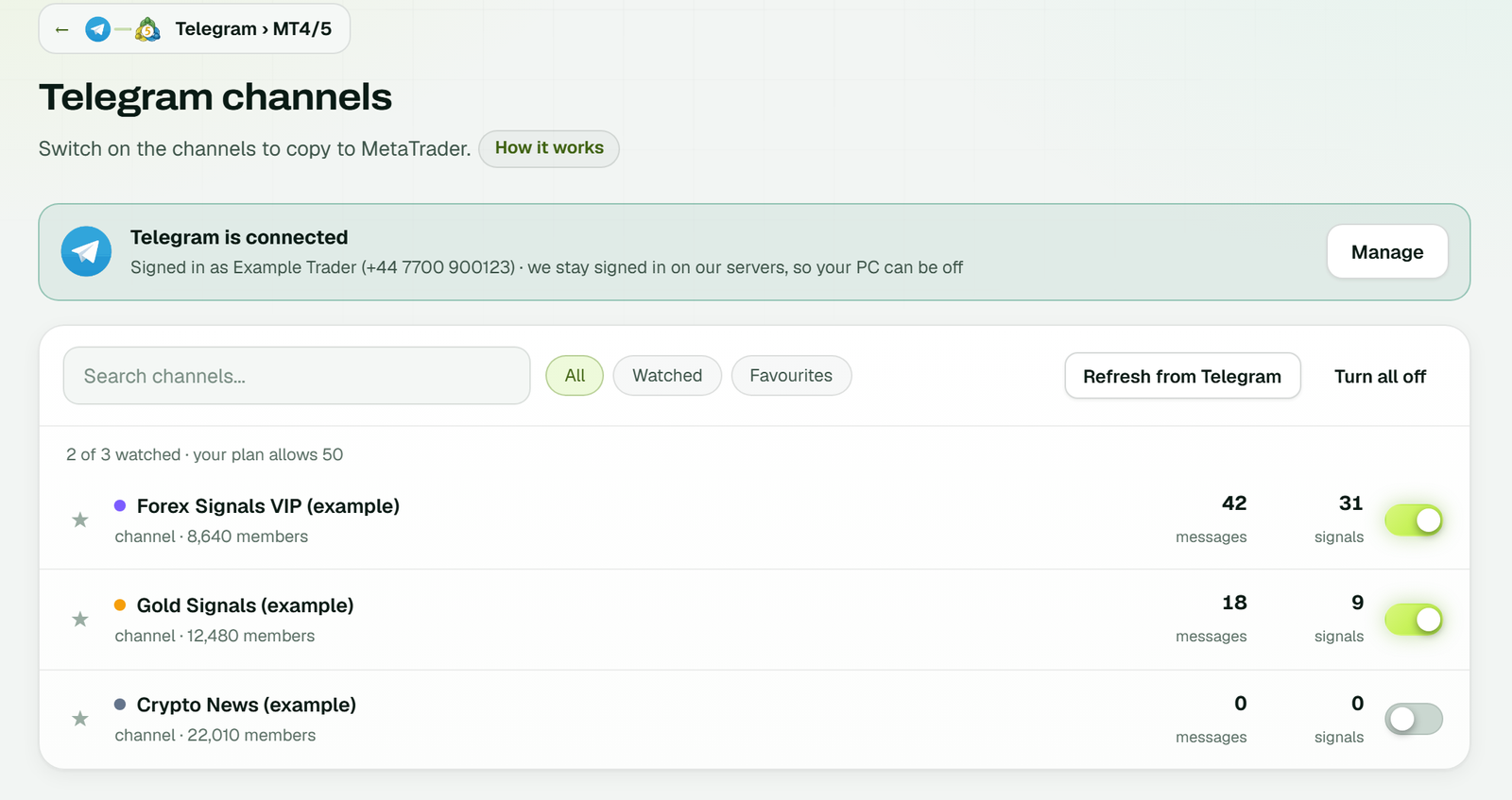
Only the channels you switch on are read - here in an example workspace.
Five automations, one cloud: Telegram, WhatsApp, Discord and TradingView to MT4/MT5, the MT4/5 cloud copier, signals to seven binary brokers and the binary trade copier. No VPS - your PC can be off.
TGGOLD BUY 4380 SL 4370 TP 4400
Telegram to MetaTrader, WhatsApp to MetaTrader and Discord to MetaTrader all run through the same TPcopier EA in your cloud MetaTrader - the same key, the same settings, the same account. Use one source or all three.
The Telegram signal copier signs in with your phone number and the code Telegram sends. Every channel and group you are in is listed - public, private or a paid VIP channel - and is read with your own login, so there is no bot to add.
GOLD BUY 4380
SL 4370
TP1 4400  TP2 4420
TPcopier joins your WhatsApp as a linked device, the way WhatsApp Web does: one QR scan under Settings › Linked devices. Tick the signal groups to copy - the WhatsApp signal copier reads nothing else.
XAUUSD SELL 4679
SL 4686
TP 4665
Sign in to Discord with a QR code, your email or phone and password, or a Discord bot token, then tick the channels. The Discord signal copier reads message text and embeds alike, and never posts.
Embed: XAUUSD BUY
SL 4370 / TP 4400
Only the channels you switch on are read - here in an example workspace.
Prices are copied from the message and nowhere else. A plain signal is read on the spot, a layout the channel used before is read from what TPcopier learned, and only something new goes to an AI - the next one like it is free.
GOLD BUY 4380 SL 4370 TP1 4400 TP2 4420 TP3 4440XAUUSD · 3 buy orders, one per targetEURUSD sell limit 1.0850-1.0855 SL 1.0900 TP 1.0800 / 1.0750sell limits at both prices, two targets eachXAUUSD SELL NOW 4676 - 4679 SL 4686 TP 4665the range is the entry zone, not a targetBTCUSD BUY NOW SL 61000 TP 63000no price anywhere: a market order↳ SL to 4390the stop loss of that signal's orders moves↳ TP2 4435the second target's orders move↳ Close allthat signal's orders close, pending ones are deleted↳ Close half / move to BEa partial close, with the EA's breakeven & partials switched onTP1 hit! +200 pipsa result post - on your block list, never sentExamples. Any language works: "CHIUDERE", "Закрыть половину", "Cerrar todo".
The TPcopier EA (Expert Advisor) runs on one chart and trades every symbol. Everything about size and risk is set in its inputs, on the website.
Fixed, a % of balance, a risk % or amount to the stop loss, lots per symbol, or a lot per target.
Prefix, suffix and replacements (GOLD=XAUUSD) turn a channel's names into your broker's.
Max open trades, trades per day, week and month, daily and account loss or profit limits, trading hours.
Breakeven after TP1-TP5, trailing stop, profit lock, and expiry for pending and open orders.
A default stop and target when a signal gives none - or refuse it instead. Set either to 0 to open without one.
Placed, refused or already open - with the broker's or the EA's own reason - next to every signal.
Connect TradingView to MT4 or MT5 in a few minutes: paste the feed's webhook address into any alert - an indicator, a line on the chart or a Pine Script strategy - and the TPcopier EA in your cloud MetaTrader places the order.
On TPcopier's TradingView page. Each feed has its own TradingView webhook address - make one per strategy if you like.
TVScalper readyAlert › Notifications › Webhook URL: the feed's address. Message: the JSON alert text.
TVwebhook onConnect the feed to your MT4 and MT5 accounts - one or many, at any broker.
TP1 feed → 3 accountsNothing to install: the TPcopier EA (Expert Advisor) in your cloud MetaTrader places the order, every symbol from one chart.
MT5EA runningOnly three are needed. TPcopier stamps every alert with its own clock when it arrives, so a late or replayed alert can never pose as a new one. Your TradingView page in TPcopier writes the message for you.
"type"buy, sell, buyclose or sellclose - or {{strategy.order.action}}"symbol"{{ticker}} - the EA maps it to your broker's name"key"keeps strategies apart: a close takes only its own key's trades"sl" / "tp"prices - or "sl_points" / "tp_points" from the entry"price"not used: MetaTrader alerts open at the market{"key":"a@1","symbol":"{{ticker}}","type":"buy"}a market buy on every linked MetaTrader account{"key":"a@1","symbol":"XAUUSD","type":"sell","sl":2352,"tp":2330}exact stop loss and take profit prices{"key":"a@1","symbol":"{{ticker}}","type":"buyclose"}closes this key's buys on that symbol{"key":"a@1","symbol":"{{ticker}}","type":"sell","sl_points":300}a market sell, its stop loss 300 points awayCopy one MetaTrader account's trades to others - MT4 to MT5, MT5 to MT4, across brokers - with your own lot rules. Both terminals run in our cloud, so nothing waits for a PC.
A receiver copies one sender, and a receiver is never a sender too - no chains, no loops.
A trade first seen more than five seconds after it opened is not copied - a late copy is a different trade.
After a restart the copier picks up from where it was: a copied trade is never opened again.
Both accounts run on the same cloud server. MT4 to MT5 trade copier guide
From your own code too: the copier API, the MT4/MT5 trading API (positions, history, prices, orders) and webhooks for every copy and position.
Telegram channels, TradingView alerts, WhatsApp groups and Discord channels all go through the same reader and the same rules - and each can trade any mix of your binary accounts.
Connect your own Telegram account with your phone number - no bot to add. Every channel and group you are in can trade: Telegram to Quotex, to Pocket Option, to IQ Option, Binomo, Olymp Trade, ExpertOption or Binolla.
EURUSD-OTC call M1
Paste your feed's webhook address into a TradingView alert. A buy is placed as a CALL and a sell as a PUT, for the alert's own expiry - TradingView to Quotex, Pocket Option or any of the seven.
{"symbol":"{{ticker}}","type":"buy","expiry":"1m"}
Link WhatsApp with one QR scan, the way WhatsApp Web works, and tick your signal groups. WhatsApp to Quotex, to Pocket Option and the other four - read on our servers, with your phone off.
AUDCAD otc SELL 3M
Sign in to Discord with a QR code, a password or a bot token and tick your channels. Discord to Pocket Option, to Quotex, IQ Option and the rest - message text and embeds read alike.
GBPJPY PUT 5min
Common layouts are read by TPcopier's own reader in under a millisecond; anything else goes to an AI, which also says whether a message is a signal at all.
EURUSD-OTC call M1EUR/USD OTC · CALL · 1 minGBPJPY PUT 5minGBP/JPY · PUT · 5 minUSD/CHF (OTC) BUY - 2 minutesUSD/CHF OTC · CALL · 2 minAUDCAD otc SELL 3MAUD/CAD OTC · PUT · 3 minUSDJPY DOWN M5USD/JPY · PUT · 5 minEUR/USD OTC 14:05 PUT M5EUR/USD OTC · PUT · 5 min · at 14:05EURUSD-OTC call M1Placed on 3 linked accountsGood morning traders!Not a trading signalGBPJPY PUTNo expiry in the message, so we did not guess oneAUDCAD otc SELL 3MPayout 72% is below your minimum of 80%EUR/USD OTC 13:40 PUT M5Refused: entry time 13:40 already passed (25 min ago)Examples - every message the copier skips gets a reason like these.
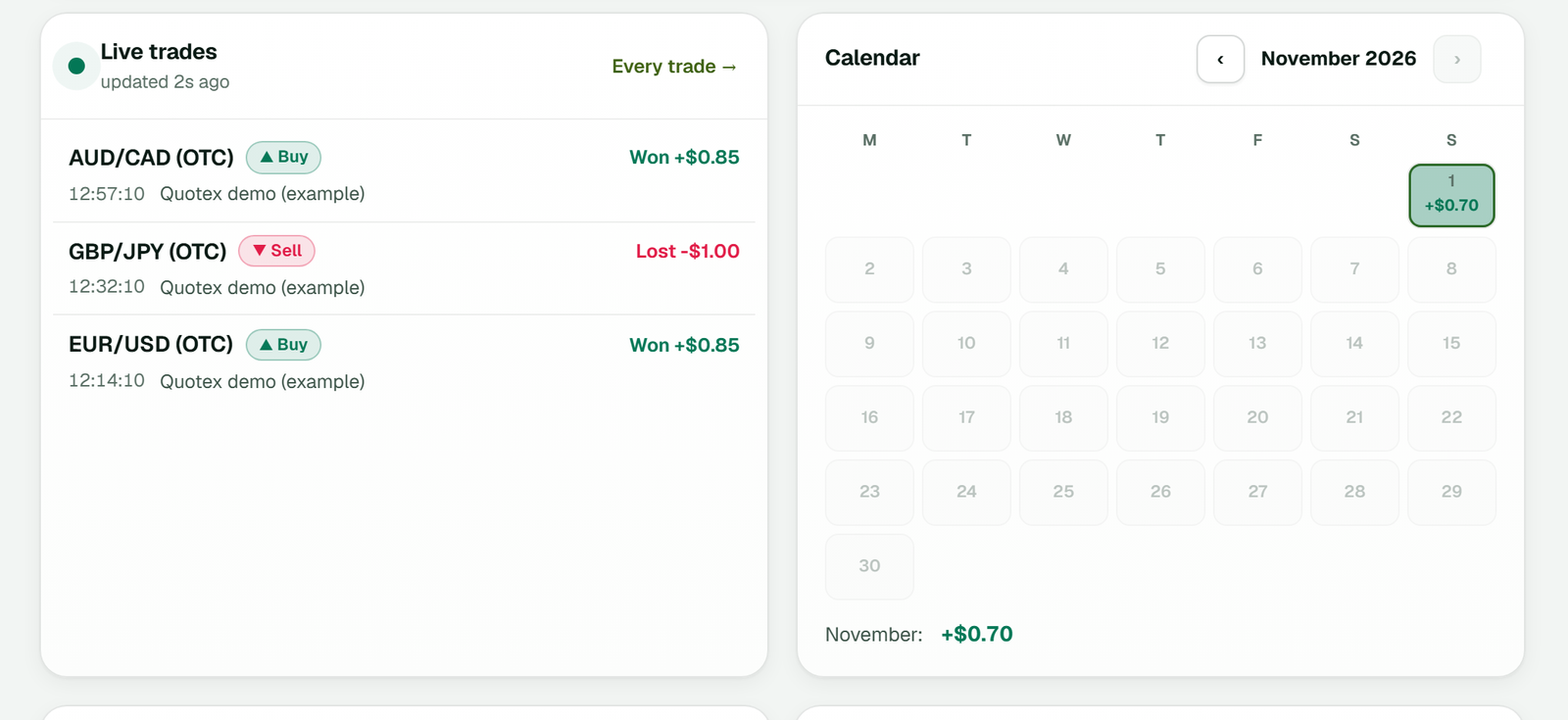
Live trades in an example workspace: the latest trades with their result, beside the month's calendar.
Set once for every source in Settings, or per channel in its Rules. Enforced on the server before any order goes out.
Both UP and DOWN, or only one of them - per channel.
Skip the signal when the broker pays less than your percentage on that pair.
When the AI reads a message, it says how sure it is; reads below your minimum are skipped.
A channel that floods during news stops at your number, counted over the last hour.
Give a channel one stake for every account it trades - or keep each account's own, with its caps and daily stop.
No expiry, no clear direction or an asset your brokers don't offer: the signal is skipped, never traded on a guess.
Each broker has its own page: what the copier does there, how its login stays alive and how its results are read.
Copy trading between your own accounts: trade on one main account - by hand or from a signal - and each follower of the same broker gets the trade at once, with its own stake. From $30 a month with 1 account following.
The binary copier and the trade copier are also software for your own Windows PC or VPS - one payment, lifetime licence.
Pick a main account and connect its followers. The trade copier sends every trade that opens on the main account - placed by you on the broker's own site or app, or by a signal - to each follower the moment it opens.
The account you trade on - on the broker's own site, in its app, or through signals from your channels.
Click each follower account of the same broker. A line is drawn between them - nothing is connected until you draw it.
The moment a trade opens on the main account, each follower is sent the same asset, direction and expiry - all at once.
Choose per follower. Accounts in a different currency from the main account use a fixed stake.
Enforced on the server for every copy, on every broker.
The asset, expiry and stake mean the same thing on every follower.
A follower is never also a main account, so a copy can never copy itself around.
However many times the broker announces a trade, it is copied exactly once.
A trade first seen long after it opened is not copied - a late copy is a different trade.
A follower's stake cap, pause, daily stop and Stop Trading are respected on every copy.
The copier log shows each main trade and what every follower got.
A desktop copier needs a computer on all day - usually a VPS you rent and look after. TPcopier is a cloud copier: we run MetaTrader with the EA, and your binary broker sessions, on our servers, so it keeps trading while your computer is off.
Connect a sourceTelegram, WhatsApp or Discord - a phone code, a QR scan or a tokenAdd the MT4/MT5 loginaccount number, password and server - the password is sealed as you type itSet the EA's inputslot size, symbols, limits - on the website, under EA settingsLink on the Bridgewhich channel trades which accountYour channels and groupsread on our servers, around the clockMetaTrader 4 or 5signed in to your broker, algo trading onThe TPcopier EAone chart, every symbol, the inputs you setThe account's logsign-in, the EA, every trade - on the websiteThe cloud is part of the price, so there is no VPS bill on top: Telegram to MT4/5 is from $40 a month, run in our cloud.
Connect one source and one demo account - and watch the next signal land.
Start free trialYes. TPcopier is a cloud Telegram copier for MetaTrader: your MT4 or MT5 account runs on our servers with the TPcopier EA inside, and your Telegram channels are read on our servers too. There is no VPS to rent and your PC can be off.
TPcopier joins your WhatsApp as a linked device, the way WhatsApp Web does - one QR scan under Settings, Linked devices. It reads only the groups you tick, never your private chats, and sends nothing. The same EA places the orders in MT4 or MT5.
Sign in to Discord with a QR code, your email or phone and password, or a bot token, then tick the channels to copy. Message text and embeds are read alike and TPcopier never posts. Automating a normal user account is against Discord's terms, so a bot is the safe choice on a server you run.
Any broker that offers MetaTrader 4 or MetaTrader 5. Symbol names with a prefix or suffix, like XAUUSD.m, are handled by the EA's Prefix, Suffix and Replacements inputs. On MT5 the EA needs a hedging account, because it opens one position per take profit.
Yes. It opens one order per take profit - up to six - and an entry zone as pending orders at its prices. A reply to a signal moves its stop loss or a target, closes half, moves to breakeven or closes it, on that signal's orders only.
Yes - MetaTrader runs on our servers, so it has to sign in. The password is sealed with the cloud server's own key the moment you type it; the website itself cannot read it.
A paid one: TradingView sends webhook alerts on its paid plans only, Essential and up, and asks you to turn on 2-factor authentication first. Any of them works with TPcopier.
Every open and close, a partial close in proportion, stop loss and take profit changes and pending orders - from one MetaTrader account to others, MT4 and MT5 in any mix, across brokers. Each receiver has its own lot rule (multiplier, fixed lot, risk % or balance ratio) and symbol names.
Measured on our live copies (4 October 2026): the copier sent the receiver's order a median 7 ms after it saw the sender's trade, and the broker's own execution then took about 140 ms. Every copy's own time is on the website.
Use {{strategy.order.action}} as the type, so the strategy's buys and sells arrive as they fill. A strategy's exit fill reports the opposite action, so send exits as their own buyclose or sellclose alerts.
A reversal needs nothing extra: a sell after a buy of the same key first closes that key's buys on the symbol, so a strategy never ends up hedged. To close without opening, send buyclose or sellclose. Give every strategy its own key, so a close from one never touches another's trades.
Yes. Connect your own Telegram account, link a channel to your Quotex or Pocket Option accounts on the Bridge, and every signal from it is placed automatically - on all seven brokers at once if you link them.
They are skipped, and the live feed says why - not a signal, no expiry given, payout below your minimum, market closed and so on. Nothing is traded on a guess.
Yes - two ways, chosen per account. By message (the default): a gale is placed only when the signal's own message names it ('1º GALE', 'MARTINGALA A LAS 17:05', 'Até 2 gales'), as many as it names, each on the next expiry at double the stake - a signal that names none is one trade. Or your own martingale system: the stake multiplied, raised by a fixed amount or taken from your own ladder, for as many steps as you set, straight back on the same pair or on the next signal - and the app shows what the ladder risks. A martingale multiplies losses as well as stakes, so try it on demo first.
Yes. The EA trades the account it runs on, so a real account trades real money from its first signal - start on a demo account.
Telegram forex copier setup for MT4 and MT5: sign in to Telegram, add your MetaTrader login, link a channel. The terminal runs in our cloud, not on your PC.
TradingViewTradingView webhook alerts to binary options in 6 steps: one feed places a CALL or PUT on Quotex and six more brokers, and can trade MT4/MT5 too.
MetaTraderA MetaTrader trade copier in the cloud: one sender copied to MT4 and MT5 receivers across brokers, with lot rules and symbol matching. $6 a month per receiver.
2 days free, demo first - nothing trades until you link it.