Telegram to Quotex Copier: 5-Step Setup Guide for 2026
A Telegram to Quotex copier reads the signal channels you already follow and places each call on your Quotex account for you: pair, direction, expiry and stake. With TPcopier it runs in the cloud, so your phone and your PC can both be off. Setting one up takes five steps; most of the care goes into the limits you set before real money goes near it.
TPcopier is not affiliated with Quotex or Telegram. Broker and app names are trademarks of their owners.
What a search for a Quotex copier turns up
Search the phrase and page one is a strange mix. Most results are copiers for MetaTrader 4 and 5, which place orders in a MetaTrader terminal and stop there. The rest are browser add-ons that make their own CALL/PUT calls. One Firefox listing, for example, describes its tool as a "browser-based control panel" that works alongside the Quotex platform (Firefox Add-ons).
Neither is what most people mean. You already pay for, or trust, a particular channel. You want its calls on your account, at the time the channel says, without sitting next to an open browser tab. That's a copier's job, and it's narrower than a "Quotex bot" that picks trades by itself.
TPcopier's binary options signal copier does this on its own servers, around the clock. Quotex is one of seven binary brokers it trades, and the Quotex broker page sums up how it works there.
Set up the Telegram to Quotex copier in 5 steps
Before you start, you need three things. Your Telegram account must already be in the channel or group you want to copy. You also need a Quotex account and a TPcopier account. The free trial runs for 2 days on one bridge, up to 10 signals a day, and asks for no card.
Open Bridge in the left menu and press Make a bridge. Under Sender pick Telegram, under Receiver pick Quotex, then press Open the bridge.
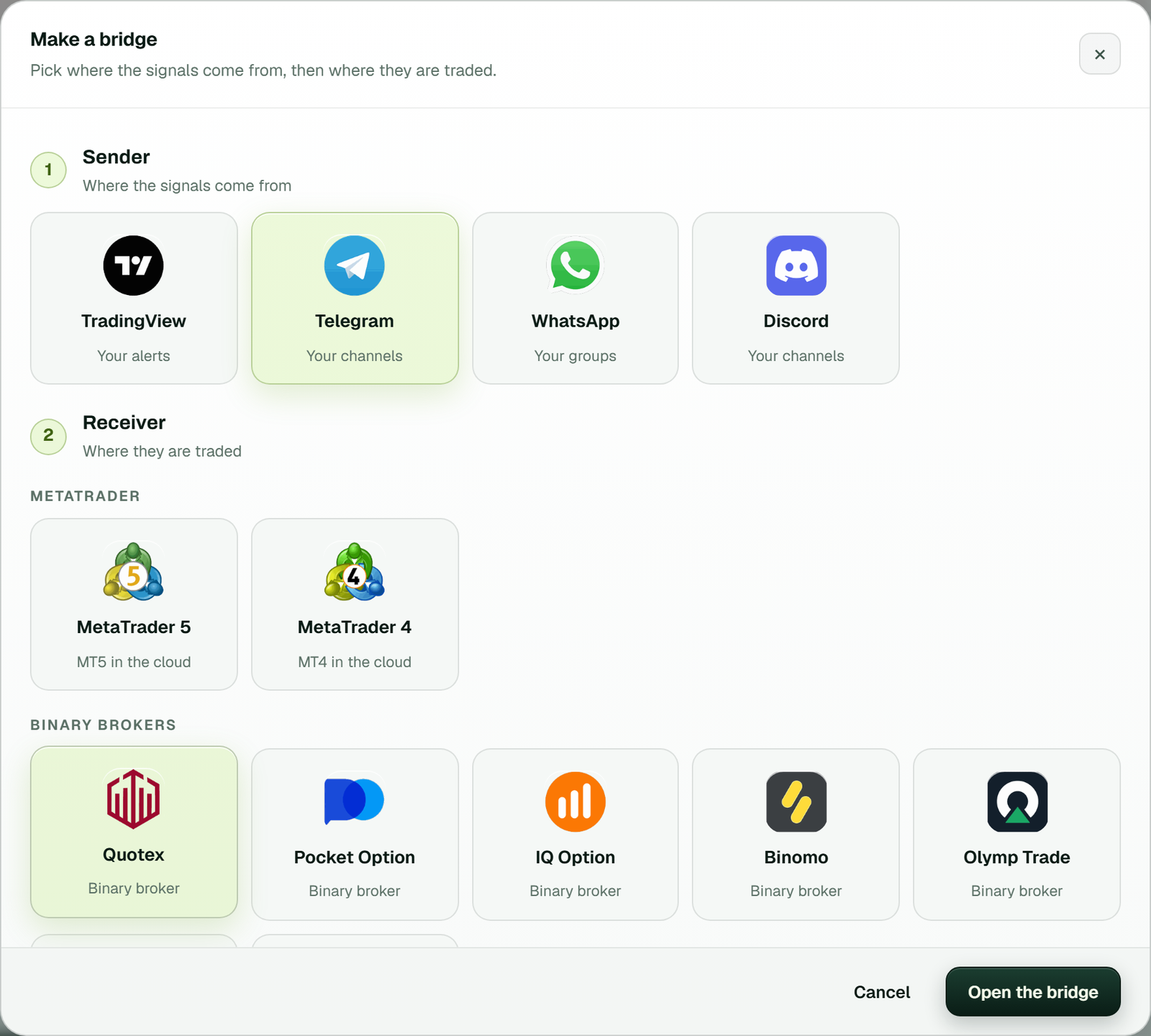 The first screen of the set-up. Only this choice changes if your provider posts on WhatsApp or Discord instead.
The bridge's window opens with a Set-up list at the bottom, which ticks each step off as you finish it.
1. Connect Telegram and switch on your channels
Press Connect Telegram, type your phone number, then type the code Telegram sends inside its app. If your account has a two-step password, TPcopier asks for that next. There's no bot to add, so the channel admin never has to do anything.
Once the page says Telegram is connected, your channels load. Switch on the ones whose Quotex calls you want and leave the rest off. A channel you joined a minute ago appears after Refresh from Telegram.
 Example workspace: the line above the list shows how many channels are watched and how many the plan allows, 50 here.
2. Add your Quotex account and sign in on Quotex's page
On the Binary brokers page, press Add a broker account. Pick Quotex, keep Demo (practice money) as the account type, name the account if you like, and press Add and connect.
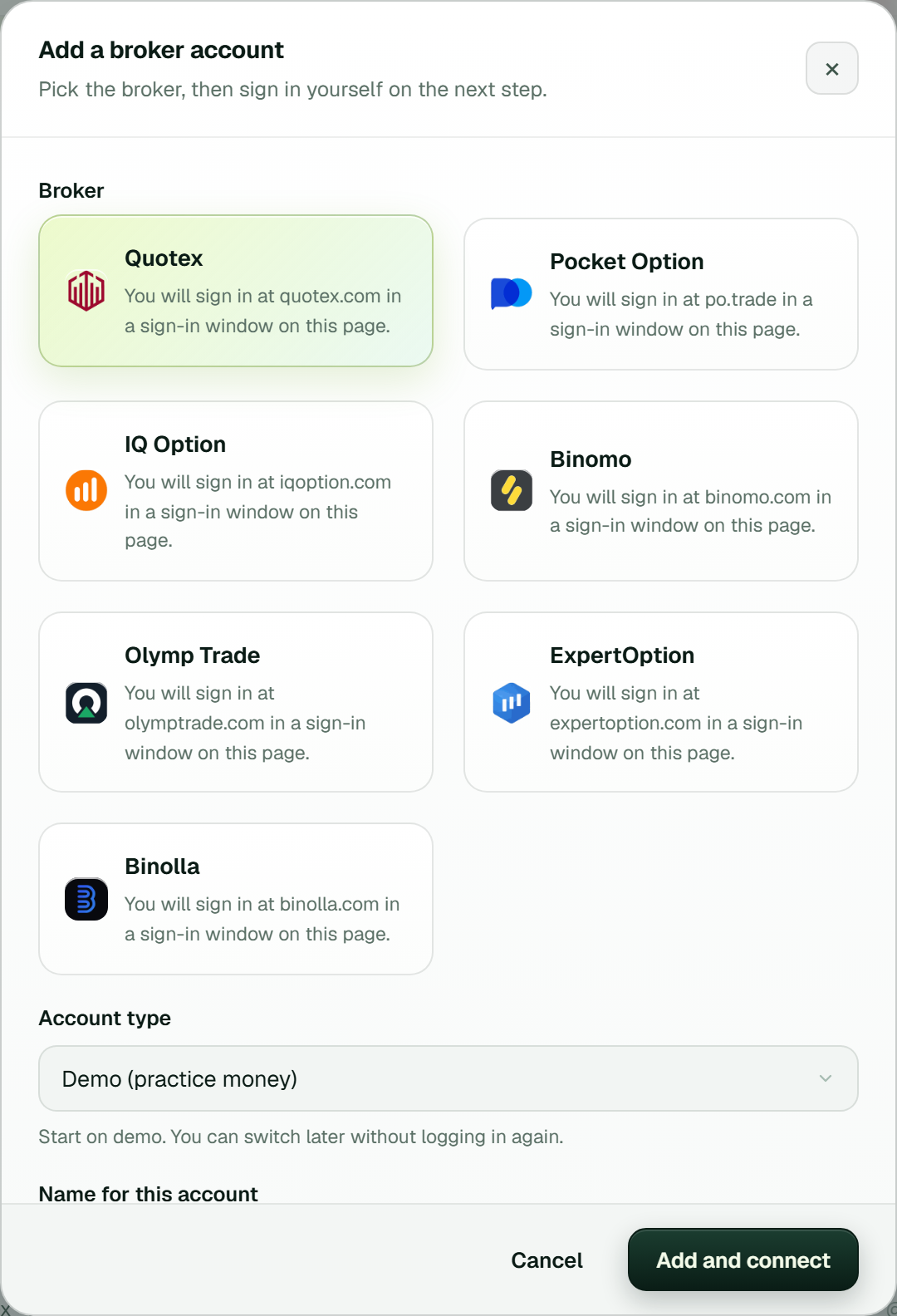 Each broker card names the site you sign in on, quotex.com here, in a sign-in window on the same page.
Next, Quotex's own sign-in page opens inside TPcopier. You type your e-mail and password there yourself, plus any "verify you are human" check, just as in a normal browser. Use e-mail and password, because "Sign in with Google" may not work in that window. TPcopier never asks for your Quotex password and never stores it; it keeps only the login session, encrypted.
After that, the account card shows a Login line, such as "Login 6s ago, not checked yet", and later "renews itself" once the session has been checked.
3. Set the stake and limits
Press Settings on the Quotex card. Stake per trade at 0 uses your default stake, which starts at $1.00. Limits holds the stop for the day after a set loss or a set profit, so fill both in while you're there.
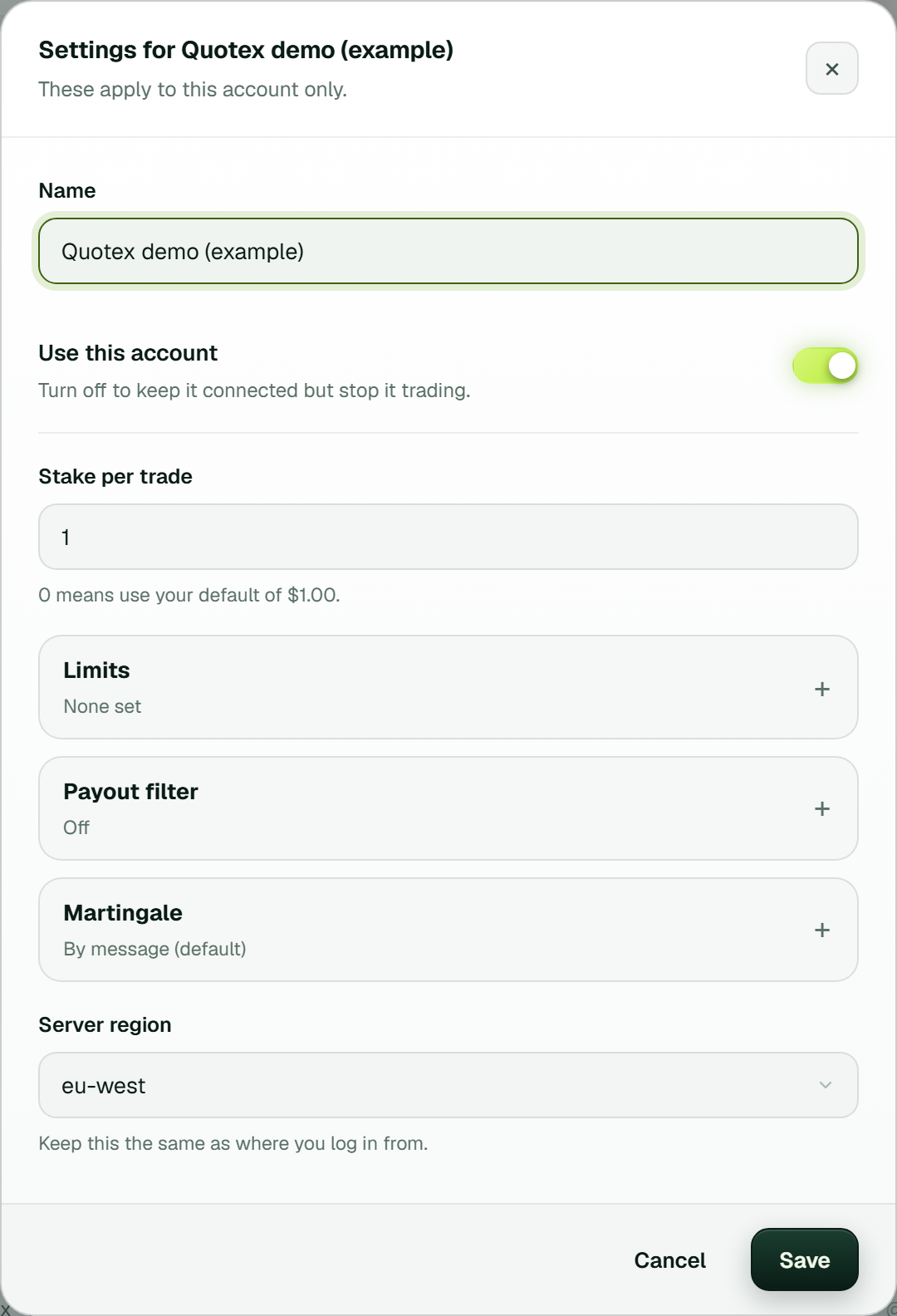 These settings apply to one account only. Keep the server region the same as where you log in from (example workspace).
The same window holds Payout filter, which is off by default, and Martingale, which starts on By message.
4. Link the channel to your Quotex account
Nothing trades until this step. In the bridge's window, your channel sits on the left and your Quotex account on the right. Link the two, and the link shows Live once it runs. One channel can feed several accounts, and each one gets the signal at the same moment.
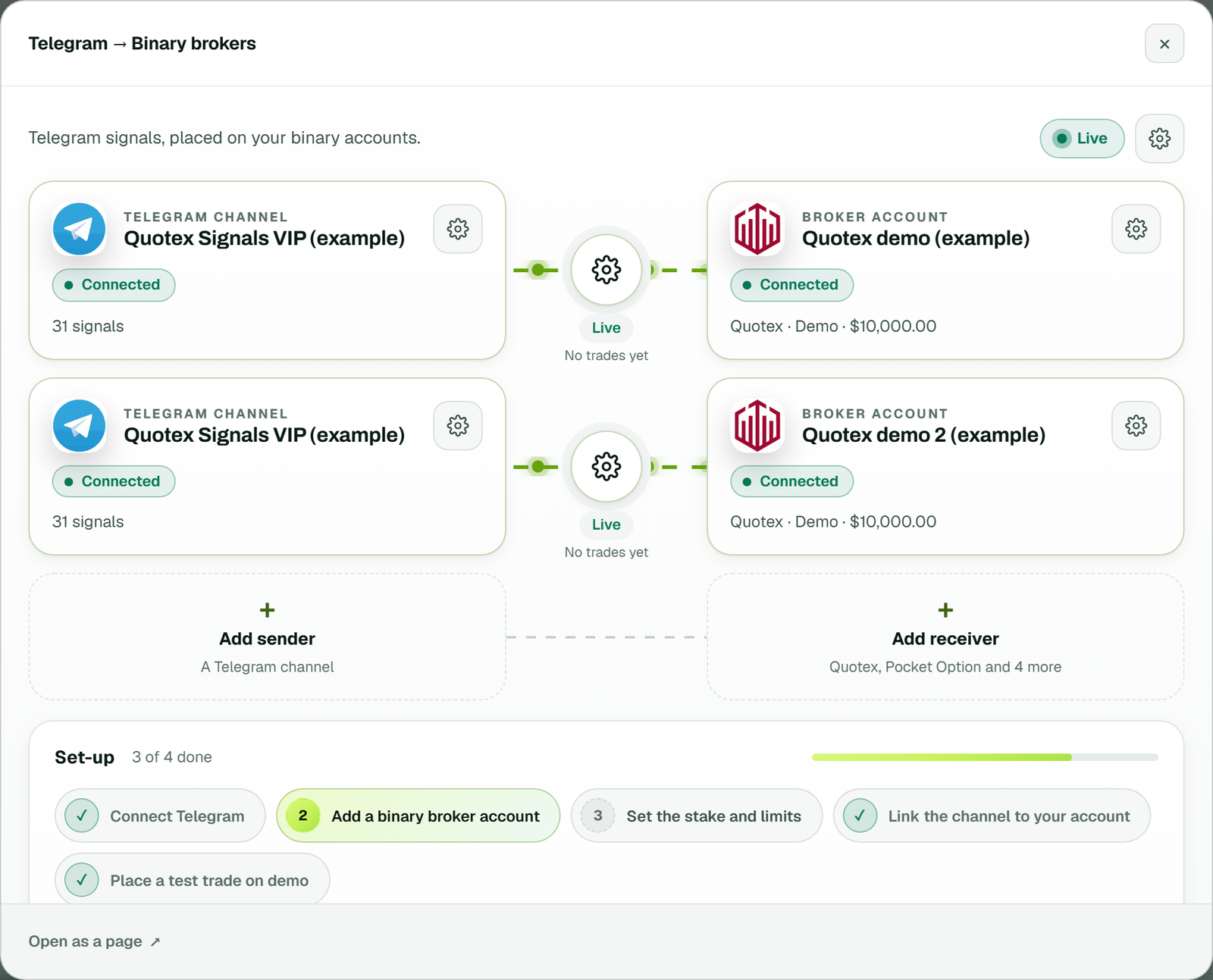 Each link has its own gear between the channel and the account, and the Set-up list ticks off the steps already done (example workspace).
If the channel posts calls with an entry time, TPcopier asks for that channel's time zone when you link it. Answer it now. A timed call isn't traded until the time zone is set.
5. Place a test trade on demo
Press Test trade on the Quotex card. It places one order on the demo balance and never runs on a real-money account. Then leave the bridge on demo for a few days and compare what it placed with what the channel posted.
On the Dashboard, Live trades shows the latest trades with their results next to a calendar of the month. History lists every trade with its stake, speed, result and profit, plus filters and a CSV export.
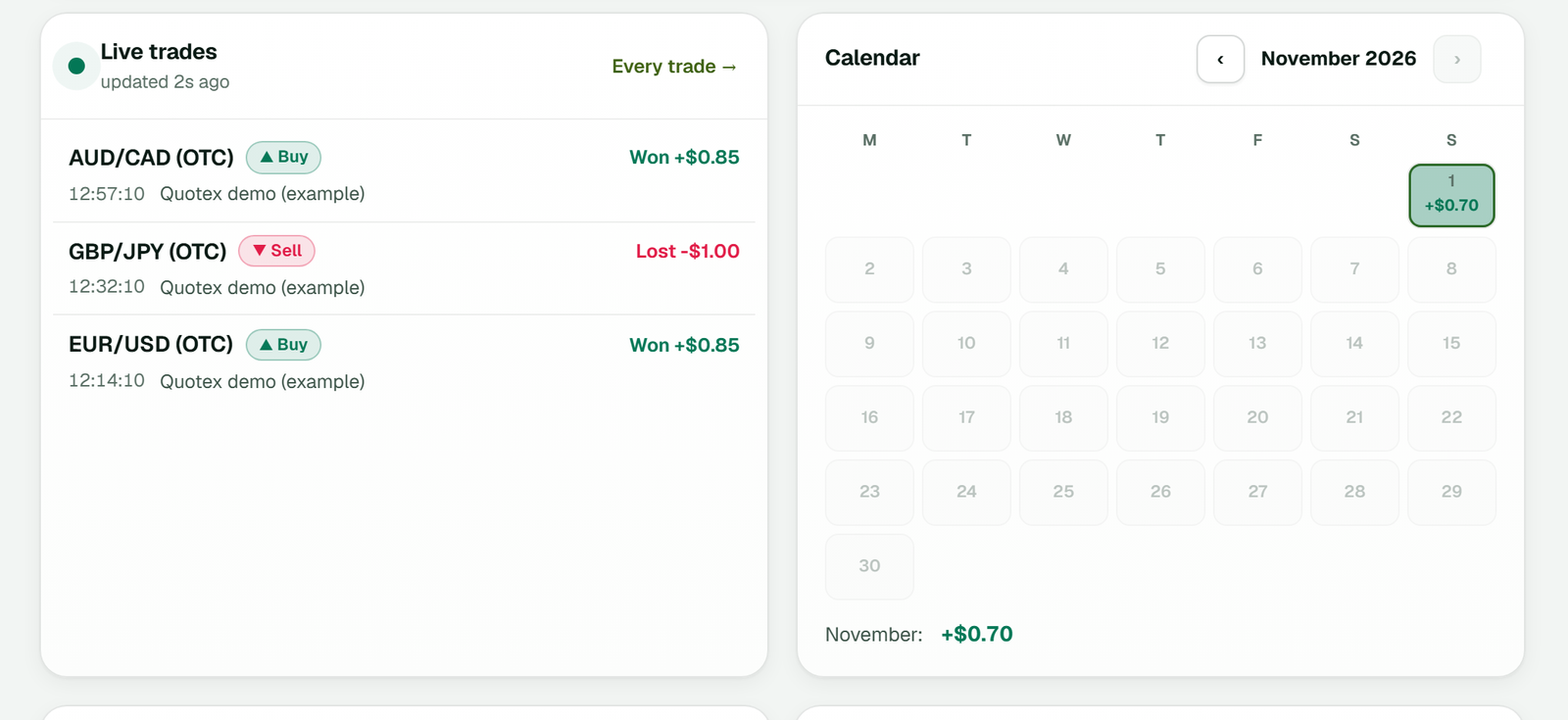 Example demo trades, not a performance record. Each day on the calendar shows that day's total.
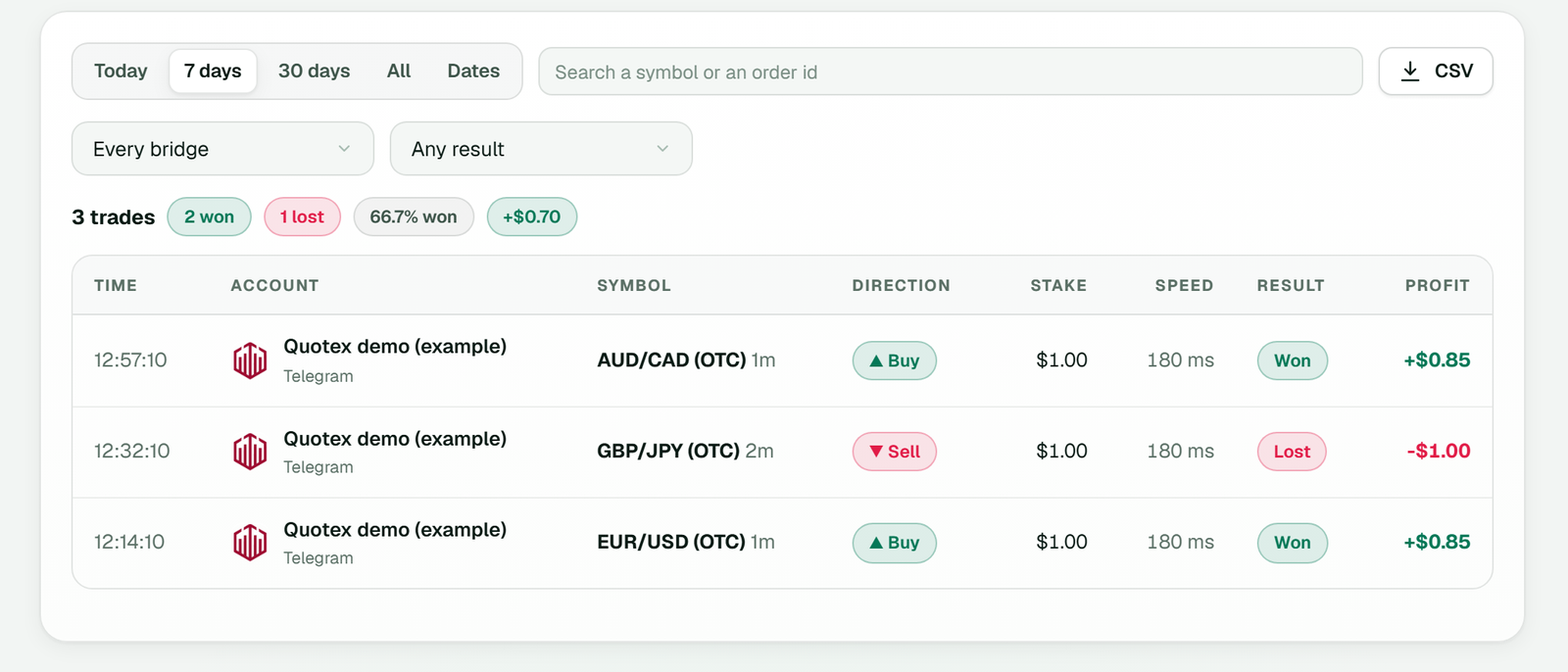 Filters at the top narrow the list by date, bridge and result, and CSV exports the same rows (example workspace).
How a Quotex call turns into an order
Channels rarely agree on a layout, and that's the first thing the copier has to handle. One writes "EURUSD-OTC call M1", another "GBPJPY PUT 5min", and a third spreads the call over three lines with arrows. TPcopier reads common layouts itself, with no AI call, and hands anything unusual to an AI that also decides whether the message is a trade at all.
A greeting or a results post counts as "not a signal". A call with a pair and a direction but no expiry is skipped too, because the copier never guesses an expiry. If your channel never writes one, set its expiry once under that channel's Rules. Developers can do the same from code with the order timing API.
The OTC suffix matters. EURUSD-OTC goes to Quotex's OTC pair, while plain EURUSD goes to the real market. But when the real market is shut, at the weekend for example, the call trades the OTC twin instead. That's on by default, and you can switch it off in the bridge's settings (the gear).
Timed calls follow the channel's clock, then wait for that minute on Quotex. If a call reaches TPcopier too late, past a tenth of the trade's length (6 seconds on a 1 minute call, five minutes at most), it's refused rather than placed late. The timed entry guide covers this in detail, and Telegram signal formats lists more layouts with their skip reasons.
Why Quotex sometimes says no
A call can be read correctly and still not trade. A few Quotex habits explain most of those cases.
The minimum stake follows your account currency. Quotex wants at least 1 on a dollar account, and other currencies have their own minimum. When Quotex refuses a stake as too small, TPcopier remembers that minimum, stops smaller orders before they leave, and warns you on the account card.
Quotex also answers an order only when the connection's chart sits on the same pair. So TPcopier sends the chart switch and the order together, as one message. The expiry travels in seconds, so an M1 call becomes 60 and a "5 min" call becomes 300. Demo or real rides on every order as a flag, which is why moving an account to real money needs no new sign-in.
Sometimes Quotex goes quiet. If it hasn't answered within 15 seconds, TPcopier looks for a deal on that pair that opened after the order left. When it finds one, it tracks that deal like any other instead of firing a second order.
Quotex refusal codes and what to do
When Quotex does refuse, the trade keeps Quotex's own code in brackets:
| What the trade says | What to do |
|---|---|
| the stake was 0.5 USD and this account's minimum is 1 [min_amount] | Raise the account's stake to that minimum |
| above this account's maximum [max_amount] | Lower the stake or its cap |
| not enough balance | Top up, or check the card is on the balance you meant |
| That market is closed right now | Nothing to fix; the call is never placed late |
| Payout 65% is below your minimum of 70% | Lower the minimum on purpose, or let it skip |
An order that never went out reads "Not placed" in Live trades, with the reason beside it.
Limits to check before real money
A copier takes you out of each trade, so the limits you set in advance carry more weight than usual. Check these four.
Martingale follows the message. By default an account places a gale (a recovery step) only when the signal's own message gives one, such as "1º GALE", and each gale stakes double the one before it. A message with no gale line gets one trade. You can switch an account to its own martingale in its Settings instead.
Payout floors and losing runs
The minimum payout lives in two places. In the bridge's settings (the gear), Minimum payout % starts at 70, which is where the last row of the table comes from. Then each account has its own Payout filter ("Only take good payouts"), which is off until you switch it on.
Losing runs pause an account. The bridge's gear also has "Pause an account after this many losses in a row", 4 by default, and 0 turns it off. A paused account waits on the Binary brokers page until you press Resume. The same gear holds the volume limits: most trades per hour or per day, most open at once, a wait between trades, and a window for ignoring repeats.
Real money and the risk
Real money is always your own move. An account added on demo stays on demo until you choose More on its card, then Switch to real money. And if anything looks wrong, the red Stop Trading button in the top bar stops all trading at once.
Binary options carry a high risk of losing money. The US regulators' investor alert on binary options says the expected return on them is negative, and it doesn't name any broker. In India, the Reserve Bank's Alert List, updated as on 19 November 2025, names Quotex among platforms not authorised to deal in forex. Check the rules where you live first.
TPcopier is software, not trading advice, and the risk management guide explains each limit further.
What it costs, and the WhatsApp or Discord route
The Telegram to Binary brokers bridge used here costs $50 a month with 1 account, then $20 for each account you add. The pricing page has every plan. All payments are final with no refunds, so use the trial and a demo account to judge it.
If your Quotex provider posts in a WhatsApp group or a Discord server instead, only the sender changes. Pick WhatsApp or Discord in Make a bridge, and every step after the first one stays the same. The WhatsApp to Quotex and Discord to Quotex guides show those sign-ins. For chart alerts, see TradingView to Quotex.
The same copier also comes as Lifetime Software that runs on your own Windows PC or VPS, trading only while that computer is on. Cloud vs lifetime signal copier compares the two, and the binary trade copier copies one Quotex account onto others.
Sources
- Firefox Add-ons, "Quotex AI Bot" listing: https://addons.mozilla.org/firefox/addon/quotex-ai-bot/
- CFTC and SEC, "Investor Alert: Binary Options and Fraud": https://www.cftc.gov/LearnAndProtect/AdvisoriesAndArticles/fraudadv_binaryoptions.html
- Reserve Bank of India, Alert List of unauthorised forex trading platforms (updated as on 19 November 2025): https://rbi.org.in/scripts/bs_viewcontent.aspx?Id=4235
FAQ
Can it copy a Telegram bot that sends me signals in a private chat?
No. Only channels and groups appear in the list, so a bot that messages you one to one isn't read. If the provider also posts in a channel or group, join that and switch it on.
Is there a free signal bot for Quotex?
TPcopier has no free-forever plan. On its trial a Quotex signal counts once with its gales, so a recovery step the message asks for still goes through after the tenth signal. Each channel, Telegram account and Quotex login gets one trial, and the free signal copier guide explains how that is checked.
Can I add a real-money Quotex account from the start?
Yes. Add a broker account offers Real money as well as Demo (practice money). Test trade won't run on a real-money account, though, so your first checks still need a demo one.