ExpertOption signal copier & trade copier.

ExpertOption signal copier in the cloud: Telegram signals sent through the fastest of four servers, and one ExpertOption account copied to many.

Demo first You sign in yourself 2-day free trial

What the ExpertOption signal copier does

The TPcopier ExpertOption signal copier runs in our cloud. It reads the Telegram, WhatsApp and Discord channels you link, and your TradingView alerts. Each signal then goes out as a CALL or PUT on every ExpertOption account you connect. Your PC can stay off.

ExpertOption runs four regional servers. Each time the ExpertOption signal copier connects, it tries all four and keeps the one that answers first. It also sets the demo or real mode on every connection before any order. Every account starts on demo.

You sign in on ExpertOption’s own page, opened right on TPcopier, and we keep only the session. That login lasts 400 days, and the site re-checks it every two days. You choose each account’s stake. The martingale follows the signal’s own message unless you set your own steps.
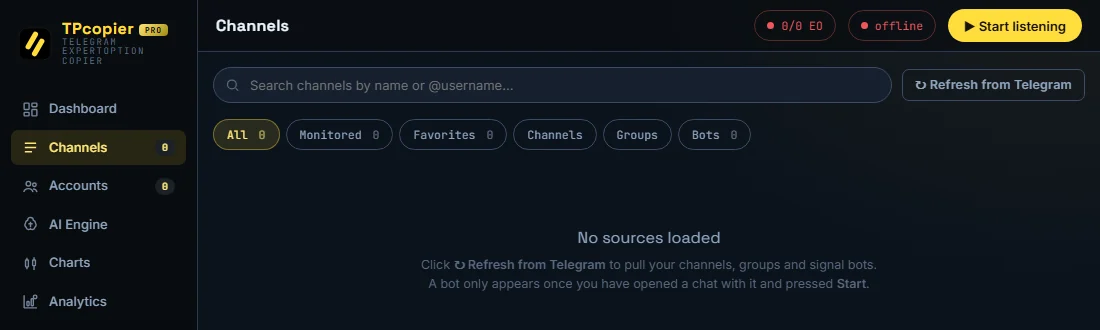
ExpertOption signal copier app for Windows: the Channels page that lists your Telegram channels

Our pay-once ExpertOption signal copier app for Windows, on its Channels page before you load any channel. Refresh from Telegram pulls in your channels, groups and signal bots.

ExpertOption trade copier and auto trading

The ExpertOption trade copier copies one main ExpertOption account to your others. You trade on the main account, by hand or from a signal. Then each follower gets the trade as it opens, at the same stake, a fixed amount or a multiple. See how the binary trade copier works.

So ExpertOption auto trading can run on one account or many. The Telegram to ExpertOption guide shows each setup step. TPcopier is not linked to ExpertOption and gives no trading advice. Check that the law where you live allows binary options - the CFTC warns about binary options fraud.
01Made for ExpertOption

What it does on ExpertOption.

The ExpertOption signal copier connects to ExpertOption the way ExpertOption works best. Here are the details.

The fastest of four servers

ExpertOption runs four regional servers; the site tries them all at every connect and keeps the one that answers first.

Demo or real, per connection

The site sets the right account mode on every connection, before any order.

Every result recorded

Read from ExpertOption's own trade history.

A long-lived login

ExpertOption's login lasts over a year; the site re-checks it every two days.

01How it works on ExpertOption

ExpertOption login, OTC pairs and expiry.

What is different about ExpertOption, and how the ExpertOption signal copier handles it. Read with the binary options signal copier page for what every broker shares.

Sign-in and session

You sign in to ExpertOption in a real Chrome window. Its login token lasts 400 days; the site re-checks it every two days. It sets the demo or real mode on every connection before any order.

OTC pairs and expiry

ExpertOption names OTC pairs with (OTC), and an OTC pair can share its symbol with the market one, so the site reads the asset's name, not only its symbol. Each connect tries all four regional servers and keeps the one that answers first.

Stakes

When ExpertOption refuses a trade for balance, the live feed shows the stake the site tried.

Common ExpertOption messages in the live feed

What the live feed saysWhat it means
is closed on ExpertOption right now - nothing was sentThe pair is shut at that moment.
is not offered on ExpertOption - nothing was sentExpertOption does not list that pair.
ExpertOption refused the trade: not enough balanceTop up or lower the stake.
ExpertOption no longer accepts the saved login. Press Connect to sign in again.Sign in again.

ExpertOption guides

02Trade copier

One ExpertOption account. Many followers.

Trade on your main ExpertOption account - by hand on ExpertOption's own site or app, or from a signal - and each follower ExpertOption account gets the trade the moment it opens: the same stake, a fixed amount or a multiple.

How the binary trade copier works

+Pay once

Telegram to ExpertOption copier software.

Would you rather run it on your own Windows PC or VPS? The Telegram to ExpertOption Copier app costs $150 once, with 2 accounts and $30 for each one more. A free demo key comes first, and it becomes lifetime when you buy. It reads your Telegram channels and places each signal on your ExpertOption accounts.

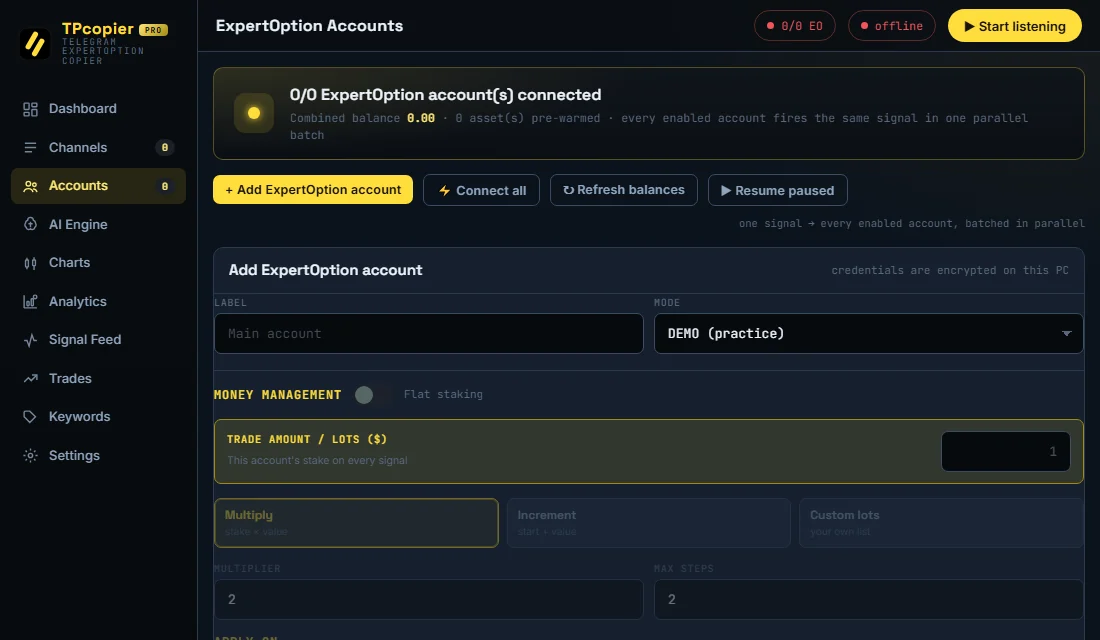
ExpertOption accounts in the Telegram to ExpertOption copier app

Each ExpertOption account starts on DEMO, with its own trade amount.

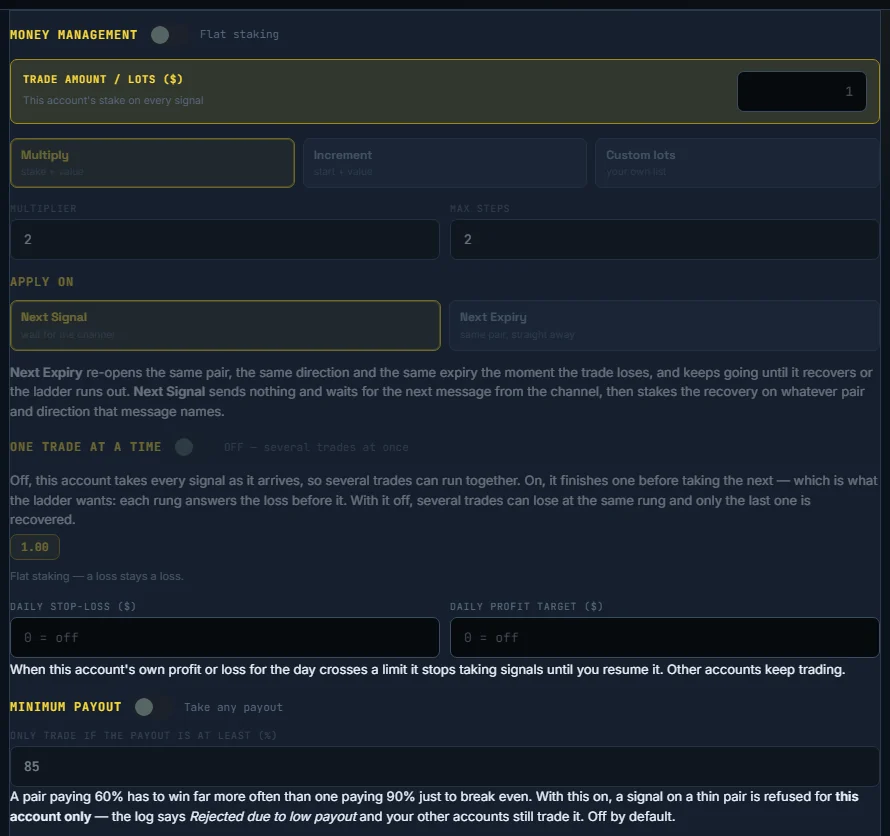
Money management settings of the ExpertOption signal copier software

Trade amount, martingale (multiply, increment or your own lots), next signal or next expiry, a daily stop-loss and a minimum payout.

Dashboard of the Telegram to ExpertOption copier

The dashboard: the Telegram connection, your ExpertOption accounts, and today's signals and trades.

How to install the Telegram to ExpertOption copier · See it on the Software page

03Set up

Running on ExpertOption in three steps.

Everything happens on demo until you switch an account to real yourself.

1

Connect ExpertOption

ExpertOption's own sign-in page opens right on TPcopier; you sign in there yourself. The site keeps only the session.

2

Link your channels

On the Bridge page, link your Telegram channels to your ExpertOption accounts - and, if you like, a main ExpertOption account to its followers.

3

It trades

Signals and copies go out in milliseconds, with every result read back from ExpertOption itself.

04FAQ

ExpertOption questions.

Other brokers:

ExpertOption signals and copying

Can Telegram signals trade on my ExpertOption accounts automatically?

Yes. Link a Telegram channel to your ExpertOption accounts on the Bridge page. The ExpertOption signal copier then places each signal from it on all of them at the same moment - and on your accounts at the other binary brokers too, if you link those as well.

Can TradingView alerts trade on ExpertOption?

Yes. Make a TradingView feed in TPcopier, paste its webhook address into your alert and connect the feed to your ExpertOption accounts on the Bridge. The copier places a buy alert as a CALL and a sell as a PUT, for the alert's own expiry.

Which ExpertOption server does it use?

Whichever of the four answers fastest - measured again every time it connects.

Can one ExpertOption account copy to many?

Yes. Link one main ExpertOption account to your other ExpertOption accounts.

ExpertOption sign-in, rules and the law

Which ExpertOption servers are there?

Four regional servers. Each time the site connects it tries all four and keeps the first that answers.

Is it legal to trade binary options on ExpertOption?

Many countries ban or restrict binary options. In India, the RBI lists several binary platforms - including this one - as not authorised for forex trading. Check the law where you live before you use any broker. TPcopier is software only; it is not a broker and is not linked to ExpertOption.

Put your ExpertOption accounts on autopilot.

Start on demo - no card, no ExpertOption password.