A PineConnector alternative, in the cloud.
Looking for a PineConnector alternative? TPcopier also turns TradingView alerts into MT4 and MT5 orders, but both MT4 and MT5 run on our servers, so no VPS is needed for either. It also copies Telegram, WhatsApp and Discord signals. Below, each PineConnector fact comes from its own pages, checked on 29 October 2026.
The short answer
PineConnector and TPcopier both connect TradingView to MetaTrader. So the question is not whether a tool works, but where MetaTrader runs, which platforms it covers and what else you need. We only compare points that PineConnector states on its own site, and we link each one, so you can check it yourself. Their pages can change after the date above.
In short, TPcopier is the PineConnector alternative for you if you want MT4 or MT5 without running a VPS, or if your signals also come from Telegram. On the other hand, PineConnector fits you if you already use its alert syntax and its own EA.
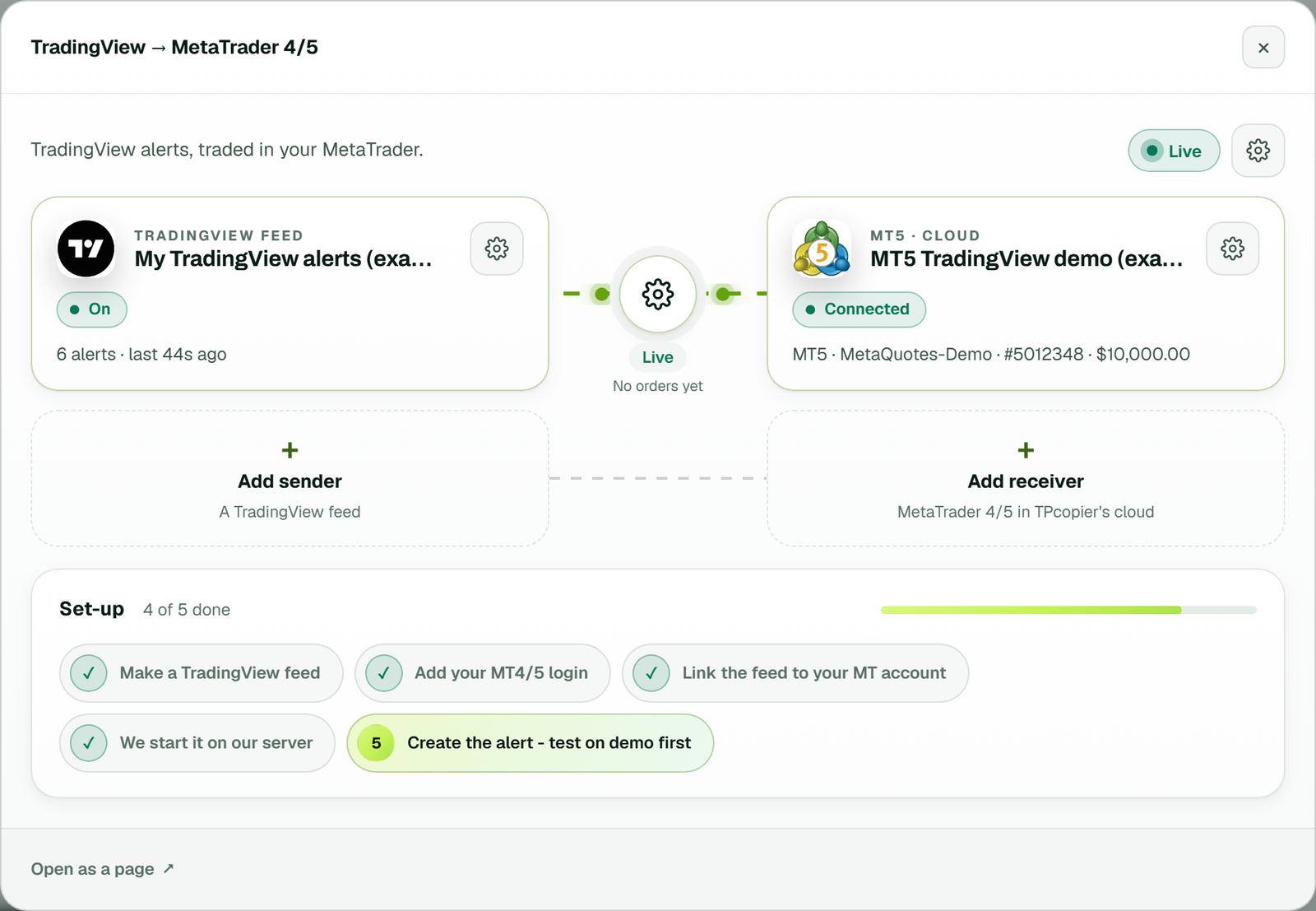
In TPcopier a TradingView feed links to a MetaTrader account that runs in our cloud, so no VPS is needed (example workspace).
PineConnector alternative: side by side
| Point | PineConnector (its own pages) | TPcopier |
|---|---|---|
| What it does | TradingView alerts to MT4/MT5 through its own EA | TradingView alerts to MT4/MT5 through the TPcopier EA |
| Self-run setup | Your own Windows VPS with MT5 and the EA kept running | Not needed: MetaTrader runs on our servers |
| MetaQuotes' built-in VPS | Excluded for this workflow, per its VPS guide | Not needed |
| Cloud MT5 | Yes, "PineConnector Edge" | Yes, in every MT4/MT5 plan |
| Cloud MT4 | No: its docs say Edge does not host MT4 | Yes |
| Other EAs in the cloud terminal | No: Edge runs the PineConnector EA only | No: the cloud terminal runs the TPcopier EA |
| Alert format | Comma list: LicenseID,buy,EURUSD,... | JSON: {"key":"a@1","symbol":"EURUSD","type":"buy"} |
| Symbol in the alert | The exact, case-sensitive broker symbol | {{ticker}}, which the EA maps to your broker's name |
| Telegram | Notifications from its Tasks, on Plus and Pro | Signals from Telegram, WhatsApp and Discord copied to MT4/MT5 |
| Binary brokers | Not mentioned on the pages we read | Seven binary brokers, as separate bridges |
| Trial | $7 for 7 days on Core, then monthly unless you cancel | 2 days free, no card, nothing renews by itself |
Sources, checked on 29 October 2026: syntax, VPS setup, MetaTrader 4, Edge, Telegram and the 2026 MT5 pricing post.
Where MetaTrader runs
This is the biggest difference. PineConnector's VPS guide asks you to keep the remote machine, MT5 and its EA running, and not to sign out or close MT5. It also says MetaQuotes' own built-in VPS is excluded for this workflow. Its cloud option, Edge, runs MT5 with the PineConnector EA only. Its MT4 page calls MT4 a legacy setup that you manage yourself.
With TPcopier, both MT4 and MT5 run on our servers with the TPcopier EA inside. You add the login, password and server, and we start the terminal. As a result, a PineConnector alternative like this needs no VPS for either platform. Each account's log, sign-in and trades show on the website.
Both tools also say what happens around the terminal. PineConnector's Edge page notes that stopping an instance does not close positions, and that a settings change means about a minute without signals. On TPcopier, saved EA inputs apply in a few seconds with no restart, and your other accounts keep running.
The alert message, field by field
PineConnector uses a comma list that starts with your License ID, then the command, the symbol and name=value
settings. For example, its docs show LicenseID,buy,EURUSD,vol_lots=0.01,sl_pips=20,tp_pips=40.
TPcopier uses a small JSON message instead, and the TradingView page writes it for you:
{"key":"a@1","symbol":"{{ticker}}","type":"buy","sl_points":300}
{"key":"a@1","symbol":"{{ticker}}","type":"buyclose"}
Here is how the common pieces line up:
| You want | PineConnector writes | TPcopier writes |
|---|---|---|
| Open a buy or sell | buy / sell | "type":"buy" / "sell", or {{strategy.order.action}} |
| Close the buys or the sells | closelong / closeshort | "type":"buyclose" / "sellclose" |
| Stop loss | sl_pips, sl_price or sl_pct | "sl" as a price, or "sl_points" from the entry |
| Take profit | tp_pips, tp_price or tp_pct | "tp" as a price, or "tp_points" |
| Lot size | vol_lots and other vol_ fields | Not in the alert: set in the EA settings on the website |
| Keep strategies apart | One License ID routes to every account on it | "key": a close takes only its own key's trades |
Mind the units: pips and points are not the same distance on most symbols. Reversing needs no extra command either: when a sell arrives under a key that holds buys, those buys close first. TradingView itself explains its webhook rules on its help page, including that 2-factor authentication must be on.
Strategy alerts, indicators and late alerts
A Pine Script strategy can fill the type for you with {{strategy.order.action}}. Its exits are the
catch: TradingView reports an exit fill as the opposite side, so give exits a separate close alert. An indicator that
only sends one line of text can use a plain line, such as BUY at 4317.56 | SL: 4307.56 | TP1: 4324.56.
In this PineConnector alternative, TPcopier stamps each alert with its own arrival time. Because that time comes from TPcopier, not from the alert, a delayed or repeated alert cannot pose as a new one. Each key also gets its own magic number in MetaTrader, which keeps one strategy's trades apart from another's on the same account.
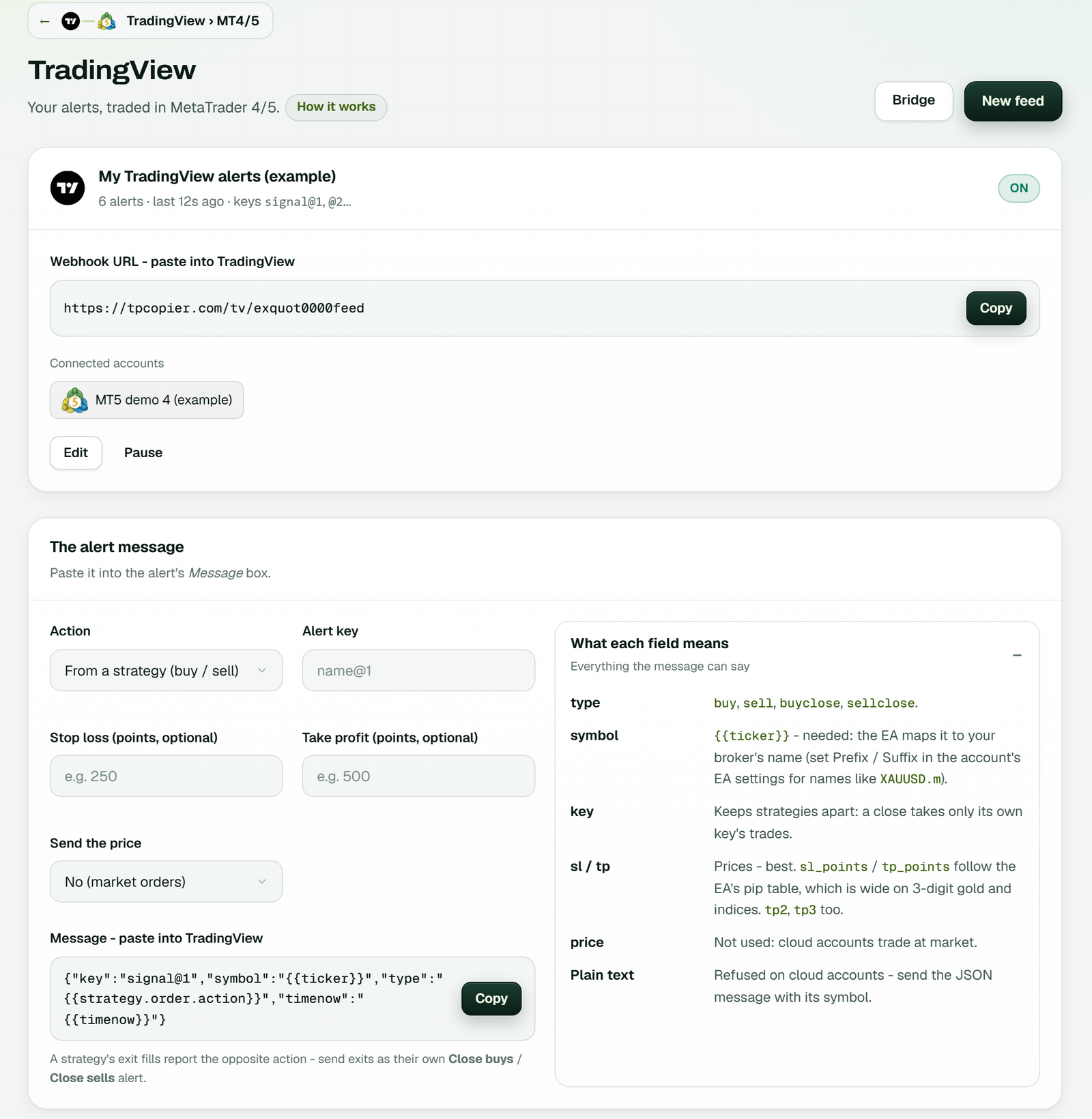
The TradingView page: each feed has its own webhook URL with a Copy button. In the alert message builder, pick the action and key, add a stop and target in points, then copy the message (example workspace).
Moving to a PineConnector alternative in 7 steps
Switching takes one sitting. Keep your old setup running until the new one has traded a demo account cleanly.
- Start the free trial, press Make a bridge, pick TradingView and MetaTrader 5 or 4, then Open the bridge.
- Add your MT4 or MT5 account to our cloud with its broker, account number and trading password.
- Make a feed on the TradingView page and copy its webhook address.
- Set the lot size, symbol names and limits in the EA settings on the website.
- Build the new message with the alert builder, one key per strategy.
- Link the feed to the account in the bridge's window.
- Edit each TradingView alert: new webhook URL, new message. Then test it on a demo account.
Point each alert at one tool only. If the old alerts and the new ones both stay live on the same account, both tools will
trade. Remember too that the TPcopier EA takes {{ticker}} and maps it, so a suffix such as
XAUUSD.m is handled by its Prefix and Suffix inputs rather than in the alert.
Other signal sources
If you also follow signal channels, TPcopier reads Telegram, WhatsApp and Discord and sends them to the same MT4 or MT5 account. Each source is its own bridge, at its own price. Read the Telegram to MT5 copier. To copy one MetaTrader account to others, use the cloud trade copier. PineConnector's Telegram page, by contrast, describes notifications sent to you, not trades copied from a channel.
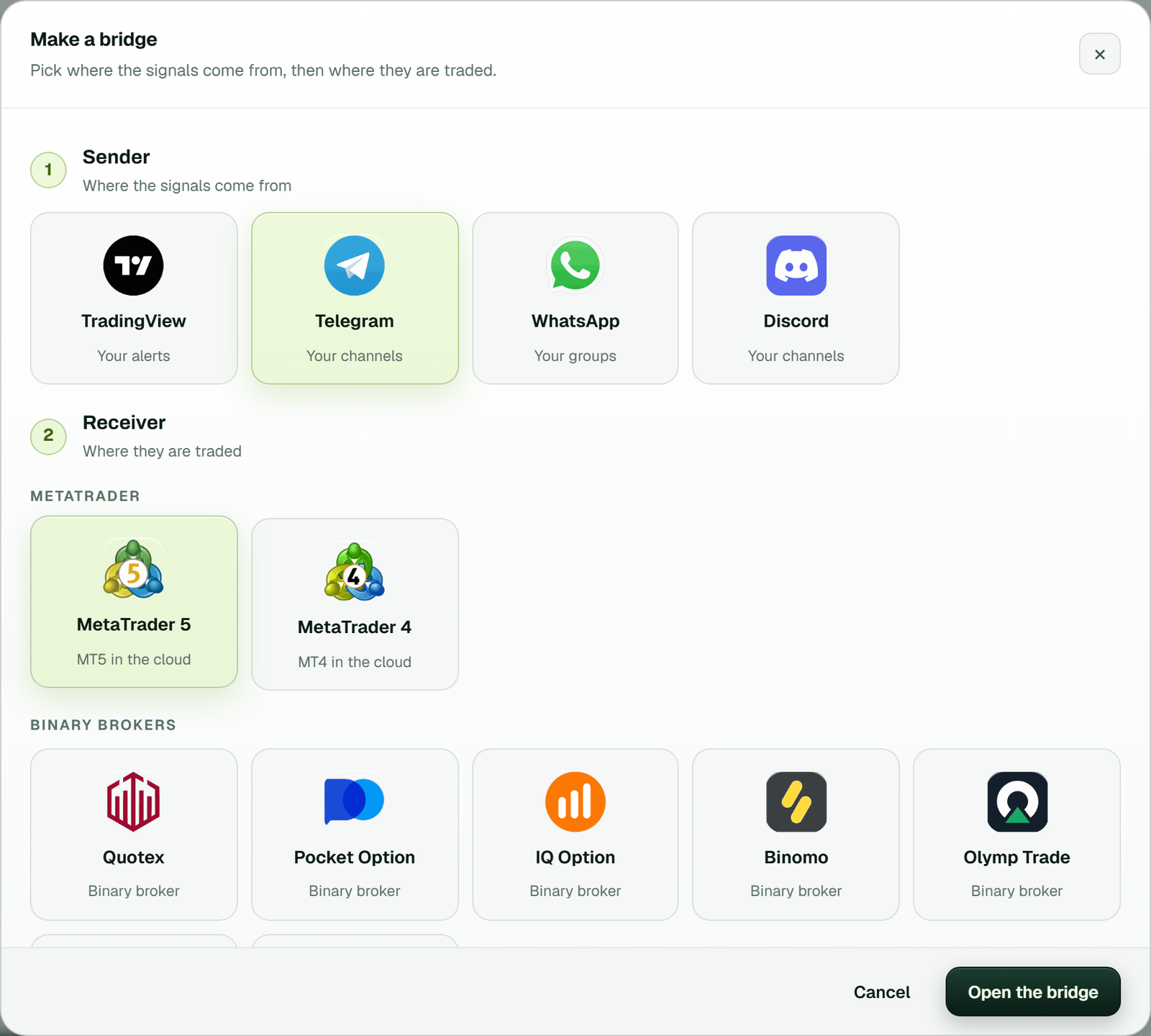
Make a bridge: each signal source is a bridge of its own, from a sender to your MetaTrader 5 or 4 account.
Trial and price
| Item | TPcopier TradingView to MT4/5 |
|---|---|
| Monthly price | $40 for 2 accounts, $60 for 3, $90 for 5, $150 for 10 and $200 for 15 |
| Cloud MetaTrader | Included in the price |
| Free trial | 2 days on one bridge, no card |
| Paying | Binance Pay or your TPcopier wallet, for 1, 3, 6 or 12 months |
| Renewal and refunds | Nothing renews by itself; payments are final |
As a PineConnector alternative, TPcopier bills by bridge. Your plan is the smallest tier that covers your accounts, so a second or third account moves you up a tier rather than adding a new bill. The price also covers each cloud terminal, so there is no VPS invoice next to it. Test on a demo account first. See the pricing page. PineConnector lists its own plans and prices on its site. Apart from the trial above, we do not repeat them here, because its pages showed different numbers at different times; please check them there.
Which one fits you
- Choose TPcopier if you want MT4 in the cloud, a free trial without a card, or Telegram signals on the same account.
- Pick PineConnector if you depend on its syntax, its EA features, or a setup you already run.
- Either way, test on demo. Neither tool makes a strategy profitable.
A fair test of any PineConnector alternative is simple. Send the same alert to a demo account on each tool for a few days, then compare what opened, what closed and what was refused. TPcopier shows each alert and the EA's answer on the website, so the comparison is easy to read.
Also read cloud vs VPS, the TradingView alerts guide and the TradingView webhook API.
Is TPcopier a PineConnector alternative for MT4?
Yes. TPcopier runs both MT4 and MT5 on its servers. PineConnector's own docs say its Edge service does not host MT4.
Can I use my PineConnector alerts unchanged?
No. PineConnector uses a comma list that starts with a License ID, while TPcopier uses a small JSON message. The TradingView page in TPcopier writes the new message for you.
Do I need a VPS with TPcopier?
No. Your MT4 or MT5 account runs on our servers with the TPcopier EA inside, so your PC can be off.
Where do I set the lot size?
In the EA settings on the TPcopier website, not in the alert. A stop and target can still come from the alert, as prices or points.
Do Pine Script strategy alerts work?
Yes. Put {{strategy.order.action}} in the type field, and give exits a separate buyclose or sellclose alert.
Is there a free trial?
Yes. 2 days on one bridge with no card. PineConnector's 2026 pricing post describes a paid trial instead.
Does TPcopier copy Telegram signals too?
Yes. Telegram, WhatsApp and Discord signals can trade the same MT4 or MT5 account, each as its own bridge.
Where do the PineConnector facts come from?
Only from PineConnector's own docs and blog, checked on 29 October 2026 and linked on this page. Their pages may have changed since.
Note: PineConnector is a trademark of its owner; TPcopier is not affiliated with it. Facts about PineConnector come from its own public pages, checked on 29 October 2026. Risk warning: trading forex and CFDs carries a high risk of losing money; TPcopier gives no trading advice.