MetaTrader Trade Copier Across Brokers: 5-Step Cloud Guide
Search for a MetaTrader trade copier and page one is mostly Expert Advisors you install twice, once in each terminal. The user guide for one of them, the Universal Trade Copier, says that all terminals must run on the same computer or VPS, which makes the copier only as reliable as the box it sits on.
TPcopier's copier takes a different route. It runs both ends on cloud MetaTrader, so the sender and every receiver are terminals on our servers and your PC can stay off. On live copies measured on 4 October 2026, it sent the receiver's order a median 7 ms after it saw the sender's trade. The broker's own execution then took about 140 ms, which is the part nobody's copier can shorten.
What a MetaTrader trade copier does
It watches one account, the sender, and repeats its trades on others, the receivers: every open, every stop loss or take profit change and every close. You can copy trades between MT4 accounts, from MT4 to MT5, from MT5 to MT4 or between MT5 accounts. The form never asks for matching platforms, which also makes it a bridge while an old account is still on MT4.
The copier follows the sender account, not one terminal. A trade you open by hand in MetaTrader on your phone counts like any other, and nothing has to stay open at home.
How a pipeline joins two accounts
A pipeline joins one sender to one receiver and holds that receiver's own rules, such as its lot size and symbol names. One sender can feed many receivers, each through its own pipeline. The app keeps three rules when you connect one:
- No chains. A receiver can't also send, and a sender can't receive.
- One sender per receiver.
- The copier keeps its own accounts. An account you added for a Telegram, WhatsApp, Discord or TradingView bridge can't join a pipeline.
Both ends also need to sit on one cloud server. If they start on different ones, TPcopier moves one across when you connect them, and the app tells you why if it can't.
Which password each account needs
The copier's rule here differs from TPcopier's signal bridges, where every account trades and needs its trading password.
The copier only reads the sender's trades, which is why the investor (read-only) password is enough for the sender, and the Add window says so. A receiver places real orders and needs its trading password, which MetaTrader also calls the master password. MetaTrader's help on logging in to an account explains the split: the master password gives full rights, while investor access can watch an account but can't trade on it.
Either way, the password is locked with our cloud server's own key the moment you press Add. After that, the website itself can never read it.
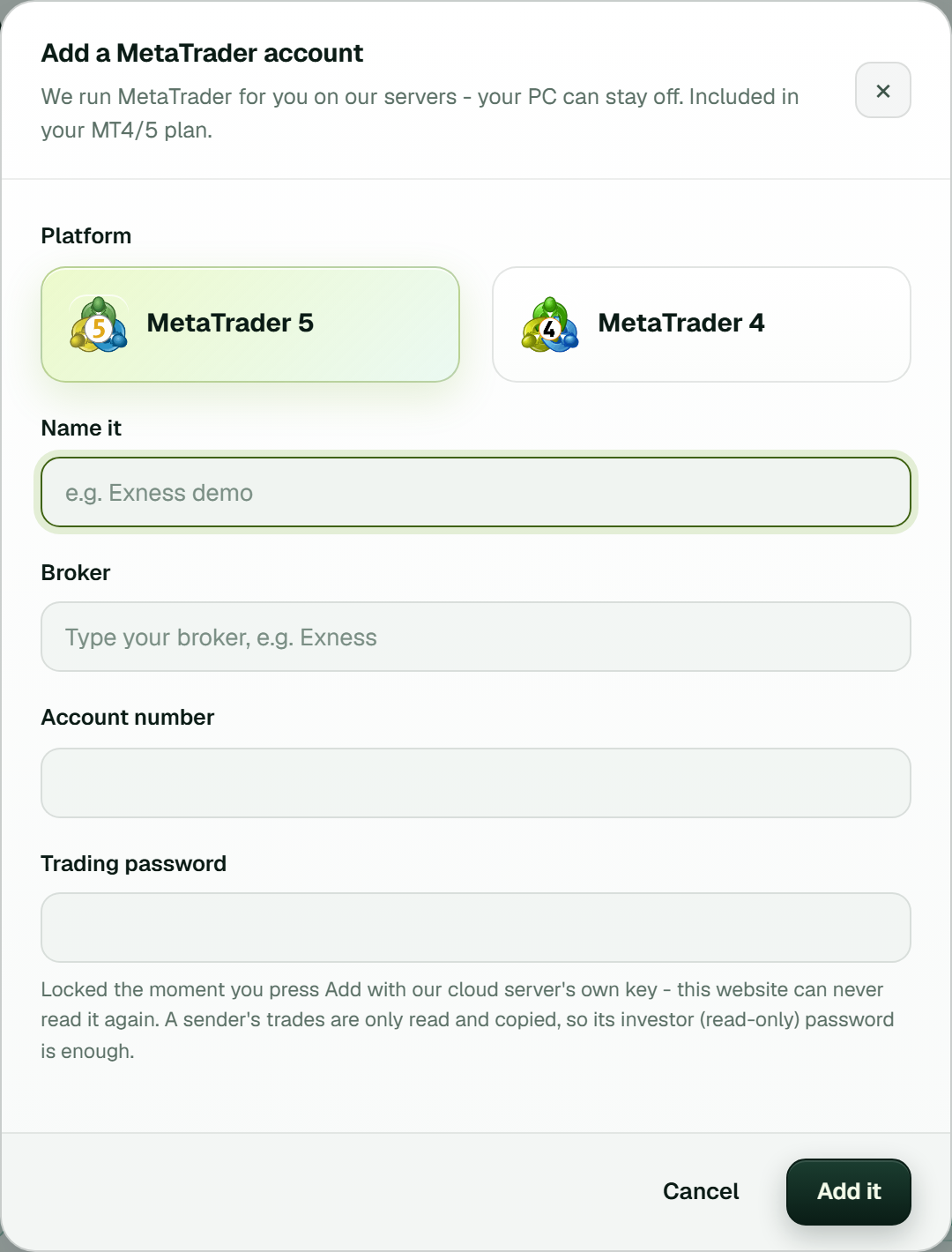 The Add a MetaTrader account window for a copier's sender. The note under the password says an investor password is enough here.
Set up the copier in 5 steps
You need two or more MetaTrader accounts, at one broker or several. Start with two demo accounts. The copier has no practice mode of its own, and a real receiver copies for real.
1. Add the copier
Open Copier in the menu, press Add a copier and pick MT4/5 trade copier (cloud). Its window opens straight away.
2. Add the sender, then its receiver
The Add a MetaTrader account window asks for MetaTrader 5 or MetaTrader 4, a name, your broker (type to search), the account number and the password. Press Add it. If the form rejects the server, copy the name from MetaTrader's own login window, dots and all.
As soon as the sender is in, a second window opens for the account that copies it. Fill it in the same way, this time with the trading password. That receiver is connected the moment it's added, at the sender's own lot (a multiplier of 1) until you change it. Add more receivers the same way.
3. Wait for Running
Each card is marked Cloud and moves from Preparing the terminal to Signing in, then Turning on Algo Trading, then Running. That takes about a minute, a little longer the first time a broker is used. The sender only starts once a receiver copies it.
If a start fails, the card shows the reason. Reconnect under More tries again, and if our cloud server can't open the password it holds, Enter it lets you type it once more. The account's Logs show the same start-up line by line.
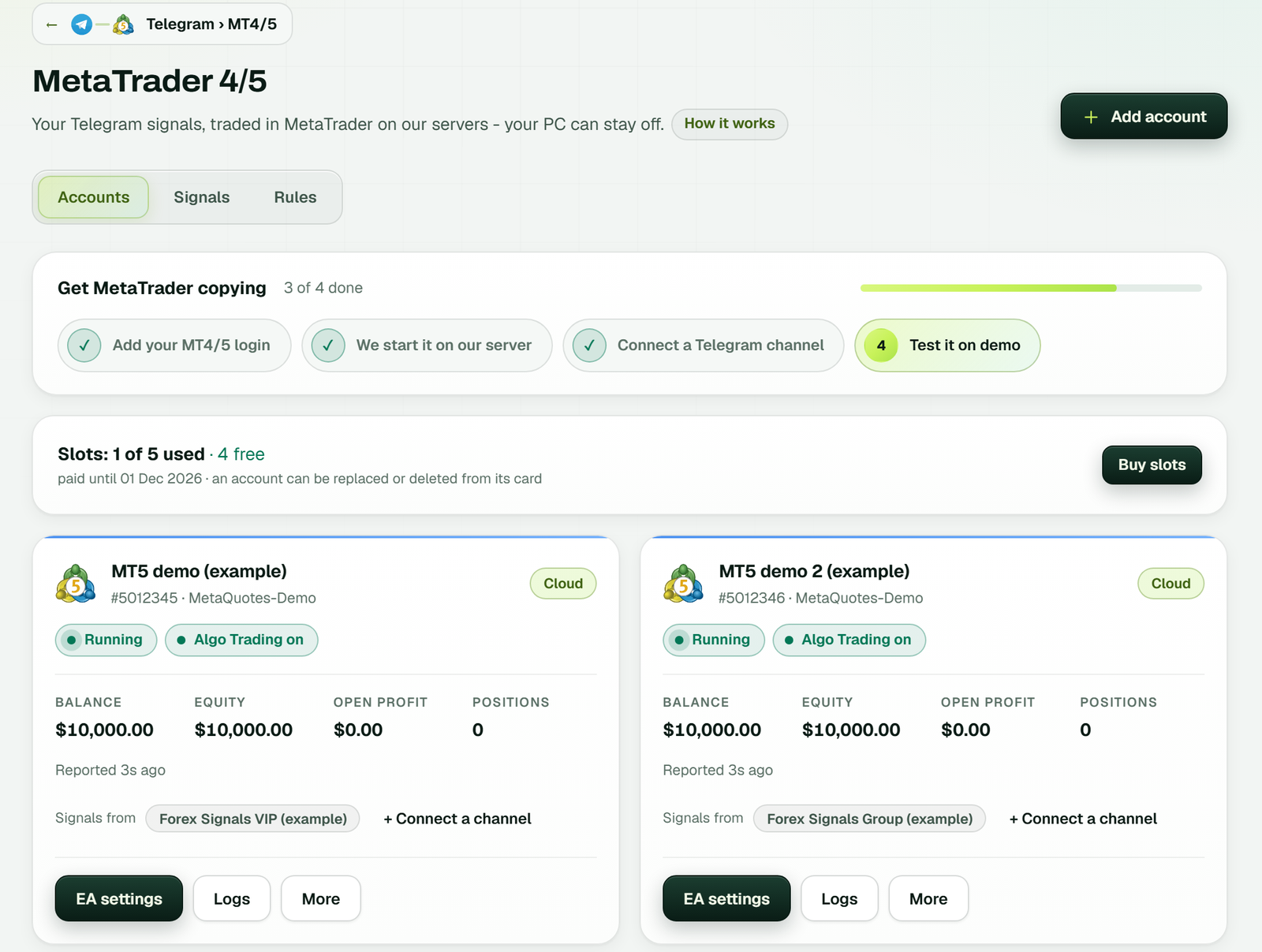 Cloud account cards, each with its balance and open positions. This shot comes from a Telegram bridge; the copier's Accounts tab uses the same cards (example workspace).
4. Set each pipeline
Your pipelines sit on the MetaTrader 4/5 page under the Copier tab. Each row shows both accounts with the lot rule between them. Beside it you get an on/off switch, Settings and a remove button. To join two accounts you already have, press Connect a sender to a receiver, pick both, set the lot rule and press Connect.
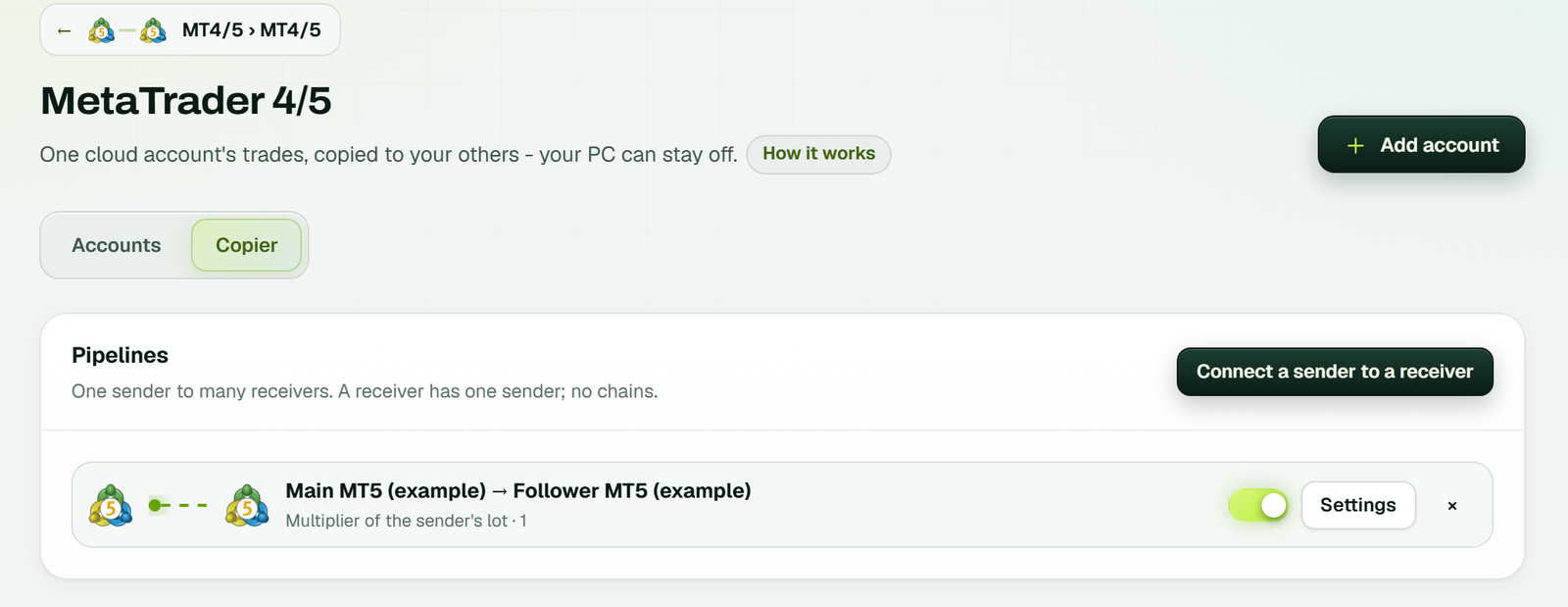 The Copier tab: one pipeline and its lot rule (example workspace).
5. Check the first copy
Place a small trade on the sender. It shows up under Copies and account events on the Copier tab. With a multiplier of 2, a 0.01 lot buy on the sender arrives as 0.02 lots on the receiver, and when the sender closes, the copy closes too. Anything the broker refused is in that account's Logs, which keep 14 days.
Every pipeline setting, in the app's words
TPcopier checks every number in this window, our cloud server checks it again, and a saved change applies within seconds. The examples assume the sender opens 0.50 lots.
Lot size
The Lot size rule decides what Lot value means:
- Multiplier of the sender's lot: a factor. 1 is the same lot, 2 is double, and 0.5 gives 0.25 lots.
- Fixed lot: the lot itself, whatever the sender traded.
- By balance ratio: the sender's lot scaled by the receiver's balance over the sender's, times Lot value. With 10,000 on the sender, 2,000 on the receiver and a value of 1, the copy is 0.10.
- Risk % of balance: how much of the receiver's balance you'd lose if price hits the sender's stop loss. A sender trade with no stop leaves nothing to size from, and that receiver skips it.
The result is then rounded down to the receiving broker's lot step and kept between Smallest lot and Largest lot (0.01 and 100 by default). Most positions open caps this pipeline's copies on the receiver; 0, the default, means no limit.
Stops, pending orders and Reverse
Copy stop loss and take profit and Copy pending orders both start on. With the first, copies carry the sender's stops and move when they move. With the second, the sender's pending orders go across too and follow every change, fill or delete. Reverse (a buy becomes a sell) is for hedging between two accounts, and it swaps the stop loss and take profit as well.
Slippage, late trades and a daily stop
Three limits deal with timing and bad days. Most slippage is 20 points by default. Skip a trade older than is 5 seconds, because a late copy is a different trade at a different price (pending orders are exempt, since their price is part of the order). Stop for the day after losing is 0, which means off; set a percentage and the pipeline opens nothing new once the receiver's equity falls that far below the day's starting balance.
A netting account on an MT5 receiver is outside the app's control: MetaTrader keeps one position per symbol there, and two copied buys on EURUSD become one bigger position. If your sender stacks trades, ask the receiving broker for a hedging account.
Copying across brokers: symbol names
A trade copier across brokers lives or dies on symbol names. One broker's XAUUSD is another's GOLD, and EURUSD may be EURUSD.c. TPcopier checks each name against what the receiver really lists, in this order:
- Your Symbol names on the pipeline, sender first:
XAUUSD=GOLD, BTCUSD=BITCOIN. - Your Prefix and Suffix, if the name they make exists on the receiver.
- An identical name.
- A broker tag on the same instrument, so EURUSD finds EURUSD.c.
- Another name for the same instrument, so XAUUSD finds GOLD.
It never invents a name. If nothing matches, no order goes out and the log says why. It won't put spot gold on a dated futures contract or take XAUEUR for XAUUSD, which is why Symbol names only needs filling in where the automatic match gets it wrong.
Price, and where it won't fit
The copier costs $6 a month for each receiving account, cloud terminals included. The sender doesn't use a slot, so one sender and one receiver come to $6. When the app says there's no room for another receiver, press Buy slots.
The pricing page has the current numbers, and the MT4/MT5 cloud trade copier page has the short version. Comparing with Duplikium? The Duplikium alternative page puts both side by side.
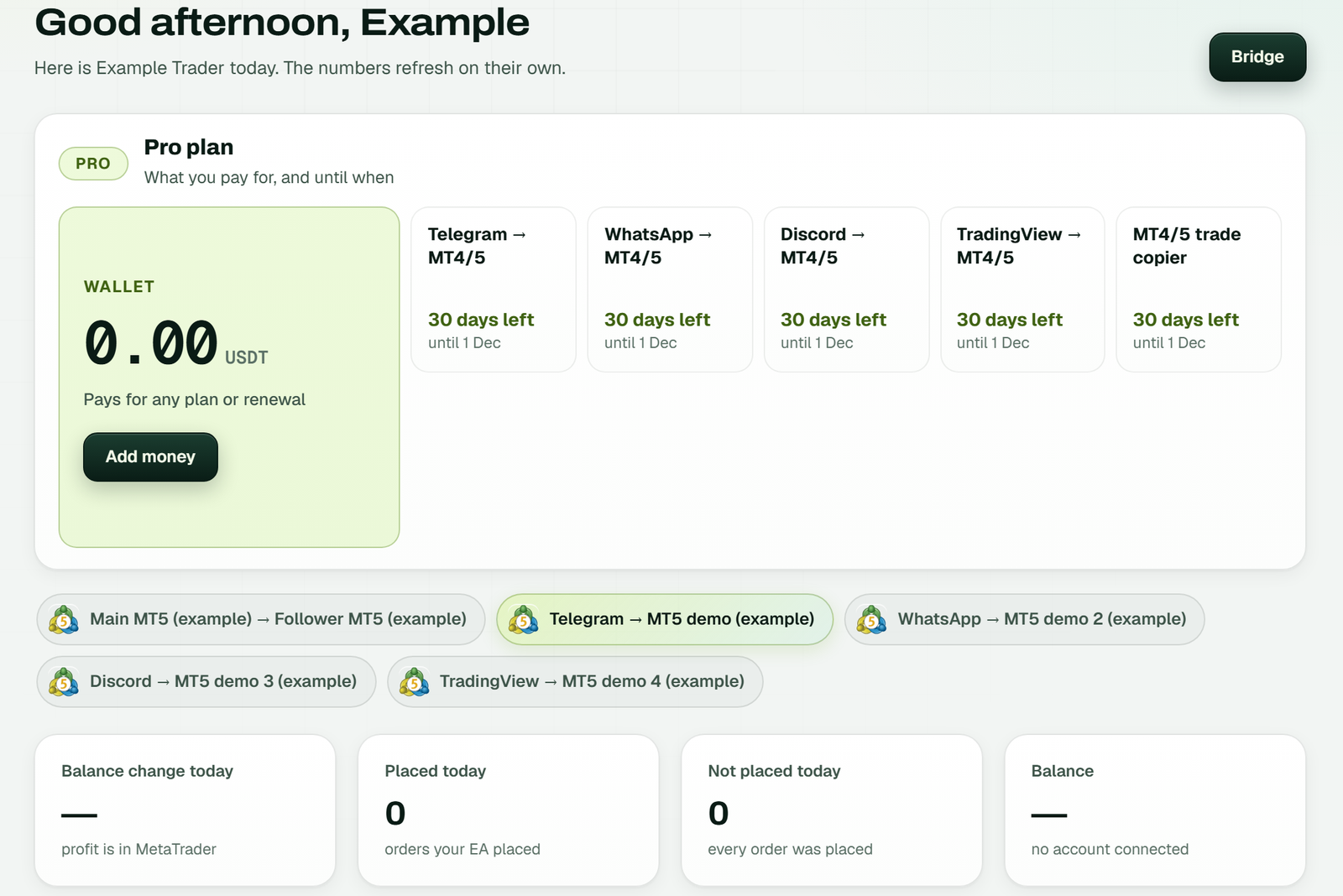 The Dashboard shows each plan's days left, the MT4/5 trade copier included (example workspace).
It won't suit everyone. Both ends must be cloud accounts, so a terminal you run yourself can't be a sender or receiver. That makes it a local trade copier alternative, not a plugin for one. It also copies losses as faithfully as wins, so size each receiver for the sender's worst week; the risk management guide covers lot sizing in more depth.
If your trades start as Telegram signals, you may not need a trade copier at all: the Telegram to MT4 and MT5 copier links one channel to several accounts. Developers can drive the same pipelines from code with the MT5 API; the trade copier API guide lists the calls.
FAQ
What happens to trades already open on the sender when I connect?
They're skipped as too old, under the 5-second late-trade limit. Pending orders already waiting on the sender do go across, because their price is part of the order.
What does switching a pipeline off do to copies already made?
Switched off, a pipeline opens nothing new, but copies it already opened keep following the sender and close when it closes. Removing the pipeline stops copying altogether; trades it already copied stay open on the receiver for you to manage.
Does MT5 have copy trading built in?
It has the Signals service. With an MQL5.community account you subscribe to a provider's signal and its deals copy to your account, which MetaQuotes says must stay connected the whole time. It follows a published signal; it doesn't join accounts you pick at different brokers with a lot rule for each.
Is TPcopier trading advice?
TPcopier is software that copies the trades you or your sender choose; it gives no advice. Trading forex and CFDs can lose money, so test every pipeline on demo before a real account goes on either end.
Start with two demo accounts
Open one MT4 demo and one MT5 demo. Create your TPcopier account, add the MT4/5 trade copier from the Copier menu and connect the two.
Then place a 0.01 lot trade on the sender and look for it under Copies and account events. If it arrived with the lot you expected, that pipeline is ready for the account you actually care about. The MT4 vs MT5 guide helps if you're still choosing a platform.
Sources
- MQL5: Universal Trade Copier user guide
- MetaTrader 5 Help: Account authorization
- MetaTrader 5 Help: General concepts, netting and hedging and Signals subscription, read 4 November 2026