Delta Exchange trading bot for Telegram signals.
This Delta Exchange trading bot copies crypto signals from Telegram to Delta Exchange without typing a single order. The TPcopier Telegram → Delta Exchange Copier is a Windows app. It signs in with your own Telegram account, and a built-in AI reads each new message in the channels you tick. Then it places the trade on your Delta accounts with the signal's stop loss and first target.
What does a Delta Exchange trading bot for Telegram do?
Crypto channels post a coin, a side, a stop and a few targets. By the time you open Delta and type the order, the price has moved. A Telegram to Delta Exchange copier reads the message for you and sends the order through Delta's own API, with your own API key.
This one is software you install, not a cloud service. It runs on a Windows 10 or 11 PC, or on a Windows VPS that stays on. Your Delta keys and your Telegram session stay sealed on that computer, and the keys go only to Delta. So every order leaves from that computer's internet address, which matters on Delta, as you will see below.
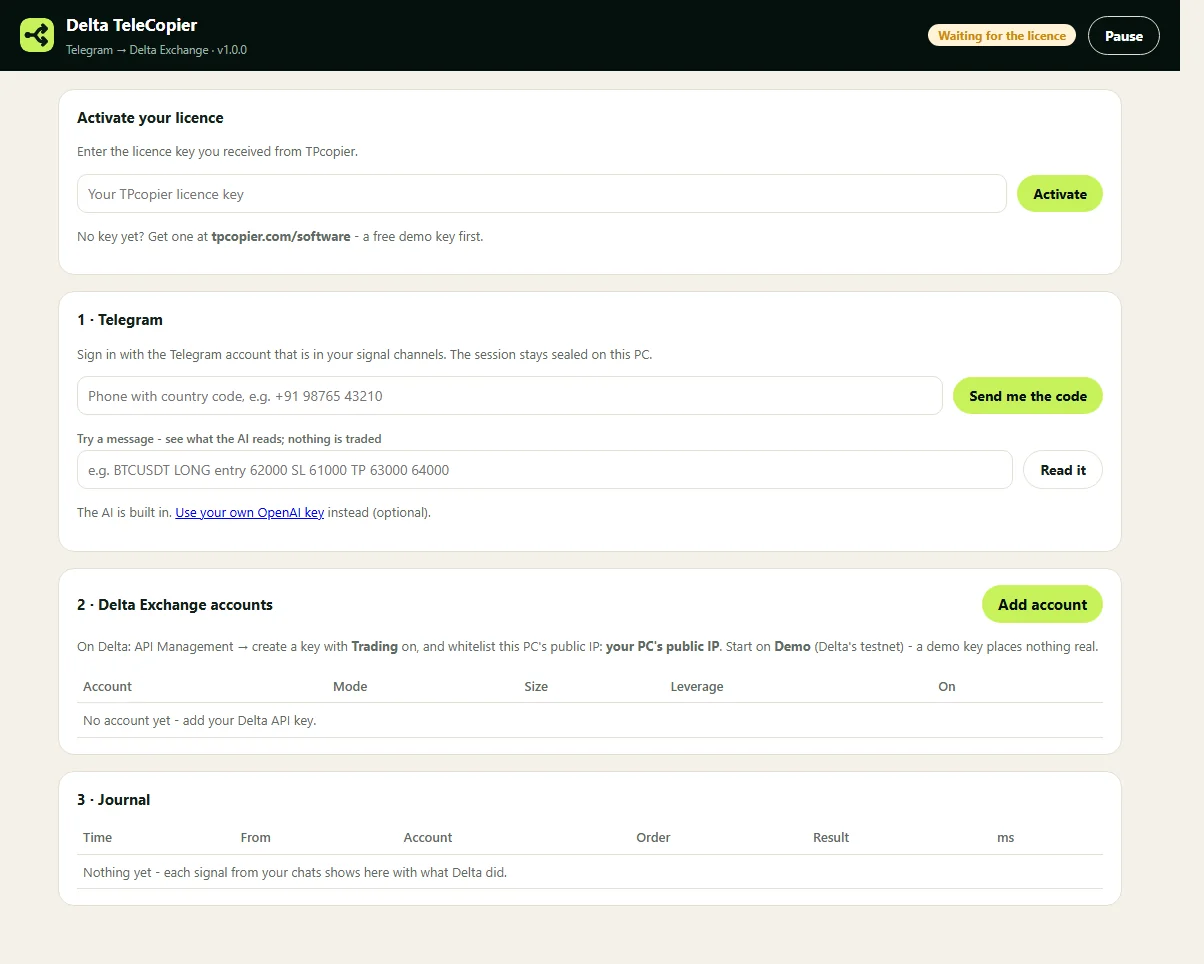
The Telegram to Delta Exchange copier on first start (version 1.0.0 shown): the licence key, Telegram sign-in, Delta accounts and the journal.
How to set up Telegram to Delta Exchange copying
- Get a demo key. Sign up free on TPcopier.com, open Software and start the demo on this app's card. Download the app and paste the key.
- Sign in to Telegram. Enter the phone number of that account, starting with the country code. Then enter the login code Telegram sends, plus your two-step password if you have one.
- Tick your channels. Every channel and group you belong to appears in a list. Tick the ones to copy. No bot joins the channel.
- Make a Delta API key. In Delta's API Management, turn on the Trading permission and whitelist the public IP the app shows.
- Add the account. Paste the key and secret, then pick the market, Demo or Real, India or Global, the size and the leverage. On Save, the app reads your balance as a check.
- Test, then let it run. Press Test order on a demo account. After that, each signal shows in the journal with Delta's answer.
Every step of setting up the Delta Exchange trading bot, with screens, is in the install guide.
How it reads Telegram crypto signals for Delta Exchange
In this Delta Exchange trading bot, each new message in a ticked chat goes to the AI once. The answer is always one of four: buy, sell, close or none. The AI never fills in a price the message did not give. If it is unsure, the answer is none, and nothing trades.
| Example message | What the app reads |
|---|---|
BTCUSDT LONG Entry 62000-62500 SL 61000 TP1 63000 TP2 64000 | Buy BTC, entry 62250 (the middle of the range), stop 61000, targets 63000 and 64000 |
SOL short, SL 152, TP 140 | Sell SOL, stop 152, target 140 |
Close ETH, book profit | Close the whole ETH position |
TP1 hit | None: a result post, skipped |
Buy BTC if it breaks 65000 | None: a conditional entry, skipped |
The first row is the app's own result, in the screenshot below. The other rows show the rules the AI follows.
Some channels send one signal in pieces: the coin, then the side, then the stop. So the app reads each new message with the last minute of that chat, and the pieces become one trade. A message that arrives more than two minutes late, for example after the PC slept, does not trade.
The AI comes with the app, so you need no AI account. If you prefer, add your own OpenAI key instead, and it stays sealed with your Delta keys. Also, if the AI has not answered within 4 seconds, the app asks again on a fresh connection and takes the first answer.
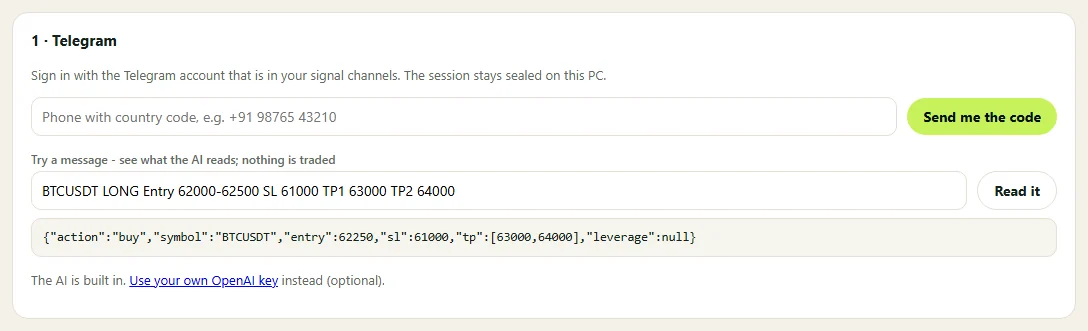
Try a message: paste a signal, press Read it and see what the AI found. Nothing trades from this box.
What the Delta Exchange trading bot places
- A market order, at once. The copier does not wait for the entry price. It reads a range or a price, but the order goes at the market as soon as the message arrives.
- The stop loss and the first target. On perpetual futures both ride on the order as Delta's bracket, and the stop triggers on the mark price. Later targets are not placed.
- Your size and leverage. Each account has its own contracts per trade and its own leverage (0 keeps Delta's). A leverage figure in the message does not change it.
- Close messages. Exit, square off or "stop hit" closes the whole position on that coin with a reduce-only order. Then the app cancels its leftover stop and target.
Delta keeps only one bracket per open position. So when a position already has one, the copier sends the entry alone and then renews the bracket. If Delta refuses the stop loss, the copier closes the trade at once. A trade never stays open without the stop its signal asked for.
In addition, the journal shows how many milliseconds each Telegram to Delta Exchange order took, measured by the app on your PC.
Futures, options, MOVE, spot and binary
The Delta Exchange trading bot gives each account one market, so add a second account for a second market. Also, when a message plainly names spot, options or MOVE, the accounts trade it in that market instead of their own.
- Perpetual futures. The app matches the coin, so when Delta India has no BTCUSDT, a BTCUSDT signal trades BTCUSD.
- Options. A buy signal becomes a call and a sell signal a put. The app takes the strike closest to the coin's price and the first expiry 12 or more hours out. A call or put (CE or PE), strike or expiry in the message wins over those choices. Each order either fills straight away near the best offer or does not fill at all.
- MOVE options. A buy buys the at-the-money MOVE contract on the nearest expiry. A sell or a close sells it back.
- Spot. India's INR pairs: BTC_INR, ETH_INR, SOL_INR and XRP_INR. A buy spends the account's amount in INR, and a sell only sells coins this app bought earlier.
- Binary options. Global only. A buy is a binary call and a sell a binary put on the next expiry. They settle by themselves.
The copier never writes an option it does not hold, and options carry no stop or target. Delta lists options on only a few coins, such as BTC and ETH, so a signal on another coin gets a clear line in the journal instead.
Delta Exchange India bot or Global?
Both. Each account has a Delta setting, India or Global, and a mode, Demo (Delta's testnet) or Real. Delta runs India and Global as separate platforms with separate API addresses. Its API documentation warns that the Global address does not work for India. So an India key belongs with India, and a demo key with Demo.
As a Delta Exchange India bot, it trades perpetuals such as BTCUSD and ETHUSD, options, MOVE options and the INR spot pairs. On Global it trades perpetuals such as BTCUSDT, options and binary options. A wrong mix shows as "Delta does not know this API key", with the mode and region to check.
Your keys, the IP whitelist and the test order
Delta lets a trading key work only from the IP addresses you whitelist on it. The app shows this computer's public IP on its accounts card, so copy it into the key on Delta. If your home IP changes, Delta refuses orders until you add the new one, and the journal says why. A VPS with a fixed address avoids that.
The app's own screen runs on 127.0.0.1 only. After you save a key, the app shows only its last four characters.
Before any real money, try the Delta Exchange trading bot on Demo. On a demo account that trades futures or spot, Test order buys a small BTC position on Delta's testnet and closes it again. Pause stops every new trade at once. When you save a Real account, the app asks you to confirm first.
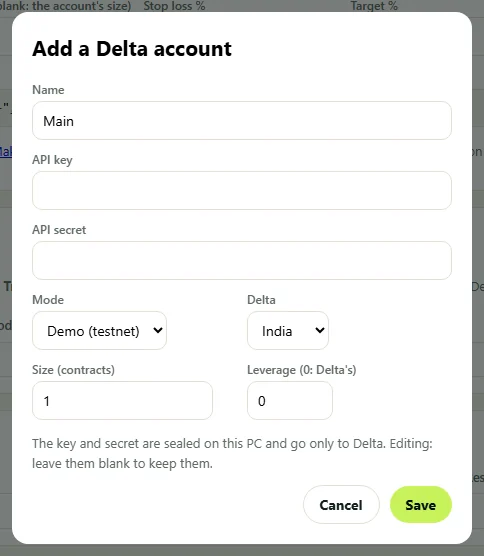
The Add a Delta account dialog, which both Delta apps share. This shot is from version 1.0.0; the current one also has a Market field.
Price, licence and the free demo
The Telegram to Delta Exchange Copier costs $150, paid once, not monthly. Delta accounts included: 2. Each extra account is $30, also paid once, and the app picks it up within 15 minutes. Each key runs on a single computer, and support can move it to another.
First, take the free demo key for the Delta Exchange trading bot, which lasts up to two days. Buying turns the demo key itself into a lifetime key, so there is nothing new to type. You pay with Binance Pay in USDT. All sales are final (see the refund policy), which is why the demo comes first.
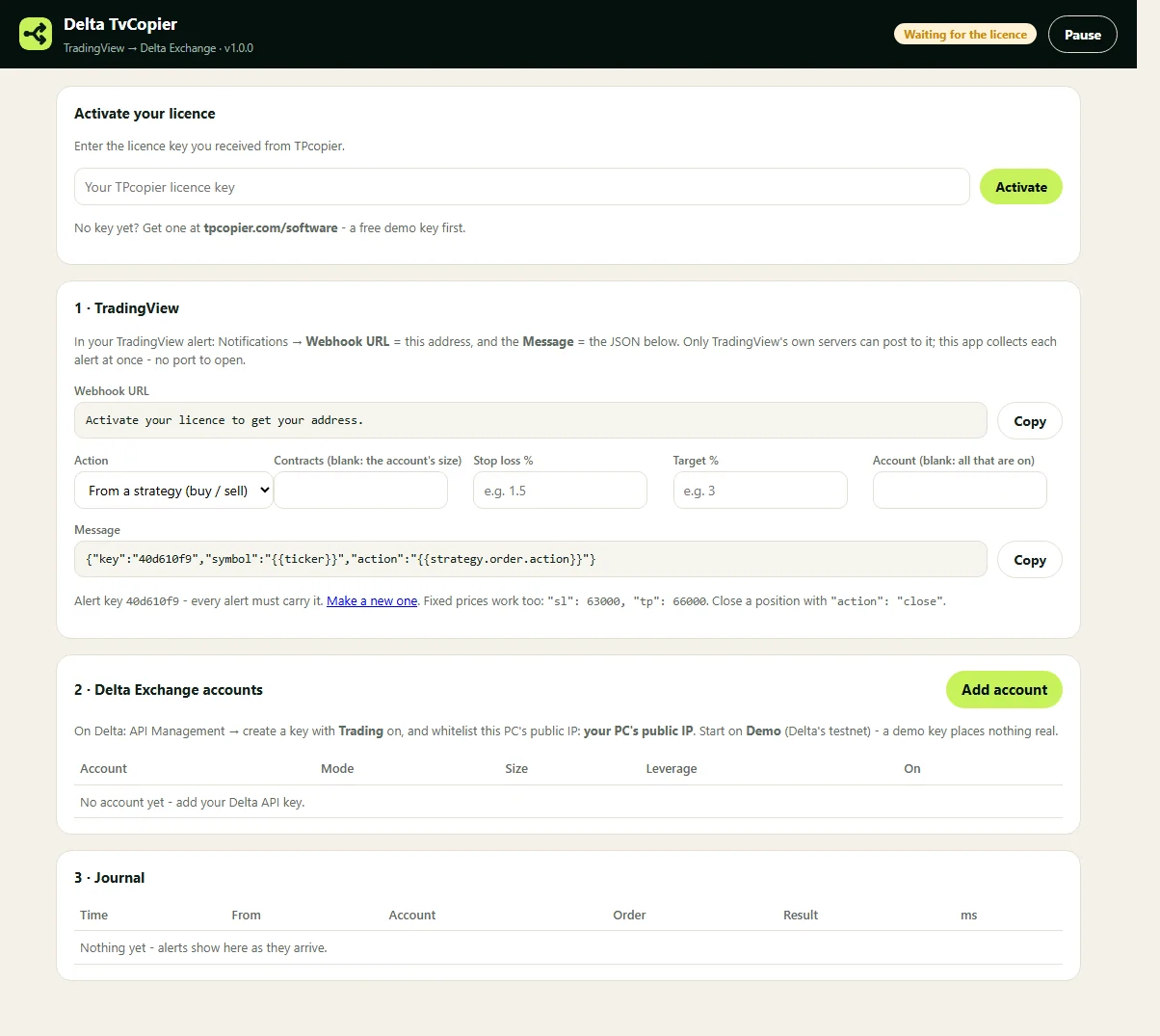
The sister app for TradingView alerts has the same accounts card and journal (version 1.0.0 shown).
Your signals come from TradingView instead? See how to connect TradingView to Delta Exchange. Every other app is on the software page. New to signal layouts? Read Telegram signal formats explained and our risk checks for signal copying.
Does the Telegram to Delta Exchange copier need a bot in the channel?
No. The app signs in with your own Telegram account, so it can read every channel and group that account belongs to, public or private. You tick the ones to copy.
Does it wait for the entry price in the signal?
No. It places a market order as soon as it reads the message. A "buy if it breaks" message is not a trade, so the app skips it.
Which target does it use?
The first one, as Delta's bracket target on perpetual futures, together with the stop loss from the signal. It never invents a price that is missing from the message.
Is it a Delta Exchange India bot?
Yes, and Global too. Each account is India or Global, Demo or Real. MOVE options and INR spot are on India; binary options are on Global only.
Does the Delta Exchange trading bot need my PC on?
Yes. It is a Windows app, not a cloud service, so the PC or VPS must stay on and online. Delta also needs that computer's IP on the key's whitelist.
How much does the Telegram to Delta Exchange copier cost?
$150 once, with a free demo key first. All sales are final, so test on Delta's testnet before you buy.
Risk warning: crypto futures, options and other leveraged products carry a high risk of losing money. TPcopier is software that places the signals you choose; it gives no trading, tax or legal advice and makes no promise of profit. Delta Exchange and Telegram are trademarks of their owners; TPcopier is not affiliated with them.
Telegram to Delta Exchange, demo first.
Begin the Delta Exchange trading bot on the testnet with a free demo key.