WhatsApp to Quotex Signal Copier: Easy Auto-Trade, 6 Steps
A Quotex call lands in your WhatsApp group while you're at work, on the road or asleep. By the time you open Quotex, find the pair, set the time and the stake and tap UP or DOWN, the entry the group meant may be gone. Setting up WhatsApp to Quotex hands that routine to TPcopier, so each call turns into a trade on its own.
TPcopier joins your WhatsApp as a linked device, the way WhatsApp Web does, and reads only the groups you tick. Once you connect a ticked group to your Quotex account, its messages go through the binary options signal copier and the orders leave from TPcopier's servers. So there's nothing to install, and your phone and PC can both be off. You need a WhatsApp account that's already in the group, a Quotex account and a TPcopier account. The free trial asks for no card.
TPcopier is not affiliated with Quotex or WhatsApp. Both names belong to their owners.
How WhatsApp to Quotex works
Three parts share the job. It helps to know which is which on the day a call doesn't trade.
- WhatsApp brings the message. The link can see every group you're in, but TPcopier opens only the ones you tick. Private chats never reach it, and it never posts a thing.
- TPcopier decides. A ticked group counts for the binary brokers only after you connect it to a binary account. From then on, its messages meet the same reader and the same checks as Telegram signals.
- Quotex takes the order. TPcopier sends it over its own connection, with the chart switch Quotex expects packed into the same message. Without it, Quotex ignores an order in total silence.
The win or loss then comes back from Quotex's own record of the deal, not from a guess.
Set up WhatsApp to Quotex in 6 steps
1. Link WhatsApp
Sign up first. Next, open Bridge in the left menu and press Make a bridge. Pick WhatsApp as the sender and Quotex as the receiver, then press Open the bridge. The bridge's window has a Set-up list that ticks off each step as you finish it.
 Make a bridge: WhatsApp picked as the sender and Quotex as the receiver, then Open the bridge.
On the WhatsApp Groups page, press Link WhatsApp, and a QR code appears. Then, on your phone, open WhatsApp, tap Settings > Linked devices > Link a device and point the camera at the code. The code renews itself every few seconds, so keep the page open while you scan.
2. Tick your signal groups
Once the page says WhatsApp is connected, your groups load by themselves. Switch on the ones whose calls you want on Quotex. If a group you joined today is missing, press Refresh from WhatsApp.
 WhatsApp is connected: one group switched on and linked to an account, one left off, with members, messages and signals for each (example workspace).
3. Add your Quotex account on demo
Open the Binary brokers page and press Add a broker account. Pick Quotex, keep Demo (practice money) as the type, name the account if you like, then press Add and connect.
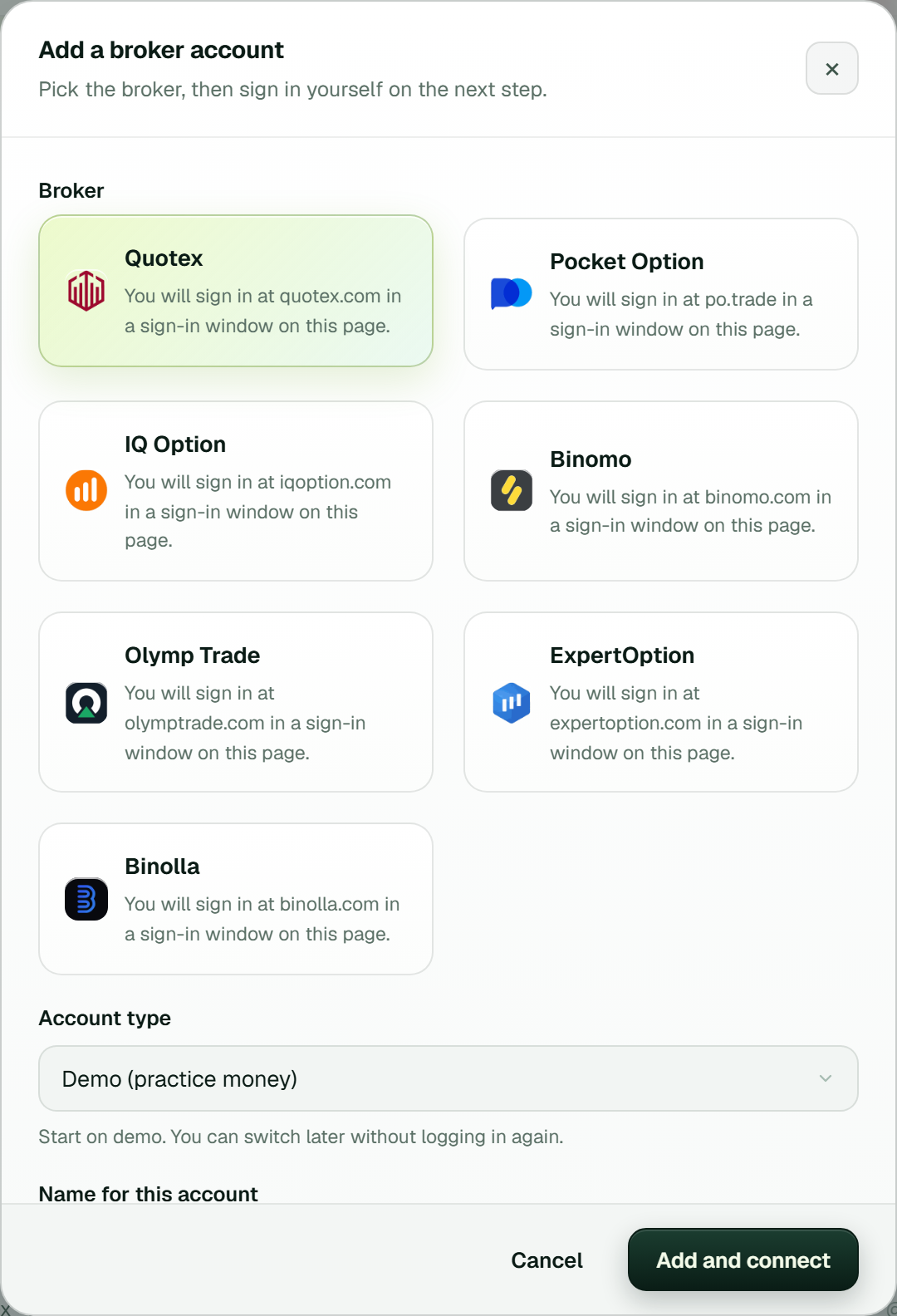 Add a broker account: Quotex picked, Demo (practice money) as the account type, then Add and connect.
The Connect dialog then shows Quotex's own sign-in page inside TPcopier. Click and type there as in any browser, and clear any "verify you are human" check yourself; e-mail and password work, while "Sign in with Google" may not. TPcopier never saves your password. It keeps the login session, encrypted, plus a saved sign-in profile that usually spares you the check next time.
4. Set the stake and the day's limits
Press Settings on the Quotex card. A Stake per trade of 0 means your default stake, which starts at 1.00. That suits a dollar account; other currencies have their own minimum, which TPcopier learns from Quotex. While you're in, open Limits and set a daily stop and a daily target too.
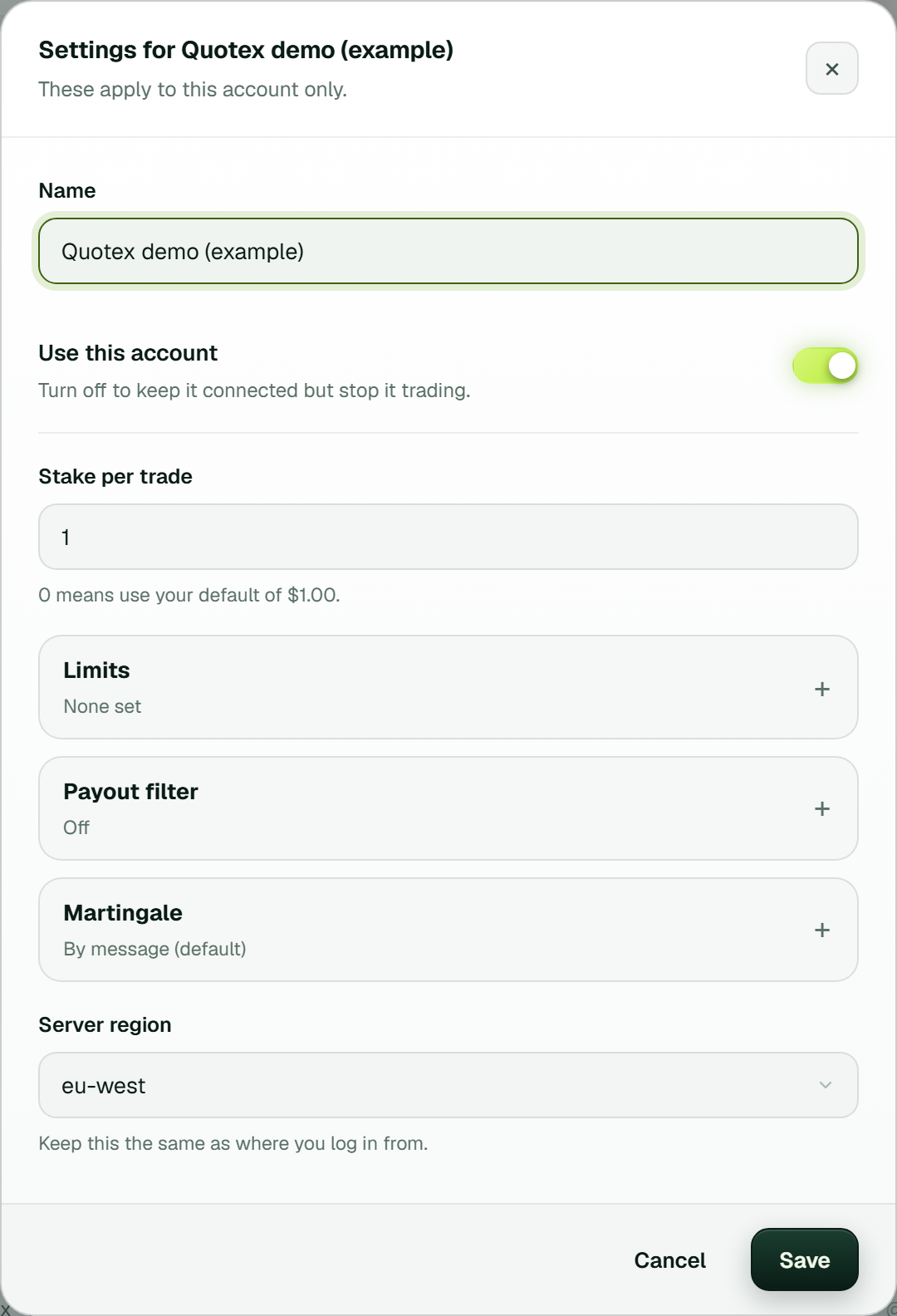 One Quotex account's Settings: stake per trade, Limits, Payout filter, Martingale (By message) and the server region (example workspace).
5. Link the group to Quotex in the bridge's window
Back in the bridge's window, your WhatsApp group sits on the left and your Quotex account on the right. Link the two; the Set-up list calls this step Link the group to your account. The link gets its own gear button and shows Live. Until you link them, TPcopier doesn't read the group for Quotex at all.
 The bridge's window: one WhatsApp group linked to a Quotex demo account and Live, with Add sender, Add receiver and the Set-up list (example workspace).
6. Test the WhatsApp to Quotex chain on demo
Press Test trade on the Quotex card. First it lists which pairs are open and what they pay. Then it places one order at the account's minimum stake on the demo balance and reports how fast Quotex confirmed it. That proves the Quotex end. The WhatsApp end proves itself with the group's next signal, which shows up under Live trades on the Dashboard once it trades.
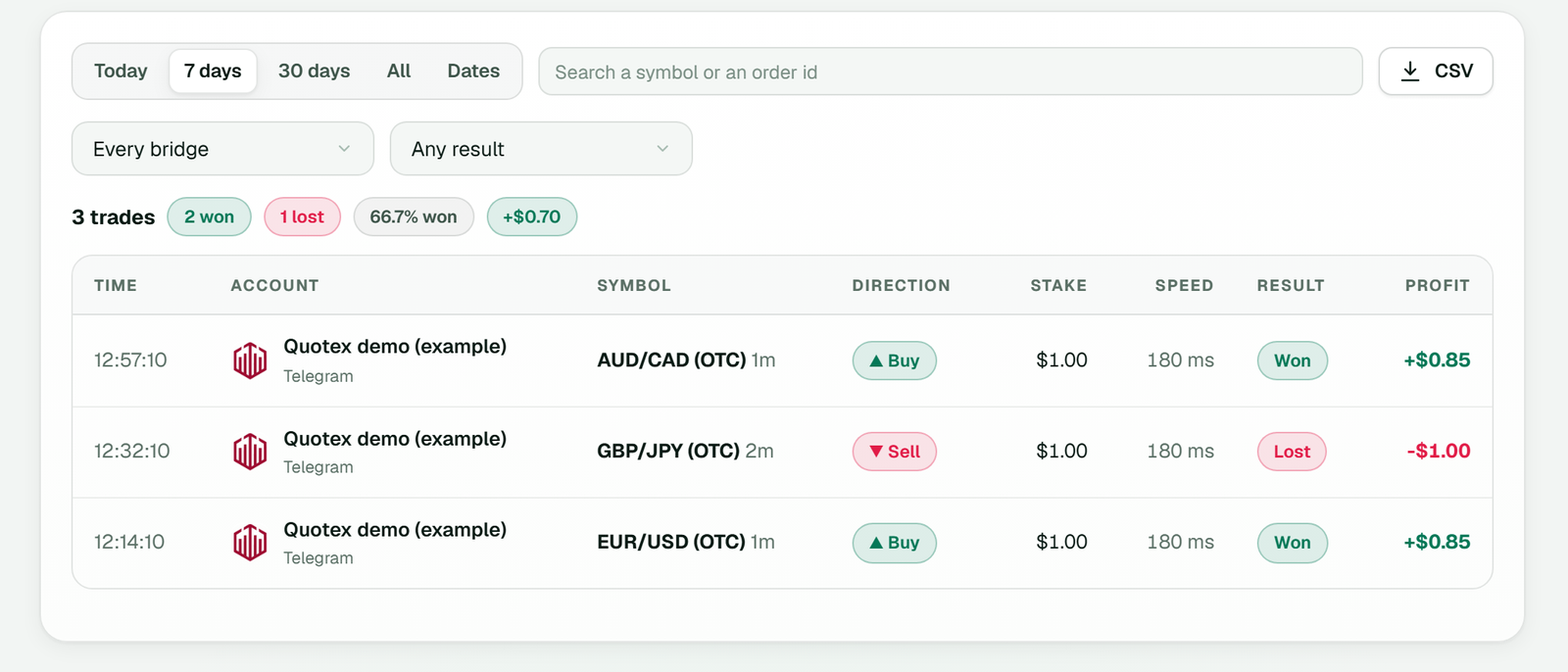 History: every Quotex order with its time, symbol, direction, stake, speed, result and profit (example workspace).
What a Quotex call in a WhatsApp group needs
TPcopier trades a message only when it finds three things in it: the pair, the direction and the expiry. Here is one layout its own reader takes without any AI (an example, not a real signal):
EUR/USD OTC
PUT 🔴
Expiry: 2 min
Shorter ones work as well, such as EURUSD-OTC CALL M1 or NZDUSD otc 🔽 M2. Its reader takes fixed layouts like these in well under a millisecond, and only when all three parts are clear. Anything else goes to an AI, which also decides whether the message is a signal at all.
WhatsApp groups add a few habits of their own:
- Captions count. Plenty of groups post a chart picture with the call typed under it. TPcopier reads that caption like any other message, but a picture with no text gives it nothing.
- Reposts. If a group forwards calls from elsewhere, Ignore forwarded messages in Settings drops them.
- Other languages. The Keywords page lists the words for up, down and never trade, with English, Spanish, Portuguese and Turkish built in.
A message with no expiry never trades, because M1 and M5 on the same idea are different trades. Results posts and "get ready" teasers count as not a signal.
OTC or the real market
Quotex lists many pairs twice: the real market and its own OTC version. The reader takes the pair exactly as the group wrote it. So EURUSD-OTC goes to the OTC pair and plain EURUSD goes to the real market, and TPcopier never swaps one for the other. When the real market is shut, at the weekend for example, a plain call is skipped with "That market is closed right now".
Quotex rules that decide whether an order goes through
The minimum stake follows the currency. Quotex wants at least 1 on a dollar account, and other currencies have their own minimum. TPcopier also learns the minimum from Quotex's own refusal and remembers it. After that, a smaller stake never leaves: the trade row names the account's minimum and the stake it refused, then tells you to raise it. The account card warns you about this before the first signal, too.
Refusals keep Quotex's code. A trade row can end in [min_amount], [max_amount] or a not-enough-balance note, so you know what to change.
Silence gets a second look. When Quotex doesn't answer within 15 seconds, TPcopier looks for a deal on that pair that opened after the order left. If the balance fell by the stake, the error says Quotex most likely did open it. Later, TPcopier finds it in Quotex's deal list and tracks it like any other trade.
Keeping both logins alive
The WhatsApp link runs on TPcopier's servers, so the phone can sleep. WhatsApp only asks the phone to come online once every couple of weeks. If someone removes TPcopier under Linked devices, TPcopier logs "WhatsApp ended this link (it was removed on the phone) - link it again", and you scan a fresh code.
On the Quotex side, the Login line on the card says it renews itself once TPcopier has checked the saved sign-in. When Quotex ends a session, TPcopier signs back in from that saved sign-in with no password. A sign-in to Quotex elsewhere can end a session, and that's when this helps.
Defaults worth changing on purpose
New binary accounts have Martingale set to By message: a gale (recovery step) goes only when the signal's own message gives one, such as G1 or G2, and a call that names none is one trade. You can switch an account to its own martingale in its Settings, so decide on purpose for a group you've never watched. In addition, the bridge's settings (the gear) pause an account after four losses in a row by default; 0 turns that off. A paused account shows on the Binary brokers page with a Resume button. A demo account stays on demo until you choose Switch to real money under More on its card. The guide to binary options risk management explains every limit.
What WhatsApp to Quotex costs
WhatsApp → Binary brokers is a bridge of its own, with its own bill. It costs the same as Telegram → Binary brokers, includes some accounts, and charges monthly for each extra one. The pricing page has today's numbers, and the free trial carries this bridge too. A ticked group with no connection adds nothing to the bill.
FAQ
Does WhatsApp to Quotex read my private chats?
No. TPcopier reads only the groups you tick, and it never reads private chats. It also sends nothing, so nobody in a group sees a message from you.
Why did a Quotex call from the group not trade?
The usual culprits are a missing expiry, a closed market or a payout under your minimum. A stake under Quotex's minimum shows on the trade itself.
What if the group posts a signal as a picture?
TPcopier reads the text typed with the picture. A picture with no caption has nothing to read, so it never counts as a signal.
Can one group trade Quotex and other brokers together?
Yes. Link the same group to several accounts in the bridge's window, and each gets the signal with its own stake, limits and demo or real mode.
Start with one group on a Quotex demo
Start the free trial, link WhatsApp and link one group to a Quotex demo account. Watch its trades under Live trades for a few days first, because a copier copies bad calls as faithfully as good ones. WhatsApp's help shows how to link a device, and the Quotex signal copier page covers the broker side. For calls that come by Telegram, read copy Telegram signals to Quotex. The same group can also feed Pocket Option or IQ Option. To manage Quotex accounts from your own software, see the Quotex trading API.
Legality: binary options are banned or restricted in many countries. In India, the RBI lists several binary platforms, including Quotex, as not authorised for forex trading. Check the law where you live before you use any broker. TPcopier is software only; it is not a broker and is not linked to Quotex.
Risk warning: binary options carry a high risk of losing money and are restricted in some countries. Nothing here is investment advice.