Binary options signal copier.
The TPcopier binary options signal copier reads your Telegram channels, WhatsApp groups, Discord channels and TradingView alerts, and places each signal on your accounts at Quotex, Pocket Option, IQ Option, Binomo, Olymp Trade, ExpertOption and Binolla. It runs in our cloud. When it cannot read a message clearly, it skips it and shows the reason.
What does a binary options signal copier do?
Signal channels post a pair, a direction and an expiry, and you have seconds to place the trade by hand. A binary options signal copier does that part for you. It reads the message, works out the trade and places it on every account you linked.
TPcopier does this on our servers, so your phone and PC can be off. Also, one channel can trade any mix of your accounts, at one broker or at all seven. Telegram, WhatsApp, Discord and TradingView all go through the same reader and the same rules.
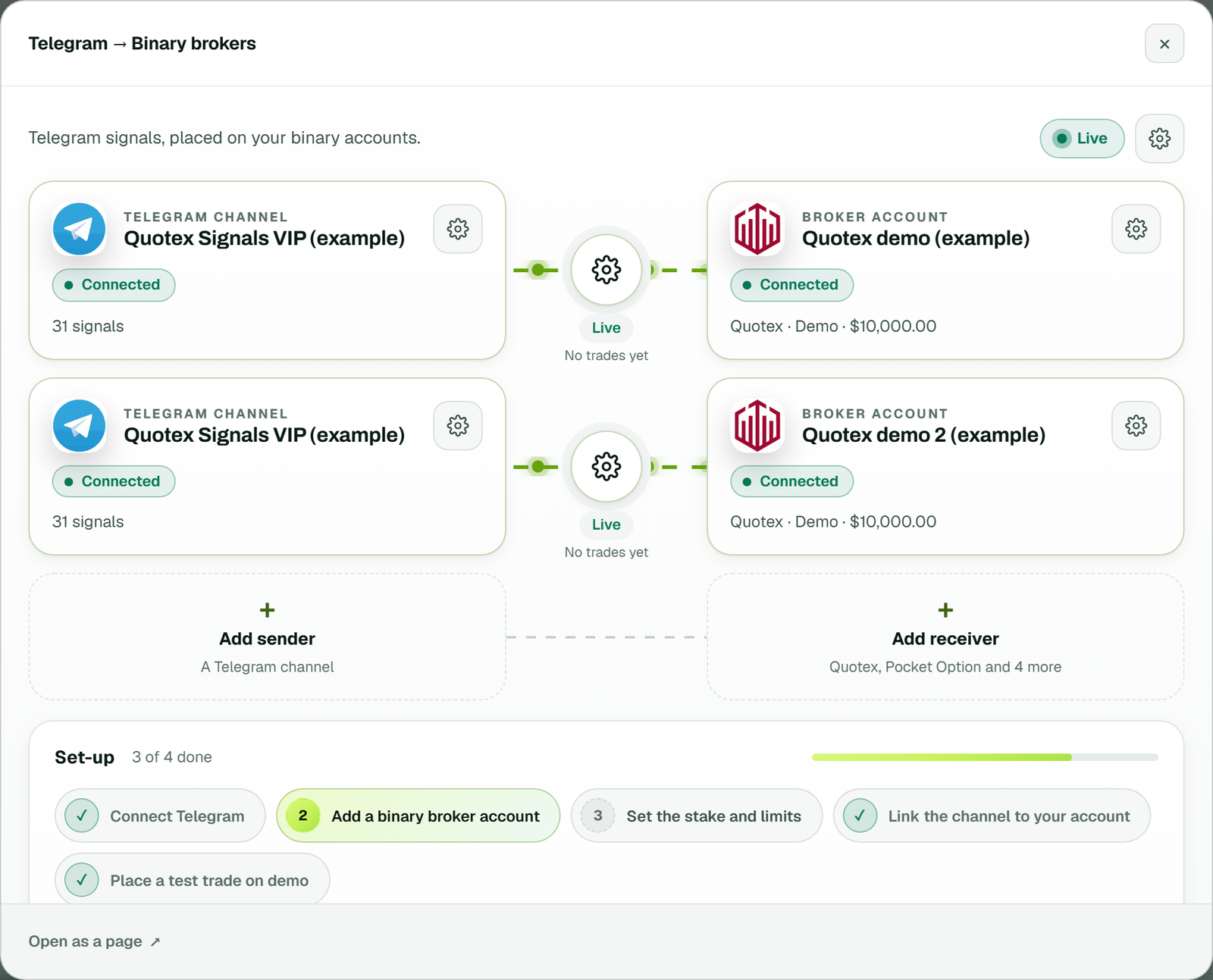
The bridge's window: a Telegram channel linked to two Quotex demo accounts, each link with its gear and a Live status (example workspace).
How to set up the binary options signal copier
- Make a bridge. On Bridge, press Make a bridge, pick the sender (Telegram, WhatsApp, Discord or TradingView) and a binary broker, then press Open the bridge. Each sender to binary brokers is a separate bridge, so you pay only for the ones you use.
- Connect a source. Telegram with your phone number and code, WhatsApp with one QR scan, Discord with a QR code or a bot token, or TradingView with a webhook.
- Add a broker account. Choose the broker, keep the account type on Demo (practice money), name it and press Add and connect. Nothing asks for your broker password here.
- Sign in yourself. The broker's own sign-in page opens inside TPcopier, and you log in there, solving any "verify you are human" step yourself. TPcopier keeps only the session.
- Set your rules. Each account's Settings hold its stake, limits, payout filter (off until you switch it on) and martingale (By message by default). The bridge's gear holds the volume limits, such as the most trades per hour.
- Link and answer the timing question. When you link a channel to a binary account in the bridge's window, the app asks for that channel's time zone. From then on, each signal goes to every linked account at the same moment.
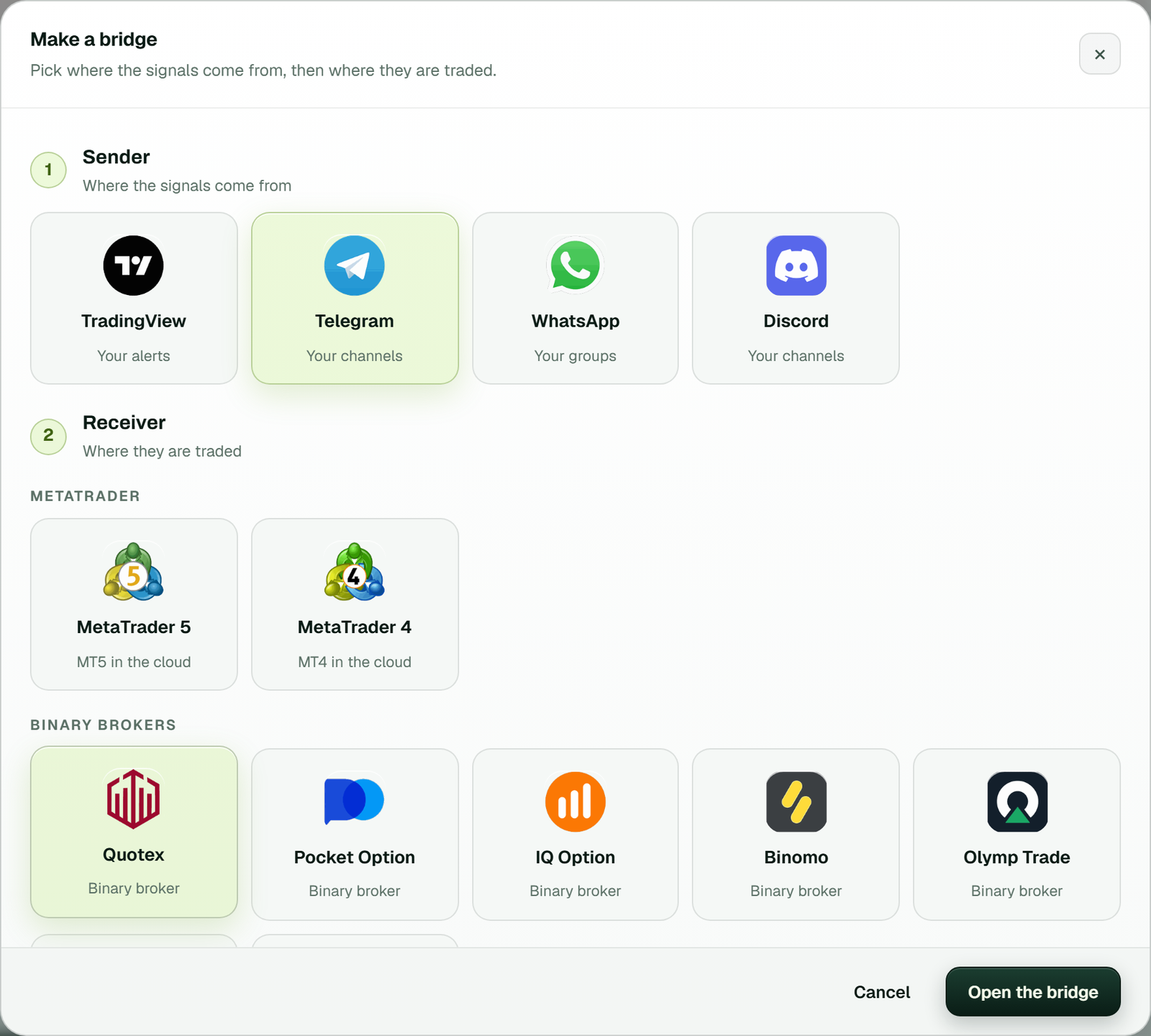
Make a bridge: Telegram picked as the sender and Quotex as the receiver, then Open the bridge.
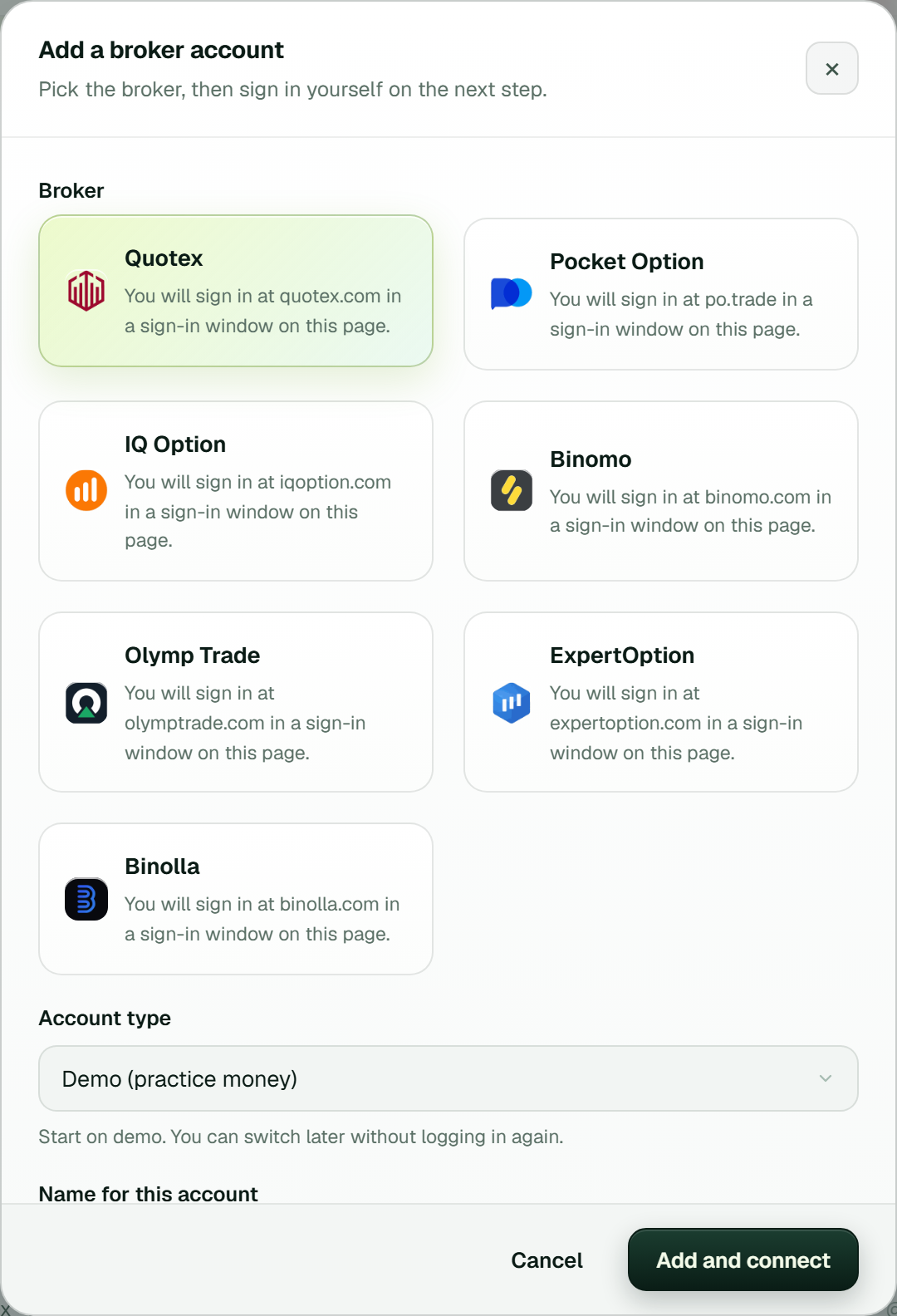
Adding a broker account: pick the broker, keep Demo (practice money), press Add and connect, then sign in yourself on the next step.
Which signals does the binary options signal copier read?
TPcopier's own reader reads common layouts in under a millisecond. Anything else goes to an AI, which also says whether the message is a signal at all. Here are layouts from our tests and what they become:
| Message | Trade |
|---|---|
EURUSD-OTC call M1 | EUR/USD OTC, CALL, 1 minute |
GBPJPY PUT 5min | GBP/JPY, PUT, 5 minutes |
USD/BRL (OTC) BUY - 2 minutes | USD/BRL OTC, CALL, 2 minutes |
AUDCAD otc SELL 3M | AUD/CAD OTC, PUT, 3 minutes |
USDJPY DOWN M5 | USD/JPY, PUT, 5 minutes |
EUR/USD OTC 14:05 PUT M5 | EUR/USD OTC, PUT, 5 minutes, at 14:05 |
Pair: GBPUSD / Entry 14:51 / Expiry 14:52 / DOWN | GBP/USD, PUT, entry and expiry by the clock |
PAR: EURJPY-OTC / HORA: 18:35 / EXPIRACAO: M5 / DIRECAO: COMPRA | Portuguese: EUR/JPY OTC, CALL, 5 minutes |
M1 | CHFJPY_otc | 13:35 | PUT, one line per trade | A session list: every line becomes its own signal |
The reader also copes with emoji, boxes, card suits and bold letters; a green circle or up arrow means CALL. Direction words count in several languages, such as compra, venda, subir, bajar, naik and turun. A 12-hour time like "04:31 PM" counts as 16:31. When a channel sends one signal in two or three messages, the copier joins them if they arrive within a minute.
From TradingView, the copier places a buy as a CALL and a sell as a PUT, for the alert's own expiry, such as
{"symbol":"{{ticker}}","type":"buy","expiry":"1m"}. Alerts trade the real market, and OTC only when the alert names it.
More layouts are in Telegram signal formats explained.
Every skip explained, and broker errors
A binary options signal copier should never trade on a guess. So every message is either traded or skipped, with a reason:
Good morning traders!- not a trading signal, skipped.GBPJPY PUT- no expiry in the message, so we did not guess one. Set a default expiry for that channel if it never writes one.AUDCAD otc SELL 3M- skipped when the payout is below the minimum in that account's payout filter, once you switch the filter on.EUR/USD OTC 13:40 PUT M5- refused when its entry time has already passed.- Recaps with words such as win, loss, ITM or OTM, "get ready" posts and "CALL or PUT" messages - skipped too.
When the real market is shut, for example at the weekend, the copier can trade the broker's OTC twin of the same pair. You can switch that off. With no open twin, the row says the market is closed, and the call never waits for later.
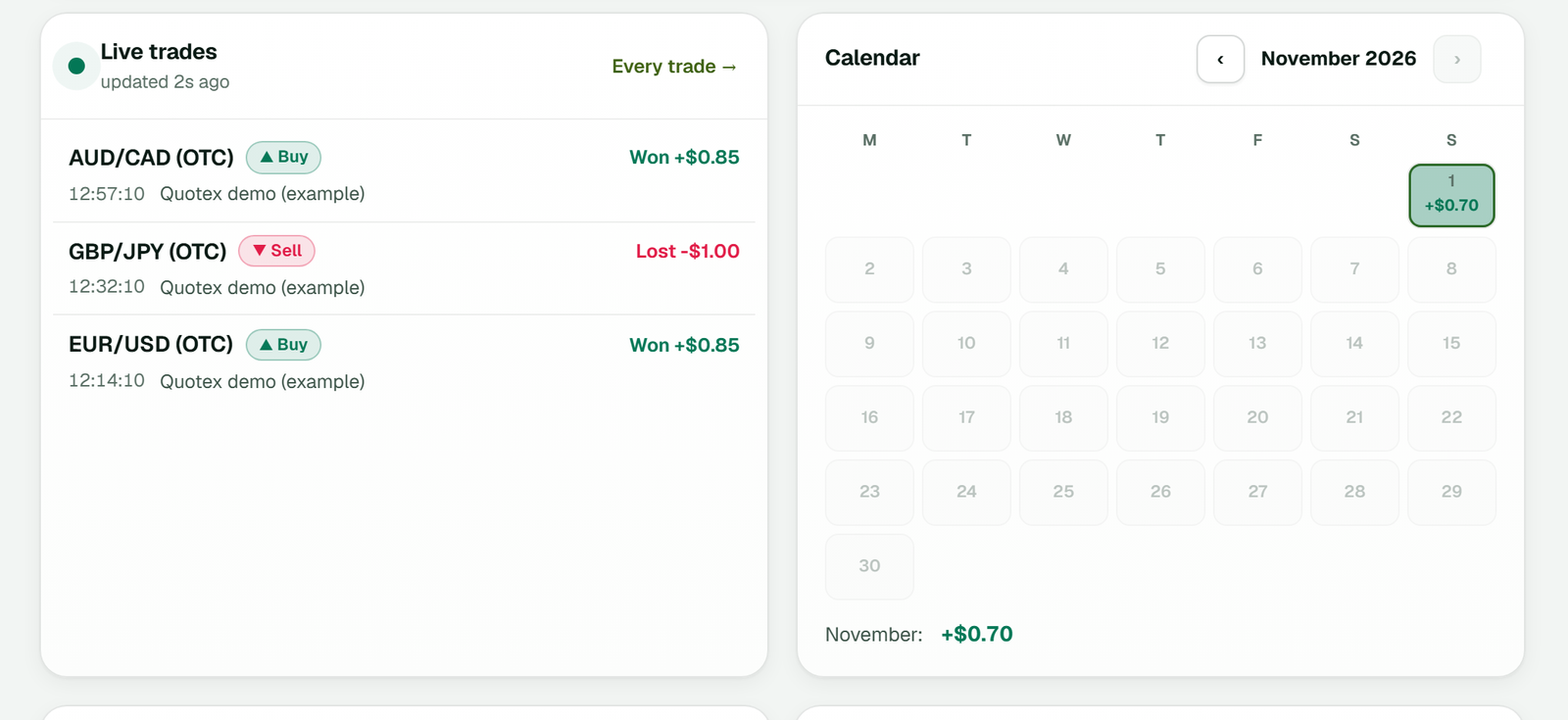
Dashboard, Live trades: the latest trades with their result, beside the month's calendar. An order that did not go out reads Not placed, with the reason (example workspace).
Broker messages and what to do
| The row says | What to do |
|---|---|
| Quotex's minimum stake on this account is ... | Raise that account's stake to at least the minimum named. |
| Pocket Option did not confirm the order within 10 s | Usually a stake under Pocket Option's minimum; raise it. |
| Time for purchasing options is over (IQ Option) | That expiry's buying window closed; the next signal goes through. |
| ... is closed on Binomo right now - nothing was sent | The row names the asset's hours; use another pair or wait. |
| The saved session or login has ended | Press Connect and sign in again in the window that opens. |
Your rules, checked on every signal
The binary options signal copier checks these on our server before any order leaves:
- Directions: trade UP and DOWN, or just one side, channel by channel.
- Minimum payout: once you switch on an account's payout filter, a pair that pays under your percent is skipped.
- AI confidence: AI reads below the level you set do not trade.
- Most signals per hour: a channel that floods during news stops at your number.
- Stake: one stake for the whole channel, or each account's own, with its caps and daily stop.
- Expiry range: an expiry outside the range you allow is refused, with your numbers in the row.
- Repeats and losing runs: the same pair, direction and expiry is not traded twice within your window, and an account can pause itself after a set number of losses in a row.
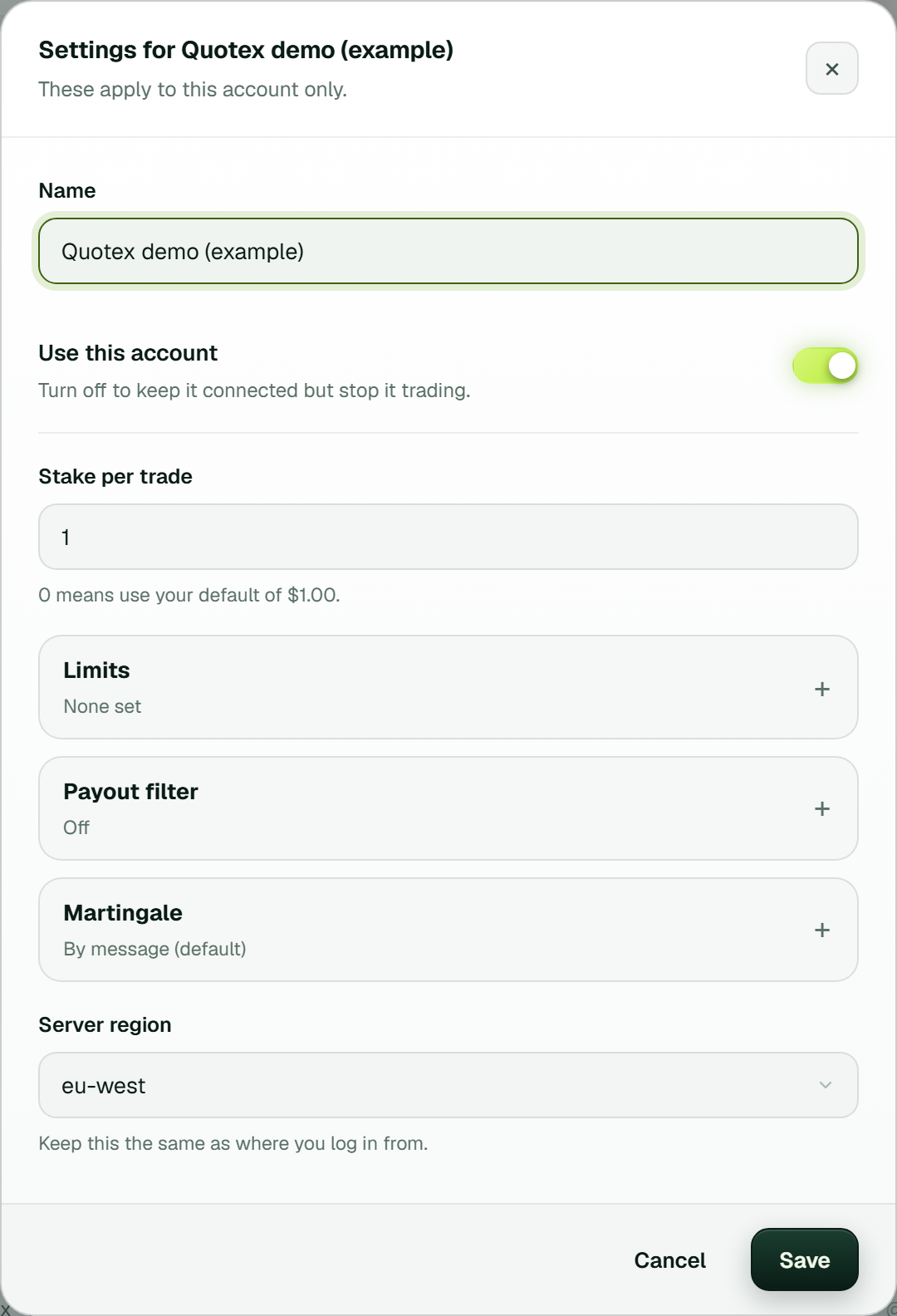
Each account's Settings: stake per trade, Limits, the Payout filter (off until you switch it on) and Martingale, By message by default (example workspace). Volume limits sit in the bridge's gear.
Timed entries and martingale
A message with no time trades at once. When a message names an entry time, the trade waits for it on the broker's own clock, never your PC's, in the time zone you set for that channel. We never guess a channel's zone. If a time arrives and no zone is set, the signal is not traded and an ACTION NEEDED notice shows at the top. When a channel states its own zone in a message, such as "UTC -3", the copier sets it at once. You can also use only the minute of each time, which ignores the hour.
Martingale works two ways, per account. By message, the default, a gale goes in only when the message names it, as many as it names, such as "1º GALE" or "Até 2 gales". Or you can use your own system, with the steps you set. However, a martingale multiplies losses as well as stakes, so try it on demo first. The guide to timed entry signals goes further.
Brokers and their pages
Each broker connects in its own way, so each has its own page with its login, OTC names, expiry rules and common messages. One fact per broker, from how the binary options signal copier works with it today:
| Broker page | One thing to know |
|---|---|
| Quotex signal copier | Quotex drops its trading login a few times a day; the site logs in again within seconds. |
| Pocket Option signal copier | Demo and real are separate sessions on separate servers, each connected on its own. |
| IQ Option signal copier | 1 to 5 minutes trade as turbo options; longer expiries settle on quarter hours. |
| Binomo signal copier | Expiries land on whole minutes, and each asset keeps a weekly trading schedule. |
| Olymp Trade signal copier | Orders go out as Fixed Time trades over a direct connection. |
| ExpertOption signal copier | Each connect tries four regional servers and keeps the first to answer. |
| Binolla signal copier | Demo is tested in full; real-account orders are not yet checked by us, so start on demo. |
Binary options are restricted or banned in some countries; check the law where you live before you use them. In India, the RBI's alert list names six of these seven brokers as not authorised for forex trading. The US regulator explains the risks in its binary options advisory.
How much does the binary options signal copier cost?
| Item | Price or terms |
|---|---|
| Telegram, WhatsApp, Discord or TradingView to binary brokers | $50 a month each, with 1 account, and $20 for each one more |
| Brokers per bridge | One bridge can trade accounts at all seven |
| Free trial | 2 days, up to 10 signals a day, no card |
| Paying | Binance Pay or your TPcopier wallet, for 1, 3, 6 or 12 months; nothing renews by itself |
| Refunds | None: payments are final, so use the trial first |
Every binary options signal copier plan, and the binary trade copier, is on the pricing page.
Copying your own trades to other accounts instead? Use the binary trade copier. Rather run it on your own PC? See the binary copier software. From your own code? See the binary options API, how it times each order in the order timing API, and the Quotex API.
Which binary brokers does it work with?
Quotex, Pocket Option, IQ Option, Binomo, Olymp Trade, ExpertOption and Binolla, in any mix. One signal can go to accounts at several brokers at once.
Do you need my broker password?
No. The broker's own sign-in page opens in a real browser window and you sign in yourself. TPcopier keeps only the session it needs to place trades.
What happens to messages that are not signals?
The copier skips them, and the live feed says why: not a signal, no expiry, payout too low, market closed and so on.
Does it wait for the time in the message?
Yes, on the broker's clock, in the time zone you set for that channel. With no zone set, a timed signal is not traded and the app asks you for one.
Does it support martingale?
Yes, two ways per account: by message, where a gale goes in only when the message names it, or your own system. A martingale multiplies losses as well as stakes.
How much does the binary options signal copier cost?
$50 a month with 1 account, and $20 for each one more. The free trial lasts 2 days.
Is binary options trading legal where I live?
Binary options are restricted or banned in some countries; check your local law first. TPcopier is software only and gives no trading advice.
Risk warning: binary options carry a high risk of losing your stake and are restricted or banned in some countries. TPcopier is software that places the signals you choose; it is not a broker, gives no trading advice and makes no promise of profit. The broker names are trademarks of their owners; TPcopier is not affiliated with them.