Telegram signal copier for MT5 and MT4, in the cloud.
A Telegram signal copier turns a message in a channel into a real order. TPcopier does this on our servers. It reads the channels you are in with your own Telegram login. Then the TPcopier EA places each signal in MT4 or MT5 with its entry, stop loss and every take profit. Your MetaTrader runs in our cloud too, so you rent no VPS, and your phone and PC can be off.
What does a Telegram signal copier do?
Signal channels post trades as plain text: a pair, a direction, an entry, a stop and a few targets. A copier reads that text and opens the trade, so you never type an order by hand.
Most copiers live on your own computer, which then has to stay on day and night. So plenty of traders rent a VPS just to keep MetaTrader open. TPcopier turns this round: your MT4 or MT5 account runs on our servers with the EA inside, and our servers read Telegram too. As a result, this Telegram signal copier keeps trading after you close the laptop.
| Point | Cloud bridge | Windows app |
|---|---|---|
| Where it runs | Our servers | Your Windows 10 or 11 PC or VPS, which must stay on |
| MetaTrader | Runs in our cloud | Installed on that same computer |
| How you pay | By the month, per bridge | Once, with a demo key first |
| Your MetaTrader password | Sealed with the cloud server's key | Stays in your own terminal |
This page covers the cloud bridge. The pay-once Windows app has its own install guide.
Telegram forex copier: pairs, gold and indices
Most of those channels post forex pairs and gold, so in practice TPcopier works as a Telegram forex copier: EURUSD, GBPJPY or XAUUSD calls land in MetaTrader under your broker's own symbol names. Indices, oil and crypto CFDs go the same way, as long as your broker lists them. Any number of channels can feed one account, so it doubles as a Telegram signals copier for a whole list of providers.
A gold call reads the same whether the channel writes XAUUSD or GOLD: the EA finds your broker's own name for the symbol, even one with an extra ending such as XAUUSDPRO or US30CASH. Each take profit becomes its own order, up to six, so every target closes on its own.
How do you set up the Telegram to MT5 copier?
You set up the cloud Telegram signal copier on the website alone. There is no terminal to open and no file to copy.
- Start the free trial. Sign up, press Make a bridge, pick Telegram and MetaTrader 5 or 4, then Open the bridge. You need no card, and the trial clock starts only at your first link.
- Connect Telegram. Type your phone number, then the code that Telegram sends inside its app. After that you see every channel and group your account belongs to: public, private or paid VIP. Nobody has to add a bot.
- Switch on your channels. Turn on only the channels you trust. The copier ignores the rest.
- Add your MetaTrader account. Press Add account, pick MetaTrader 5 or 4, then give your broker, the account number and the trading password. The cloud server's own key locks the password the moment you add it, and the website can never read it again. Then wait for the card to say Running.
- Set the EA. Pick the lot size, symbol names and limits on the website.
- Link, then test. In the bridge's window, link the channel to the account. Before real money, paste one of the channel's old messages into Test the reader. The copier reads it exactly as it would a live signal, but nothing goes to any EA.
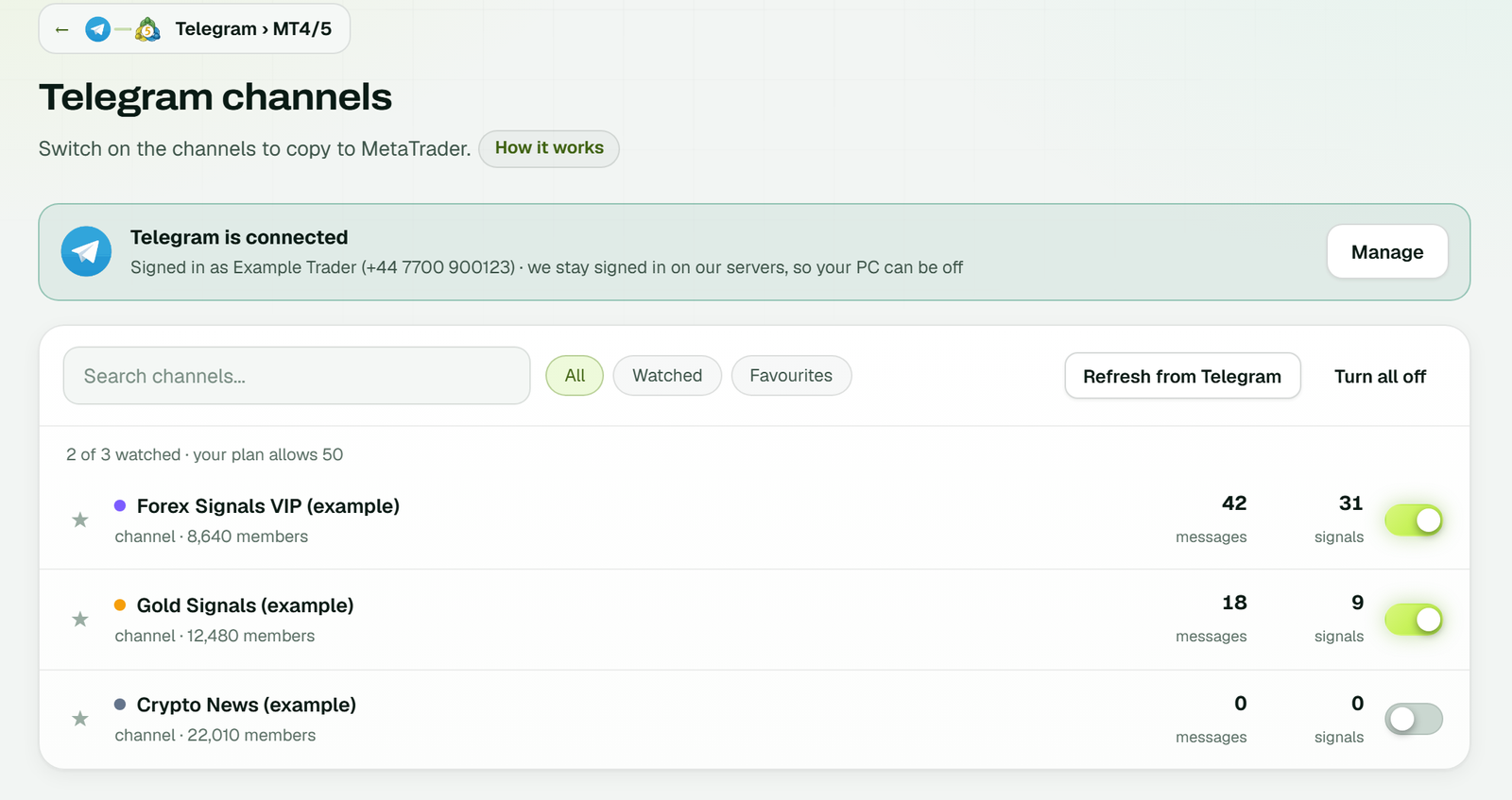
Step 3: the copier reads only switched-on channels. Here two are on and Crypto News is off (example workspace).
One channel can feed several accounts. For example, link a VIP channel to two MT5 accounts at different brokers, and each signal goes to both.
Signal formats the Telegram signal copier reads
Every price it trades is a price the channel wrote. It reads a simple signal at once, and a layout the channel has used before from memory. Only a layout it has never seen goes to an AI, and later messages in that shape skip the AI.
| Message in the channel | What happens in MetaTrader |
|---|---|
GOLD BUY 4380 SL 4370 TP1 4400 TP2 4420 TP3 4440 | The EA buys gold three times, each position with its own target |
XAUUSD BUY NOW 2345.50 / SL 2338.00 / TP1 2350.00 / TP2 2355.00 / TP3 2362.00, one level per line | The same shape over five lines: one stop, three positions |
EURUSD sell limit 1.0850-1.0855 SL 1.0900 TP 1.0800 / 1.0750 | Two pending sells, one per price, each carrying both targets |
XAUUSD SELL NOW 4676 - 4679 SL 4686 TP 4665 | The EA takes 4676 to 4679 as the entry zone |
BTCUSD BUY NOW SL 61000 TP 63000 | With no entry written, it buys at market |
XAU/USD SELL 2350 SL 2360 TP 2340 | The EA drops the slash and sells XAUUSD |
XAUUSD TP1 hit +45 pips | Nothing: a result post, stopped by the block list |
The rules behind the table
- The number written next to BUY or SELL becomes the entry. No number anywhere means a market order.
- Pending orders need the word: the EA places a limit or stop order only if the message says "limit" or "stop".
- Targets one to three trade by default, and you can allow up to six.
- A stop or target in pips or points, such as "TP 100 pips", also counts.
- A follow-up with no symbol uses the one this channel traded in the last four hours.
The block list starts with words such as "tp hit", "sl hit" and "result". If a message contains one, the EA never sees it, even when it names a pair and a price. More layouts are in the guide to Telegram signal formats.
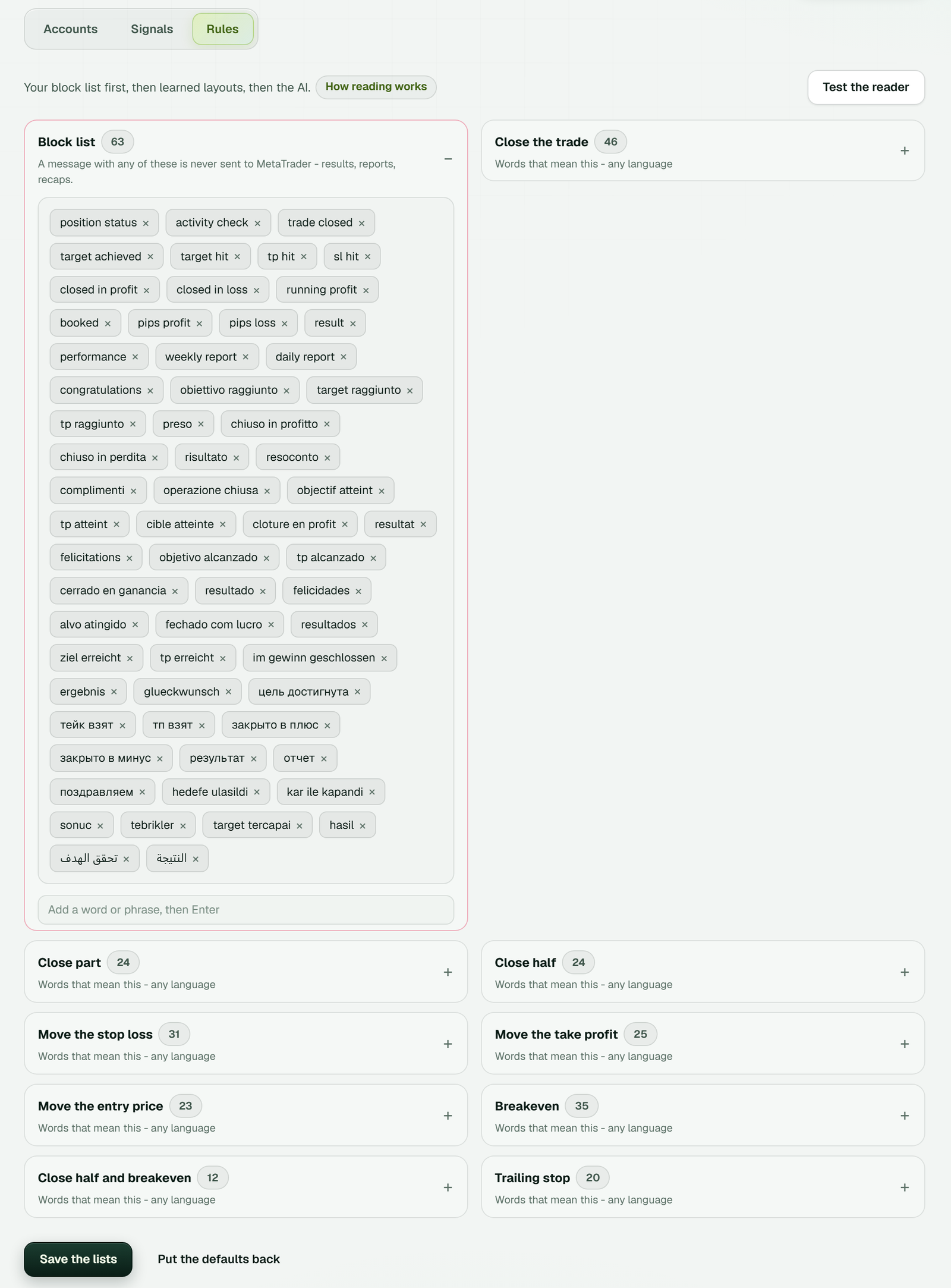
MetaTrader 4/5 → Rules: the block list keeps result posts and recaps away from MetaTrader, and the lists beside it hold the words for closing, moving the stop loss, breakeven and trailing, in several languages (example workspace).
Replies, edits and late posts
Channels often manage a trade with a reply. So a reply to a signal acts on that signal's orders only:
SL to 4390orMove SL to entry 2345.50moves the stop loss of that signal's orders.TP2 4435moves the second target.Close allcloses its orders and deletes the pending ones.Close halfcloses 50%, andmove to BEputs the stop at the entry price. Both are on by default.
An edited message or a late repost never opens a second trade. Replies in other languages work as well, for example "Cerrar todo" or "chiudi tutto". However, the EA never moves a stop or closes part of a trade on its own unless you switch that on. So a Telegram signal copier set up this way follows the channel, not its own ideas.
The EA settings, explained
One chart is enough, because the TPcopier EA trades every symbol from it. Its inputs live on the website, and saved changes apply in a few seconds, with no restart. The same EA runs in MT4 and MT5, so the Telegram to MT4 copier and the MT5 one share these inputs of the Telegram signal copier.
Lot size
| Mode | What it does | Default |
|---|---|---|
| Fixed lot | The same lot on every order | 0.01 |
| Auto lot % | A lot that grows and shrinks with the balance | 1 |
| Risk % | Sized so a stop-out loses that share of the balance | 1 |
| Risk amount | Sized so a stop-out loses that sum | 100 |
| Special lots | A lot per symbol, such as XAUUSD=0.01 | empty |
| Lots per target | One lot for each TP, in order | 0.03,0.02,0.01 |
Symbols, levels and limits
- Symbol names: the EA finds your broker's own name by itself, so XAUUSD can trade as Gold or XAUUSD.m. Prefix, suffix and replacements such as GOLD=XAUUSD handle the rest. A 24/7 version of a symbol trades only when the normal one is shut or the message names it.
- Brokers: any broker that offers MT4 or MT5 accounts works.
- Missing levels: a signal without a stop or target gets 100 pips by default. Set 0 to open without one, or refuse such signals.
- Limits: most open trades, trades per day, week and month, daily loss and profit limits and trading hours. All are off until you set them.
- Spread: a maximum spread is off by default, so no signal is refused for it unless you set one.
- Management: breakeven after a target, trailing stop and profit lock exist, but stay off unless you switch them on.
WhatsApp and Discord signals too
Some providers post in a WhatsApp group or a Discord channel instead. The Telegram signal copier handles those too: the same EA, the same settings and the same MetaTrader account. Each source is a bridge of its own, at the same tier prices.
WhatsApp links once as a device, with one QR scan, as WhatsApp Web does. The copier then reads only the groups you pick and posts nothing. Discord signs in by QR code, e-mail and password, or a bot token. Then it reads text and embeds in the channels you choose, and never posts. If you own the server, use the bot token, since Discord's rules prefer a bot. Linking them from your own code? See the WhatsApp and Discord signal API.
Guides: copy WhatsApp signals to MT4/MT5 and Discord signals to MT4/MT5.
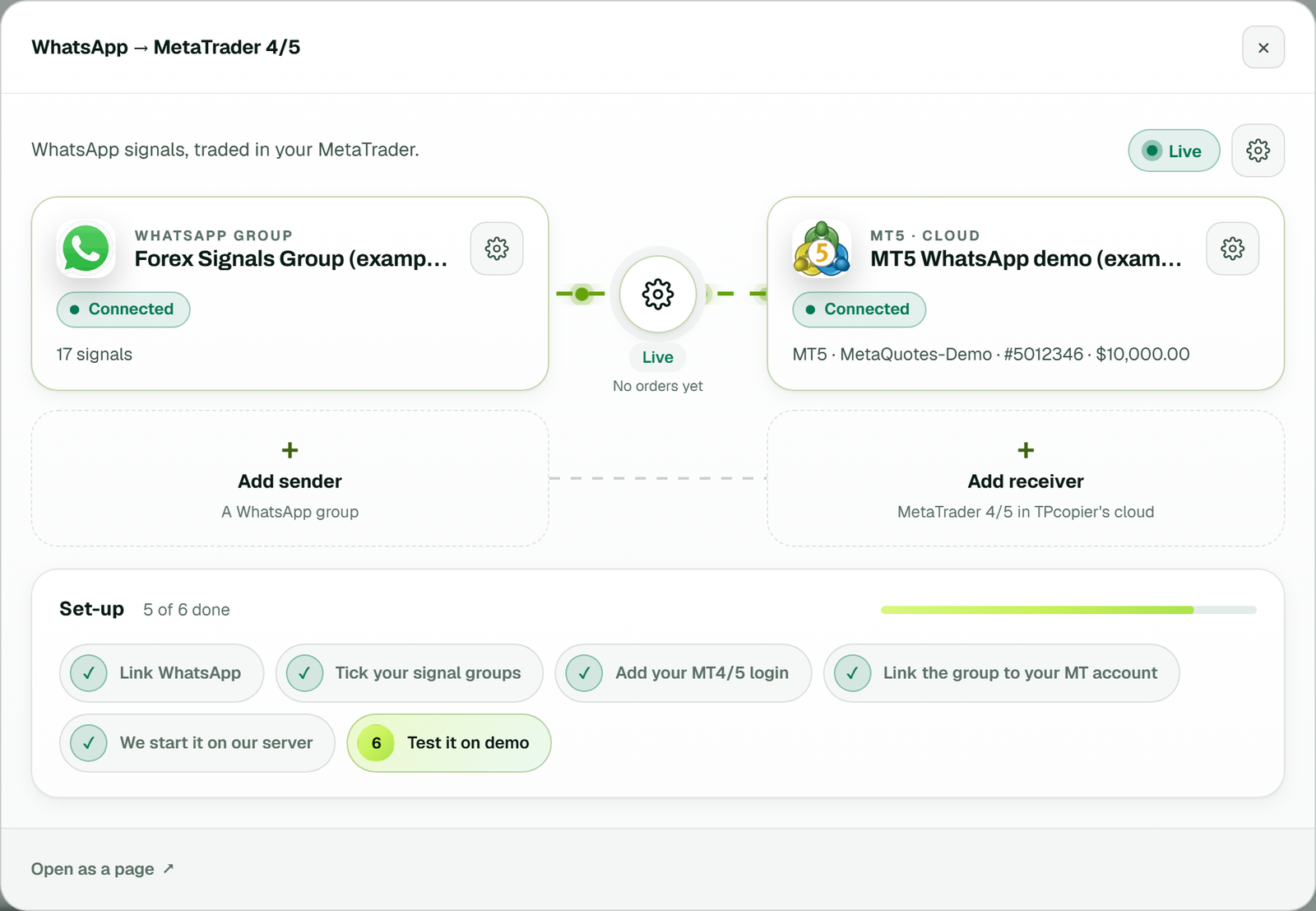
The WhatsApp to MetaTrader 4/5 bridge: the group on the left, the cloud MT5 account on the right, and the link between them Live (example workspace).
Telegram signal copier vs Copygram and TelegramFXCopier
Two other cloud copiers often come up beside us. We read their own pages on 29 October 2026 and list only what those pages state, which may have changed since.
| Point | TPcopier | Copygram | TelegramFXCopier |
|---|---|---|---|
| MetaTrader link | A cloud terminal with our EA, inside the plan price | A cloud web app, no VPS | MetaAPI, bought on the side and billed by use |
| Signal sources | Telegram, WhatsApp, Discord, TradingView | Telegram, TradingView, MT4, MT5, Tradovate, NinjaTrader, TradeLocker | Telegram |
| Trades go to | MT4, MT5 and seven binary brokers | MT4, MT5, Tradovate, NinjaTrader, TradeLocker, DXtrade, MatchTrader, OANDA, Binance Futures | MT4 and MT5 |
| Take profits | One order per target, up to six | One position, part closed at each target | Splits the lot across targets by your shares |
| Free trial | 2 days, no card | None | A free demo, length not stated |
| Refunds | None: all payments are final | First purchase, within 7 calendar days | First subscription, within 14 days, if core features fail after support |
| Monthly price | $40 for 2 accounts, $60 for 3, $90 for 5, $150 for 10 and $200 for 15 | $29, $49 or $79 for 2, 3 or 5 accounts; Telegram needs $49 or $79 | $49.99 for unlimited accounts, with MetaAPI on top |
Sources: Copygram's home page, pricing and Telegram page; TelegramFXCopier's home page, features, pricing and refund policy, all checked on 29 October 2026.
Where they do better
Both rivals win on some points. Copygram trades far more platforms, such as Tradovate, NinjaTrader and OANDA, and first-time buyers get a refund window. TelegramFXCopier says it reads signals posted as pictures, and one fee covers any number of accounts. TPcopier does none of that, and it gives no refunds. Our side is one bill with MetaTrader inside, three more sources, binary brokers and a free test before you pay. Full write-ups: the Copygram alternative and the TelegramFXCopier alternative. Searching for a similar name? See TSCopier vs TPcopier.
How fast is the Telegram signal copier?
We timed the 170 trades that MT4 and MT5 EAs took in the 30 days up to 30 October 2026. These are medians: half the trades were faster, half slower.
| Step | Median |
|---|---|
| Reading the signal, in a layout the channel used before | 6 ms |
| Reading a new layout with AI (once per layout) | about 1 to 3 s |
| The EA fetching the order after that | about 10 ms |
| The EA's own order at the broker | about 149 ms |
| From the Telegram message's time to the EA's answer | 1.8 s |
So on our side, a known layout costs a few milliseconds, and most of the rest is the broker filling the order. The last line starts at Telegram's own stamp on the message. That stamp counts whole seconds only and includes Telegram's delivery, so 1.8 s is a rough figure.
Common errors and how to fix them
Each signal shows the EA's answer on the website: placed, refused or already open, with the reason. Here are the answers new users meet first:
| The answer says | What it means and what to do |
|---|---|
| The account is NETTING | MT5 merges positions on netting accounts. Open a hedging account instead. |
| Symbol not available on this broker | Your broker uses another name. Add it to Replacements, such as GOLD=XAUUSD, or set the prefix or suffix. |
| SPREAD TOO HIGH | You set a maximum spread and the market was wider. Raise it, or set 0 to switch the check off. |
| BREAKEVEN / PARTIAL CLOSE IS SWITCHED OFF | This account turned off breakeven and partials by message. Switch it back on to follow such replies. |
| IGNORED: blocked by your keyword | A block list word matched. Remove the word if it was a real signal. |
| Nothing after 10 signals | The trial allows that many a day; it starts again the next day. |
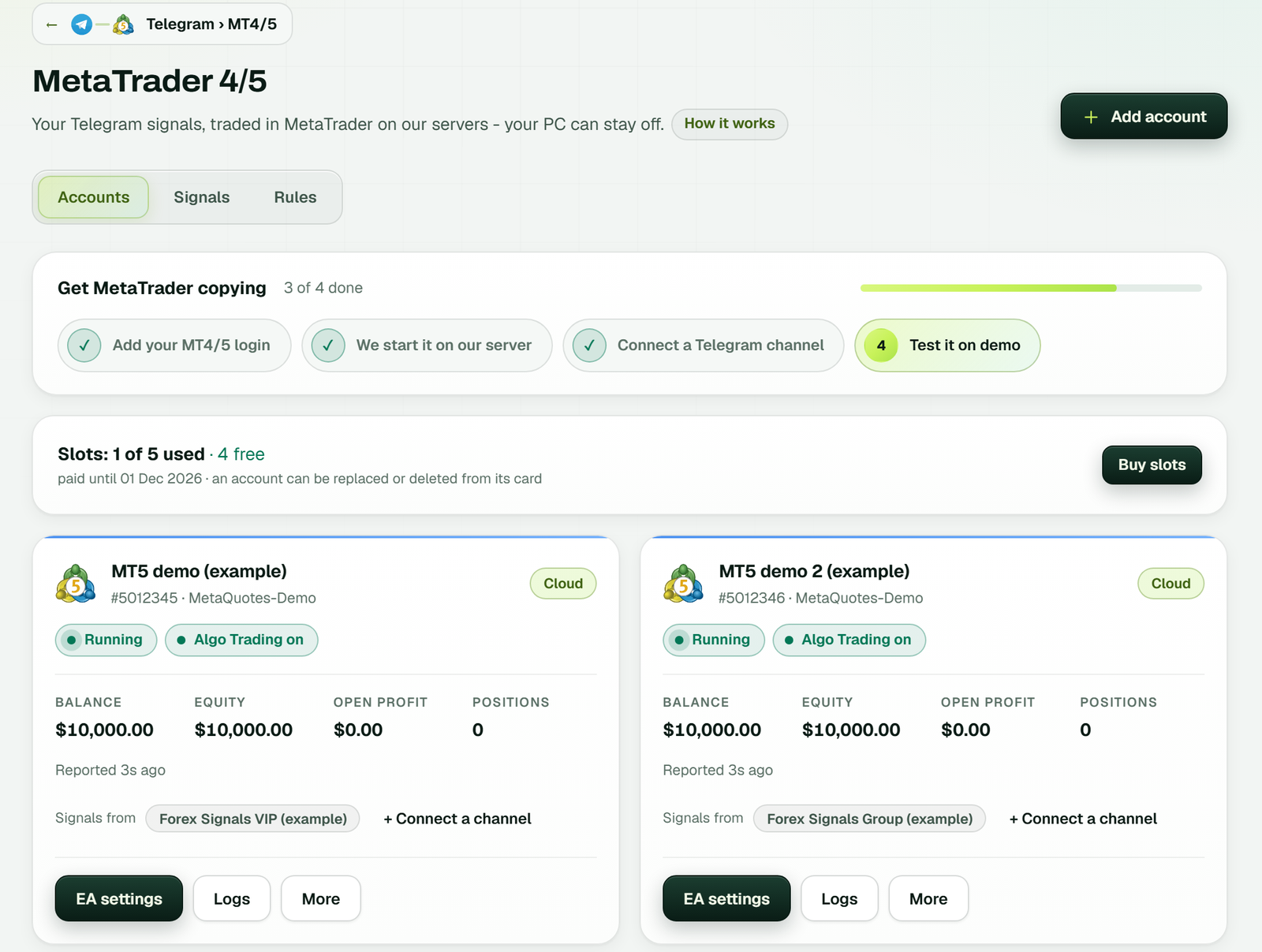
The MetaTrader 4/5 page: Accounts, Signals and Rules tabs, the Get MetaTrader copying checklist, your slots, and each account with Running, Algo Trading on, balance and equity (example workspace).
Only on your phone? Read the signal copier on Android and why an EA cannot run in MT5 for Android: the cloud copier trades for you while the phone app only shows the results.
Limits you should know
- MT5 needs a hedging account, since each take profit gets a position of its own.
- It reads only channels and groups that your own Telegram account is in.
- Whatever account the EA sits on is the one it trades: on a real account, real money from the first signal. Start on demo.
- It does not give trading advice or pick signals. It places the signals you choose.
- A Telegram signal copier is only as good as the channel. Watch a new channel on demo for a while before real money.
Telegram itself documents how third-party apps sign in on its API pages.
How much does the Telegram to MT4 copier cost?
| Item | Telegram to MT4/5 |
|---|---|
| Monthly price | $40 for 2 accounts, $60 for 3, $90 for 5, $150 for 10 and $200 for 15 |
| Cloud MetaTrader | Included, so there is no VPS bill on top |
| Free trial | 2 days, up to 10 signals a day, no card |
| Paying | Binance Pay or your TPcopier wallet, for 1, 3, 6 or 12 months |
| Renewal and refunds | Nothing renews by itself; all payments are final |
On the Telegram signal copier, MT4 and MT5 cost the same. Your plan is the smallest tier that covers your accounts. See every plan on the pricing page.
Copying a whole MetaTrader account? Use the MT4/MT5 cloud trade copier. Also see TradingView to MT4/MT5, the binary options signal copier, the signal copier API and cloud vs VPS.
Getting started
Is there a free Telegram signal copier?
TPcopier has a 2-day free trial on one bridge, with up to 10 signals a day and no card. After that it is a paid monthly plan, so test it on a demo account first.
Can I copy Telegram signals to MT5 without a VPS?
Yes. Your MT5 or MT4 account runs on our servers with the TPcopier EA inside, and our servers read your channels too. Your PC can be off.
Do I need to add a bot to the Telegram channel?
No. The Telegram signal copier reads channels with your own Telegram login, so any channel or group you are in works, including private and paid VIP channels.
Is the Telegram to MT4 copier different from the MT5 one?
No. Both run the same EA and settings at the same price, and both open one order per take profit, up to six. Only MT5 needs a hedging account.
Signals and price
What if a signal has no stop loss?
The EA adds a default stop and target of 100 pips, or refuses the signal if you prefer. Set either to 0 to open without one.
Is there a Telegram copy trading bot?
TPcopier does that job without a bot in the channel: it reads the channels you are in with your own Telegram login and places each signal on your MT4 or MT5 account, with entry, stop loss and take profits.
How do I copy signals from a Telegram bot?
If the bot posts its signals in a channel or group you are in, switch that channel on and they are copied like any other post. A private chat with a bot is not read: the Telegram signal copier lists channels and groups only.
How much does the Telegram to MT5 copier cost?
$40 for 2 accounts, $60 for 3, $90 for 5, $150 for 10 and $200 for 15 a month, cloud MetaTrader included, after a 2-day free trial with no card. All payments are final, so there is no refund.
Risk warning: trading forex and CFDs carries a high risk of losing money. TPcopier is software that places the signals you choose; it gives no trading advice and makes no promise of profit. MetaTrader, Telegram, WhatsApp, Discord, Copygram and TelegramFX Copier are trademarks of their owners; TPcopier is not affiliated with them.