MT5 trade copier, in the cloud.
The TPcopier MT5 trade copier repeats one MetaTrader account's trades on your other accounts: MT5 to MT5, MT4 to MT5, MT5 to MT4 or MT4 to MT4, across brokers. Both terminals run on our servers, so no PC or VPS has to stay on. Each receiver keeps its own lot rule and symbol names, for $6 a month per account.
The MT5 trade copier at a glance
| Question | Answer |
|---|---|
| What it copies | Opens, closes, partial closes, stop loss and take profit changes, and pending orders |
| Platforms | MT4 and MT5 in any mix, across brokers |
| Where it runs | On TPcopier's servers, so no PC or VPS has to stay on |
| Accounts | One sender feeds many receivers; each receiver follows one sender |
| Lot rule per receiver | A multiplier, a fixed lot, a risk percent or a balance ratio |
| Symbol names | Matched per receiver, so XAUUSD can arrive as GOLD |
| Speed (our part) | Median 7 ms from seeing the sender's trade to the receiver's order leaving our server, on live copies on 4 October 2026; the broker's fill then took about 140 ms |
| Price | $6 a month per account, cloud terminals included |
| Free trial | 2 days, no card |
What does the cloud trade copier copy?
A trade copier repeats one account's trades on other accounts. You trade on the sender, by hand or with your own EA, and every receiver gets the same trade. Usually this needs both terminals open on one PC or VPS. With the TPcopier cloud trade copier, both terminals run in our cloud instead.
It copies:
- every open and every close;
- a partial close, in proportion;
- stop loss and take profit changes;
- pending orders, or you can switch them off;
- the opposite side, if you want trades reversed.
The MT5 trade copier watches the sender account itself, not one window. So when you buy from the MetaTrader app on your phone, that trade reaches the receivers too. In short, it is a trade copier for MT5 and MT4 with nothing to install on your side.
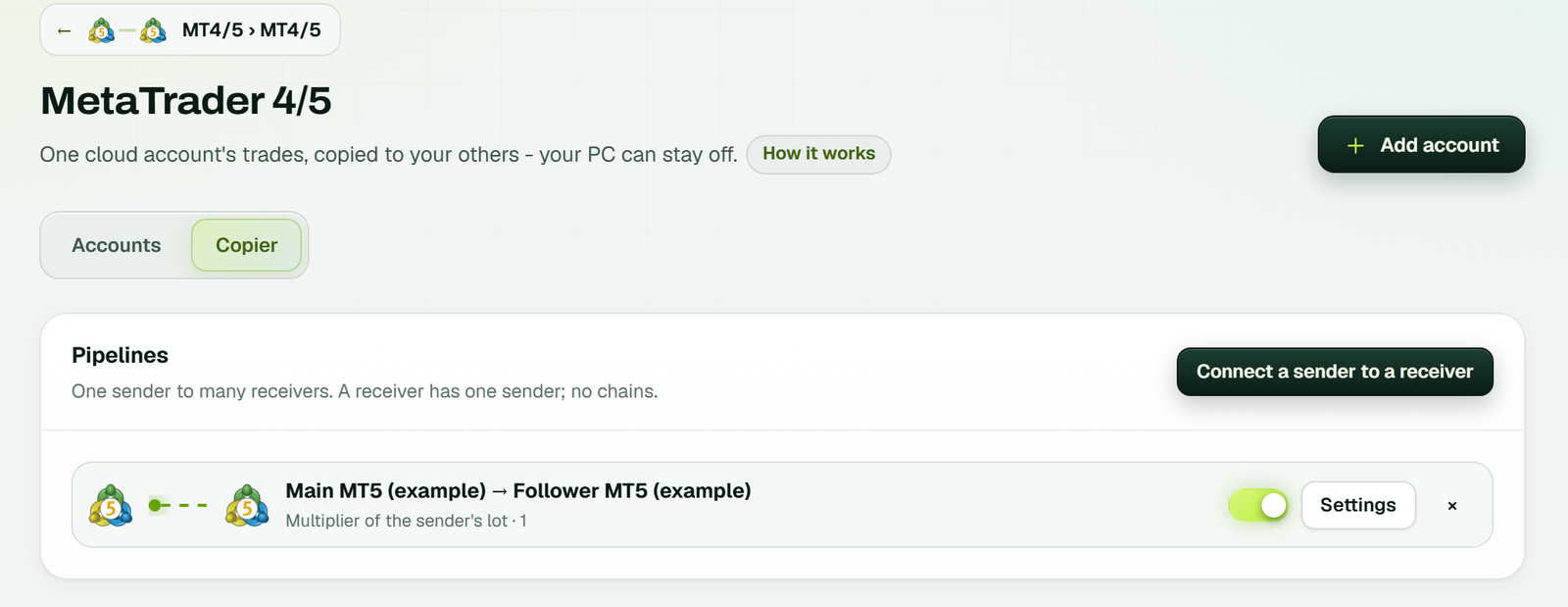
The Copier tab on the MetaTrader 4/5 page: each pipeline runs from a sender to a receiver, here Main MT5 to Follower MT5 with a lot multiplier of 1, a switch and Settings (example workspace).
MT5 to MT5, MT4 to MT5, MT4 to MT4: every direction
The same copier covers every pairing of the two platforms, and the receiver never needs to match the sender:
- MT5 to MT5 trade copier: the common case today, between two brokers or two accounts at one broker.
- MT4 to MT5 trade copier: keep trading on MT4 while your receivers move to MT5, at the same broker or another.
- MT5 to MT4: the other way round, for a receiver that is still on MT4.
- MT4 to MT4 trade copier: two or more MT4 accounts, with no MT5 involved at all.
Because it copies any symbol the receiver's broker lists, it works as a forex copier for currency pairs and as a MetaTrader trade copier for gold, indices or crypto CFDs alike. What differs between brokers is the symbol name and the lot step, which the next sections cover.
Set up the MT5 trade copier in 5 steps
Have two demo accounts ready, MT4 or MT5, at the same broker or two different ones. For each, note its login number, its main (trading) password and its server.
- Open the copier. In the left menu, go to Copier and pick MetaTrader 4/5. Its page has an Accounts tab and a Copier tab.
- Add the accounts. Press Add account for the sender first, then each receiver: platform, broker, account number and trading password. The sender can use its investor (read-only) password. Pick the server exactly as your broker's login window spells it.
- Let them start. Each card shows the terminal preparing, signing in and switching Algo Trading on, then Running. Allow about a minute, or a bit more for a broker we have not started before.
- Draw the pipeline. On the Copier tab, press Connect a sender to a receiver, then pick the sender, the receiver and a lot rule with its value. One pipeline per receiver.
- Prove it on demo. Buy 0.01 lots on the sender and check the copy in Copies and account events. Then close the trade and watch the copy close.
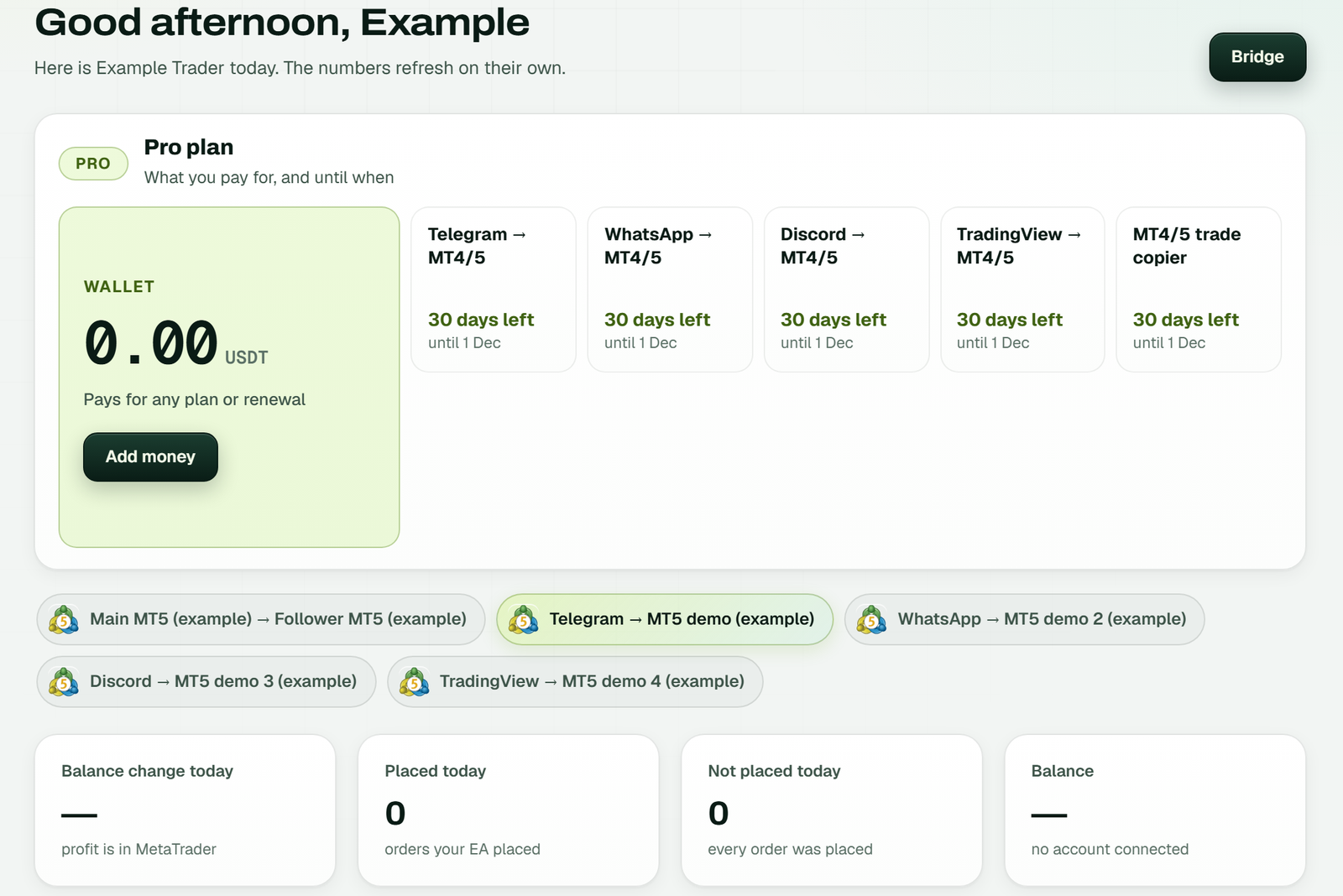
The Dashboard: the plan with the wallet first and the MT4/5 trade copier's days left, then the Main MT5 to Follower MT5 pipeline among your bridges (example workspace).
MT5 trade copier settings: lots, stops, limits
Each pipeline keeps its own settings, and a change you save applies within seconds. We check every number, and the cloud server checks it a second time.
Four lot modes, with numbers
The Lot value field changes meaning with the mode. In these rows the sender buys 1.00 lot:
| Lot mode | What the value is | Value and result |
|---|---|---|
| Multiplier | A factor of the sender's lot | 0.5 → 0.50 lots |
| Fixed lot | The receiver's lot, every time | 0.20 → 0.20 lots |
| Balance ratio | Sender's lot × receiver balance ÷ sender balance × value | 10,000 and 5,000, value 1 → 0.50 lots |
| Risk % | Share of the receiver's balance lost at the sender's stop | Sender has no stop → nothing copied |
Every result is cut down to a lot size the receiving broker accepts. It also stays inside your smallest and largest lot, which start at 0.01 and 100.
Stops, pending orders and reverse
- Stops: on by default, so each copy takes the sender's stop loss and take profit and follows every change. Off means copies open bare.
- Pending orders: also on. Limit and stop orders appear on the receiver and track each edit, fill or cancel.
- Reverse: off by default. On, it turns buys into sells and swaps the stop with the target, which suits hedging one account against another.
Bounds, filters, hours and protection
- Open positions: up to 100 copies at once by default; 0 lifts the cap.
- Slippage: 20 points by default, the furthest a market copy may fill from its price.
- Daily loss: past the percent you set, no new copies open until tomorrow, while open ones keep following.
- Symbols and hours: allow some symbols or block some, and copy only inside your hours, closing copies when they end.
- Equity guard: notify you, stop copying or close everything.
Copying between brokers: symbol mapping
Symbol names decide whether an MT4 to MT5 trade copier works across brokers. Gold may be XAUUSD here and GOLD there, and a suffix can turn EURUSD into EURUSD.c. For every trade, the copier checks the receiver's own symbol list in five passes:
- your own pairs on the pipeline, sender's name first, like
XAUUSD=GOLD, BTCUSD=BITCOIN; - your prefix and suffix, when they build a name the receiver has;
- an exact match;
- the same instrument with a broker tag, so EURUSD finds EURUSD.c;
- the same instrument under another name, so XAUUSD finds GOLD.
No match means no order, with the reason in the log. The copier never invents a symbol: spot gold never lands on a futures
contract, and XAUEUR is never taken for XAUUSD. For example, an MT5 sender at one broker can feed an MT4 receiver at another,
where XAUUSD arrives as GOLD at half the lot.
Many receivers and funded accounts
One sender can feed many receivers, each with its own pipeline and lot rule. To the copier, a funded or prop firm account is just another MetaTrader login. Its rules belong to the firm, so check what your firm allows on copy trading first. Then keep that receiver's largest lot and daily loss inside the firm's limits.
How fast is the MT5 trade copier?
We measure speed instead of promising it. On our live copies on 4 October 2026, the copier sent the receiver's order a median 7 ms after it saw the sender's trade. That number covers our part only: from the moment the copier sees the new trade to the moment the receiver's order leaves our server.
After that, the receiver's broker still has to fill the order. In the same measurement, that took about 140 ms, so the broker makes up most of a copy's time. Because both numbers depend on the brokers, every copy's own time is on the website, under Copies and account events.
Rules, limits and common fixes
Rules the MT5 trade copier never breaks
- One sender per receiver. A receiver copies one sender and is never a sender too, so there are no chains or loops.
- Late trades skipped. A trade first seen more than five seconds after it opened is not copied, because a late copy is a different trade. Pending orders are exempt: their price travels with them.
- Never twice. After a restart the copier picks up where it was, so a copied trade never opens again.
Switch a pipeline off and it starts nothing new, yet its open copies keep following the sender until they close. Delete it and copying ends; anything it opened stays on the receiver for you to handle.
Limits
- The sender and its receivers run on the same cloud server.
- We need each account's MetaTrader password, because the terminal runs on our servers. MetaTrader's help on signing in to an account explains why an investor (read-only) password cannot trade.
- Brokers differ in symbols, lot steps and trading hours, so test the pipeline on demo accounts first.
- The copier copies your trades; it does not choose trades or give trading advice.
Common problems and what to do
| You see | What to do |
|---|---|
| An account card shows Failed | Read the error on it. Wrong password? Use the Password button and type it again; Reconnect simply retries. |
| The server name is refused | Copy it letter for letter from MetaTrader's own login window. |
| Not enough accounts on the copier | Add more in Plan & Billing. |
| Sender and receiver on two cloud servers | Ask support to move one of them. |
| No copy, and the log names a symbol | Pair the two names in the pipeline, sender's first. |
| A risk % receiver got nothing | The sender's trade had no stop loss to size from. |
| An older position never arrived | Trades open before you connected are too old to copy; pending orders already waiting still go across. |
Each account also has its own log on the website, newest first. It keeps 14 days, including anything the broker refused.
MT5 trade copier vs TradersConnect, Duplikium and FX Blue
These are the trade copiers Google shows first for this search. Each row is what the company's own page says, checked on 1 November 2026; where a page says nothing, the table says so.
| Copier | Where it runs | Price | Free trial |
|---|---|---|---|
| TPcopier | Both terminals in our cloud; no PC or VPS | $6 a month per account | 2 days, no card |
| TradersConnect | Not stated on its pricing page | $10 a month per account (Standard), $15 (Premium) | None listed for the copier |
| Duplikium | "Based on the Cloud", no VPS to pay | From €9 a month per account, or €0.50 a day prepaid | €30 of credit; SMS check needed |
| FX Blue Personal Trade Copier | Between MT4/MT5 installations on the same computer | Not stated on its page | Not stated |
Where the others do better: Duplikium and TradersConnect copy to platforms beyond MetaTrader, and FX Blue runs on a computer you already keep on, with nothing to sign up for. TPcopier fits when you want MetaTrader only, with both terminals in the cloud and nothing left running at home. Full write-ups: the Duplikium alternative and the MetaApi alternative.
How much does the MT5 trade copier cost?
| Item | MT4/5 trade copier |
|---|---|
| Price | $6 a month for each account, however many you add |
| Cloud terminals | Included, so there is no VPS bill on top |
| Free trial | 2 days, no card; the clock starts at your first link |
| Paying | Binance Pay or your TPcopier wallet, for 1, 3, 6 or 12 months |
| Renewal | Never automatic; a reminder comes three days before the end |
| Yearly offer | Does not apply to this copier |
| Refunds | None: payments are final, so use the trial first |
On the MT5 trade copier, each account's month runs from the day you pay for it. See every plan on the pricing page, or read the guide to MetaTrader without a VPS.
Copying from your own code? The trade copier API makes pipelines, reads every copy and sends webhooks, and the MT5 API reads and trades a cloud account directly. Running a brokerage? See the trade copier for brokers. Copying signals instead of an account? See the Telegram to MT5 copier or TradingView to MT5. Binary accounts? Use the binary trade copier. Weighing a VPS? Read cloud vs VPS. MetaTrader's maker describes the platform on the MetaTrader 5 website.
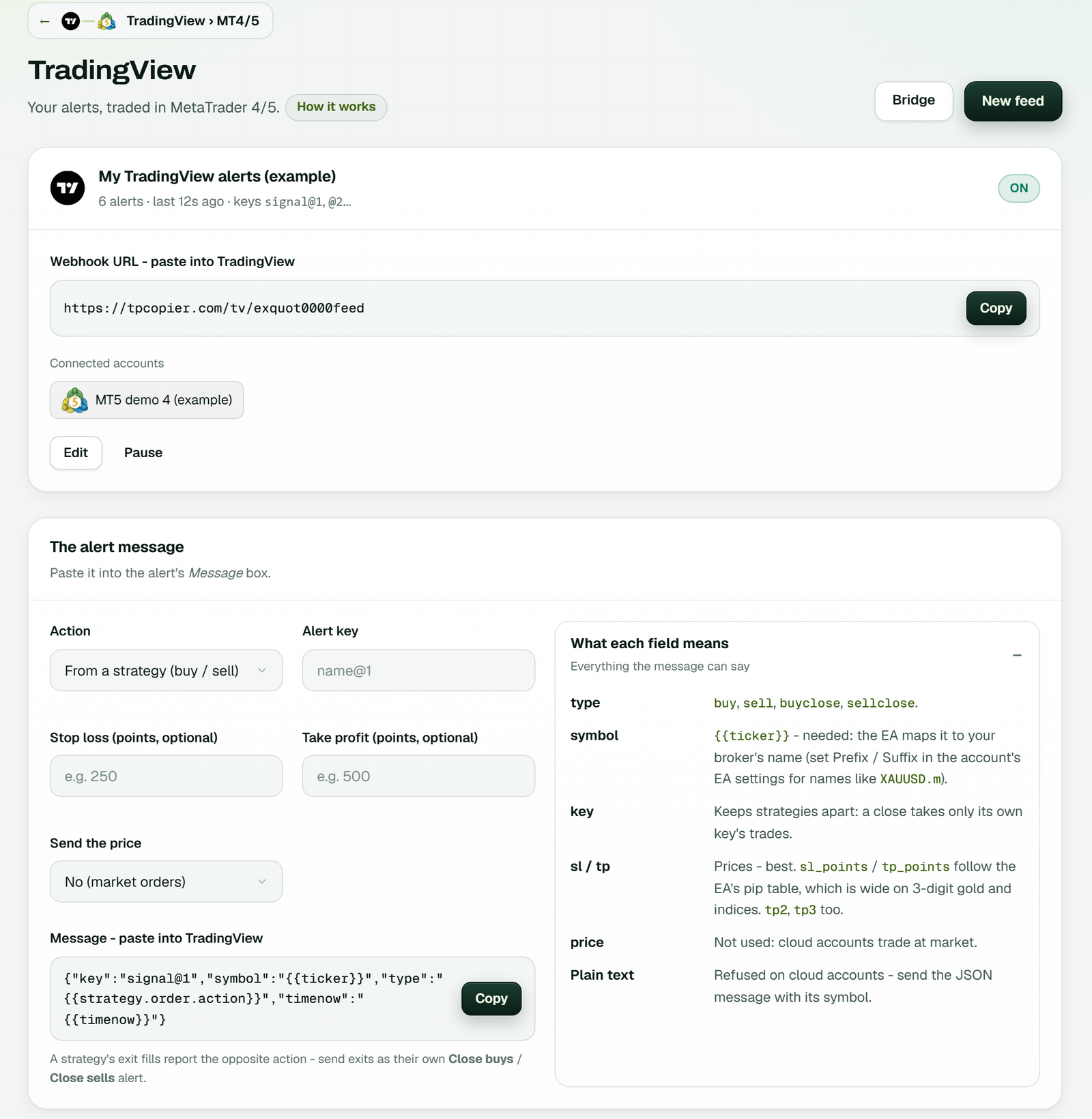
Copying alerts instead of an account: the TradingView page with its webhook URL, the MT5 account it trades and the alert message builder (example workspace).
How the copier works
Can you copy trade on MT5?
Yes. A trade copier repeats one MT5 account's trades on your other MT5 or MT4 accounts. This one runs the sender's and the receivers' terminals in our cloud, so nothing has to stay open on your PC.
Can I copy trades from MT4 to MT5?
Yes. It copies MT4 to MT5, MT5 to MT4 and either one to the same platform, across brokers.
Do I need a VPS for the trade copier?
No. Both the sender and the receivers run on our servers, so your PC can be off.
How fast is the copy?
On our live copies on 4 October 2026, a median 7 ms passed between seeing the sender's trade and sending the receiver's order. The broker's fill then took about 140 ms.
Can each receiver use a different lot size?
Yes: a multiplier, a fixed lot, a risk percent or a balance ratio, each with its own smallest and largest lot.
Can one sender copy to many accounts?
Yes, one pipeline per receiver. A receiver follows only one sender.
Are trades already open on the sender copied?
No. They count as too old, since entering now means a moved price. Waiting pending orders still go across.
Price and trial
Is there a free trade copier?
Free to try, not free for ever. The MT4/MT5 trade copier starts with a 2-day free trial with no card; after that it is $6 a month per account. Test it on demo accounts first.
Is it forex copy trading software?
Yes. It is copy trade software for MT4 and MT5: it copies forex pairs, gold, indices or any other symbol your broker offers, from one of your accounts to others. It is not a marketplace of strategy providers; you pick the sender account yourself.
Is copy trading illegal in the USA?
Copying trades between your own accounts is not illegal in itself, but who may trade for whom, and which products a retail trader may hold, depend on US rules and your broker's licence. This is general information, not legal advice: check with your broker or a lawyer.
How much does the MT5 trade copier cost?
$6 a month per account, cloud terminals included, after a 2-day free trial with no card.
Risk warning: trading forex and CFDs carries a high risk of losing money. A trade copier copies losses as well as profits. TPcopier is software; it gives no trading advice and makes no promise of profit. MetaTrader is a trademark of its owner; TPcopier is not affiliated with it.