A Quotex API for signals and trades.
The TPcopier Quotex API lets your own code add Quotex accounts, have their owners sign in, link signal channels and read every trade with its result. The trading runs in our cloud, so nothing has to stay open on your side. It works the same way for six more binary brokers.
What this Quotex API is, and what it is not
This is TPcopier's own REST API. TPcopier is not affiliated with Quotex, and this is not a Quotex product. Instead, the API drives TPcopier's cloud copier. It keeps the Quotex session the account's owner creates, then places the trades.
As a Quotex trading API, it gives you the parts a signal service or a trading app usually needs:
- add a Quotex account, on demo or real money;
- get a sign-in link, so the owner logs in to Quotex in a cloud browser;
- connect a signal source to it: a Telegram channel, a WhatsApp group, a Discord channel or a TradingView feed;
- say when a channel's orders open and how long they run;
- read every message, what it was understood as, and each order with its result.
Trades come from the signals you link. The one order you place by hand is a test trade, on a demo account only, at the account's smallest stake. Prefer a ready app to code? Try our binary signal copier.
One binary options API for seven brokers
The same calls work for every binary broker TPcopier supports. You only change the broker field:
quotexfor Quotex;pocketfor Pocket Option, so it is a Pocket Option API too;iqoptionfor IQ Option, which also makes it an IQ Option API;binomo,olymptrade,expertoptionandbinollafor the rest.
GET /api/v1/broker/list returns the current list. One channel can feed a Quotex account and a Pocket Option
account side by side.
Each broker has quirks: pairs, minimum stakes, how sessions end. Those details live on each broker's page, for example Quotex. The Quotex API itself stays the same across them.
Signing in a Quotex account
A binary account is signed in by its owner, never by you with their password. The flow has three calls:
# 1. the account (its "id" is A)
POST /api/v1/broker/accounts
{"broker":"quotex","label":"My Quotex","mode":"PRACTICE","bridge":"tg-bin"}

# 2. its sign-in link
POST /api/v1/broker/accounts/A/connect-link
{"ok": true, "url": "https://tpcopier.com/connect/...", "expires_at": "...",
 "status": "/api/v1/broker/accounts/A/connect/status"}

# 3. ask until "done": "ok" true means connected
GET /api/v1/broker/accounts/A/connect/status
The link works in any browser or phone for 30 minutes, with no TPcopier login. Open it yourself or send it to your user. They type their Quotex e-mail and password into Quotex's own page. TPcopier keeps only the login session that produces, encrypted, and never the password.
If the sign-in fails, the status answer has a message that says why. A new link simply tries again.
Sign-in inside your own website or app
You do not have to send people to tpcopier.com. Add one script to your page and call it with the link's url. On a PC the window opens over your page; on a phone it fills the screen, and touch and the phone's keyboard work.
<script src="https://tpcopier.com/static/js/tpc-connect.js?v=a00fb5e101"></script>
TPcopier.connect(url, {
  onDone: r => r.ok ? alert('Quotex connected') : alert(r.message)
});
The window closes by itself once the account is connected. Make the link on your server, though, because your key must never sit in a web page.
There are other ways in as well:
- an iframe with
?embed=1, which tells your page its height and when the account is connected; - your app's own web view on Android, iOS, React Native, Flutter, Windows (WebView2) or Electron, through a bridge named
TPcopierBridge; - a
return_url, so the browser goes back to your app or page when it is done; - drawing the window yourself from pictures and sending clicks and typing back.
The picture and input calls of that last option never count against your key's requests a minute. The broker sign-in window guide has code for each one.
Linking signal channels to the account
A connected account trades nothing until a source is linked to it. First, you sign in to Telegram once, by phone and the
code Telegram sends, so TPcopier can read your channels. A WhatsApp group, a Discord channel or a TradingView feed can
be the source instead. Then one call links a channel C to the account A:
POST /api/v1/bridge/links
{"kind":"signal","source_id":C,"target_account_id":A}
Each channel can carry its own rules, such as the lowest payout to trade, the directions allowed and its own stake. The Telegram guide covers sign-in and choosing channels.
When a message is unclear, TPcopier passes on it and notes why. As a result, an odd message is never guessed into a trade.
Order timing and expiry
Binary signals often name a time. So each channel linked to a binary account says how its messages give the order, with
entry_mode:
instant: the trade opens when the message arrives;timed: it opens at the time the message names, on the provider's clock;by_minute: only the minute counts, for a provider whose timezone is unknown.
PATCH /api/v1/channels/C
{"entry_mode":"timed","tz_offset_min":360,"default_duration":60}
Here 360 means GMT+06:00, and 60 is a one-minute trade when the message gives no expiry. A timed signal more than 5 minutes late, or more than 3 hours ahead, is refused rather than traded at the wrong moment. Martingale steps go only when the message itself gives them. The order timing guide explains each case.
Reading trades and results through the Quotex API
Two reads tell the whole story. GET /api/v1/signals lists every message read and what it was understood as.
Then GET /api/v1/trades lists each order with its result, or the reason there was none. You can filter trades
by account, broker, result, direction and date.
Per account, you can also read the broker's own deal history and the pairs it can trade right now, with their payouts. One more call switches the account between demo and real money.
Webhooks save the polling. Set a URL and a secret; TPcopier then posts a signed signal event for each post
in a linked binary channel. It carries the channel, the text, whether it was a signal, the asset, the direction,
the duration and the reason. See the webhooks guide for the signature check.
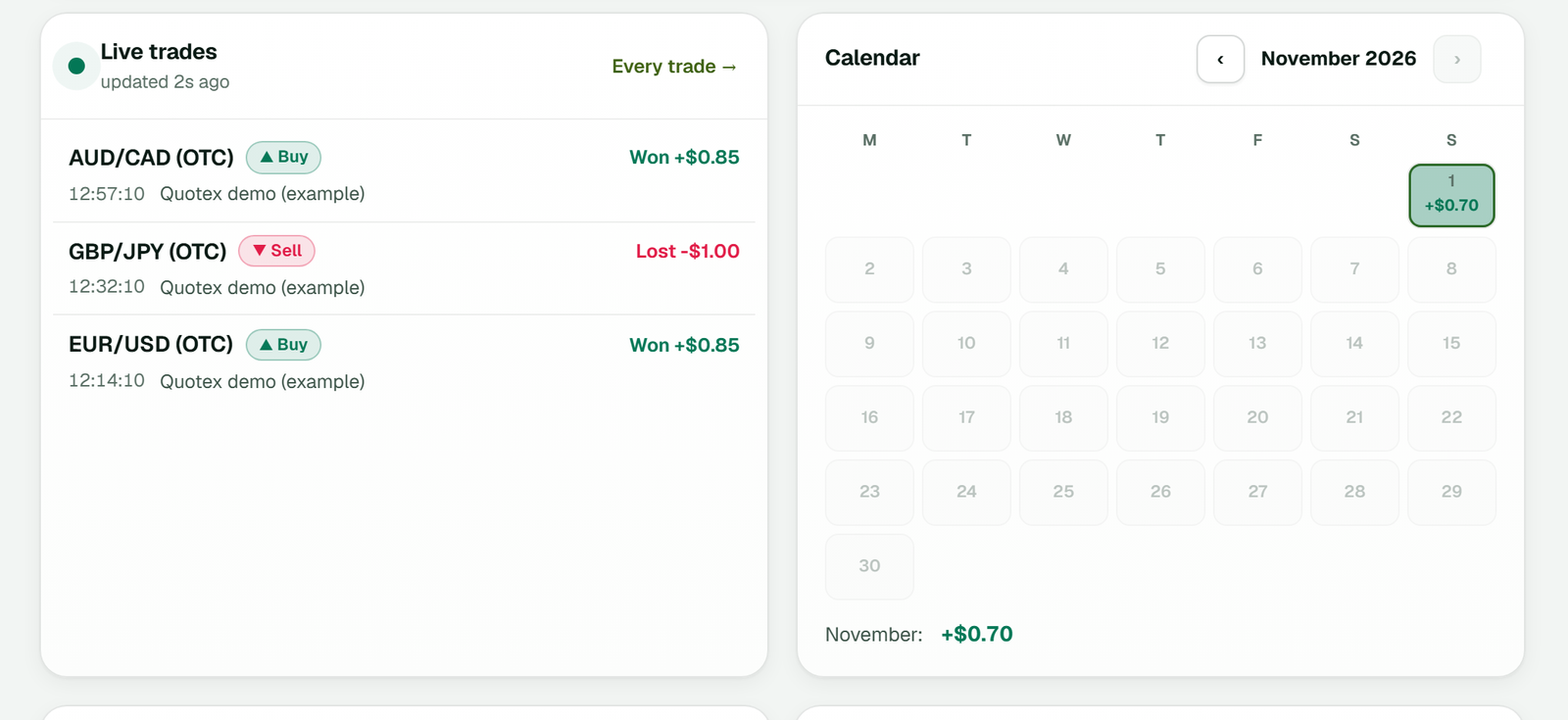
Live trades on the app's dashboard: each trade with its direction and result, beside the month's calendar (example workspace). The trades read returns the same facts, and the reason when an order was not placed.
Copy Our Bots through the API
Copy Our Bots is TPcopier's own set of signal bots for binary accounts. When your workspace has it, the same key reads each bot's record, but never the channel behind it. It also picks which of your binary accounts the bots copy onto, the lowest payout to copy and your starting stake. A third call chooses every bot, or only some.
A bot's past record is not a promise. Run it on a demo account first and judge it there.
API keys, limits and price
API access is turned on workspace by workspace. Sign up, then press Ask for access on the app's API page. Once
approved, you create keys, full or read-only, on that page. Send the key as Authorization: Bearer tpc_....
Each key may make 120 requests a minute, and there is no charge per request. The accounts are billed like the bridge they belong to. Telegram to binary brokers is $50 per month, 1 account included, then $20 for each extra one. Your wallet pays, and you fill it with USDT on TRC20. The pricing page lists them all.
The trial runs 2 days, with a cap of 10 signals per day. Payments are final, so begin with a practice account.
Want the copier without code? Read our Telegram to Quotex copier guide.
Is there a Quotex API?
TPcopier offers a Quotex API of its own: add an account, sign it in, link signal channels and read every trade. TPcopier is not affiliated with Quotex, and this is not a Quotex product.
Do I need my user's Quotex password?
No. The account owner logs in to Quotex in a cloud browser window opened from a link. TPcopier keeps only the login session, encrypted, never the password.
Is there a Pocket Option API or an IQ Option API too?
Yes, the same one. Set the broker to pocket or iqoption instead of quotex. Binolla, Binomo, ExpertOption and Olymp Trade follow the same pattern.
Can I place a trade with a single call?
Only a test trade, on a demo account, at the account's smallest stake. Other trades come from the channels and TradingView feeds you link to the account.
Does it work on Quotex demo accounts?
Yes. Add the account with mode PRACTICE. Start there before any real money.
What does the Quotex API cost?
Requests are free, within 120 a minute per key. Accounts are billed like their bridge: Telegram to binary brokers is $50 per month, 1 account included.
How do I get a key for the Quotex API?
Make a free account, then use Ask for access on the API page of the app. After approval you can create full or read-only keys.
Note: Quotex and the other brokers named here belong to their owners, and TPcopier is not affiliated with any of them. Risk warning: binary options are high risk, and money can be lost very quickly. Read the CFTC warning on binary options. TPcopier is software. It does not give trading advice or promise any profit.