TradingView to MT5 trade copier, in the cloud.
TPcopier sends TradingView to MT5 and MT4 without a VPS: a TradingView trade copier in the cloud. You make a feed, paste its webhook address into a TradingView alert and link the feed to your accounts. When the alert fires, the TPcopier EA in your cloud MetaTrader opens or closes the trade at the market, with the stop loss and take profit you put in the alert.
Why send TradingView to MT5 from the cloud?
TradingView can post a message to a web address when an alert fires. MetaTrader has no web address of its own, so it cannot take that message by itself. The usual fix is a bridge EA on a home PC or a rented VPS that must never sleep.
TPcopier moves both halves onto its servers. Our server takes the webhook, and your MT4 or MT5 terminal already runs in our cloud with the TPcopier EA on one chart. So TradingView to MT5 keeps working while your laptop is shut. Every alert, and the order it turned into, shows on the website.
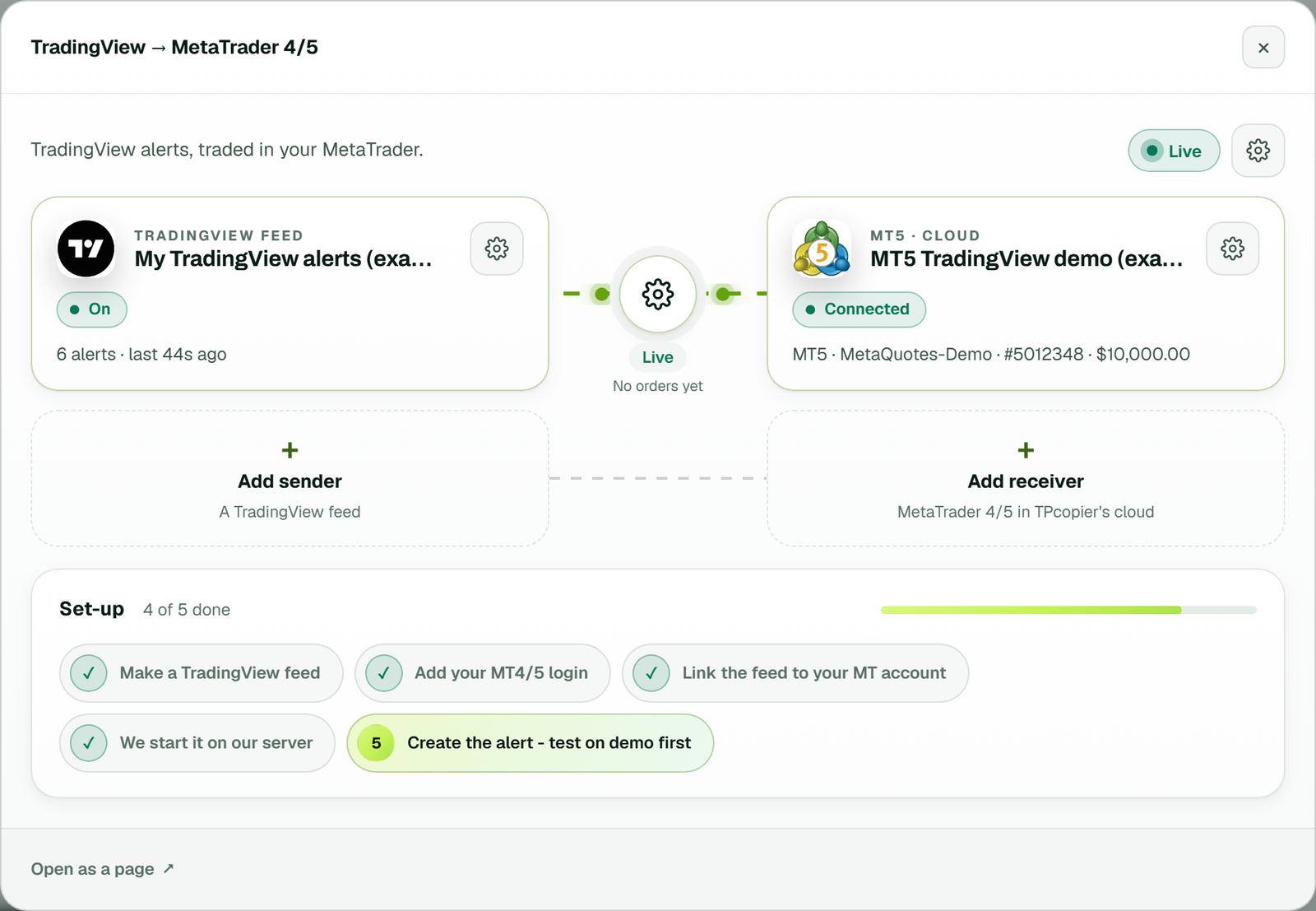
The TradingView to MetaTrader 4/5 bridge: the feed on the left, the cloud MT5 account on the right, and the link between them Live (example workspace).
Set up TradingView to MT5 in six steps
Use a demo account for your first TradingView to MT5 test, and keep a real one for later.
- Start the trial. Sign up, press Make a bridge, pick TradingView and MetaTrader 5 or 4, then Open the bridge.
- Add your account. Enter your broker, the MT4 or MT5 account number and its trading password. It runs in our cloud.
- Make a feed. On the TradingView page, make one feed per strategy and copy its webhook address.
- Write the message. The alert builder on the same page writes the JSON for you. Pick the action and a key, add a stop and target in points if you like, then copy it.
- Fill in the alert. In TradingView, open the alert's Notifications tab, tick Webhook URL and paste the address. Paste the JSON into the Message box.
- Link it in the bridge. In the bridge's window, link the feed to one or more MT4 and MT5 accounts, at any broker. Nothing trades until you link it.
TradingView sets its own rules for webhooks. Its help page on webhooks says they need a paid plan and 2-factor sign-in turned on. Check both before you build alerts.
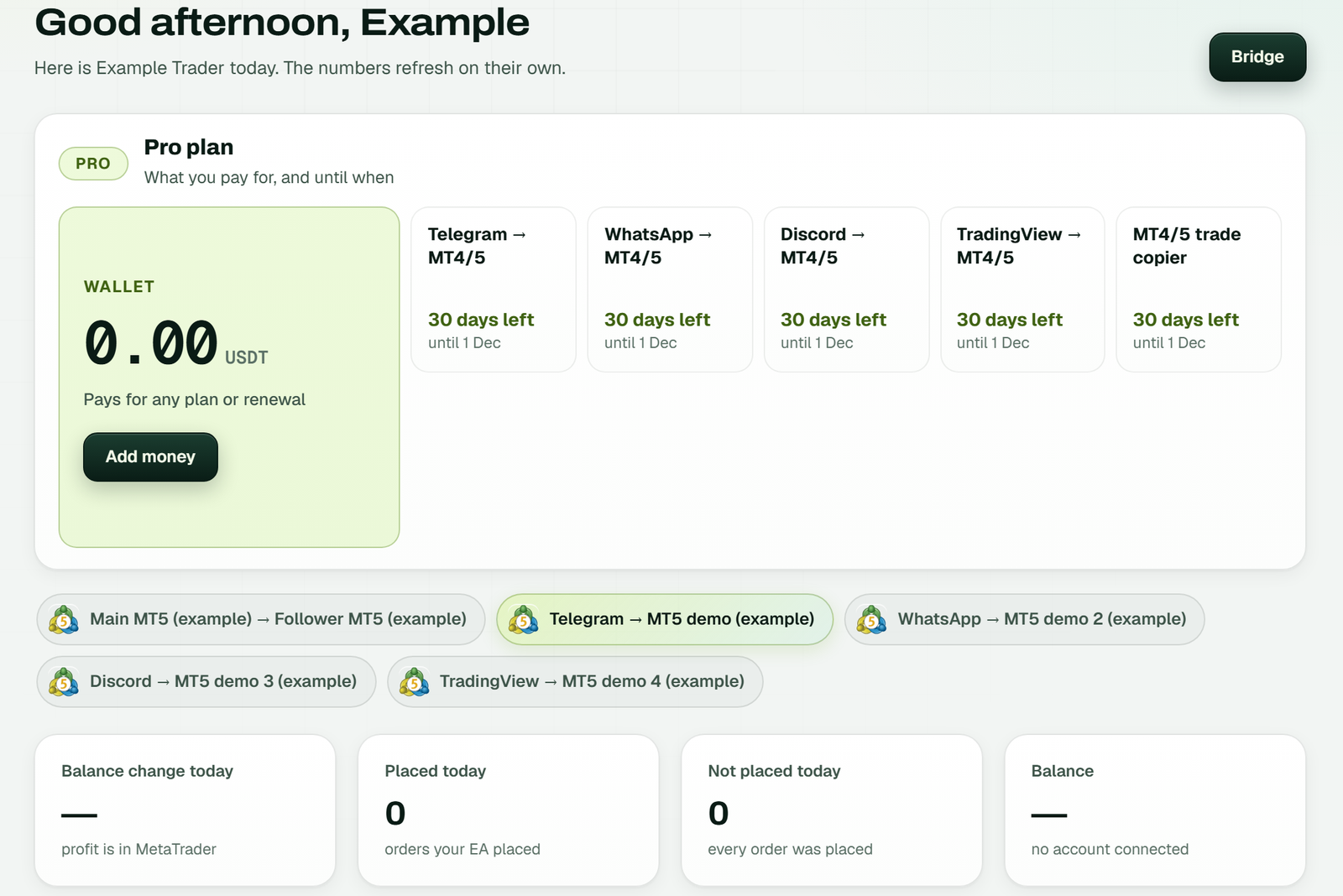
An example workspace: the Dashboard shows TradingView to MT4/5 in the plan with its days left, the TradingView link among the bridges, and today's orders below.
The TradingView to MT5 alert JSON, field by field
You must send type and symbol. Every other field is optional. A number must be above zero to
count, and a field TPcopier cannot read as a number is simply left out rather than guessed.
| Field | Needed? | What it does |
|---|---|---|
"type" | Yes | buy, sell, buyclose or sellclose. Any other word is refused. |
"symbol" | Yes | Usually {{ticker}}. A prefix such as OANDA: is dropped, then the EA finds your broker's name. |
"key" | Best to set | Names the strategy. Closes and reversals touch only trades opened under the same key. Left out, the feed's key name with @1 is used. |
"sl" / "tp" | No | Stop loss and first target, as prices. |
"tp2" / "tp3" | No | A second and third target, as prices. |
"sl_points" / "tp_points" | No | Stop and target as a distance in points from the entry. |
"price" | No | Ignored by cloud MetaTrader. The order always opens at the market. |
"timenow" | No | {{timenow}} from TradingView. It lets TPcopier refuse an alert that turns up too late. |
Four messages you can paste and adjust:
{"key":"gold@1","symbol":"{{ticker}}","type":"buy","sl_points":300,"tp_points":600}
{"key":"gold@1","symbol":"XAUUSD","type":"sell","sl":2352,"tp":2330,"tp2":2320}
{"key":"gold@1","symbol":"{{ticker}}","type":"sellclose"}
{"key":"trend@1","symbol":"{{ticker}}","type":"{{strategy.order.action}}","timenow":"{{timenow}}"}
Paste-ready examples
with a stop 300 points away and a target 600 points away. Line two sells gold with a fixed stop and two targets. The third closes the sells that key opened on that symbol. The last line lets a Pine Script strategy fill in the side, and adds the time TradingView fired it.A trailing comma after the last field is a common paste mistake. TPcopier removes it once before it gives up on the JSON. TPcopier refuses a message over 16 KB.
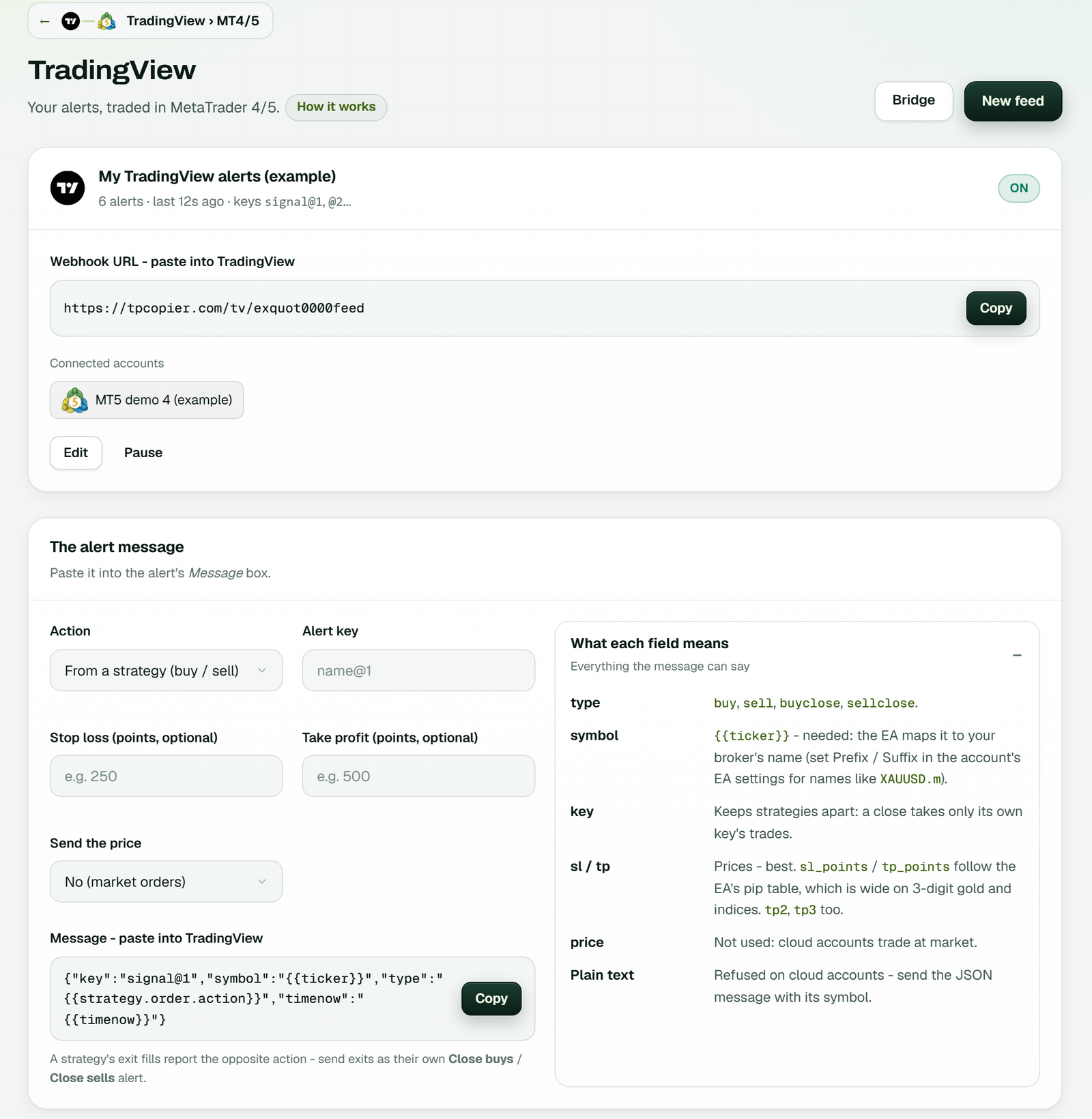
The TradingView page: the feed's webhook URL, then the builder. Choose From a strategy or a fixed action, add a key and optional points, then press Copy. Notes on each field sit on the right (example workspace).
Strategy alerts vs indicator alerts
A Pine Script strategy
One strategy alert covers every order it makes. Put {{strategy.order.action}} in the type, and
TradingView writes buy or sell at each fill. There is one catch. An exit fill reports the opposite side, so a long's exit
arrives as a sell. Send exits as their own buyclose or sellclose alerts, or let a reversal do the work.
Reversals need nothing extra. When a buy arrives under a key that has opened sells on that symbol, the EA closes those sells first and then buys. As a result, one strategy never ends up holding both sides by accident.
An indicator or a drawing
An indicator alert sends a fixed message, so you make one alert per action: a buy, a sell, and a close for each side. Use
the same key in all of them so the closes find the right trades. {{ticker}} still works here.
Some indicators can only send one line of text, such as BUY at 4317.56 | SL: 4307.56 | TP1: 4324.56.
TPcopier reads that line, but it names no symbol. A cloud account trades every symbol from one chart, so it needs one.
For cloud MetaTrader, send the JSON instead.
Symbol mapping, lot size, SL and TP
TradingView and your broker often spell the same market differently, so TradingView to MT5 needs a name check. The EA works through the name in this order:
- TPcopier drops an exchange prefix, so
OANDA:XAUUSDbecomes XAUUSD; - the EA's Prefix and Suffix inputs add your broker's tag, so XAUUSD can become XAUUSD.m;
- its Symbol Mapping input swaps names in pairs, and starts with
GOLD=XAUUSD,SILVER=XAGUSD; - it also knows common other names for one market, such as XAUUSD, GOLD, XAU and GOLDUSD for gold.
Lot size
The lot never comes from the alert. You set it in the EA settings on the website: a fixed lot, a percentage of balance, a risk percent or amount at the stop, a lot per symbol, or a lot per target. When you save, only that account's terminal restarts; the rest carry on.
Stop loss and take profit
Give levels as prices (sl, tp, tp2, tp3) or as points from the entry.
A point is the symbol's smallest price step. On EURUSD quoted to five decimals, 300 points is 0.00300. A close alert
carries no levels. The EA's Entry settings decide whether each target gets its own order, and TP1 to TP3 are on by
default. Before you go live, also check the Missing SL / TP setting.
Errors, late alerts and what they mean
Every TradingView to MT5 alert gets an answer, and the website shows why one did not trade. These are the ones you may meet:
| You see | Why | What to do |
|---|---|---|
type must be buy, sell, buyclose or sellclose | A word like "long" in the type | Use one of the four, or the strategy's action |
need symbol and type | One of them is missing or empty | Add both |
malformed json or text signal | Neither JSON nor a BUY or SELL line | Paste the builder's message again |
feed paused | You paused the feed | Switch it back on |
unknown feed | An old or mistyped address | Copy the current one; New address replaces it |
too many alerts - slow down | Over 120 alerts in 10 seconds on one feed | Look for an alert that fires on every tick |
| Not sent: it arrived late | Older than your freshness setting, 120 seconds by default | Check TradingView's delay, or change the setting |
| Not sent: names no symbol | A plain-text line sent to a cloud account | Send JSON with {{ticker}} |
Each alert gets TPcopier's own arrival time, never a time taken from the message. A replayed or delayed alert therefore cannot pass for a fresh one. A paused feed still answers with success on purpose, so TradingView does not flag your alert as broken.
TradingView to MT5 with TPcopier or PineConnector
PineConnector is a well-known tool for the same job. We list only what its own pages say, checked on 29 October 2026, so you can verify each point. The longer version is on our PineConnector alternative page.
| Point | PineConnector (its own pages) | TPcopier |
|---|---|---|
| Where MT5 runs | Your Windows VPS kept on with MT5 and its EA, or its Edge cloud | Our cloud |
| MT4 in the cloud | Its docs say Edge does not host MT4 | Yes |
| Alert format | A comma list that starts with a License ID | JSON with type, symbol and key |
| Symbol in the alert | The exact broker symbol, case-sensitive | {{ticker}}, mapped by the EA |
| Trial | $7 for 7 days on Core, then monthly unless cancelled | 2 days free, no card |
Sources, checked on 29 October 2026: syntax, VPS setup, Edge and the 2026 MT5 pricing post. Their pages may have changed since.
How much does TradingView to MT5 cost?
| Item | TradingView to MT4/5 |
|---|---|
| Monthly price | from $40 a month |
| Tiers by accounts | $40 for 2 accounts, $60 for 3, $90 for 5, $150 for 10 and $200 for 15 |
| Cloud MetaTrader | Included, so no VPS bill on top |
| Free trial | 2 days, no card |
| Paying | Binance Pay or your TPcopier wallet, for 1, 3, 6 or 12 months |
| Renewal and refunds | Nothing renews by itself; payments are final |
Your bill follows the lowest tier that fits the number of linked accounts. Adding an account later moves you to the next tier instead of opening a second bill. Every plan is on the pricing page.
Signals from Telegram instead? See the Telegram to MT5 copier. Copying one account to others? Use the MT4 to MT5 trade copier. Alerts to binary brokers? Read the binary options signal copier. Want screens for every step? Follow the TradingView alerts guide. Making feeds from your own code? Use the TradingView webhook API.
Setup
Can I send TradingView alerts to MT5 without a VPS?
Yes. Your MT5 or MT4 terminal runs in our cloud with the TPcopier EA, and our server takes the webhook. Your computer can be off.
Which TradingView plan do I need for webhooks?
A paid one. TradingView sends webhook alerts only on paid plans and asks for 2-factor sign-in first. Any paid plan works with TPcopier.
Does TradingView to MT5 work with Pine Script strategies?
Yes. Put the strategy's order action in the type field. Send exits as separate buyclose or sellclose alerts, because an exit fill reports the opposite side.
Symbols and sizing
How are TradingView symbols matched to my broker's names?
TPcopier drops the exchange prefix. Then the EA applies its Prefix, Suffix and Symbol Mapping inputs, and it knows other common names, such as GOLD.
Can one alert trade several MT4 and MT5 accounts?
Yes. On the Bridge, link the feed to every MT4 and MT5 account your plan covers, at any broker.
Where do I set the lot size?
On the website, in that account's EA settings. The alert never sets the lot, though it can carry the stop and targets.
Connecting and price
Is it possible to connect TradingView to MT5?
Yes. TradingView cannot place MT5 orders itself, so a TradingView alert sends a webhook to TPcopier, and the TPcopier EA in your cloud MT5 terminal places the order. Your PC can stay off.
TradingView trade copier
Does TradingView have a built-in trade copier?
Not for MetaTrader. TradingView fires alerts and can send each one to a webhook address; it cannot place an order in MT4 or MT5 by itself. A TradingView trade copier such as TPcopier receives that webhook and places the order in your MetaTrader account.
What is the best trade copier for TradingView?
It depends on where you trade. For MT4 and MT5, compare the price per account, the alert format and where MetaTrader runs; TPcopier runs it in its cloud, so no PC or VPS stays on. Our PineConnector comparison sets the two side by side. Test either on a demo account first.
How can I copy a trade on TradingView?
Create an alert on your chart or Pine Script strategy, tick Webhook URL and paste your TPcopier feed address, then paste the alert message TPcopier gives you, with the action, symbol, stop loss and take profit. Each time the alert fires, the trade opens in every MetaTrader account linked to that feed.
Is there a free way to connect TradingView to MT5?
TPcopier has a 2-day free trial with no card, then a monthly plan. TradingView itself sends webhook alerts only on its paid plans, so you need one of those either way.
How much does TradingView to MT5 cost?
$40 for 2 accounts, $60 for 3, $90 for 5, $150 for 10 and $200 for 15 a month, with cloud MetaTrader included. The free trial lasts 2 days and needs no card.
Risk warning: trading forex and CFDs carries a high risk of losing money. TPcopier is software that places the alerts you send; it gives no trading advice and makes no promise of profit. TradingView, MetaTrader and PineConnector are trademarks of their owners; TPcopier is not affiliated with them.