Discord to Quotex: Copy Channel Signals in 6 Simple Steps
Your signal group lives on Discord. A bot drops a call into #signals, you switch to Quotex, find the pair, set the time, type the stake and click. On a quiet day that works. On a busy one, half the calls are stale before your finger lands. Setting up Discord to Quotex copying takes that loop off your hands: the message arrives, and the trade opens on your Quotex account without you.
TPcopier does it with its Discord → Binary brokers bridge. It signs in to Discord, reads only the channels you tick and places each signal on Quotex from its own servers, so nothing runs on your PC. You need a Discord account that can see the channel, a Quotex account and a TPcopier account. The free trial asks for no card, and every broker account starts on demo.
TPcopier has no tie to Discord or Quotex. Their names are trademarks of their owners.
How Discord to Quotex works
On the Discord side, TPcopier keeps a live line open to Discord and hears each new message the moment Discord sends it. It drops anything from a channel you haven't ticked. Even a ticked channel isn't read for Quotex until you link it to a binary account in the bridge's window, because one Discord login can see whole servers, and most of that chatter isn't yours to trade.
On the Quotex side, TPcopier holds a trading connection open for your account. Quotex only answers an order when that connection's chart sits on the same pair, and an order without that step can vanish in silence. So every order leaves with its own chart switch, packed into one batch that nothing can split.
What it reads from a Discord message
Many Discord signal bots post embeds: boxed cards with a title, a description and fields. TPcopier reads them as text, one line each, next to the message itself. Here is an example:
Title:        EURUSD-OTC
Description:  CALL
Field:        Expiry   M1
That becomes three lines: EURUSD-OTC, CALL and Expiry M1. TPcopier's own reader takes it as EUR/USD OTC, up, one minute, with no AI call at all. A message it can't read with certainty goes to an AI instead, which also decides whether it's a signal in the first place.
The suffix picks the market. EURUSD-OTC goes to Quotex's OTC pair, while plain EURUSD goes to the real market. TPcopier never swaps one for the other, since they are two different prices.
Set up Discord to Quotex in 6 steps
First, start the free trial. Then open Bridge in the left menu and press Make a bridge. Pick Discord as the sender and Quotex as the receiver, and press Open the bridge. The bridge's window has a Set-up list that ticks off each step TPcopier can see done.
 Make a bridge: Discord picked as the sender and Quotex as the receiver, then Open the bridge.
1. Sign in to Discord
Open the Discord Channels page. It offers three buttons: Show the QR code, Email & password and Paste a token. The QR code is the quickest. On your phone, open the Discord app, tap your picture, choose Scan QR Code, aim it at the screen and tap Log in. Your password never passes through TPcopier, and Discord doesn't ask this route for a captcha. Discord describes it in its own QR code login FAQ.
2. Tick your signal channels
Once the green card says Discord is connected, press Refresh from Discord. Your channels load, each with a switch; turn on the ones whose calls you trade.
 Discord is connected: one channel read and linked to an account, one left off, each with its message and signal counts (example workspace).
3. Add your Quotex account
On the Binary brokers page, press Add a broker account. Pick Quotex, keep Demo (practice money), name the account if you like and press Add and connect.
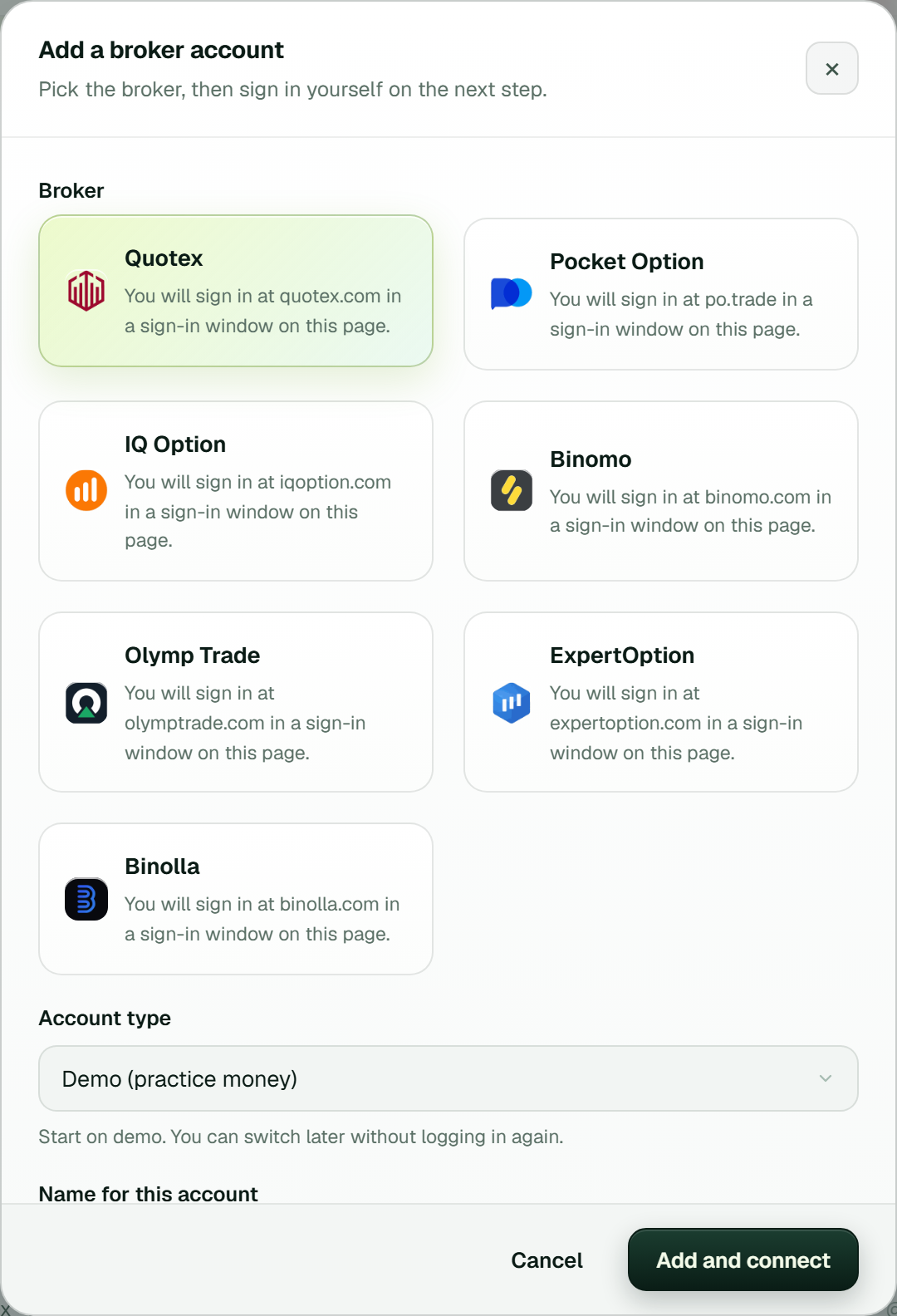 Add a broker account: Quotex picked, Demo (practice money) as the account type, then Add and connect.
A dialog titled Connect opens, and Quotex's own sign-in page sits inside it. Sign in there as you would in a normal browser, and clear any "verify you are human" check yourself. After you sign in, it runs through saving the session and opening the trading connection until it says Connected. TPcopier keeps the session it needs, encrypted, but never your password.
4. Set the stake and limits
Press Settings on the Quotex card. Stake per trade at 0 means your default stake, which starts at 1.00. A dollar account is fine at 1, since Quotex's minimum there is 1 USD. Other currencies have their own minimum, so check it first. Otherwise Quotex refuses the order with [min_amount], and from then on TPcopier stops such orders before they leave while the card warns you. Limits in the same window holds a stake cap and the day's stop and target.
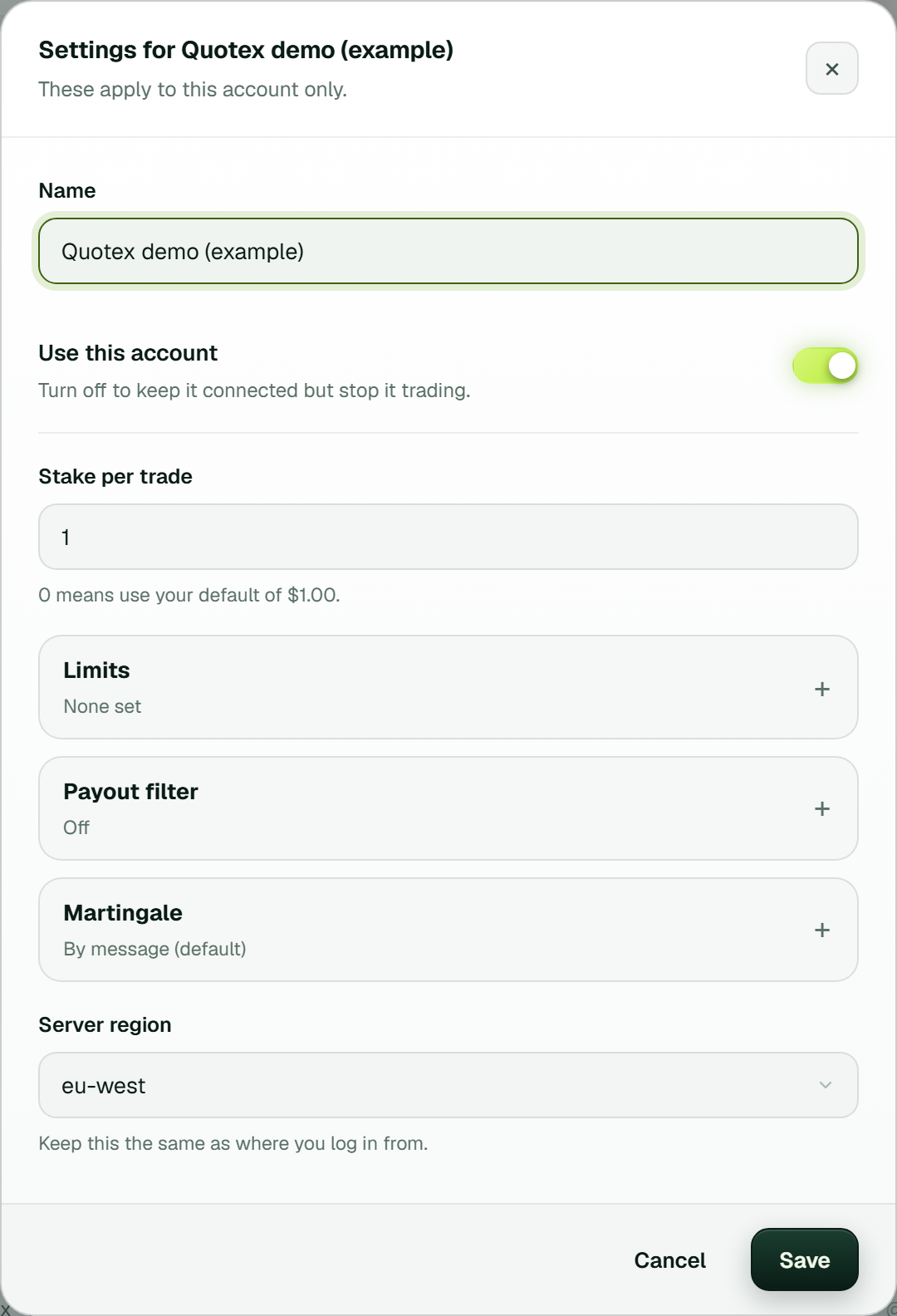 Settings for one Quotex account: stake per trade, Limits, Payout filter, Martingale (By message) and the server region (example workspace).
5. Link the channel to Quotex in the bridge's window
Back in the bridge's window, your Discord channel sits on the left and your Quotex account on the right. Link the two; the Set-up list calls this step Link the channel to your account. The link gets its own gear button and shows Live. From that moment the channel is read for Quotex.
 The bridge's window: #quotex-signals (example) linked to a Quotex demo account and Live, with Add sender, Add receiver and the Set-up list (example workspace).
6. Place a test trade on demo
Press Test trade on the Quotex card. It shows which pairs are open and what they pay, then places one order at the account's minimum stake on the demo balance. A losing test never starts a recovery ladder. Then let the channel post while Live trades on the Dashboard sits open next to Discord.
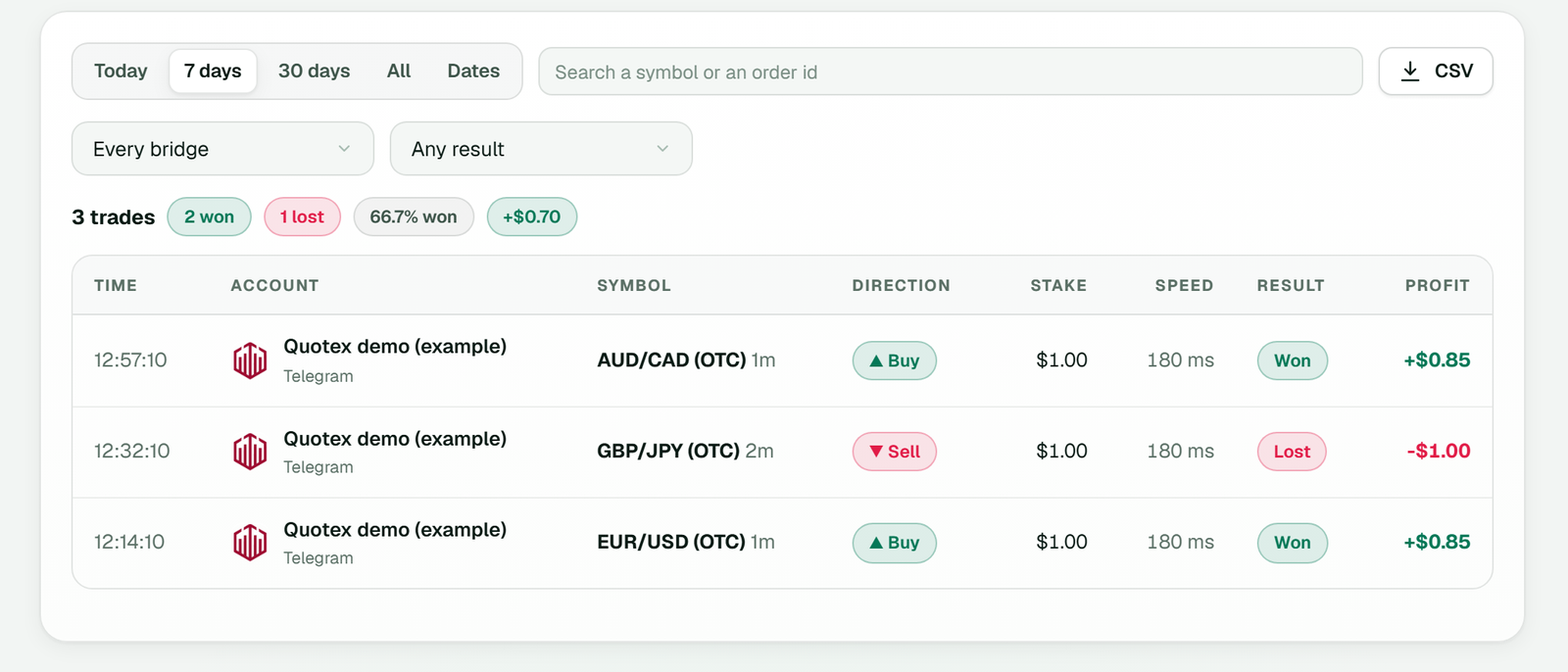 History: each Quotex order with its time, symbol, direction, stake, speed, result and profit (example workspace).
Which Discord login to use, honestly
The QR code and the password both sign in as you, and that has a catch. Discord's help centre says that automating a normal user account, a so-called self-bot, is not allowed and can get the account terminated. TPcopier keeps a user login quiet: it shows as invisible, reads only what you tick and never posts. The risk still sits with your account.
A bot token is the route Discord's rules prefer. However, it only works on a server you run, because you have to invite the bot yourself. If the Quotex calls come from someone else's server, the choice is a user login or copying by hand. The Discord to MT4 and MT5 guide walks through the bot set-up.
What Quotex does its own way
The login comes back by itself. Quotex ends sessions now and then, often when you sign in somewhere else. The card then says Quotex no longer accepts the saved login and tries your saved sign-in first: TPcopier opens that saved profile in the background and keeps the fresh session only after Quotex accepts it. Once it has been checked, the Login line on the card says it renews itself, and you press Connect only if that saved sign-in has ended too.
Demo or real rides on each order. Quotex takes the balance as a flag on every order, so a later move to real needs no new sign-in, only Switch to real money under More on the account's card.
Seconds, not candles. Quotex gets the expiry as a number of seconds. An M1 call becomes 60 and a 5min call 300.
Timed calls use Quotex's clock. Some channels post an entry minute, like 14:05. When you link the channel to a binary account, TPcopier asks for its time zone, and until that is set such calls are not traded. Then the order waits for 14:05 on the broker's clock, which for Quotex comes from the server time on its live quotes. A call read over five minutes late is refused, not traded late, as the timed entry guide explains.
When a call doesn't reach Quotex
A call from a linked channel can be skipped before any order leaves, or refused by Quotex once the order arrives. Each keeps its reason:
| Message | Kind | What to do |
|---|---|---|
| No expiry in the message, so we did not guess one | Skipped call | Nothing; the call named no time |
| That market is closed right now | Skipped call | Wait for the pair to open |
| Payout ...% is below your minimum of 70% | Skipped call | Lower the account's Payout filter, or let it skip |
| Quotex refused the trade on ...: ... [min_amount] | On the order | Raise the stake to the minimum it names |
| Quotex's minimum stake on this account is ... Nothing was sent. | On the order | The same, caught before sending |
| Quotex refused the trade on ...: ... [max_amount] | On the order | Lower the stake |
| Quotex did not answer the order within 15 s. | On the order | Rare; see below |
On that last one, TPcopier first looks for a deal on the pair that opened after the order left, and counts it if one did. If the balance fell by the stake meanwhile, the error says Quotex most likely opened it.
An account can also sit a call out: after the same pair, direction and expiry within 60 seconds, after a daily stop or target, or after four losses in a row. That last one is "Pause an account after this many losses in a row" in the bridge's settings (the gear), 4 by default and 0 for off. The account then waits on the Binary brokers page until you press Resume.
Check these defaults before real money
Martingale is By message on every new binary account: a gale goes on only when the signal's own message gives one, each at double the stake before it, and a message with no gale line gets one trade. You can switch an account to its own martingale in its Settings. The Payout filter, a minimum payout % per account, stays off until you switch it on. The risk management guide covers the other limits.
What Discord to Quotex costs
Discord → Binary brokers is a bridge of its own on your bill, priced like Telegram → Binary brokers. It includes some accounts, with a monthly price for each extra one, and the pricing page has the numbers. Nothing renews by itself: a bridge that runs out stops placing orders, and you get a reminder three days before. Payments are final, so prove it on demo first.
FAQ
Is Discord to Quotex against Discord's rules?
It depends on the login. Automating a normal user account goes against Discord's terms, and that risk is yours. A bot token on a server you run is the route Discord prefers, but a bot can't join a server someone else owns.
Can TPcopier read Quotex calls that a bot posts as embeds?
Yes. It reads an embed's title, description and fields as lines of text.
Will other members see that I copy the channel?
No. A user login shows as invisible, and TPcopier never posts or replies. It only reads the channels you tick.
Can one Discord channel trade Quotex and another broker?
Yes. Link it to several accounts in the bridge's window, and each gets the signal with its own stake, limits and demo or real mode.
Start with one channel on a Quotex demo
Start the free trial, tick one channel and link it to a Quotex demo account. Watch Live trades next to Discord until the two agree, then decide about real money. The Discord signal copier and Quotex bot pages have the overview. The same provider on another app? See Telegram signals on Quotex, WhatsApp to Quotex or TradingView to Quotex. For another broker, try Discord to Pocket Option.
Legality: binary options are banned or restricted in many countries. In India, the RBI lists several binary platforms, including Quotex, as not authorised for forex trading. Check the law where you live before you use any broker. TPcopier is software only; it is not a broker and is not linked to Quotex.
Risk warning: binary options carry a high risk of losing money and are restricted in some countries. Nothing here is investment advice.