Risk Management for Signal Copying: 7 Simple, Safe Checks
Copying signals automatically changes where the risk sits. You no longer decide on each trade, so the choices you make before the first signal arrives do most of the work. This guide covers risk management for signal copying in TPcopier: what each limit does, where you set it and how to think about it. It ends with a checklist of seven things to do before any account trades real money.
Why risk management for signal copying comes first
Trading by hand has a natural brake: you have to be there. A copier removes it, and several things change at once.
- Signals arrive at any hour. The cloud binary options signal copier runs around the clock on TPcopier's servers, so it can trade while you sleep.
- Channels post in bursts. A copier follows every signal your rules let through.
- One signal can reach several accounts. A channel linked to three accounts trades on all three at the same moment.
- No setting makes signals win. Limits cap what a bad run can cost; they do not make a call right.
That is why risk management for signal copying has to live inside the copier. Before any of it, check whether you should trade binary options at all. They carry a high risk of losing money, and several places restrict them for retail traders. The EU's markets regulator agreed to prohibit binary options for retail investors, and US regulators have published an investor alert on binary options.
Start on demo, and stay there a while
Good risk management for signal copying starts on demo. You add each account in TPcopier as Demo (practice money) or Real money, so begin with a demo one. Use the demo time well:
- Watch Live trades on the Dashboard. It shows the latest trades with their result, and a signal that did not go out reads "Not placed", with the reason.
- Compare what the channel posted with what the copier did.
- Look at the results in History, which lists every trade. TPcopier reads them from the broker's own trade history, not from the channel's posts.
That last point matters. A channel's results posts and your account's results are not the same thing, and only the second is your money. Payments are final with no refunds, as the refund policy says, so the free trial is the place to find out whether a channel suits you.
Daily stop and daily target
The daily stop is the most you will lose on one account in a day. In the account's Settings, under Limits, it is called Stop for the day after losing. When the account reaches it, the account pauses itself for the rest of the day and says why.
Set it before the first real trade, and set it from what you can afford to lose, not from what you hope to win back. A copier keeps trading through a losing run unless something stops it, and this is that something.
Stop for the day after making works the same way in the other direction. A target is not a forecast. Instead, it gives the day an end point, which a copier otherwise lacks.
A cap on every stake
Never stake more than, also under Limits, puts a ceiling on any single order on the account. It guards against a typo in a channel's own stake or a trade copier multiplier set higher than you meant. It also caps the recovery ladder, so a long losing run cannot grow the stake without limit.
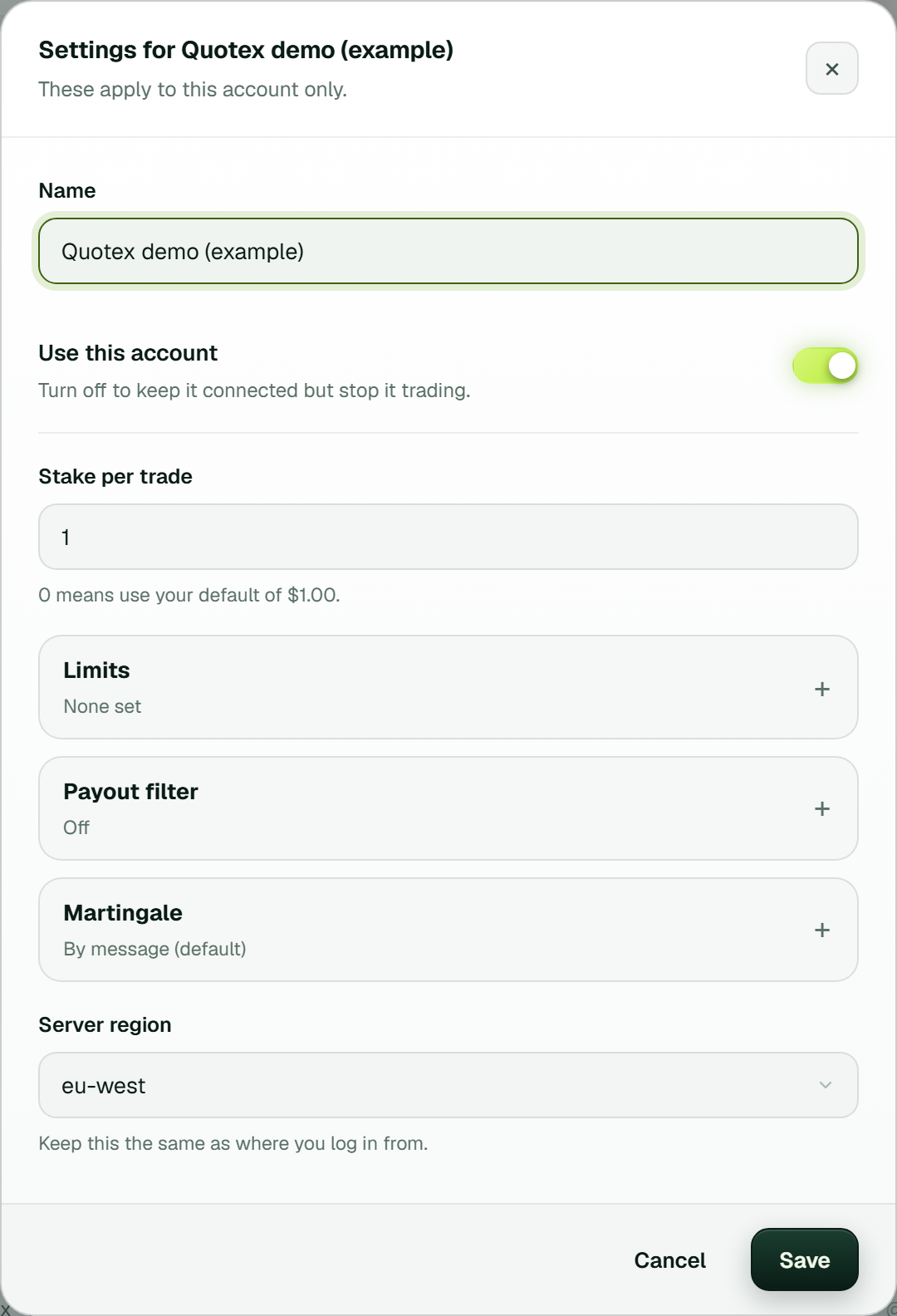 One account's Settings: Stake per trade, then Limits (the stake cap, daily stop and daily target), the Payout filter (off), Martingale (By message, the default) and the server region (example workspace).
What the recovery ladder really risks
Every binary account has Martingale set to By message by default. A gale (recovery step) goes only when the signal's own message gives one: when the channel says G1 or G2, the account follows it; when it says nothing, the signal is one trade. You can switch an account to My own martingale system in its Settings instead, and then the Settings work out the cost for you under What this actually risks. With a 1.00 stake, doubling and two steps, the ladder goes 1, 2, 4. If every step in a row loses, the account risks 7.00 to win back 1.00.
Read that line before you switch on a ladder of your own; with it on, it is the one number that matters most. More steps or a bigger multiplier make the worst case grow fast. One trade at a time belongs here too. With it on, the account finishes each trade before it takes the next, which is what a ladder wants. With it off, several signals run at once, and if several lose on the same rung, only the last one is recovered.
Minimum payout
A payout decides how much a win returns against what a loss costs. Below a certain level, trades must win more often just to break even. Each account has a Payout filter in its Settings: switch on Only take good payouts and set the minimum payout in %. It is off until you switch it on, so a new account takes any payout.
Bridge limits that catch a runaway channel
Each bridge's settings, behind the gear in the bridge's window, hold the volume limits:
- Most trades per hour and most trades per day, so a spammy channel cannot drain you.
- Most trades open at once, which caps what is at risk at any moment.
- Wait between trades, in seconds, on the same account.
- Ignore repeats within 60 seconds, so the same call is not traded twice.
- Pause an account after this many losses in a row, 4 by default; 0 turns it off. A paused account shows on the Binary brokers page with a Resume button.
These limits cover binary accounts, and the caps on trades start at 0, which means no limit. Each account trades its own balance, demo or real; More on a demo account's card has Switch to real money. Pause and Stop Trading stop everything at once.
Per-channel rules
You can tighten each channel on its own:
- Allowed directions. UP only, DOWN only, or both.
- Minimum AI confidence. The copier skips messages the AI reads with less confidence.
- Most signals per hour. A cap for that channel alone.
- A stake of its own. That way a new channel can trade smaller than the rest.
The copier also refuses to guess. It skips a message with no expiry, a call for a closed market and an asset your brokers do not offer. Telegram signal formats explains how TPcopier reads messages.
Stop Trading
The red Stop Trading button in the top bar stops all trading at once, and there is a Pause too. Use Stop Trading when something looks wrong and you want everything to stop now. Try it on demo, so you know where it is before you need it.
Late signals and timed entries
Some channels post an entry time. When you link a channel to a binary account, TPcopier asks for that channel's time zone. A call that names an entry time is then placed at that time, and it is not traded at all until the time zone is set. A call read after its entry time has passed is refused rather than traded late. The guide to timed entry signals goes into detail.
If you copy to MT4 or MT5
On MetaTrader, the TPcopier EA holds its own limits in its inputs: most open trades, trades per day, week or month, and daily and account loss or profit limits that close everything when hit. One default deserves a look: a signal with no stop loss or take profit gets 100 pips by default. Set those inputs to 0 if you would rather open without one. The EA install guide shows where the inputs live.
Risk with the trade copier
With the trade copier, every trade on the main account goes to each follower, so every follower repeats the main account's decisions. A follower's own stake cap, daily stop and Stop Trading still apply to every copy, and a trade the copier sees late stays uncopied. So set limits on each follower as carefully as on the main account. What is a trade copier explains the rules it keeps.
A 7-point checklist for risk management for signal copying
-
Run the channel on demo and watch Live trades until the placed and not placed rows make sense.
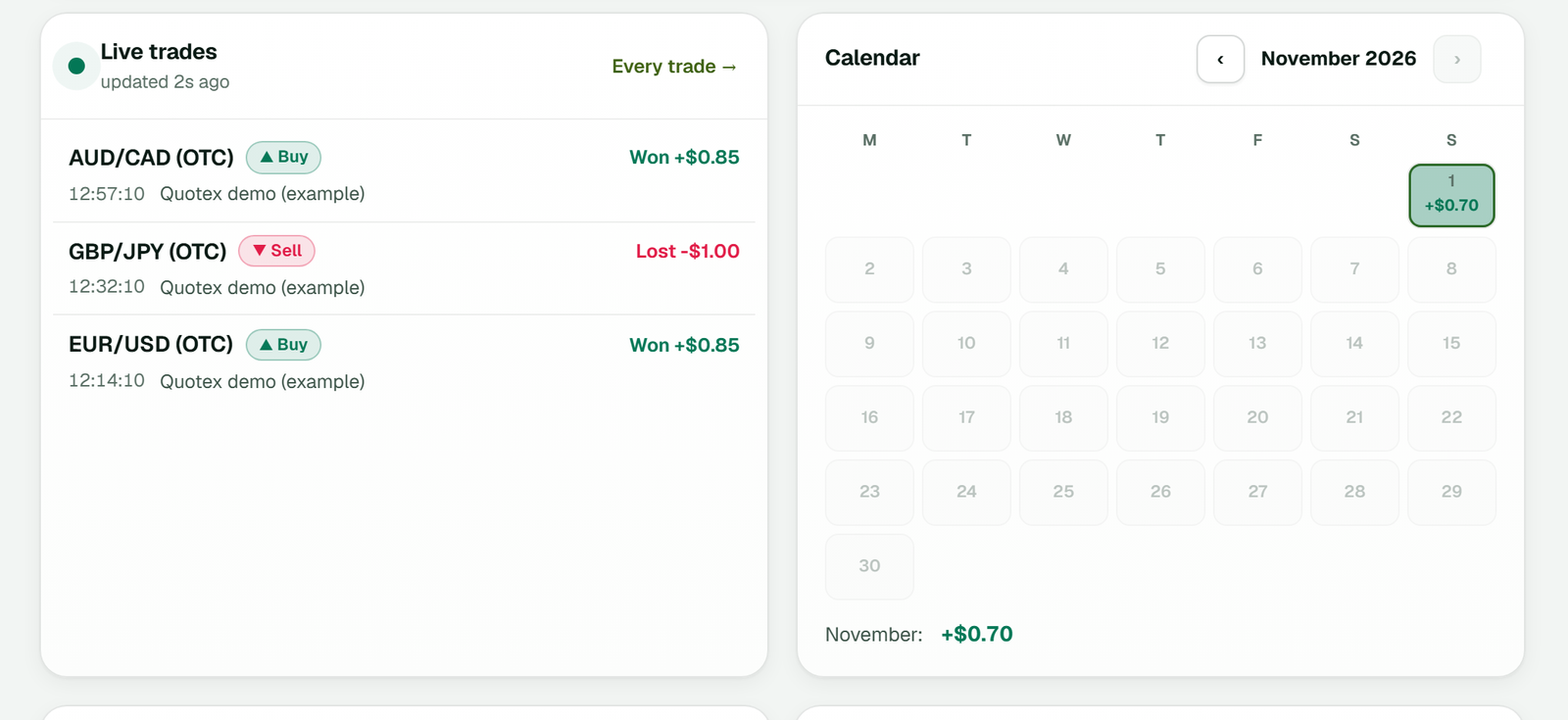 Dashboard → Live trades: the latest demo trades with Won or Lost and the profit, beside the month's calendar (example workspace).
-
Set a daily stop and a daily target on every account.
- Put a stake cap on every account, and if you use your own martingale, read what the ladder risks.
- Decide whether each account needs a minimum payout; the payout filter is off until you switch it on.
- Check the bridge's limits: trades per hour and per day, and the pause after losses.
- Find Stop Trading in the top bar and try it on demo.
-
Switch one account to real first, not all of them at once.
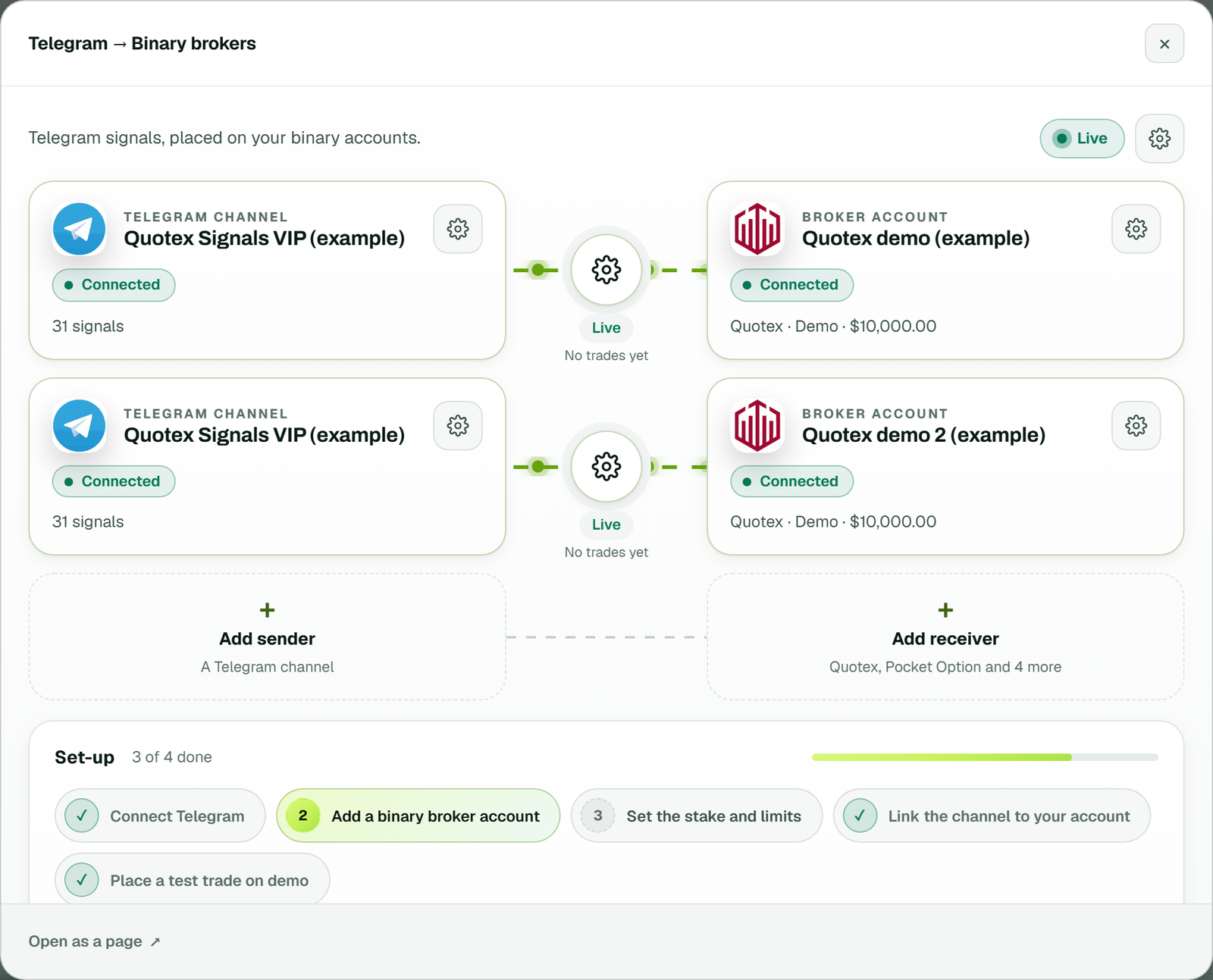 The bridge's window: one channel linked to two demo accounts, each link with its own gear and Live status, and the bridge's gear at the top right (example workspace).
When you are ready to try this on demo, the free trial starts here and needs no card.
FAQ
Can risk management for signal copying stop me from losing money?
No. It limits how much a bad day or a bad channel can cost, but it does not change whether a signal wins. Binary options carry a high risk of losing money whatever settings you use.
What happens when an account reaches its daily stop?
It places no more trades for the rest of that day and says why on its card. Your other accounts carry on under their own limits, unless you press Stop Trading.
Should I switch the recovery ladder off?
That is your call, but read What this actually risks first. It shows, in money, what a full losing run costs against what one win brings back.
Should I trust a channel's posted results?
Treat them as the channel's own claims. TPcopier reads your results from the broker's own history, and a period on demo shows how the calls do on your account.
Is this guide investment advice?
No. It explains what each setting does. Whether and how much to trade is your own decision, and some countries restrict binary options for retail traders.
Legality: binary options are banned or restricted in many countries. In India, the RBI lists several binary platforms, including Quotex, Pocket Option, IQ Option, Binomo, Olymp Trade and ExpertOption, as not authorised for forex trading. Check the law where you live before you use any broker. TPcopier is software only; it is not a broker and is not linked to any of them.
Risk warning: binary options carry a high risk of losing money and are restricted in some countries. Nothing here is investment advice.