Telegram Signal Formats: 11 Clear Examples, All Tested
Telegram signal formats differ from one channel to the next. One puts the pair on the first line, another starts with an emoji, a third squeezes everything into four words. A copier has to turn all of them into the same few facts before it can trade, and it has to skip some messages on purpose. We checked eleven common layouts against TPcopier's readers.
The examples cover both kinds of channel. Some are binary options calls for brokers such as Quotex or Pocket Option, and others are forex calls for MetaTrader 4 and 5. Telegram's own page on channels describes the broadcast tool these signals arrive in. Crypto calls go to separate Windows apps: the Telegram to Binance copier and the Telegram to Delta Exchange copier.
What Telegram signal formats have to say
A binary options call can trade only when it answers three questions:
- Which asset? For example EURUSD-OTC, GBPJPY or USD/BRL (OTC).
- Which direction? Call, buy and up point one way; put, sell and down point the other.
- How long? The expiry, written as M1, 5min, 3M, 2 minutes and so on.
A forex call for MetaTrader needs more. It names the symbol and buy or sell, usually with an entry, a stop loss and one or more take profits. Calls of either kind sometimes add an entry time, such as 14:05. The guide to timed entry signals covers that case.
Binary options signal formats: 6 tested examples
We ran six common layouts through TPcopier's own reader on 4 November 2026. Each one came back as shown:
| The message | Asset | Direction | Expiry | Entry time |
|---|---|---|---|---|
| EURUSD-OTC call M1 | EUR/USD OTC | Call (up) | 1 minute | None |
| GBPJPY PUT 5min | GBP/JPY | Put (down) | 5 minutes | None |
| USD/BRL (OTC) BUY 2 minutes | USD/BRL OTC | Call (up) | 2 minutes | None |
| AUDCAD otc SELL 3M | AUD/CAD OTC | Put (down) | 3 minutes | None |
| USDJPY DOWN M5 | USD/JPY | Put (down) | 5 minutes | None |
| EUR/USD OTC 14:05 PUT M5 | EUR/USD OTC | Put (down) | 5 minutes | 14:05 |
Look at how much these vary. Some write the pair with a slash and others without, and OTC hangs on the pair with a hyphen, sits in brackets or stands alone, in capitals or not. The direction mixes call and put with buy, sell and down, while the expiry turns up as M1, 5min, 3M, M5 or "2 minutes". A copier that knew only one of these layouts would miss most of them.
Four layouts that trip up simple copiers
Real channels add a few twists, and TPcopier handles each one without an AI call:
- A bot template with emojis. Many bots post one fixed block: a pair such as BRLUSD-OTC, a clock (14:51), an expiry (M1) and a direction (🟢 CALL). Green circles and up arrows read as a call; red circles and down arrows as a put.
- Other languages. Direction words in Portuguese, Spanish, Turkish and Indonesian count too. TPcopier reads compra, venda, acima, abaixo, subir, bajar, al, sat, naik, turun, beli and jual. A Brazilian template with "DIRECAO: COMPRA" read as a call when we tested it.
- A 12-hour clock or a declared time zone. TPcopier reads "04:31 PM" as 16:31. When a template also says "TIME ZONE = UTC +5:30", the reader drops that line before it reads any clock. So its 5:30 can't become the entry time. TPcopier tells you the zone, but your channel setting decides.
- A list of a whole session. A provider may post twenty lines like
M1 | CHFJPY_otc | 13:35 | PUT. Each line with a pair, a clock and a direction becomes its own signal, so TPcopier loses none of them. If your broker doesn't list a pair, Live trades shows it as not placed, with the reason.
The reader takes in martingale lines too. "1º GALE", "Até 2 gales", "USE 1 STEP MTG" or "sem gale" tell TPcopier how many gales the message itself allows. By default an account follows exactly that count and adds no martingale of its own. You can switch an account to its own martingale in its Settings.
Messages it never trades
A results post looks like a call: it names a pair, a direction and sometimes a time. That's why TPcopier refuses any message with recap words. These include win, loss, result, recap, ITM, OTM, refund and screenshot. In our test, "✅ WIN ✅ EURUSD-OTC M1 CALL, Profit: +87%" came back as not a signal.
Waiting messages such as "get ready" or "next signal" go the same way, and so does a message that names both directions, like "CALL or PUT depending on the candle".
Forex signal formats for MT4 and MT5: 5 examples
Forex calls look different: an opening call first, and replies later. Each example here is taken from the reading rules TPcopier's MetaTrader reader follows.
Three targets, three orders
GOLD BUY 4380
SL 4370
TP1: 4400
TP2: 4420
TP3: 4440
This reads as a buy on XAUUSD at 4380, with a stop loss at 4370 and three take profits. The TPcopier Telegram EA opens one position per take profit, so three targets become three orders. Spoken names map to symbols the same way: GOLD to XAUUSD, DOW to US30, NASDAQ to NAS100.
Entry zones and the word NOW
XAUUSD SELL NOW
4676 - 4679
SL 4686
TP 4665
This one is a sell with an entry zone from 4676 to 4679. "NOW" describes urgency only: when the message writes a price anywhere, that price is still the entry. By contrast, "GOLD BUY NOW" with no price at all is a market order.
Limit and stop orders
EURUSD sell limit 1.0850-1.0855, stop 1.0900, targets 1.0800 / 1.0750
Here the reader sees a sell limit with two entries and two targets. It uses a limit or stop order only when the message says "limit" or "stop". Otherwise a call with a price stays a plain buy or sell. The reader takes up to six take profits, and "TP open" means none.
A plan isn't an order
This fifth example must not trade at all. The message says "if this H1 closes bullish we will set a buy limit around 4125". It names a symbol, a direction and a price. Still, it's a plan, and the rules treat a plan as analysis rather than an order.
Replies and results posts
Replies then manage the trade they answer. "Move SL to entry" changes the stop loss, and "close half" closes half of the trade. Other languages count too, such as Italian "CHIUDERE" for a full close or Russian "Безубыток" for breakeven.
Results posts like "XAUUSD TP1 hit +45 pips" never open anything. The block list on the MetaTrader page's Rules tab stops them. It starts with words such as "tp hit", "sl hit" and "result".
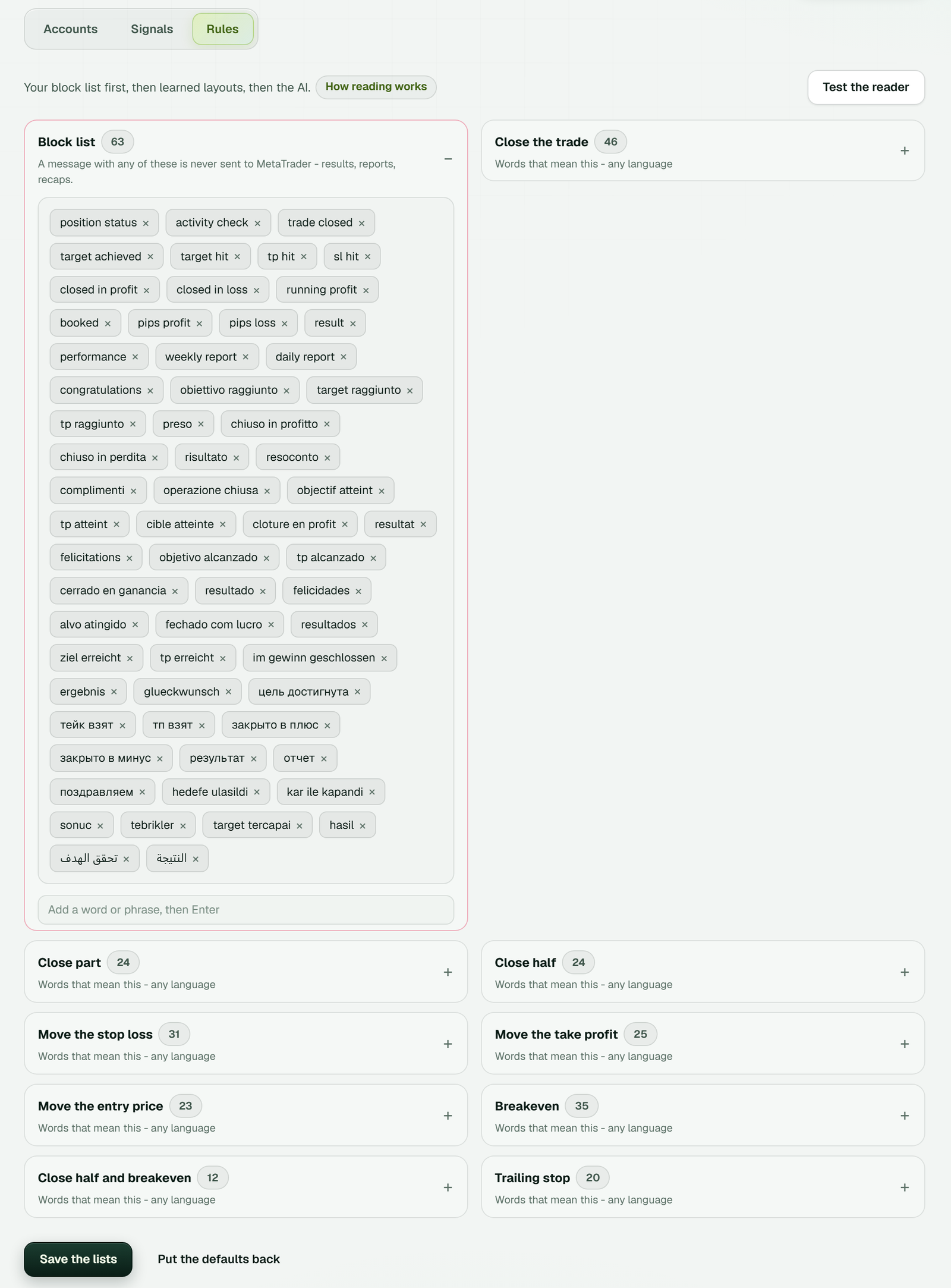 Each list can be edited, and Put the defaults back restores the original words. Test the reader sits at the top right.
The Signals tab then shows every message with what it meant. The full set-up is on the Telegram to MT4 and MT5 copier page. If two copier names confuse you, TSCopier vs TPcopier explains which is which.
Two readers: a fast one, then an AI
TPcopier's own reader handles the common layouts first. Our test on 4 November 2026 timed it at 0.18 ms per message, averaged over 2,600 reads. That adds nothing you'd notice when timing matters. For MetaTrader, the reader also learns each channel's layouts as it goes.
An AI reads anything else, and it also decides whether a message is a signal at all. That matters, because channels post plenty of messages that aren't trades: greetings, recaps, adverts and reminders. The bridge's settings hold a minimum AI confidence, medium by default, and each channel's Rules can set its own; a reading below it doesn't trade.
For MetaTrader, Test the reader on the Rules tab reads a message you paste the way it reads a channel's. It sends nothing to any EA.
Why a message gets skipped
Even a clear message can stop short of a trade. For binary brokers, Live trades on the Dashboard shows the latest trades. A signal that didn't become a trade shows there too, with its reason. These are the main ones.
Not a trading signal
A good morning message, a results recap or an advert names no trade, so the copier places nothing.
No expiry in the message
"GBPJPY PUT" names an asset and a direction but no expiry. A one-minute trade and a five-minute trade on the same idea are different trades, so the copier doesn't pick one for you.
The row says the message had no expiry and points you to Channels, Rules, Order timing, where you can give the channel its own expiry for messages without one. Set it once for a channel that keeps its expiry in a pinned note, and its calls trade from then on.
A message that names only the time a trade ends, such as "expires 17:10", needs the channel's time zone. Without it, the row says the trade wasn't placed because the channel's time zone isn't set.
Expiry outside your allowed range
The row gives the expiry and your allowed range, for example 3600s against 5s to 14400s. Change the range in the bridge's settings (the gear in the bridge's window), or let the call go.
Payout below your minimum
Two settings can stop a low payout. The bridge's settings hold a Minimum payout %, which starts at 70. Each account also has its own payout filter, which stays off until you switch it on. The copier skips a pair paying less, and the row reads, for example, "Payout 65% is below your minimum of 70%".
That market is closed right now
The real market shuts at the weekend, for example. Then TPcopier trades the broker's OTC twin of the same pair, if it's open. You can switch that off in the bridge's settings. With no open twin, the row says the market is closed, and TPcopier never queues the call for later.
Not offered by your brokers
When none of your brokers offers the asset, there's nothing to place.
Your own channel rules
A call can also stop at rules you set. It may name a direction you haven't allowed, hit your signals-per-hour limit or fall under your minimum AI confidence. TPcopier won't trade a signal that names an entry time until you set the channel's time zone. And it refuses one read after its entry time has passed, rather than trading late.
How to check how your channel's calls are read
-
Switch the channel on under Telegram channels. TPcopier reads only the channels you switch on. The free trial needs no card, and the free signal copier guide explains what it covers.
 Only switched-on channels are read; the third one here is off (example workspace).
-
Link it to a demo account in the bridge's window, with the account added as Demo (practice money).
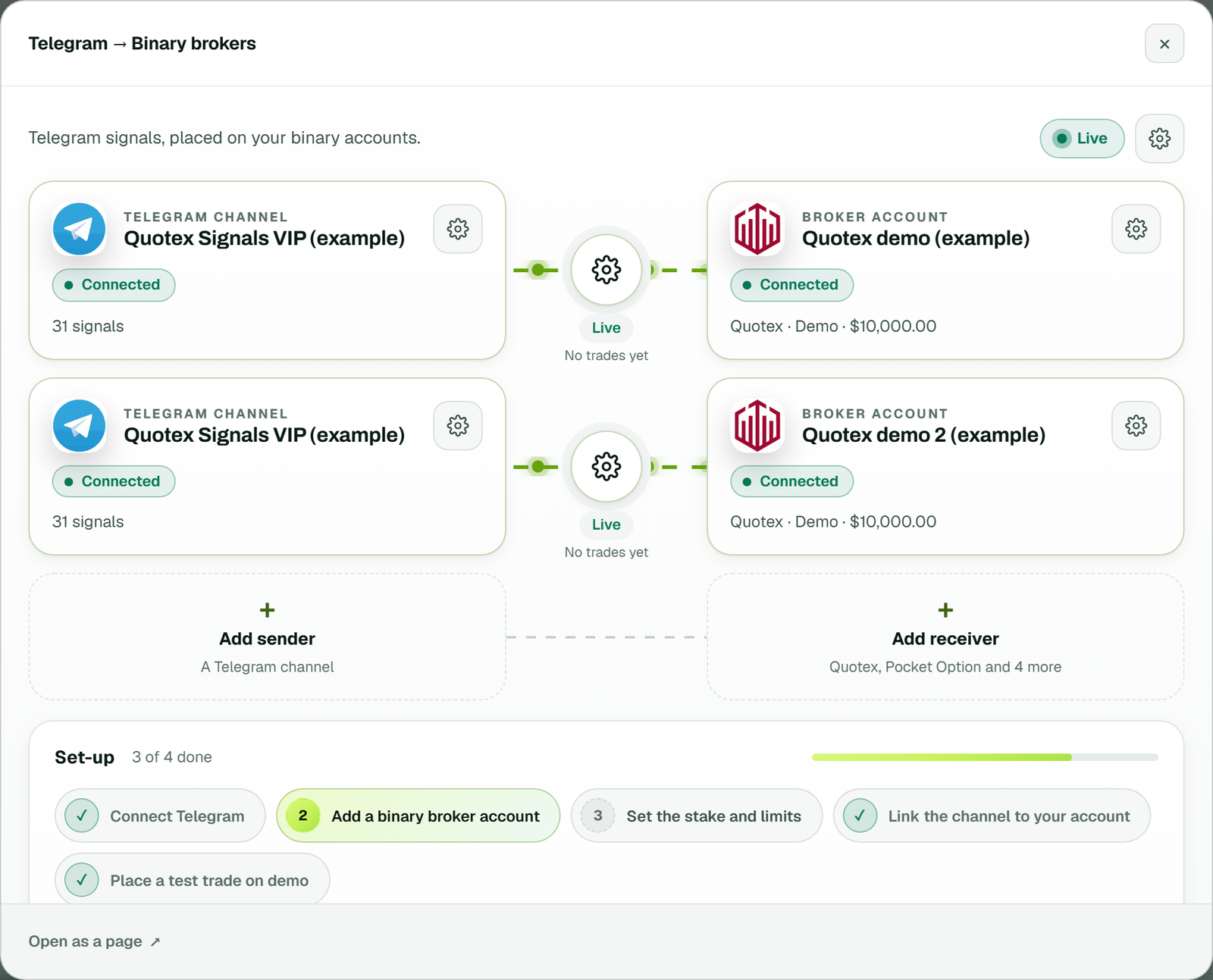 Both demo accounts get the same call at the same moment (example workspace).
-
Keep Live trades on the Dashboard open next to the channel for a day or two.
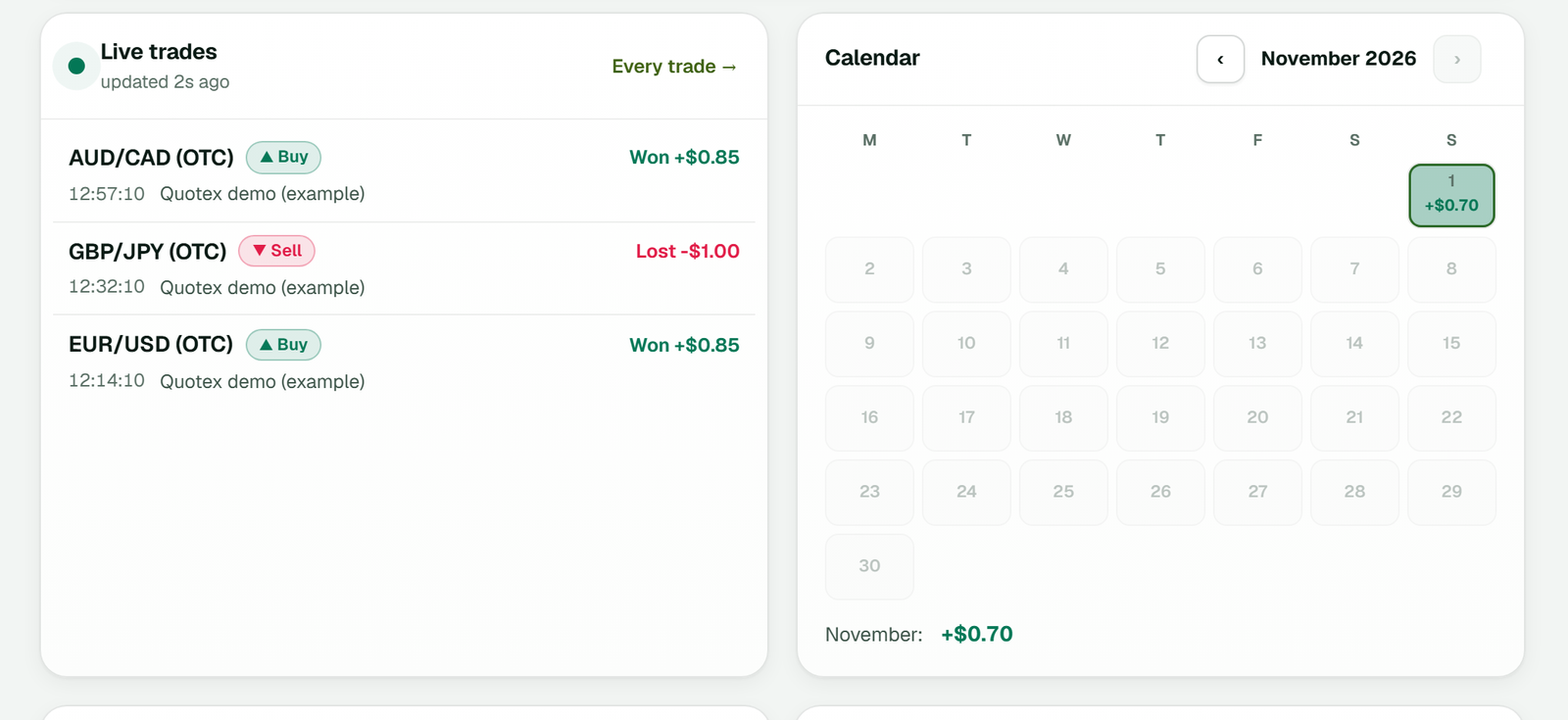 Example demo trades, not a performance record (example workspace).
-
Look at each row that didn't trade. It reads "Not placed" with the reason, such as a missing expiry or a closed market.
-
If the copier skips real calls for a missing expiry, check whether the channel ever writes one. If the AI reads messages you wouldn't trade, raise the channel's minimum AI confidence or limit its directions.
From reading to placing
Once a message in any of these layouts passes every check, each linked account gets its order. History then shows what each call became, with its speed and result.
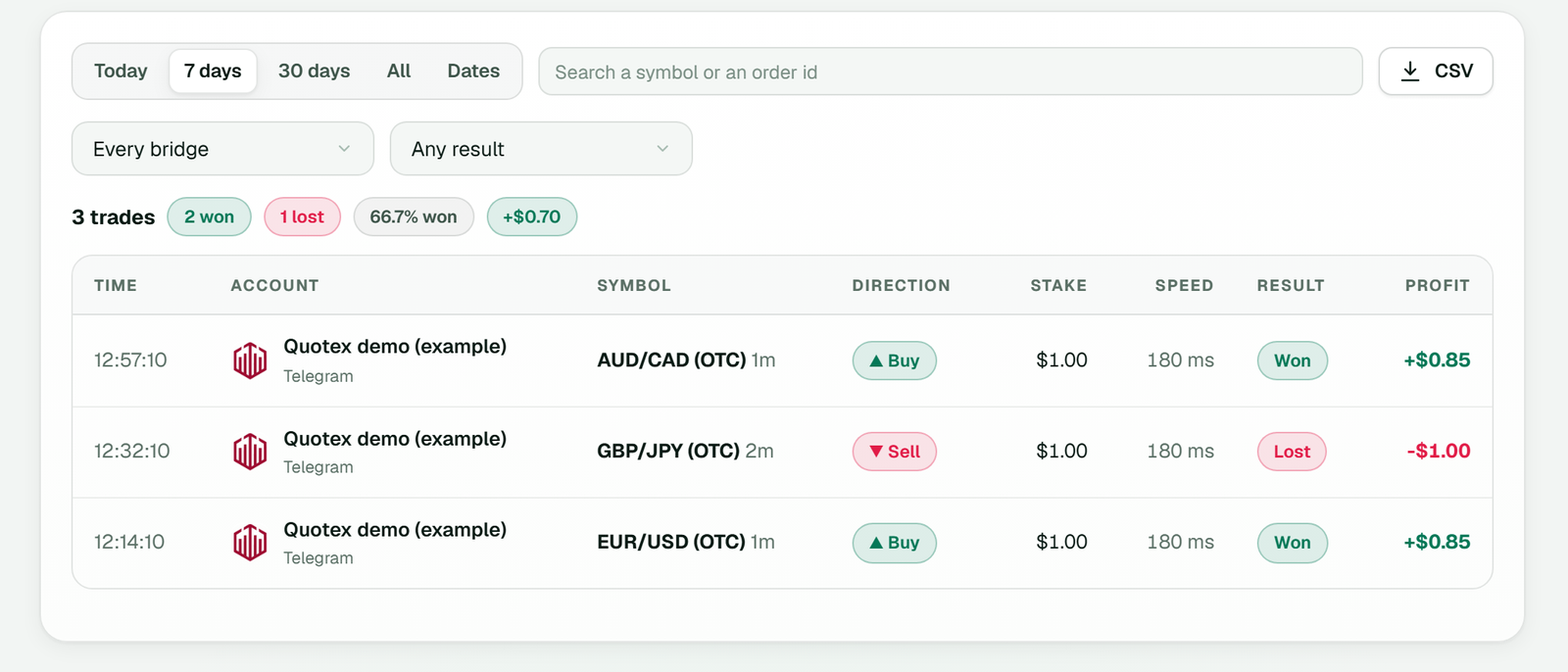 The expiry read from each message is printed next to the symbol (example workspace).
For a full set-up on one broker, see the Telegram to Quotex copier guide. The binary options signal copier page shows how it works across all seven brokers. Plans are on the pricing page. Before real money, the risk management guide covers the limits worth setting.
Sources
- Telegram, Channels, telegram.org.
- Reserve Bank of India, Alert List of unauthorised forex trading platforms, updated as on 19 November 2025, accessed 4 November 2026.
- TPcopier's own reader, tested on 4 November 2026: the examples above, at 0.18 ms per message.
- TPcopier's MetaTrader reader rules, from the app's source code.
Legality: many countries ban or restrict binary options. In India, the RBI's alert list (updated as on 19 November 2025) names entities not authorised to deal in forex, and Quotex, Pocket Option, IQ Option, Binomo, Olymp Trade and Expert Option are on it. Check the law where you live before you use any broker. TPcopier is software only; it isn't a broker and isn't linked to any of them.
Risk warning: binary options and forex trading on margin carry a high risk of losing money. TPcopier is software that copies the instructions you connect; nothing here is investment advice.
FAQ
Does upper or lower case matter?
Case makes no difference. The examples above mix call and PUT, or otc and OTC, and TPcopier reads them the same way.
Can the expiry be written in seconds or hours?
Yes. "30 seconds", "1 hour", "2h" and a spelled-out "ONE MINUTE TRADE" all read as an expiry. The reader accepts anything from 5 seconds to 4 hours, so "3 sec" or "5 hours" counts as no expiry at all.