Copy Trade MT4 to MT5: What Differs and Which to Pick
You rarely have to choose between the platforms to copy trade MT4 to MT5. A copier reads the trades on one account and places them on another, so a sender can stay on MT4 while its receivers run on MT5, or the other way round. The choice that is still yours is the platform for each new account, and on MetaQuotes' own pages MT5 is the safer long-term pick. Everything below about MetaTrader was checked against those pages on 5 November 2026.
Why traders compare MT4 and MT5 at all
Most people asking have a real decision in front of them. A signal provider trades on MT4 and you opened MT5 accounts. Your broker offers both and you don't know which to tick. Or you run several accounts and want one to follow another.
Two questions get mixed up here:
- Which platform should this account use?
- Can my trades move between the two?
The second one is about software. The first is about what MetaQuotes builds and what your broker supports.
Is MT4 discontinued?
No, not for traders. MT4 still runs, and brokers that already had it can keep offering it. What changed was on the broker side. In January 2018 MetaQuotes confirmed it would stop issuing new MT4 licences to new brokerages, while existing customers could keep using the platform. FinanceFeeds reported the decision on 29 January 2018 and noted that existing brokers could not add new MT4 servers.
What that means in 2026:
- Your MT4 account keeps working as long as your broker runs its MT4 server.
- A broker that started after that decision is likely to offer MT5 only.
- New features land on MT5. The MT5 feature page lists timeframes and order types that the MT4 page does not.
We found no announcement of a date when MT4 stops working altogether. Is MT4 being phased out, then? Only in the sense above: fewer new brokers can offer it, while existing servers keep running. If you read of a shutdown date, check it against MetaQuotes' own site before acting on it.
MT4 vs MT5: the differences that are documented
Plenty of comparison tables online repeat claims nobody has checked. This one keeps only what MetaQuotes' pages and documentation say.
| MetaTrader 4 | MetaTrader 5 | |
|---|---|---|
| Timeframes | 9 (MT4 platform page) | 21 (MT5 platform page) |
| Pending order types | 4 | 6, including Buy Stop Limit and Sell Stop Limit (MT5 help) |
| Position accounting | Not described on the MT4 page | Netting and hedging, chosen per account |
| Programming language | MQL4 | MQL5 |
| New broker licences | Stopped for new brokerages in January 2018 | Still offered |
| Copy with TPcopier | Yes, as sender or receiver | Yes, as sender or receiver |
MetaQuotes also describes MT5 as a multi-asset platform for currencies, stocks and futures. The MT4 page does not make that claim.
Netting and hedging on MT5
This row matters most for copying. MetaTrader 5's help explains both systems. With netting, an account holds one common position per symbol, and an opposite deal reduces, closes or reverses it. With hedging, an account can hold several positions on the same symbol, including opposite ones.
Picture a sender that opens two separate EURUSD buys. A hedging receiver holds them as two positions, just as the sender does. A netting receiver merges them into one, and closing one of the sender's buys then means trimming that single position. For an MT5 receiver, ask your broker for a hedging account, and check which system an account uses before you fund it.
What coding language does MT5 use?
MT5 uses MQL5. MT4 uses MQL4. The MQL5 reference describes MQL5 as a high-level language for indicators, trading robots and utilities, with syntax very close to C++ and support for object-oriented code.
Although the two languages look alike, an EA does not move across unchanged. The Moving from MQL4 section of the documentation lists the main breaks:
- MQL5 has no
start(),init()ordeinit(). Their jobs go toOnInit,OnDeinit,OnTickand similar event functions. - The predefined
Ask,BidandBarsvariables are gone. - The
Open[],High[],Low[],Close[],Volume[]andTime[]arrays are gone too. You request price history through functions instead.
An MT4 robot therefore needs rewriting, or at least careful porting, before it runs on MT5. A copier is useful during that move: the MT4 EA keeps trading where it is, and the copier repeats its trades on MT5 while the port is unfinished.
Does the platform change the copying?
Less than people expect. A trade copier watches one account, the sender, and repeats its trades on others, the receivers. TPcopier's MT4 to MT5 trade copier handles all four directions: MT4 to MT4, MT4 to MT5, MT5 to MT4 and MT5 to MT5.
One sender can feed several receivers, and each receiver has its own lot rule. An MT4 sender can feed an MT4 receiver and an MT5 receiver at the same moment.
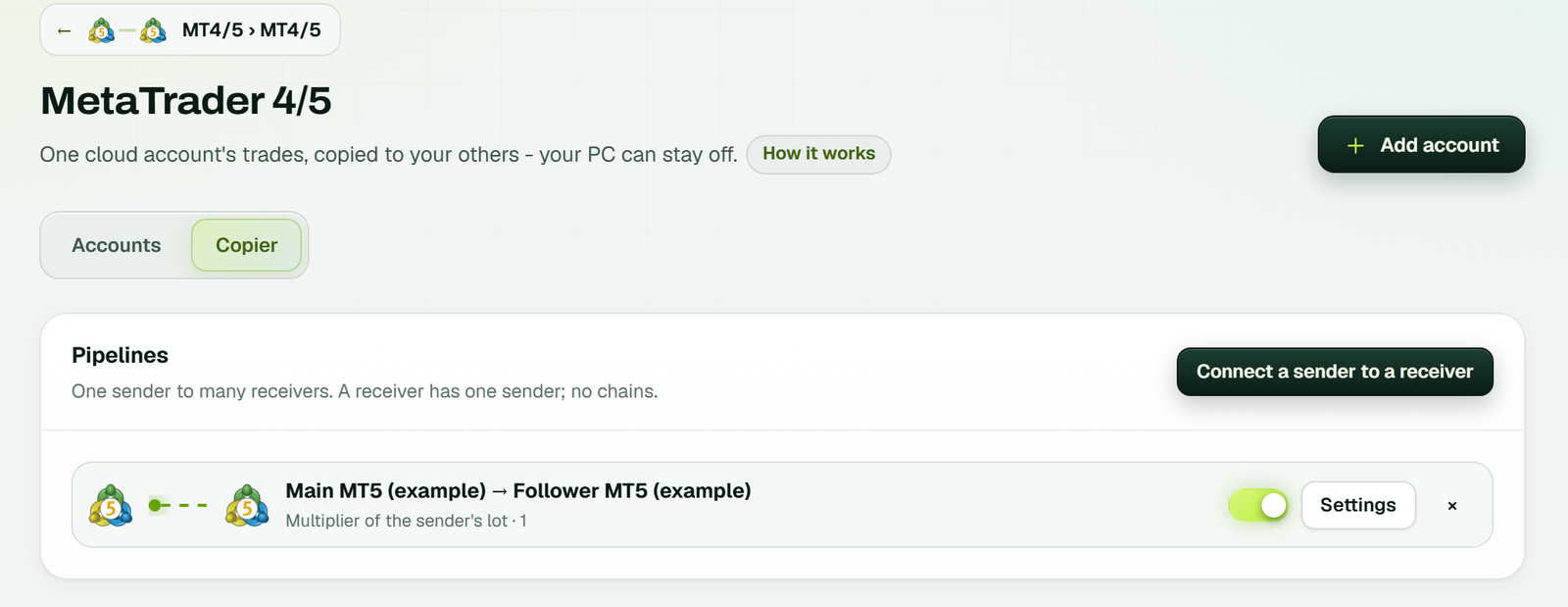 The Copier tab: each pipeline is one sender and one receiver with its own lot rule. This one copies MT5 to MT5; an MT4 account connects the same way (example workspace).
What the copier handles for you:
- Symbol names. Brokers name things differently. The copier checks the receiver's own symbol list, so EURUSD can find EURUSD.c and XAUUSD can find GOLD. If nothing matches, it places no order and logs why. It never swaps in a different instrument.
- Lot steps. Each result is rounded to the receiving broker's lot step and kept between your smallest and largest lot.
- Stops and pending orders. Stop loss and take profit changes follow the sender, and pending orders are copied unless you turn them off.
What the platform still decides is the order type. MT5 has two pending types MT4 does not have, Buy Stop Limit and Sell Stop Limit, so an MT5 sender that uses them has no exact twin on an MT4 receiver.
How quick is the copy?
TPcopier measured live copies on 4 October 2026. The median time from the copier seeing the sender's trade to the receiver's order leaving its server was 7 ms. The receiving broker's own fill then took about 140 ms. That number is for the trade copier only, and real times depend on your brokers. The site shows the time for each copy.
Is there a trade copier for MT5?
Yes, several. They fall into two groups.
Local copiers run on a Windows PC or VPS next to your terminals. Both MetaTrader terminals must stay open, so the machine must stay on. TPcopier also sells a pay-once trade copier app for Windows if you want that route.
Cloud copiers run the terminals for you. TPcopier's cloud copier is one of these: the sender and the receivers run on TPcopier's servers, so nothing has to stay open at home. The guide to running MT4 and MT5 without a VPS explains how the cloud terminals work.
If you'd rather build your own logic, the MT5 API gives developers access to the same cloud accounts from code.
Is there a free trade copier software for MT5?
Free-forever copiers do exist, usually as scripts or EAs you install yourself. One well-known example is FX Blue's Personal Trade Copier. Its page says it can send and receive between any combination of MT4 and MT5 accounts, with the MT4 version installed in MT4 and the MT5 version in MT5, and that it copies between terminals running on the same computer. With any local copier you keep that computer running and fix things when they break. Nothing is wrong with that if you enjoy it.
TPcopier is not free forever. It has a free trial, and the pricing page sets it out like this:
- 2 days, and the clock starts at your first link, not at sign-up.
- No card.
- Up to 10 signals a day on the trial.
- Cloud terminals included.
After the trial, the MT4/5 trade copier costs $6 a month for one account and $6 for each extra account. Plans run for 1, 3, 6 or 12 months, paid with Binance Pay or your TPcopier wallet. Nothing renews by itself. All payments are final with no refunds, which is why the trial comes first.
Which platform is best for MT5?
This question usually means "which broker or set-up should I run MT5 on?" We don't recommend brokers, but these checks help whichever one you look at:
- Does the broker offer MT5 at all? Look for it on the account-opening page, not just the download page.
- Does it offer hedging accounts on MT5?
- Are the symbols you trade listed? Compare names. The copier matches most of them on its own, and you can add the rest by hand.
- Where will the terminal run? On your PC it stops when the PC sleeps. On a VPS you pay every month. In TPcopier's cloud the terminal is part of the copier price.
Which one should you pick?
- Keep MT4 if your broker, your EA or your signal provider is tied to it and everything works. Nothing forces you off it today.
- Choose MT5 for new accounts, especially with a broker that started recently. It is the platform new brokerages can still get, and it has more timeframes and order types.
- Run both if you're halfway through a move. Copy MT4 to MT5 so your new accounts trade from day one while your old set-up stays live.
Our step-by-step post on the MT4 to MT5 copier setup walks through adding the sender, the receiver and each lot rule.
FAQ
Why was MT5 banned?
It wasn't banned as a platform. In September 2022 Apple removed the MetaTrader 4 and MetaTrader 5 apps from its iOS App Store, while the desktop terminals kept working. MetaQuotes announced on 6 March 2023 that both iOS apps were back in the App Store.
Does the copier need the sender's trading password?
No. When you add a copier's sender, the Add a MetaTrader account window says an investor (read-only) password is enough, because the sender's account is only read. Each receiver needs its trading password, since the copier places orders there.
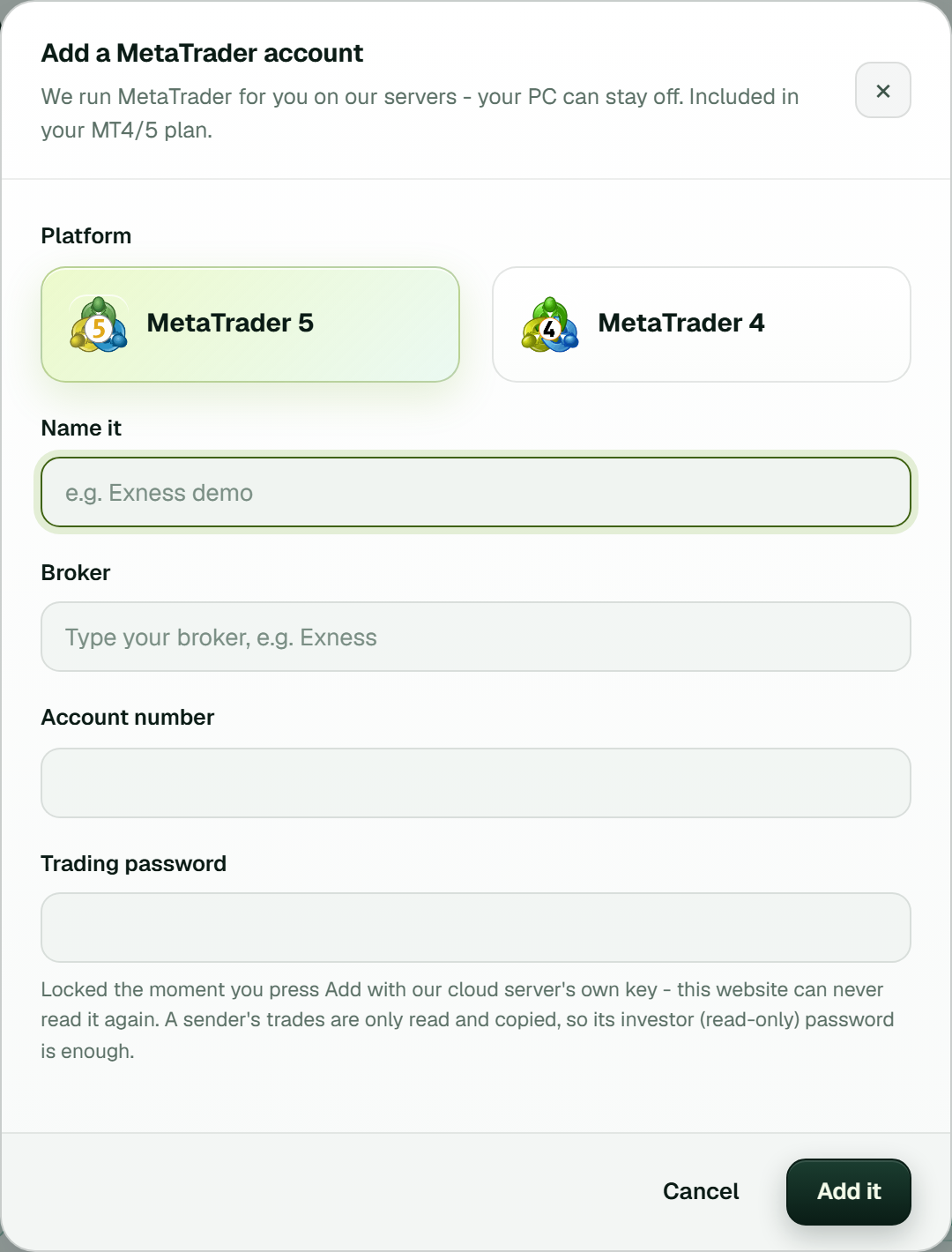 The Add a MetaTrader account window for a copier's sender, with the note that an investor password is enough (example workspace).
Which trade copier is best for MT5?
That depends on your set-up, so compare them on facts you can test: whether it copies both ways between MT4 and MT5, where it runs (same PC, VPS or cloud), how it sets lots and matches symbol names, whether it shows the time of each copy, and what it costs once the trial ends. Run any candidate on two demo accounts before you trust it with a funded one.
Is copy trading legal?
Copying trades between accounts you own is generally not the problem; the broker's licence and the product are what regulators look at. Our guide is copy trading legal sets out what each regulator's own page says.
Copy trade MT4 to MT5 on two demo accounts
Open one MT4 demo and one MT5 hedging demo. Create your TPcopier account, add the MT4/5 trade copier, connect the MT4 account as sender with its investor password and the MT5 account as receiver. Place a 0.01 lot trade on the MT4 demo, then check that it arrives on MT5 at the lot your rule gives and that the copy shows its time on the site. The two trial days are enough to see how the copy behaves on your own brokers before any real money is involved.
Risk warning: trading forex and CFDs carries a high risk of losing money and is not suitable for everyone. The copier copies losses as well as profits. Nothing here is investment advice.