VPS Copy Trade or Cloud: Keep MT4 and MT5 Copiers Running
A copier is an Expert Advisor, and an EA trades only while its MetaTrader terminal is open. MetaTrader's help on algo trading lists turning the platform off and closing the chart among the things that stop one. A VPS copy trade set-up solves that by moving the terminals to a rented machine that never sleeps. It is one of four places a copier can live. The other three are your own PC, MetaQuotes' MQL5 VPS and a cloud copier such as TPcopier's cloud MT4 and MT5, where we run the terminal and the EA for you.
Four places a copier's terminal can run
| Option | Runs any EA you choose | Your PC can be off | Who looks after it | Monthly cost |
|---|---|---|---|---|
| Your own PC | Yes | No | You | Your power and internet |
| Rented Windows VPS | Yes, any program | Yes | You | The provider's fee |
| MetaQuotes' MQL5 VPS | Yes, but no DLL calls | Yes | MetaQuotes | $10 to $15 |
| TPcopier cloud | No, only the TPcopier EA | Yes | TPcopier | Part of a TPcopier plan |
Your own PC, a rented VPS and MQL5 VPS suit a copier EA you bought or an EA you wrote. TPcopier's cloud suits copying itself: Telegram, WhatsApp or Discord signals, TradingView alerts, or one account's trades sent to others.
A VPS copy trade set-up on a rented Windows server
A Windows VPS is a computer you rent in a data centre and run yourself. For copying, the usual layout puts every terminal on the same machine. The sender's MetaTrader and each receiver's MetaTrader all carry the copier EA. You install the terminals, copy the EA into each Experts folder, sign in to every account and allow any web addresses the EA calls.
It runs anything, DLLs included. The upkeep is yours. Windows updates restart the machine, a terminal can log out after a broker's server change, and logs fill the disk. The provider's fee varies, so weigh it against the hours you'll spend looking after it.
MQL5 VPS from inside MetaTrader
MetaQuotes' virtual hosting help describes a service for round-the-clock operation of the platform, covering your own robots, Expert Advisors from the Market and Signal subscriptions. To rent it, you connect with the trading account you want hosted, right-click in the Navigator and run Register a Virtual Server, as the server registration help describes. Payment goes through your MQL5.community account.
On 5 November 2026 the MQL5 VPS page listed $15 a month on a one-month plan, $13 on three months, $10.83 on six and $10 on twelve. Its 24-hour free trial moves to the paid plan when it ends.
Four of MetaQuotes' migration rules decide whether a copier can run there:
- DLL calls are completely forbidden on the virtual platform.
- Only charts that carry an EA are copied across, and scripts aren't transferred at all.
- Accounts that sign in with a one-time password can't be used.
- The virtual platform has no user interface, and synchronisation only goes one way, from your terminal to the server.
Some local copiers pass trades between terminals through a DLL, so read your copier's own notes before you pay. If it needs a DLL, a Windows VPS or your own PC is still the answer.
Your own PC left on
This is the free option, as long as you already own the PC. It works while the PC never sleeps, never restarts for an update and never drops its connection. That's fine while you test a copier on demo. For one that mustn't miss a trade, it's the least reliable of the four, because it depends on your own power and internet.
The running cost is electricity. Here is a worked example, not a measurement. A PC drawing 50 W around the clock uses 50 W × 24 h × 30 days = 36 kWh a month. Multiply that by your own tariff. A plug-in meter shows your PC's real draw, and a desktop with a graphics card can draw several times more.
A trade copier without VPS: the TPcopier cloud
TPcopier runs MetaTrader 4 or 5 on its own servers, signed in to your account, with the TPcopier EA inside it. The EA is ours and the account is yours. You set everything up on a web page rather than copying a file into MetaTrader and attaching it to a chart.
A cloud account can trade three kinds of source:
- Signals from Telegram channels and groups, WhatsApp groups and Discord channels. The EA reads the entry or entry zone, the stop loss, up to six take profits and the replies that manage each trade. The Telegram to MT4 and MT5 copier page has the details.
- TradingView alerts. You paste a feed's webhook address into the alert, and the EA opens or closes at the market with the alert's stop loss and take profit. TradingView sends webhooks only on its paid plans, and its webhook help adds that 2-factor authentication must be on. TradingView to MT4 and MT5 explains the alert message.
- Another account's trades. The MT4/5 trade copier repeats one account's trades on others, across brokers, with a lot rule for each receiver. It matches symbol names too, so XAUUSD at one broker can arrive as GOLD at another. Its guide is the MT4 to MT5 trade copier.
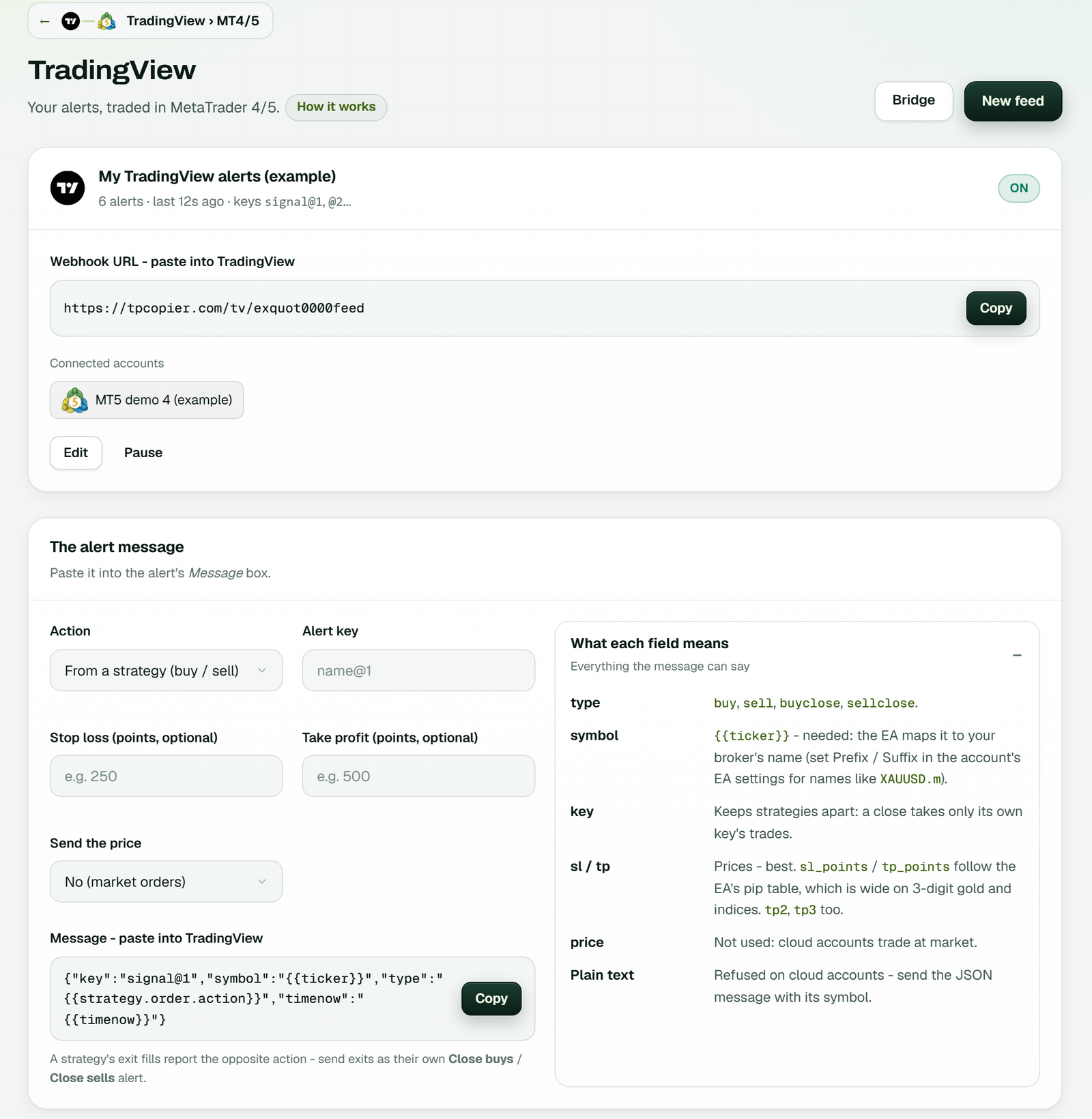 The TradingView page: the feed's webhook URL with Copy, the cloud MT5 account it trades, and the alert message builder below it (example workspace).
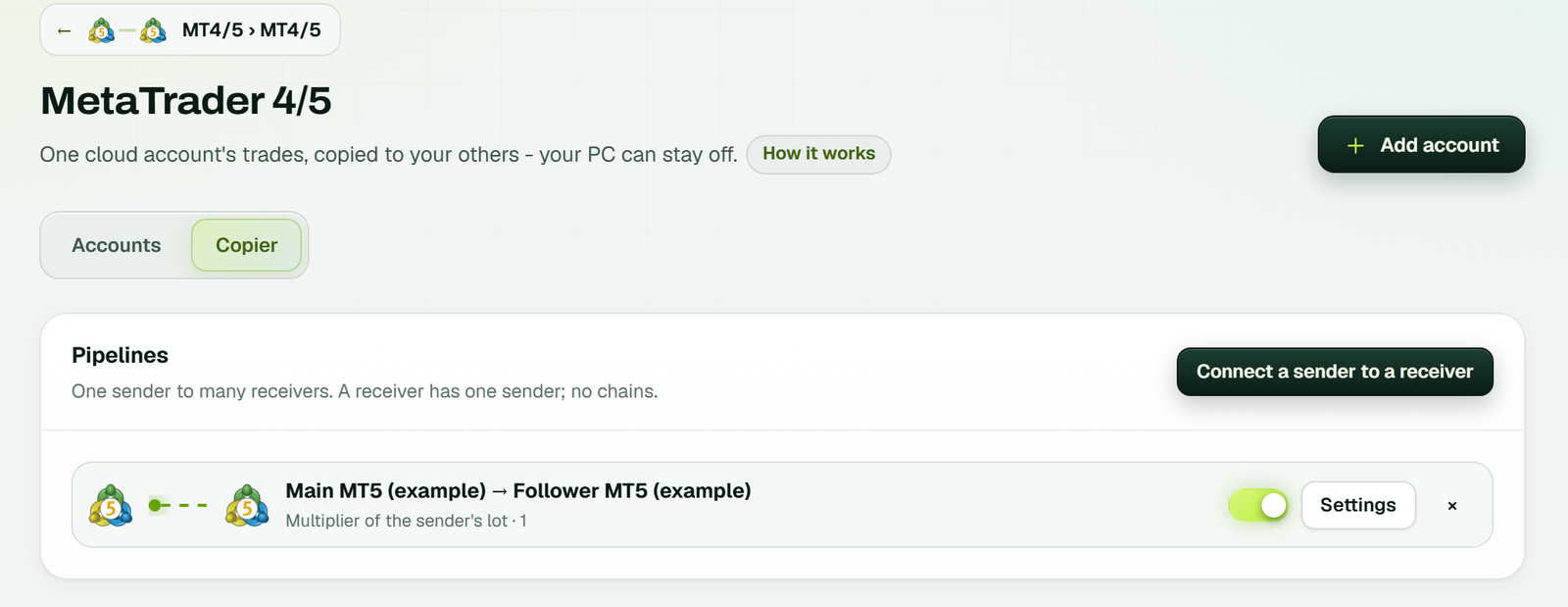 The trade copier's Pipelines: a main MT5 account copied to a follower with a multiplier of the sender's lot (example workspace).
Set up a cloud MT4 or MT5 account in 6 steps
1. Make a bridge
On the Bridge page, press Make a bridge. Pick the sender (TradingView, Telegram, WhatsApp or Discord), pick MetaTrader 5 or MetaTrader 4 as the receiver, then press Open the bridge.
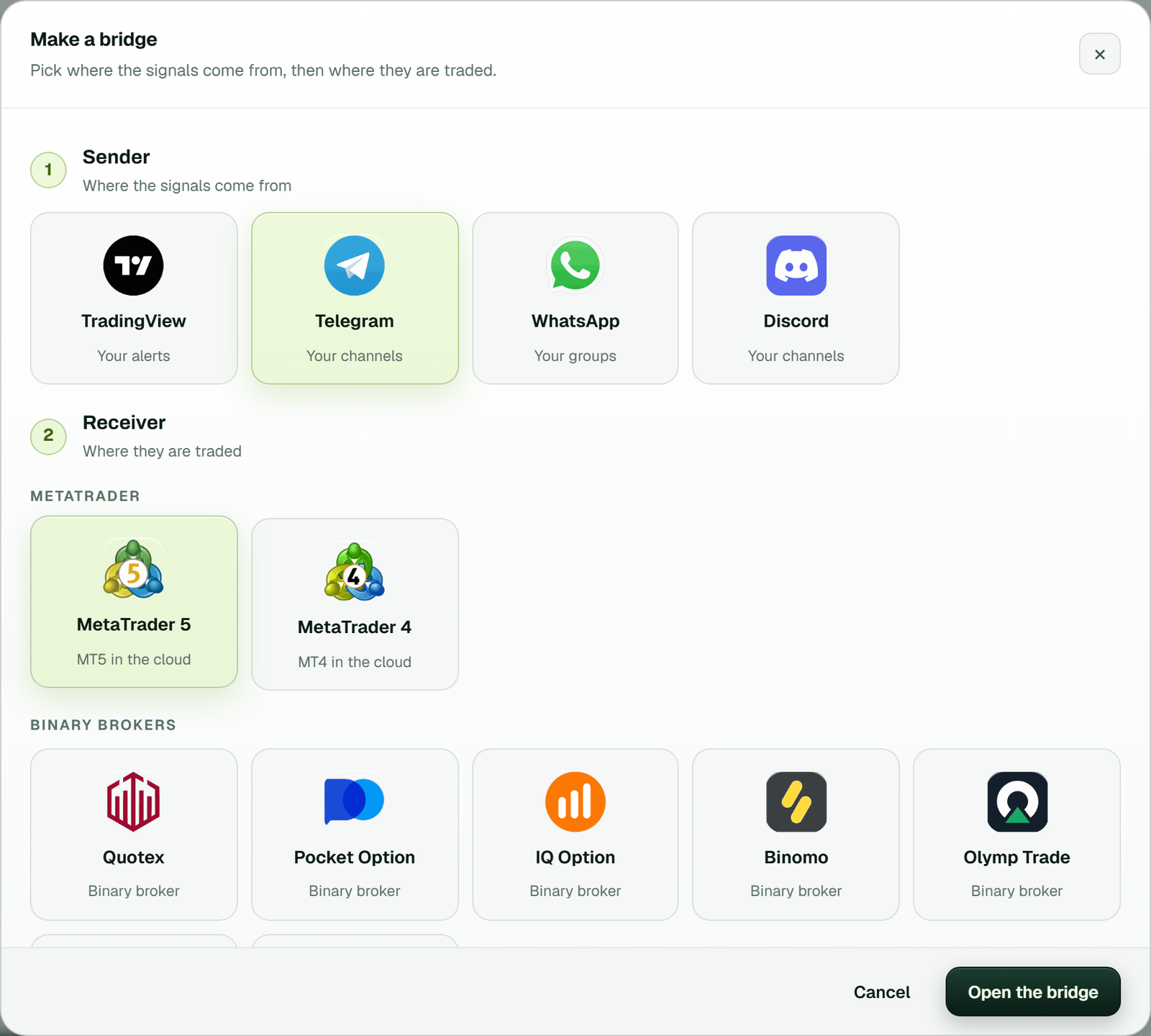 Make a bridge: Telegram as the sender and MetaTrader 5 in the cloud as the receiver.
2. Connect the sender
Sign in to Telegram with your phone number and the code Telegram sends in the app. For the others, link WhatsApp with one QR scan, sign in to Discord, or make a TradingView feed. Then switch on the channels or groups you want copied.
3. Add the MetaTrader account
The Add a MetaTrader account window asks for the platform, a name, your broker and its server, the account number and the trading password. Press Add it, and our cloud server's own key locks the password at that moment. Use the trading password, because MetaQuotes says an investor password lets you see the account but not trade. In TPcopier, that read-only kind only works for a trade copier's sender, whose trades are read and never placed.
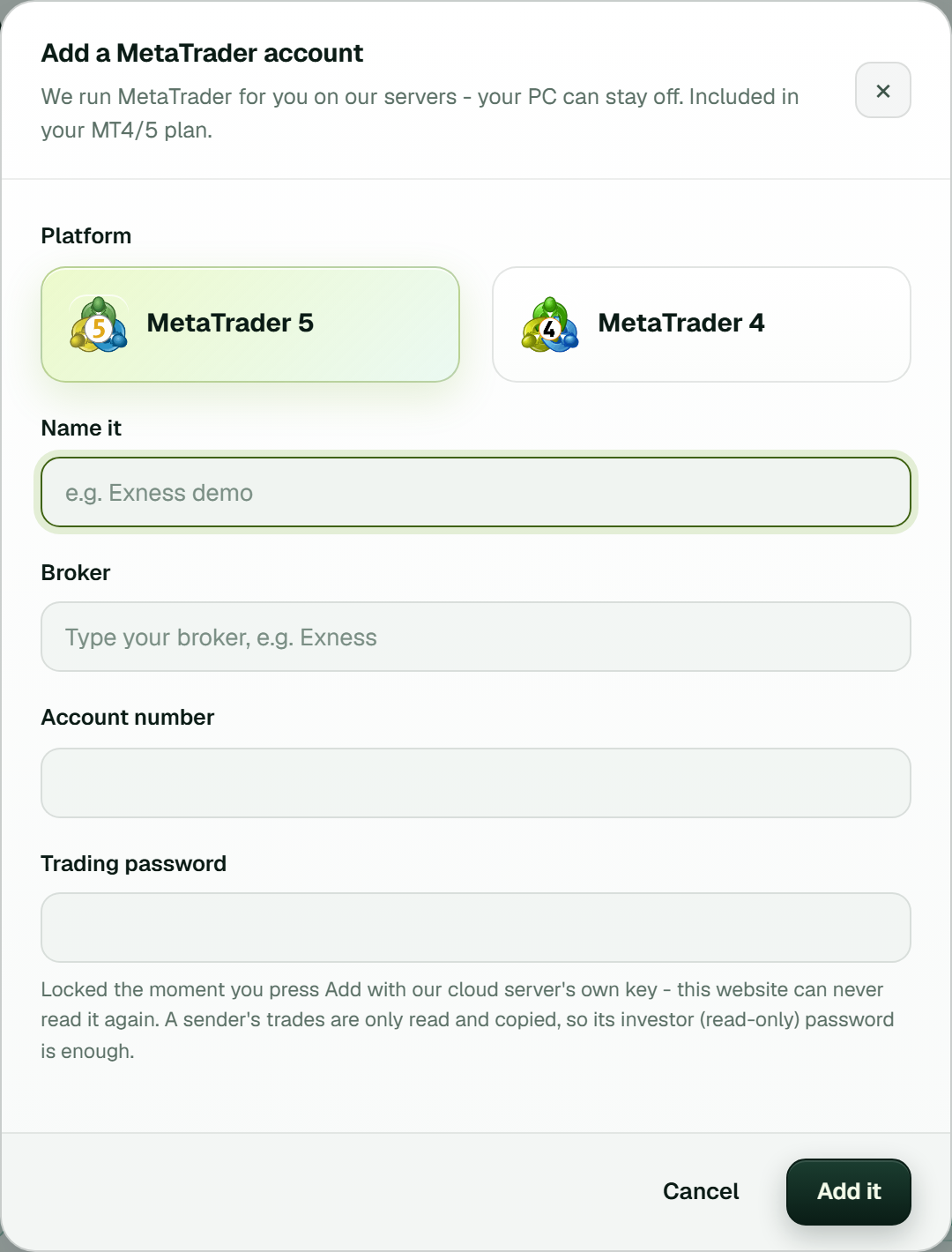 Add a MetaTrader account in TPcopier: a note under the password field explains the lock.
4. Wait for Running
The card, marked Cloud, goes through Starting MetaTrader on our server, Signing in to your broker and Turning on the TPcopier EA. On a trade copier account the last step reads Turning on Algo Trading. Then the card shows Running with Algo Trading on.
5. Set the EA's inputs
Open EA settings on the card. These are the TPcopier EA's own inputs, the same ones as in MetaTrader, and a saved change applies in a few seconds with no restart.
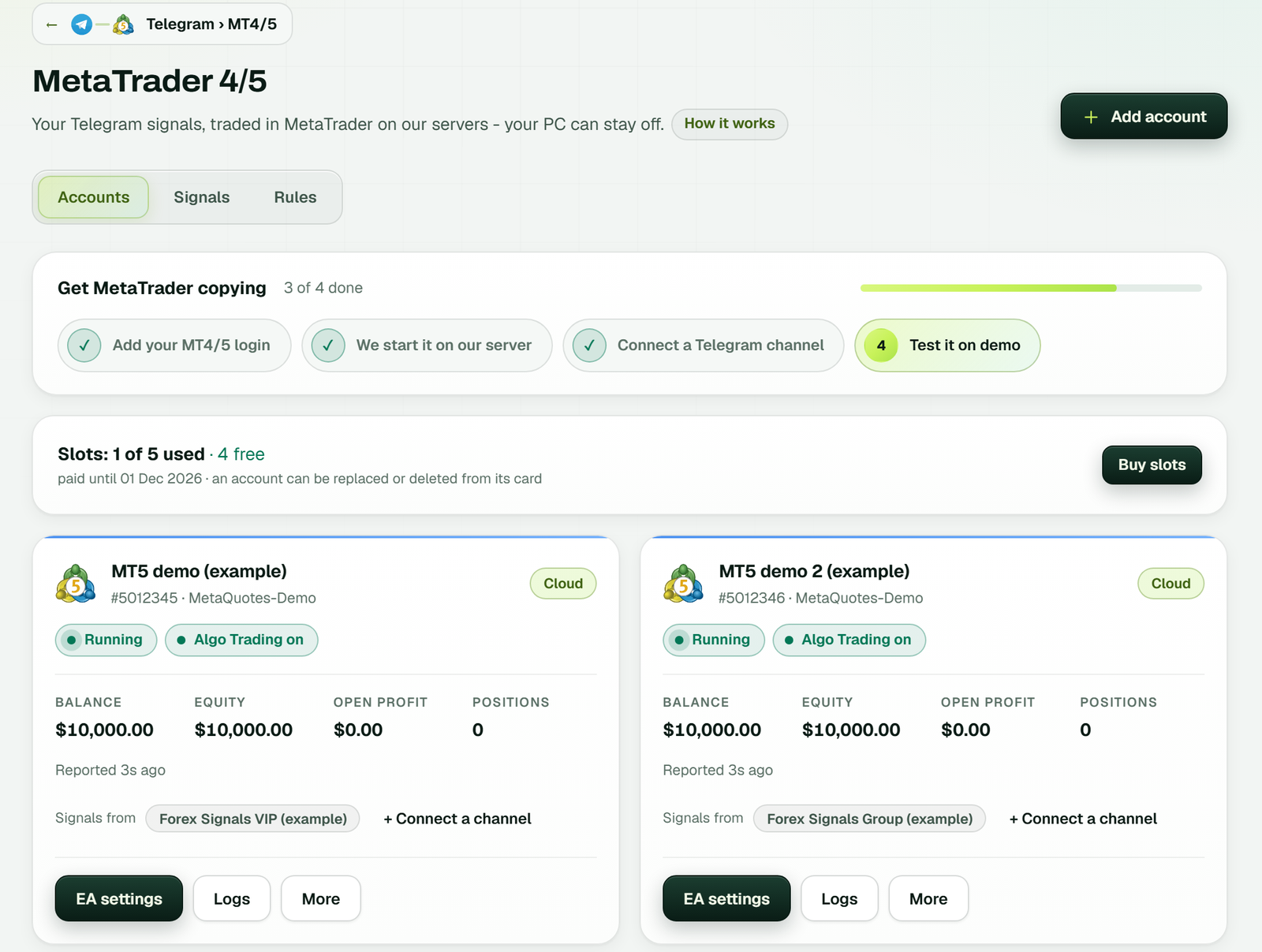 Two cloud MT5 accounts, both Running with Algo Trading on, each with EA settings, Logs and More (example workspace).
6. Test on demo
On a Telegram, WhatsApp or Discord bridge, More then Test connection gets an answer from the EA and trades nothing. Stay on a demo account until the trades look right, because a real account trades real money from its first signal.
When something stops
With a PC or a rented VPS, you find out a terminal has stopped when trades stop arriving. The fix is a remote-desktop session. MQL5 VPS keeps the virtual platform's journal, which you request from your own terminal, and you change things only by synchronising again.
On a TPcopier cloud account, the card shows the error in words, with a Reconnect button next to it. More holds Reconnect and Password, for when the broker refused the password and you need to type it once more. Logs shows what the terminal reported, kept for 14 days.
The cloud has its own limits, and they're worth knowing before you choose it:
- It runs the TPcopier EA and nothing else. There's no upload for an EA of your own.
- It signs in with your trading password. The website can never read it back once it's locked. If you'd rather not hand over a password at all, keep the terminal on a machine of your own.
- Each bridge keeps its own accounts, and one MetaTrader login can be added only once.
- TradingView alerts trade at the market, and the cloud EA doesn't use a price in the alert.
- MetaTrader 5 needs a hedging account for signal copying, because the EA opens one position per take profit.
- A phone can't run an EA. Can you install an EA on MT5 Android? explains why.
What each way costs
TPcopier doesn't charge for the terminal itself, because cloud MetaTrader is part of the bridge's monthly plan. Telegram, WhatsApp, Discord or TradingView to MT4/5 costs $40 a month for 2 accounts, $60 for 3, $90 for 5, $150 for 10 and $200 for 15. The MT4/5 trade copier is $6 a month for one account and $6 for each one more.
Every bridge starts with a 2-day free trial with no card, up to 10 signals a day. Payment is by Binance Pay or the TPcopier wallet, nothing renews by itself, and all payments are final with no refunds. The pricing page always has the current figures.
MQL5 VPS costs $10 to $15 a month, but that buys hosting only, and the copier EA is yours to supply. A rented Windows VPS adds its fee to the copier's own licence.
Pick by what the copier has to do
If your copier calls a DLL, rent a Windows VPS. Without a DLL, MQL5 VPS is the quickest start, and its 24-hour trial is enough to watch the copier on a demo account. If you only want signals or trades copied, the signal copier without VPS comparison goes deeper into the cloud against a VPS. A TPcopier free trial on a demo account shows the first copies within the two days.
Whichever host you pick, it only keeps the terminal running. It can't make the trades any better, so judge them on demo before real money goes in.
FAQ
Is there a free trade copier?
Yes. Free copier EAs exist, and on your own PC they cost only power. You then keep the PC on and fix things when they break. TPcopier isn't free after its 2-day trial.
Can I watch a cloud account from my phone?
Yes. The MetaTrader 4/5 page shows each card's balance, equity, open profit and positions in the browser. You can also sign in to the same account in the MetaTrader mobile app with the investor password. That password shows the account without trading on it.
Is copy trading profitable?
That depends on the trades being copied, not on where the terminal runs. A copier repeats losses exactly as it repeats wins.
What happens to the cloud terminal when my plan ends?
The account stops, and a day later its terminal leaves our server. We keep the account and its locked password, so paying again starts it on a new terminal.
Sources
- MetaTrader 5 Help, accessed 5 November 2026: Algo trading, Virtual hosting, Registering a virtual server, Virtual platform journal, Migration and Authorization
- MQL5, accessed 5 November 2026: VPS
- TradingView, accessed 4 November 2026: plans and features and About webhooks
- TPcopier: llms.txt and pricing
Risk warning: trading forex and CFDs carries a high risk of losing money and is not suitable for everyone. The copier copies losses as well as profits. TPcopier is software, not trading advice.