How to set up the
TradingView to Binance Copier
This guide shows how to install and set up the TradingView to Binance Copier. Your TradingView alerts, traded on Binance from your own PC - spot, cross and isolated margin, USD-M and COIN-M futures, and options - with stop loss and target orders, on Binance's demo first. TradingView sends each alert straight to the app, on port 80.
What you need for the TradingView to Binance Copier
- Windows 10 or 11 (64-bit), a PC or a VPS that stays on, with a public static IP (a Windows VPS; most home lines share one address and can't be reached)
- A Binance account and an API key with the market you trade switched on (Spot & Margin, Futures or Options)
- A TradingView plan that sends webhook alerts
How to set up the TradingView to Binance Copier, step by step
Get your key
Sign up free at tpcopier.com, open Software and press Start free demo on the TradingView → Binance Copier card - a demo key for a few days, nothing to pay. Buy it later on the same card: the demo key itself becomes lifetime, so you never type a new one.
Download the app
On the same card press Download. Keep the .exe in a folder of its own on the Windows PC or VPS it will run on, for example C:\TPcopier.
Start it
Double-click the .exe. If Windows says "Windows protected your PC", press More info, then Run anyway - it is TPcopier's own build, and tpcopier.com checks every copy's fingerprint when it is activated. If your antivirus holds it back, allow the file.
Activate your key
Paste the key and press Activate. One key works on one computer; to move it, write to us.
Make an API key on Binance
On Binance open API Management, create a key, switch on the market you trade - Spot & Margin Trading, Futures or Options - and restrict it to the public IP of the computer the app runs on (the app shows it on its Accounts card). Start with a key made on demo.binance.com: spot and futures there place nothing real.
Add your Binance account
Press Add account: a name, the API key and secret, its market (spot, cross or isolated margin, USD-M or COIN-M futures, options), Demo or Real, how much one trade is (USDT; USD for COIN-M), and the leverage for futures (0 keeps Binance's). Press Save - the app checks the key and shows the balance. The key and secret are sealed on this PC and go only to Binance.
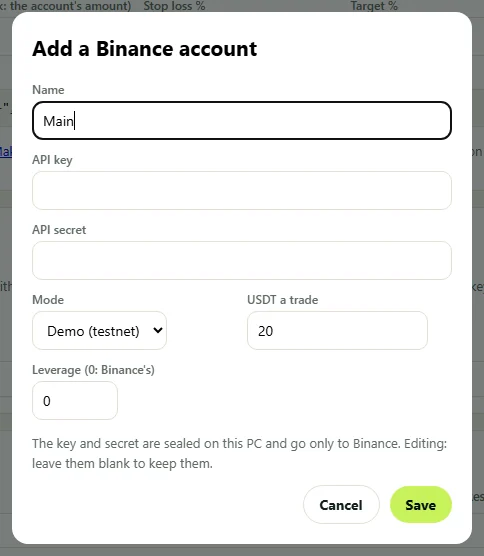
Add your Binance account - the app's own screen. Copy your webhook address and message
The TradingView card shows this PC's webhook address (port 80) and writes the alert message: the action (from a strategy, buy, sell, close or one side), the market (or each account's own), the amount, a stop loss and target in percent, an option's call or put, strike and expiry, and which account. Copy both.
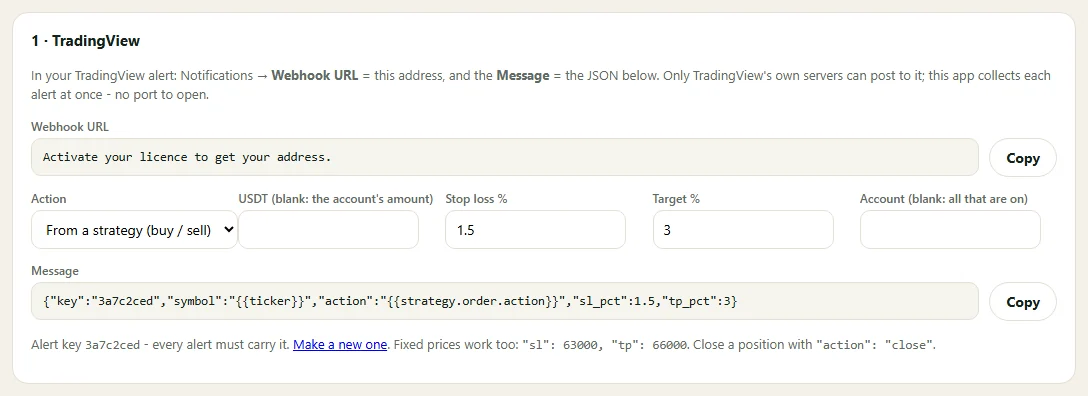
Copy your webhook address and message - the app's own screen. Create the alert in TradingView
In the TradingView alert: Notifications, Webhook URL = the address, and Message = the JSON. Only TradingView's own servers can post to that address. Port 80 must be open: press Allow in Windows Firewall on the TradingView card, and on a VPS open it in the provider's firewall too.
Test on the demo, then go live
On a Demo account press Test order: the smallest order its market takes is bought and closed again on Binance's demo. Every alert and Binance's answer shows in the Journal; Pause stops everything at once.
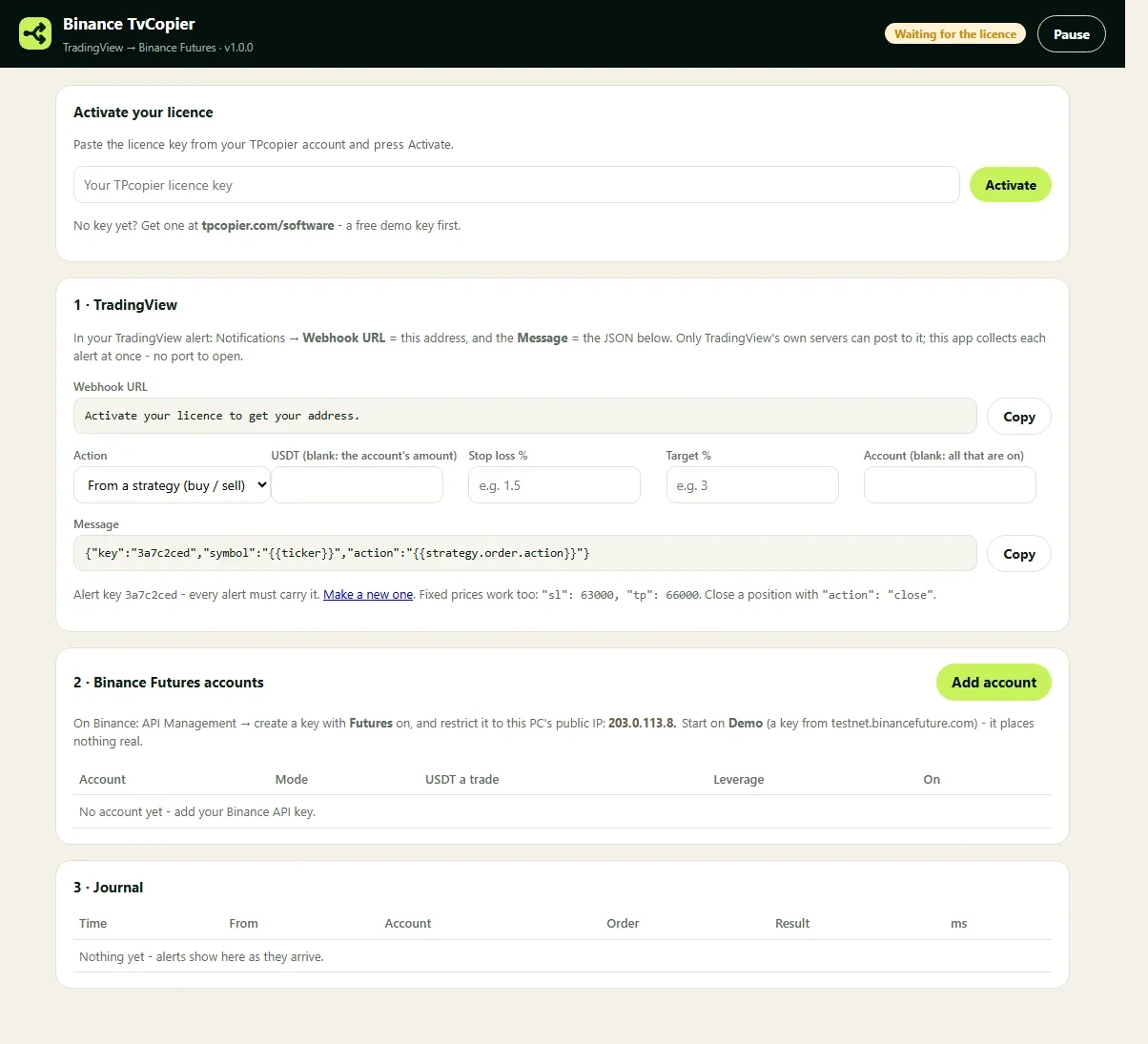
Test on the demo, then go live - the app's own screen.
TradingView to Binance Copier: questions and answers
Which Binance markets?
Spot, cross margin, isolated margin, USD-M futures (perpetuals, quarterlies and the TradFi perpetuals like XAUUSDT), COIN-M futures and options. Each account trades one market; an alert can name another with "market". TradingView tickers like BINANCE:BTCUSDT.P, BTCUSD.P (COIN-M) and BTCUSDT25Z2026 (a quarterly) are understood as they come.
How big is each trade?
The account's amount (or the alert's own usdt or qty): USDT on spot, margin, USD-M and options; whole contracts of 100 USD (BTC) or 10 USD (other coins) on COIN-M - rounded to Binance's step for that coin. An order under Binance's minimum is refused with the reason in the Journal.
How are the stop loss and target placed?
On futures, as Binance's conditional orders that close the whole position at the mark price; on spot and margin, as one OCO for the coins bought, which repays the loan on margin. A futures or margin trade whose stop loss Binance refuses is closed again at once. Options take limit orders only - no stop loss or target there.
Does a spot sell sell my own coins?
No - a sell or close on spot and margin sells only what this app bought, never coins it did not buy.
Options: which contract?
A buy alert buys a CALL and a sell alert a PUT, at the money, on the nearest expiry at least 12 hours away - unless the alert names "option", "strike" or "expiry". It fills at once at the best price or not at all.
Is there a free demo?
Yes - Start free demo on the app's card gives you a key for a few days. When you buy, that same key becomes lifetime.
Can it run on a VPS?
Yes - any Windows 10, 11 or Windows Server VPS. It trades while that computer is on.
Can I move my key to another computer?
One key works on one computer. To move it, write to us and we free it.