Telegram Auto Trading India: TeleCopier Setup in 10 Steps
Telegram auto trading in India runs through your broker's API, and since SEBI's retail algo rules that API only takes orders from a static IP registered to you. The Indian TeleCopier is a Windows program built around that rule. It reads the Telegram channels you already follow and places each call at your Indian broker from your own PC or VPS, through that broker's own API.
SEBI's circular of 4 February 2025, Safer participation of retail investors in Algorithmic trading, says brokers must not allow open APIs. Access is through a unique API key and a static IP the broker has whitelisted. SEBI later extended the timeline for putting this in place, so ask your broker which date applied to your account.
What to have ready
- A Windows PC or VPS with a static IP. A small Windows VPS works well, and one in Mumbai keeps the route to the exchange short. Windows 11 already has Microsoft WebView2. On Windows 10 the app checks for it and offers to install it.
- An API app at your broker. The app works with ten brokers: Zerodha, Angel One, Upstox, Dhan, Fyers, Groww, ICICI Direct, 5paisa, Kotak Neo and Alice Blue.
- Your Telegram account, already a member of the channels you want to copy.
- No AI key of your own is needed. The app reads each message with a built-in OpenAI key. You can switch to your own key from Groq, OpenAI, DeepSeek, Google Gemini, Anthropic (Claude) or Mistral.
- A licence key from TPcopier. The free demo runs for two days from the moment you activate it and acts on up to 10 signals a day. After that, the lifetime licence costs $150 once for one computer. See pricing for the current figure.
The Indian TeleCopier setup in 10 steps
Screenshots here come from version 1.1.0 of the app with example data. The current version, 1.4.10, renamed a few labels and no longer has a WhatsApp & Discord page in its sidebar, and the steps use today's labels.
1. Get the key and the download
This step happens on the website, so there's no picture of it here. First create a TPcopier account. Then open the Indian Copier page and press Get my free demo key on the Indian TeleCopier card, or buy the lifetime licence there instead. The same card carries Download for Windows and Show and copy key.
2. Start the app and activate it
Run the download on the computer that owns your static IP. It's one .exe file, so there's nothing to unzip. A small start-up window lists what it checks. If a part such as WebView2 is missing, it names the part and asks before it downloads anything.
Next comes the licence screen. Paste your key into the box and press Activate. One key works on one computer.
 The licence screen names this computer and takes the key TPcopier gave you (example computer name, version 1.1.0).
3. Copy your static IP into your broker's API app
The Dashboard opens with a dark Static IP band at the top. That number is the address your broker sees. Press Copy and paste it into your broker's API page, in the box for the static IP. If your line ever changes its address, the band shows the old and the new one. Until you register the new address, your broker refuses every order, so this band is the first place to look when nothing goes through.
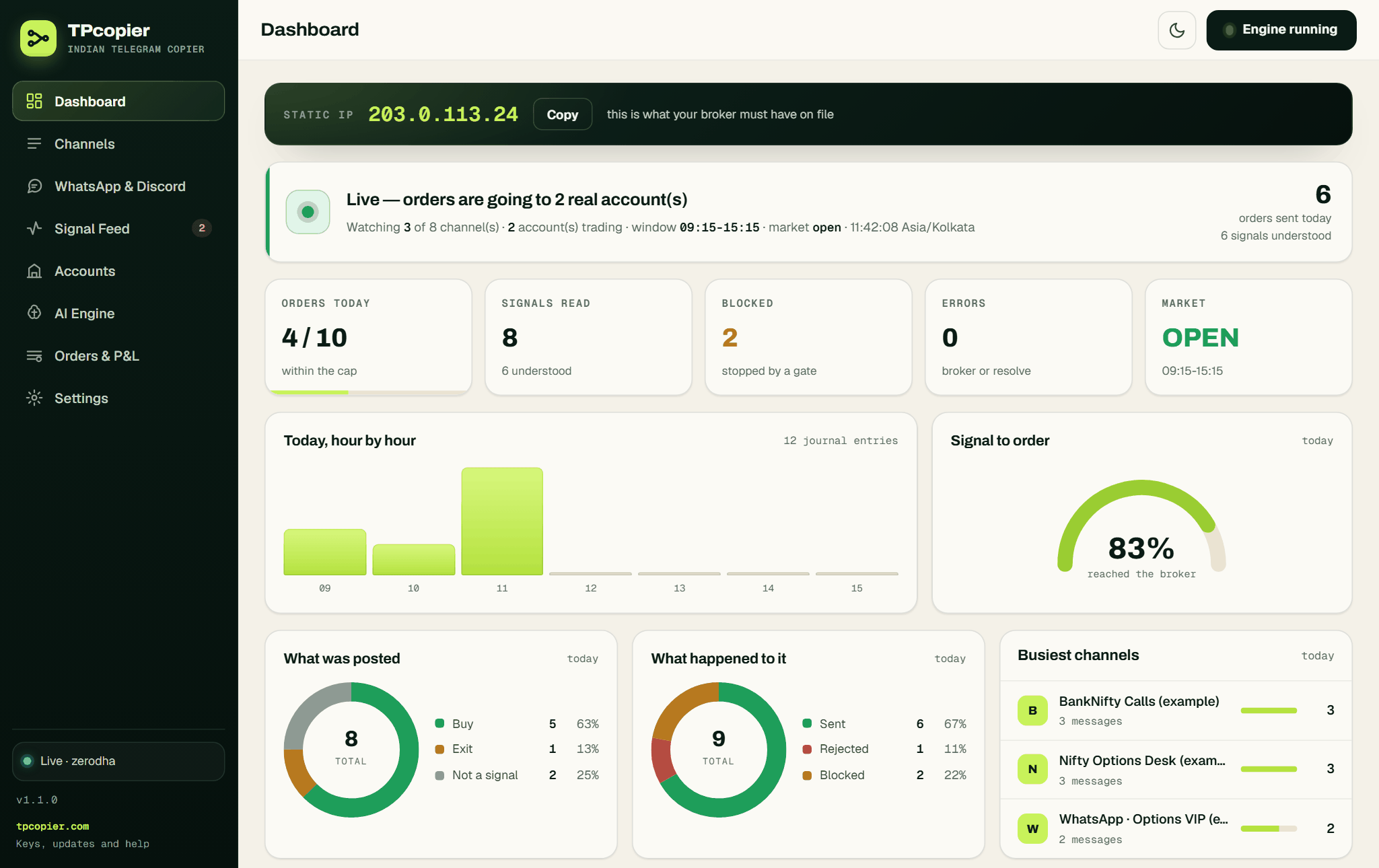 The Static IP band sits above the day's numbers, with a Copy button beside the address (example data, version 1.1.0).
4. Connect your broker account
Open Accounts and press + Connect a broker. A grid of the ten brokers appears, and each card says how many keys that broker needs. Pick yours, and the account form opens with that broker's own fields. The form offers Paper trading ticked, so a new account starts on the broker's live prices with every order simulated in the app.
 Every broker the app supports, each with the number of keys you paste (example accounts below, version 1.1.0).
Fill in what the form asks for. Zerodha, for example, wants the API key, the API secret and the access token, and it adds a Log in with Kite button. Angel One wants the API key, client code, MPIN and TOTP secret instead. Save the account, then press Save & test the connection. A good answer names your account at the broker. After that, the app shows your keys only in masked form, and it never writes them into the journal.
 A new Zerodha account: its three keys, the Log in with Kite box and the redirect address for Kite (example, version 1.1.0).
 Each account has its own switch, its own share of the size and a live connection state (example accounts, version 1.1.0).
5. Set the account's own rules
Every account has a tab for each market: Equity (NSE and BSE shares), Options (NIFTY, BANKNIFTY and stock F&O), Commodity (MCX) and Currency (CDS). In each one, Quantity decides the size:
- Fixed lots (Fixed quantity for shares) places Lots per trade when the signal states no size. A size in the signal goes first.
- Auto lots, from the stop loss works out the size from your Risk per trade (₹): lots = risk ÷ ((entry − SL) × lot size), rounded down. If one lot already risks more, the trade is skipped. A signal with no SL is taken at the fixed size.
Keep Send market signals as protective limits on. It turns a market call into a limit order a small buffer through the price, which Angel One requires and 5paisa and Dhan need. For the first days, set a low Most orders in a day and a small Most lots in one order, which Auto never goes above.
Further down, you decide what happens to the stop loss in a message. With Send the stop loss as a real order off, the app only records it. Once you switch it on, the stop goes to the broker after the entry fills, and Move the stop to the entry or Trail the stop behind the price can then move it, only in your favour.
 Shape of the order, the ceilings and the segments this account may trade (example values, version 1.1.0; today's version splits these by market).
 The stop block, with the Save this account and Test the connection buttons under it (example values, version 1.1.0).
Options calls with no strike
Options calls that name no strike, such as "BUY NIFTY CE", buy the strike whose live premium is nearest your Target premium (₹), within Nearest allowed, ± per cent. If none is near enough, the order is skipped and the journal says what the nearest one was. EXIT CE, EXIT PE and EXIT NIFTY close what is held, and "exit all" squares off everything.
6. Check the AI engine
The built-in OpenAI key is already active, so this step is optional. To use your own, open AI Engine, pick a provider, paste your API key and press Use this engine. The model reads every message, whatever its layout or language. Then the app checks the answer on its own. A strike that isn't on the index step, a missing CE or PE, or an entry that looks like an index level ends as a refusal, not an order. If every provider fails, for example when a free Groq key hits its per-minute limit, the app's built-in reader tries the message before it is given up on.
 The active engine, how many times to retry, and a card for each provider with its key and model (example, version 1.1.0).
7. Sign in to Telegram
The app comes with its own Telegram API ID, so you don't create one at my.telegram.org. When you are not signed in, the Channels page shows a bar that says so, with a Sign in to Telegram button. Type your number in international format and press Send login code. The code arrives inside the Telegram app on your phone, not by SMS. If your account has a two-step password, the app asks for it next. It reads with your own login, so you don't need a bot.
 Sign in with your phone number; I will do this later keeps the rest of the app open (version 1.1.0).
Settings has a separate Notifications tab. A bot token and chat id there make a bot of your own message you when an order is placed or refused. It's optional.
8. Switch on your channels
Press Refresh from Telegram on the Channels page. Every group and channel your account is in appears, each with a switch. Turn on the ones that post the calls you want. Open a channel to give it its own size, or tick accounts under Trade it on to limit it. With nothing ticked, it trades on every account that's on.
 One channel switched on, trading on two of the three accounts at full size (example channels, version 1.1.0).
9. Read your channel's messages before money moves
Scroll to the Parser Lab at the foot of the Signal Feed. Paste a few real posts from your channel and press Parse only. It shows exactly how the app reads each one, and it never trades. Don't use Run the full pipeline for this, because that button is the live path and asks first for a reason.
Then keep your accounts on Paper trading for a session and start the engine. The Signal Feed logs every message with what the app understood and why it would or wouldn't trade, and the paper orders show what would have happened at the broker's prices.
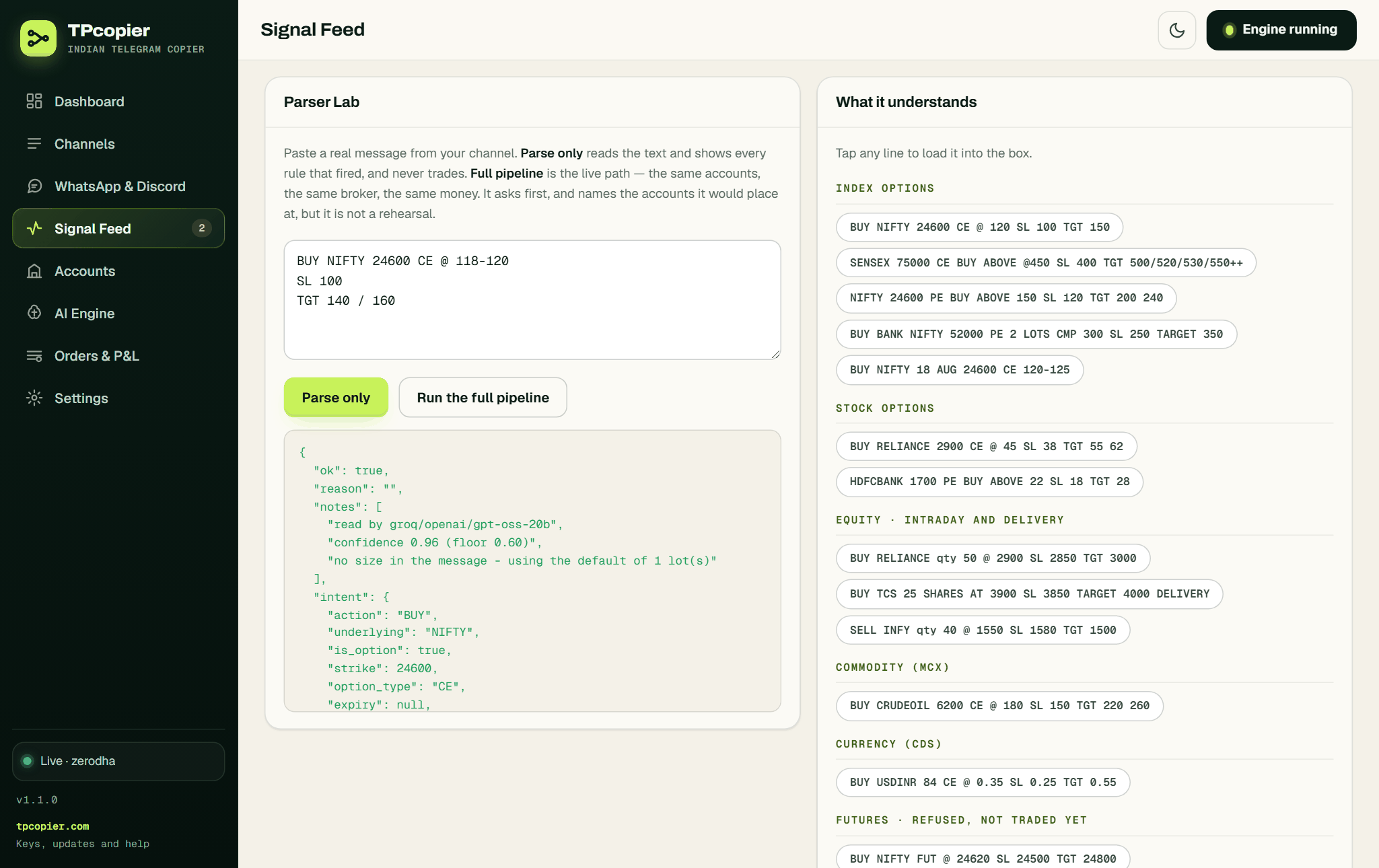 Parse only shows the notes and the order the app would build, and places nothing (example message, version 1.1.0).
 Each row says what happened and why, with a { } button for the full story (example data, version 1.1.0).
10. Go live with one small account
When the feed reads every call the way you would, switch one account to real. Keep it small: Fixed lots at 1, or a low Risk per trade (₹), and the low daily cap from step 5. Then check Orders & P&L through the day. It shows what is working at the broker, what filled, what the broker refused in its own words, and a Square off everything button.
 Running orders, the broker's own record of the day, open positions and closed P&L (example data, version 1.1.0).
Signals on WhatsApp or Discord
The Indian TeleCopier reads Telegram channels only. Its WhatsApp and Discord relay was removed on 22 October 2026, so a tipster who posts only in a WhatsApp group or a Discord channel can't be copied to an Indian broker. Many providers also run a Telegram channel, so ask for it. For your own strategies, the Indian TvCopier places TradingView alerts instead. WhatsApp to Indian brokers explains the routes that work.
Your morning routine
Most Indian broker APIs hand out a login that lasts one trading day, so renew it before the window opens at 09:15.
| Broker | What to renew |
|---|---|
| Zerodha | Press Log in with Kite on the account |
| Angel One | Nothing, the app logs in with your TOTP secret |
| Upstox, ICICI Direct, Alice Blue | The day's token or session |
| Kotak Neo | Trading token and session id, from one TOTP login |
| Fyers | The token, which ends at 6 AM |
| 5paisa | The token, which ends at 11:59 PM |
| Dhan, Groww | The token, when it runs out |
For Zerodha, once you set the Kite app's redirect address, one press of Log in with Kite opens Kite's page in your browser and saves the day's token on its own.
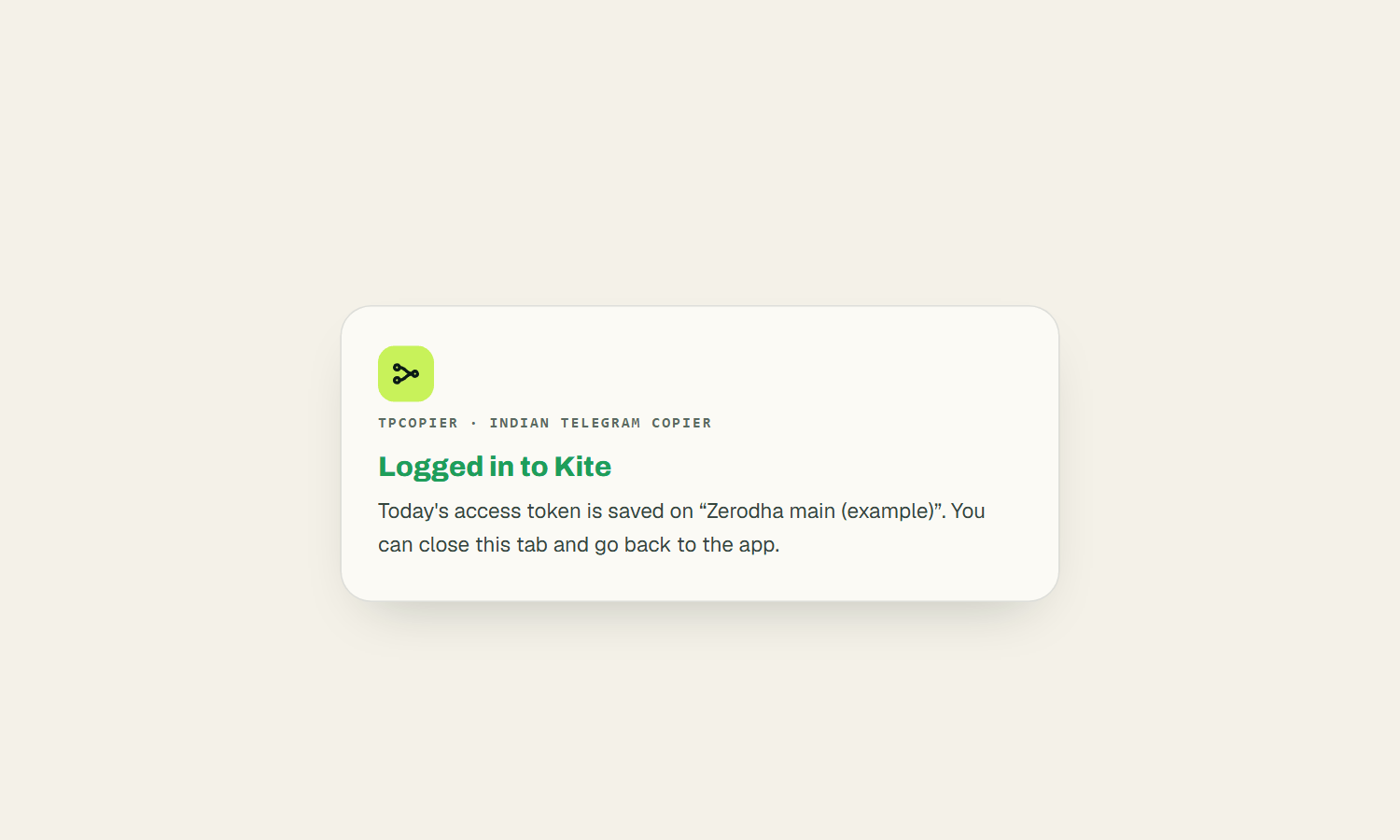 After Kite's login, the app confirms that today's token is on the account (example account, version 1.1.0).
After that, glance at the Static IP band. When tpcopier.com has a newer version, an Update available link appears under the version number in the sidebar.
 The sidebar foot with the version and an update notice (example version number).
Settings worth a look
Settings → Market & session holds the trading window, 09:15 to 15:15 unless you change it, and nothing fires outside it. Square everything off at stays blank unless you pick a time. The time zone under App is Asia/Kolkata, which matters on a VPS that runs on UTC.
Settings → Risk caps holds Ignore repeats within, a window in seconds for the calls channels repost two or three times, and the Kill switch, which blocks every order while it's on.
 The repeat window and the kill switch, which blocks every order while it's on (version 1.1.0).
When something doesn't work
| What you see | What to do |
|---|---|
| "Not signed in to Telegram" bar on Channels | Press Sign in to Telegram |
| Static IP band says "changed from" | Register the new address with your broker |
| "session expired" on a refused order | Renew that broker's day login |
| "not enough margin" | Add funds, or lower the lots on that account |
| "Demo limit: 10 signals a day reached" | The demo's allowance; exits still go through |
| "duplicate of a signal already handled" | Normal, channels often repost a call |
To move to another computer, ask TPcopier support to release the key, through Custom Work → Help in your TPcopier account. Then activate it on the new machine.
FAQ
Can I run Telegram auto trading in India from a VPS?
Yes. Use a Windows VPS with a static IP and register that IP with your broker. The app opens in its own window on the VPS desktop. It listens on 127.0.0.1 only, so nobody can reach it from outside.
What happens when my computer restarts?
Start the app again and it opens with your accounts, channels and settings as you left them. While it's closed, it reads nothing and places nothing.
Do I need a new key when I buy?
No. When you buy, the demo key itself becomes your lifetime key, so you don't type anything again.
Does it trade futures?
No. It trades index and stock options and NSE or BSE shares, plus MCX or currency options where your broker lists them. A futures call gets read and refused, and the Signal Feed says why.
Is this a Telegram trading bot?
Not the kind most search results describe. Those are crypto bots you command inside a Telegram chat, and they swap coins from a wallet you fund. Nothing here is typed to a bot and no wallet is involved: the orders land in your demat and trading account, with the broker's margin and charges.
How do I spot a fake Telegram tips channel?
Ask for its SEBI registration. A person who sells stock or option calls in India must be registered as a research analyst or investment adviser, and SEBI's site lets you search the number. Promises of fixed daily profit, or a channel that copies a broker's name and logo, are the usual warning signs. Run any channel on Paper first, since the app copies a bad call exactly as it copies a good one.
Which broker needs the least daily work?
Angel One, because the app logs in with your TOTP secret. Zerodha comes close, since Log in with Kite takes one press each morning. The broker pages cover each one, for example Telegram to Zerodha and Telegram to Angel One.
A first week of Telegram auto trading in India
Take the free demo on the Indian Copier page and follow the ten steps with one channel and one paper account. Read the Signal Feed for a session before you switch anything to real. A copier places a bad call as faithfully as a good one, so the quiet session is worth it. When you're ready, see pricing for the lifetime licence. The Telegram copier for ten Indian brokers page sums up what the app does.
Risk warning: trading options and shares carries a high risk of losing money and is not suitable for everyone. Nothing here is investment advice.