Telegram to Kotak Neo: Copy Calls from Your PC in 8 Steps
Telegram to Kotak Neo copying puts the calls from your channel on your Kotak account without you typing them. Kotak Securities now trades under the Kotak Neo name, as its October 2026 announcement puts it. TPcopier's Indian TeleCopier does it from your own Windows PC or VPS: it reads the channels you are in with your own Telegram login, then places each call through the Neo Trade API, Kotak's API for its Neo platform. Inside the app the broker is listed as Kotak Securities (Neo). The Kotak facts below were checked on Kotak's and SEBI's own pages on 5 November 2026, and the app details against version 1.4.10.
What you need first
- A Windows PC or VPS with a static IP. SEBI's retail algo framework applies to every stock broker from 1 April 2026 (SEBI circular of 30 September 2025, point 8). Under it a broker takes API orders only from a static IP it has whitelisted for that client, which is why this app runs on your computer and not in a cloud.
- Neo Trade API access at Kotak, with that IP registered. Kotak's Neo Trade API page describes the three parts: an access token from the API dashboard, a TOTP registered in an authenticator app, and static IP whitelisting.
- Your Telegram account. You sign in with your phone number. The app needs no API ID or API hash from you.
- A TPcopier licence key. The demo runs 2 days with one broker account and a daily cap on new entries. The lifetime licence is $150 once for one computer with one broker account, and each extra account is $30, also once (see pricing).
The two values Kotak gives you each morning
Kotak's session does not last. The Kotak form in the app asks for:
- Trading token: the token from the Neo TOTP login. It expires every trading day.
- Session id: the sId that comes back with the same login. The app needs both.
- Consumer key: from your Neo app registration. It is optional, because the token and session id authorise every call.
Unlike Angel One, where the app logs itself in, Kotak's TOTP login is yours to run each trading morning. Paste both values from that one login, then use Save & test the connection on the account. A good pair answers "connected" with the amount Kotak reports as available. A stale pair gets "Kotak Neo refused the token or session id", and the fix is a fresh login. Refreshing only one of the two looks exactly like a dead token, so the pair always goes in together.
 The Kotak Securities (Neo) form: trading token and session id are both needed, the consumer key is optional (example name). Shot on version 1.1.0; the three boxes are unchanged, the WhatsApp & Discord item in the sidebar has since been removed.
Where the app gets a Kotak price
Kotak streams its market data over a websocket, and early versions of the app had only one REST price to work with: the last price in your position book, which exists only for a contract you already hold. Since version 1.3.0 (13 October 2026) the app also asks Kotak's quotes endpoint, the one in Kotak's own SDK, for the last traded price of many contracts in one call. Kotak lists live quotes among the things the API offers.
We have not yet watched that quotes call on a live Kotak account, so treat it as new and give it a Paper day first. If a quote does not come back, the app falls back to the position book, and for a contract you don't hold there is then no price at all. What that means in practice:
- A call with a price goes in as a limit at the channel's price while Price to enter at says The channel's price. No live price is needed for that, which makes it the safest setting at Kotak.
- A call with no price needs a live price to become a protective limit. Without one, it goes to Kotak as a market order.
- Skip if the price has moved more than (%) compares the live price with the channel's. With no live price it has nothing to compare, so it cannot stop a late entry.
- Once you hold the position, exits, breakeven and trailing read the price from your position book, so they work as they do at other brokers.
Channels that write "BUY ABOVE 380" or "@ 120" hand the app a limit price. Channels that post no price are the ones to be careful with at Kotak.
Setting up Telegram to Kotak Neo in 8 steps
1. Take a key and the download
Create your TPcopier account, open the Indian Copier page and press Get my free demo key, or Buy lifetime. Download for Windows sits on the same page. Buying turns the same key into a lifetime one.
2. Activate on the static-IP computer
Start the app on the PC or VPS whose IP Kotak will whitelist. It needs Microsoft WebView2, which Windows 11 has; on Windows 10 it offers to install it first. Paste the key and activate. One key works on one computer.
3. Sign in to Telegram
The app opens its dashboard only after Telegram is signed in. Give your number in international format and press Send login code. The code arrives in the Telegram app on your phone, not as an SMS. Enter it, then your two-step password if your account has one.
4. Register the IP with Kotak
On the Dashboard, the Static IP band shows the address your broker must have on file, with a Copy button. Paste it into Kotak's static IP whitelisting before the first order, or Kotak refuses the orders this computer sends.
5. Connect Kotak Securities (Neo)
Go to Accounts, press + Connect a broker and pick Kotak Securities (Neo) in the "Which broker?" grid. Paste this morning's trading token and session id. Under "What is this account for?" tick the markets you want, such as Options and Equity. Paper trading is ticked by default: live prices, every order simulated inside the app, nothing sent to Kotak. Leave it on for now and press Connect.
6. Set the size and the limits
Each market has its own settings tab on the account. Under How much, choose Fixed lots, or Auto lots, which sizes each order from its stop loss. On the general tab, set low ceilings for the first days: Most orders in a day, Most one order may be worth (₹) and Most positions open at once. Check that Price to enter at says The channel's price.
7. Switch the channel on
On Channels, press Refresh from Telegram and switch on the channel you copy. The app reads only the channels you switch on.
8. Check the reading, then one order by hand
Paste a one-lot call in the Parser Lab and press Parse only. It shows how the app reads the message and never trades. Run the full pipeline is the live path, with the same accounts and the same money, so keep it for when you mean it. The app's own note for Kotak adds one step: place one small order by hand in Kotak Neo itself before the app sends any. Then press Start engine, watch a Paper day in the Signal Feed, and switch the account to Real in Settings only when those trades look right.
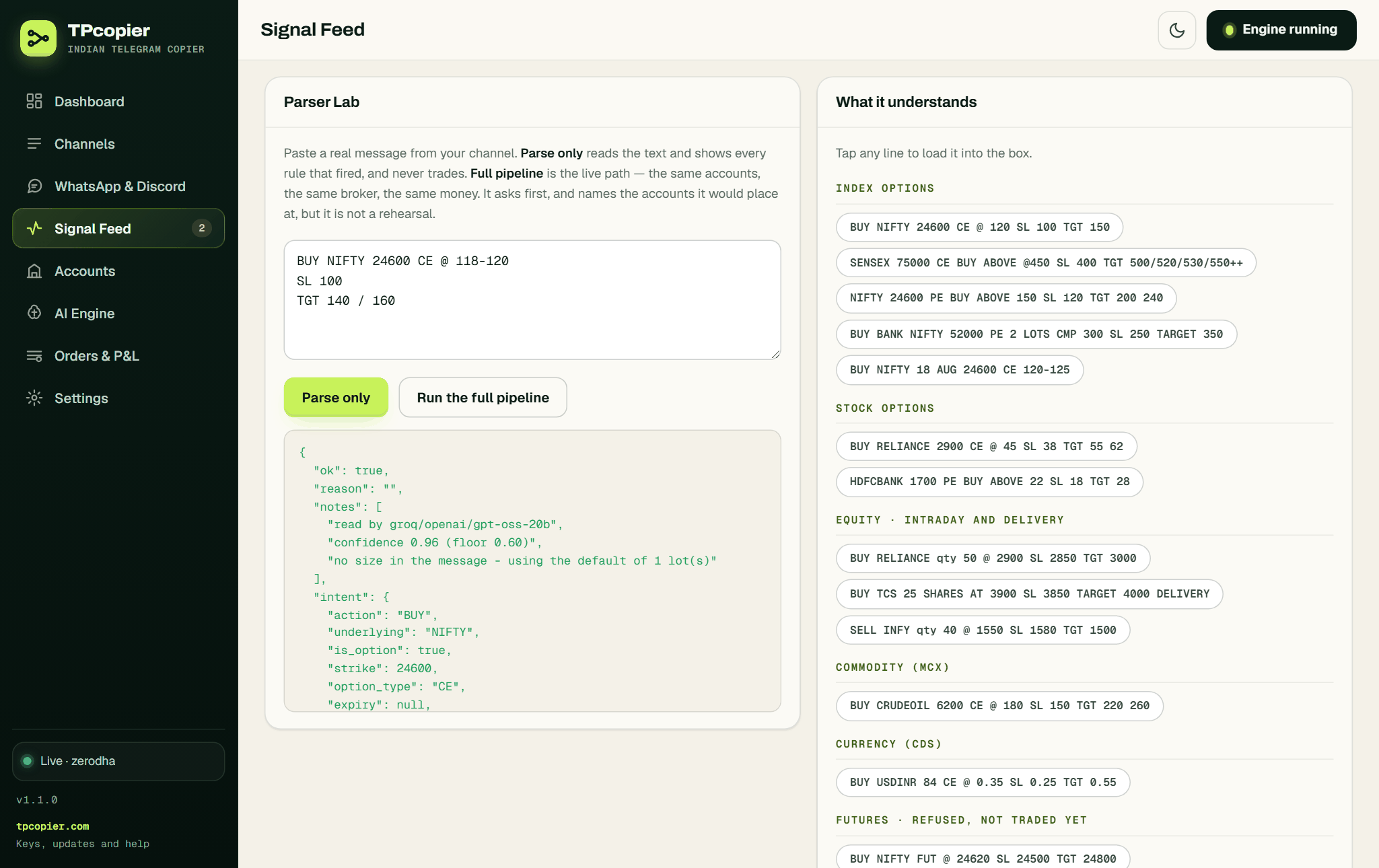 The Parser Lab: Parse only never trades, Run the full pipeline is the live path (example message). Shot on version 1.1.0; the WhatsApp & Discord item in the sidebar has since been removed.
How the app reads Kotak's scrip master
Kotak publishes its contracts as daily files, one per segment: NSE and BSE cash, NSE and BSE F&O, MCX and currency. Early in the morning today's file may not exist yet, and on a holiday it never appears, so the app falls back to the latest earlier file, up to four days back.
The files hold two traps, and the app handles both. Strikes and ticks come in paise, so 2500000 means a strike of 25000. Expiry dates count from 1 January 1980 instead of 1970, which would make every contract look ten years old.
If one segment fails to download, the others still trade, and a "not found" refusal then says that part of the scrip master didn't load. That saves you a morning spent checking a strike that was right.
An example: a SENSEX call
An example message, not a real call:
SENSEX 81500 PE buy above 380
SL 330
TGT 440 / 490
The model reads a buy of SENSEX 81500 PE at 380, with a stop at 330 and targets at 440 and 490. SENSEX strikes step in 100, so the strike passes. The app finds the contract in Kotak's BSE F&O file, takes its trading symbol from there and sends a limit order at 380 with product MIS for intraday. Carried overnight it would go as NRML on an option, or CNC on a share.
Exits use the same trading symbol. When the channel posts "EXIT SENSEX 81500 PE", the app finds that symbol in your positions and closes what Kotak says you hold. A message with no strike, such as "BUY NIFTY CE", has its strike picked by premium from the live quotes, which is one more reason to test the quotes call on Paper first.
Errors you may see from Kotak
- "Kotak Neo refused the token or session id": run the TOTP login again and paste both new values.
- "Kotak Neo has no ... check the strike is one the exchange actually lists": the strike isn't in Kotak's file, or part of the file didn't load.
- "... is not in the Kotak Neo NSE cash list": the share name didn't match a cash scrip, which Kotak writes like RELIANCE-EQ.
- "Kotak Neo accepted the order but returned no order number": check Kotak's order book before you place anything again.
- An HTTP 429 answer: Kotak's rate limit, not a fault in the order. Kotak's page puts order placement at up to 10 orders a second.
FAQ
Do I need my own AI key?
No. The app comes with an OpenAI key built in for reading messages. On AI Engine you can paste your own OpenAI, Groq or DeepSeek key instead if you prefer.
Does Kotak charge for the Neo Trade API?
Kotak's page says the Trade API is free of cost at present, with no subscription charge, and that brokerage is ₹0 per order on its trade free plans when you trade through the API. Other charges still apply, and the square-off leg of a bracket order is charged at standard brokerage.
Can the Kotak Neo login be automated?
Not in this app. Its Kotak form takes the day's trading token and session id, not your TOTP secret, so it has nothing to log in with on its own. That is the difference from Angel One, whose form does take the TOTP secret.
Is a Telegram tips channel safe to copy into Kotak Neo?
Check it before you copy it. Kotak Neo's own video Telegram Trading Trap: Verify Before You Invest warns about calls pushed through Telegram. In India, a person who sells stock or option calls must be registered with SEBI as a research analyst or investment adviser, so search SEBI's site for the registration number the channel gives. Then run it on Paper for a few sessions, because the app copies a losing call exactly as it copies a winning one.
Can WhatsApp or Discord calls go to Kotak Neo?
Not with this app. It reads Telegram channels only, since its WhatsApp and Discord relay was removed on 22 October 2026. WhatsApp to Kotak Neo lists the routes that do work.
Other routes into Kotak Neo
If your calls come from TradingView alerts, see TradingView to Kotak Neo. For the other nine brokers, read Telegram and TradingView to Indian brokers. The Telegram trade copier for Indian brokers page explains why the app runs on your PC and not in the cloud, and the install guide walks through every screen. All sales are final, so use the demo first.
TPcopier is not affiliated with Kotak Securities. Broker names are trademarks of their owners.
Risk warning: trading options and shares carries a high risk of losing money and is not suitable for everyone. Nothing here is investment advice.