Telegram to ICICI Direct Signal Copier: Easy Breeze, 8 Steps
Your calls come from a Telegram channel, and your broker is ICICI Direct. Its trading API, Breeze, is the odd one out among the ten brokers in the Indian TeleCopier. It has no trading symbols, it wants every request signed, and its login hands you a number that isn't the token it signs with. Even so, Telegram to ICICI Direct runs as one Windows program on your own PC or VPS. It reads your channels with your own Telegram login, then places each NIFTY, BANKNIFTY or stock call in your ICICI account.
Have these ready before you start:
- a Breeze app at ICICI Direct, with your static IP registered to it;
- a Windows PC or VPS that owns that IP;
- your Telegram account, plus your own API key for Groq, OpenAI or DeepSeek;
- a TPcopier licence key: the demo is free for two days from activation, and the lifetime licence is $150 once for one computer (see pricing).
Why Telegram to ICICI Direct runs on your own PC
SEBI's retail algo framework came into force on 1 April 2026. From then on, a broker takes an API order only from a static IP registered to that client, though a family may share one. An order from a cloud server would come from the wrong address, and ICICI would refuse it. So the copier is software on your machine, and every order leaves from your IP.
The three Breeze values
Pick ICICI Direct (Breeze) in the app and the form asks for three things:
- App key, from your Breeze app registration.
- Secret key, which the form marks "Kept only on this computer". The app signs each request with a SHA-256 checksum over a timestamp, the request body and this secret, so the secret itself never travels.
- Session token, from the Breeze login page. It expires every trading day.
The session token is the fiddly one. After you log in on the Breeze login page, ICICI puts an API_Session number in your browser's address bar, eight or nine digits long. Breeze won't sign with that number, because it wants it swapped for the real session token first. So paste the number as it is. The app makes the swap once and keeps the result. If you already hold a swapped token, paste that instead, since the app uses anything that isn't all digits as it stands.
Next comes Test the connection. A live session answers "connected as" with your ICICI user name. An old one says "the session token has expired - Breeze tokens last one trading day". A number ICICI won't swap brings a reminder of where to find it. Either way, log in on the Breeze login page again and paste the new number. For the Breeze app itself and the IP registration, follow ICICI's Breeze API documentation.
How ICICI Direct names a contract
Breeze has no symbol to build and no instrument file to download. Instead, an option has four parts: a stock code, an expiry date, a strike, and call or put.
Stock codes
ICICI doesn't use NSE symbols. RELIANCE is RELIND there, for example, and ICICIBANK is ICIBAN. So the app reads this mapping from ICICI's Security Master file every 12 hours. When a download fails, it tries again ten minutes later and sends the NSE symbol meanwhile.
Expiry
The app asks ICICI's own option chain which expiries exist for that strike, rather than working a date out from a calendar. With no expiry in the message, it takes the nearest date ICICI lists. If the message names a date ICICI doesn't list, the app refuses the call and shows the nearest ones.
Lot and tick size
Breeze publishes neither. For the lot, the app tries ICICI's security master first, then a size another broker's file reported that day, and only then its own built-in table. For the tick, it borrows one from another broker's file read that day. If ICICI is the only broker in your app, there's nothing to borrow, so prices go out rounded to two decimals.
That's harmless for prices the channel posts, since those go out as posted. It matters for prices the app works out itself, like a protective limit or the limit behind a stop. For example, 3% under a stop of 101.35 is 98.31, and the exchange refuses that price.
Setting up Telegram to ICICI Direct in 8 steps
Step 1: get your key and the app
Sign up at tpcopier.com, go to the Indian Copier page and press Get my free demo key, or Buy lifetime. Then press Download for Windows. You get one demo per TPcopier account and per computer. It lasts two days from activation and acts on up to 10 signals a day, and buying turns the same key into a lifetime one.
Step 2: activate, then copy the IP to Breeze
Start the app on the machine with the static IP. It needs Microsoft WebView2, which Windows 11 has, and on Windows 10 it offers Install now or Skip for now first. Paste the key and press Activate. The Dashboard then opens with the Static IP band, so press Copy and register that address with your Breeze app.
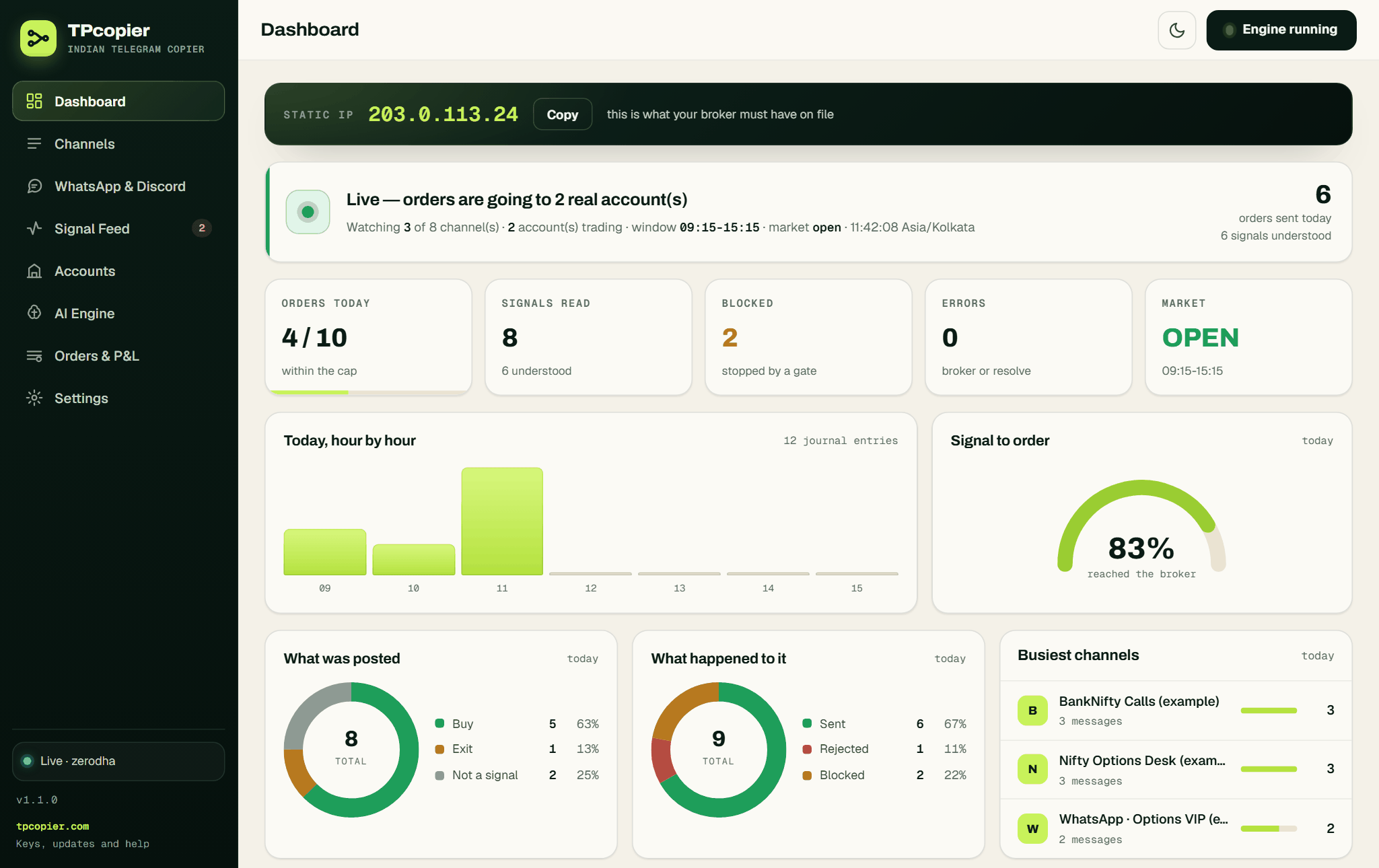 The Static IP band reads "this is what your broker must have on file" (example address and figures).
Step 3: pick ICICI Direct (Breeze)
Go to Accounts and press + Connect a broker. The "Which broker?" grid shows all ten brokers, and the ICICI tile says 3 keys to paste. If you've set up another account already, the new one starts with that account's order settings, so check them afterwards.
 "Which broker?" lists every broker the app supports and how many keys each one needs.
Step 4: paste the three Breeze values
Fill in App key, Secret key and Session token, which is that API_Session number. Press Save this account, then Test the connection, and look for "connected as". Lower on the same form, keep Convert market signals into protective limits ticked.
 The ICICI Direct (Breeze) form, where the session token box warns that it expires every trading day (example name).
Step 5: decide how stops go out
Scroll down to The stop loss, and walking it. While Send the stop loss as a real order is off, the app only records the stop from the message. Tick it, and the stop goes to ICICI after the entry has filled. The breakeven and trailing boxes sit beside it, and neither ever moves a stop against you.
 A real stop order and breakeven are ticked here, with trailing off (example values).
Step 6: choose the AI engine
On AI Engine, paste your own key on the Groq, OpenAI or DeepSeek card and press Use this engine. The model reads each message. After that, the app checks the strike step, CE or PE, the expiry and the premium before anything reaches ICICI.
Step 7: sign in to Telegram and turn on the channel
Open Settings > Telegram first. When the tab shows API ID and API hash boxes, create them free at my.telegram.org in the API development tools section, paste them and press Save everything. After that, Sign in to Telegram asks for your number in international format. Press Send login code and read the code in your Telegram app, because it doesn't come by SMS. Then press Verify, adding your two-step password if you use one. Last, open Channels, press Refresh from Telegram and switch your channel on.
 The app's own Telegram sign-in card asks for your number in international format.
Step 8: watch a session before real orders
Switch the ICICI account off on Accounts, then press Start engine. The Signal Feed keeps reading and writing down every call, but nothing goes to ICICI. When the rows match your own reading of the channel, switch the account on with a small share and a low daily cap.
 The journal shows sent orders, a blocked repeat, an ignored greeting and a margin rejection (example data).
One call, followed into Breeze
Here's an example message, not a real call:
BUY NIFTY 25100 PE ABOVE 142
SL 118
TGT 170 / 195
The AI reads a buy of NIFTY 25100 PE at 142, with a stop at 118 and targets at 170 and 195. NIFTY strikes step in 50, so 25100 passes the check.
Then ICICI's side takes over. First, the app finds the stock code. Next, it asks the option chain for the nearest expiry of the 25100 put. It sizes one lot from the security master, and finally it sends a limit order at 142, product "options", on NFO. In the journal you'll see NIFTY 25100 PE plus the expiry, a label the app builds itself, since Breeze never sees a symbol.
At Breeze the product is the segment. So an option always goes as "options", whatever your Product setting says. That setting only matters for stocks: Intraday goes as "margin", and Delivery / carry as "cash".
Stops and exits at ICICI Direct
Breeze calls a stop "stoploss", and it's always a stop-limit. With the account's Kind of stop on SL, the trigger is the channel's stop, and the limit sits your market protection band beyond it, 3% unless you change it. Breeze has no stop-market either, so the app sends SL-M as a stop-limit whose limit is the trigger itself.
Exits need care too. A Breeze position row names only the stock code, so every NIFTY option you hold just says NIFTY. When a channel posts "EXIT NIFTY 25100 PE", the app matches the stock code, call or put, strike and expiry. Only then does it close what ICICI says you hold.
Messages you may see from ICICI Direct
| In the Signal Feed or on Accounts | What it means and what to do |
|---|---|
| the session token has expired - Breeze tokens last one trading day | Log in on the Breeze login page and paste the new API_Session number |
| ICICI Direct did not accept that API session number | Same fix; copy the whole number from the address bar |
| ICICI Direct lists no ... contract - check the strike is one the exchange actually has | The strike isn't on NFO, or the call is for a BSE index |
| ... has no ... expiry at ICICI Direct. Nearest: ... | The message named an expiry ICICI doesn't list |
FAQ
Which API does Telegram to ICICI Direct use?
Breeze, ICICI Direct's own trading API. You register a Breeze app and your static IP with ICICI. The app then needs the app key, the secret and each day's session.
Why does the journal say RELIND when my channel wrote RELIANCE?
ICICI names stocks by its own short codes, and RELIND is its code for RELIANCE. The app reads that mapping from ICICI's Security Master, so your channel can keep writing NSE symbols.
Can I copy SENSEX option calls to ICICI Direct?
Not with this app. It looks ICICI options up on NFO, NSE's F&O segment, so NIFTY, BANKNIFTY and stock options work. A SENSEX or BANKEX call fails, with the reason in the Signal Feed.
Can WhatsApp or Discord calls reach ICICI Direct too?
This app reads Telegram channels only. Its WhatsApp and Discord relay was removed on 22 October 2026, so a tipster who posts only in a WhatsApp group or a Discord channel can't be copied to ICICI Direct. WhatsApp to ICICI Direct lists the routes that do work.
Does Telegram to ICICI Direct trade futures?
No. The app refuses a futures call and writes "futures are not supported yet" in the Signal Feed. It places options and NSE cash equity only.
Try it before the market opens
Sign up and take the demo key from the Indian Copier page. Get as far as "connected as" on the Accounts page, then watch one session with the account switched off. That's the calm way into Telegram to ICICI Direct.
For the other brokers, see Telegram and TradingView to Indian brokers, and for TradingView alerts read TradingView to ICICI Direct. Calls with no strike price are covered on the Telegram copier for Indian brokers page. The lifetime price is on the pricing page, and all sales are final.
TPcopier is not affiliated with ICICI Direct. Broker names are trademarks of their owners.
Risk warning: trading options and shares carries a high risk of losing money and is not suitable for everyone. Nothing here is investment advice.