Telegram to Groww Signal Copier: Simple Setup in 8 Steps
A BANKNIFTY put shows up in your Telegram channel, and by the time you've opened Groww, found the strike and typed a price, the premium has moved on. Telegram to Groww copying takes the typing away. The Indian TeleCopier is a Windows app that reads your channels with your own Telegram login. Then it sends each call to your Groww account as a real order, through Groww's trade API.
You need four things: a Windows PC or VPS with a static IP registered at Groww, API access on your Groww account, your Telegram account, and your own API key for the AI model that reads the messages (Groq, OpenAI or DeepSeek). There's a free two-day demo, and the lifetime licence is $150 once (see pricing).
Why the copier sits on your PC
SEBI's framework for retail algo trading has applied since 1 April 2026. Under it, a broker accepts an API order only from a static IP registered to that client, although a family may share one. A cloud copier would send your order from its own address, so this one runs where your IP is. Your Groww token and Telegram login stay on that machine too.
A small Windows VPS is the calm choice, since its address never changes. A home PC works as well if your internet provider gives you a static IP.
The Groww access token, in plain words
Groww asks for less than most brokers. Its form in the app has three boxes, and only one of them matters:
- Access token: you create it on the Groww trade-api dashboard, and the app's own hint calls it short-lived.
- API key and API secret: both say Optional. The app keeps them, but every Groww call runs on the access token alone.
The app can't make a token for you. When one runs out, create a fresh one and paste it over the old one. Groww decides how long a token lives, so its trade API documentation is the place to check.
Test the connection then asks Groww for your positions and gives one of three answers:
- "token accepted" means you're set for the day.
- "token rejected - Groww access tokens are short-lived, regenerate it" means the token ran out, or you pasted only part of it.
- "something between this computer and Groww answered instead of Groww" points at a proxy or a login page on your network.
Run that test before 9:15. A dead token hurts exits as much as entries. If the app can't read your Groww positions, it won't guess what you hold, so it sends no exit and the Signal Feed tells you why.
Setting up Telegram to Groww in 8 steps
1. Get a key and the download
On tpcopier.com, create a TPcopier account, open its Indian Copier page and press Get my free demo key, or Buy lifetime if you've already decided. Download for Windows is on the same page. The public Indian Copier page explains all of it before you sign up.
The demo is the whole app for two days, counted from the moment you activate it. It acts on up to 10 signals a day, but only entries count, so an exit is never held back. If you buy, the demo key becomes your lifetime key.
2. Activate it on the machine with the static IP
Run the download on the PC or VPS whose address you'll register. The app needs Microsoft WebView2, which Windows 11 already has. On Windows 10 it lists what's missing and offers Install now or Skip for now before it downloads anything. After that, paste your key on the licence screen and press Activate. One key works on one computer.
 The licence screen asks for the key you received from TPcopier (the computer name is an example).
3. Register the static IP with Groww
The Dashboard opens with a dark Static IP band. That's the address Groww will see, and the band says it plainly: "this is what your broker must have on file". Press Copy, then register the address with Groww, following Groww's own steps for API access.
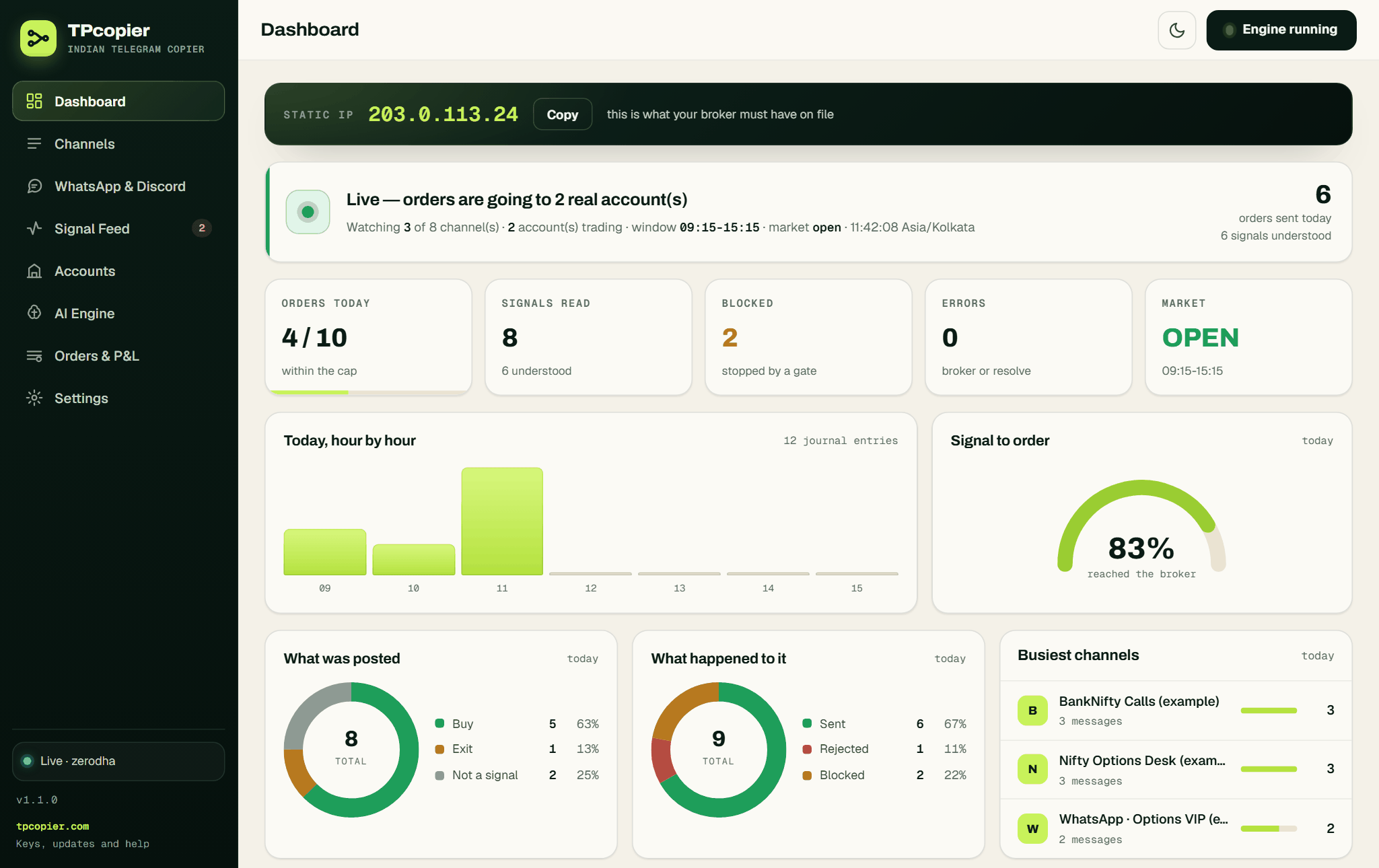 The Static IP band sits above a busy trading day (example data).
4. Connect Groww
Open Accounts, press + Connect a broker and pick Groww. Name the account and paste the access token. Its share of every order stays at 1 for full size, while 0.5 halves every order here. Leave Static IP for this account empty unless this computer has more than one internet connection. Next, press Save this account and then Test the connection.
 A blank Groww account still says "keys missing", and only the access token is required (example name).
5. Choose the AI engine
Every message goes to the model you pick on the AI Engine page. Paste your own key on the Groq, OpenAI or DeepSeek card, choose a model and press Use this engine. The app's hints call Groq the fastest, with a free tier, and DeepSeek the cheapest. If a second provider also has a key, it stands by for the moments the first one doesn't answer.
 Groq is active here, and OpenAI takes over if Groq still fails after 3 retries (example setup).
The model only reads. The app then checks its answer, from the strike step to the expiry.
6. Sign in to Telegram
Open Settings > Telegram. If the tab shows API ID and API hash boxes, create both for free at my.telegram.org under API development tools (Telegram's own instructions). Paste them and press Save everything. Then press Sign in to Telegram, type your number in international format and press Send login code. The code lands in the Telegram app on your phone, never by SMS. Press Verify, and type your two-step password if your account has one. The app signs in as you, because a bot can't read somebody else's channel.
 The Telegram tab: API ID, API hash, your phone number and the Sign in to Telegram button.
7. Switch your channel on
On Channels, press Refresh from Telegram and switch on the channel you copy. Open it to set This channel's size and Trade it on. With nothing ticked there, the channel trades on every account that's switched on. Once a channel is on, the app studies its recent posts and learns its layouts, so a message in a known layout costs no AI call.
 "Nifty Options Desk (example)" is on at size 1 and trades on two ticked accounts.
8. Test one message, then start
Scroll to the Parser Lab at the foot of the Signal Feed. Paste a real post from your channel and press Parse only, which never trades. You'll see which model read it, how sure it was, and the trade it understood. Run the full pipeline is the live path to your real accounts, so leave it alone for now.
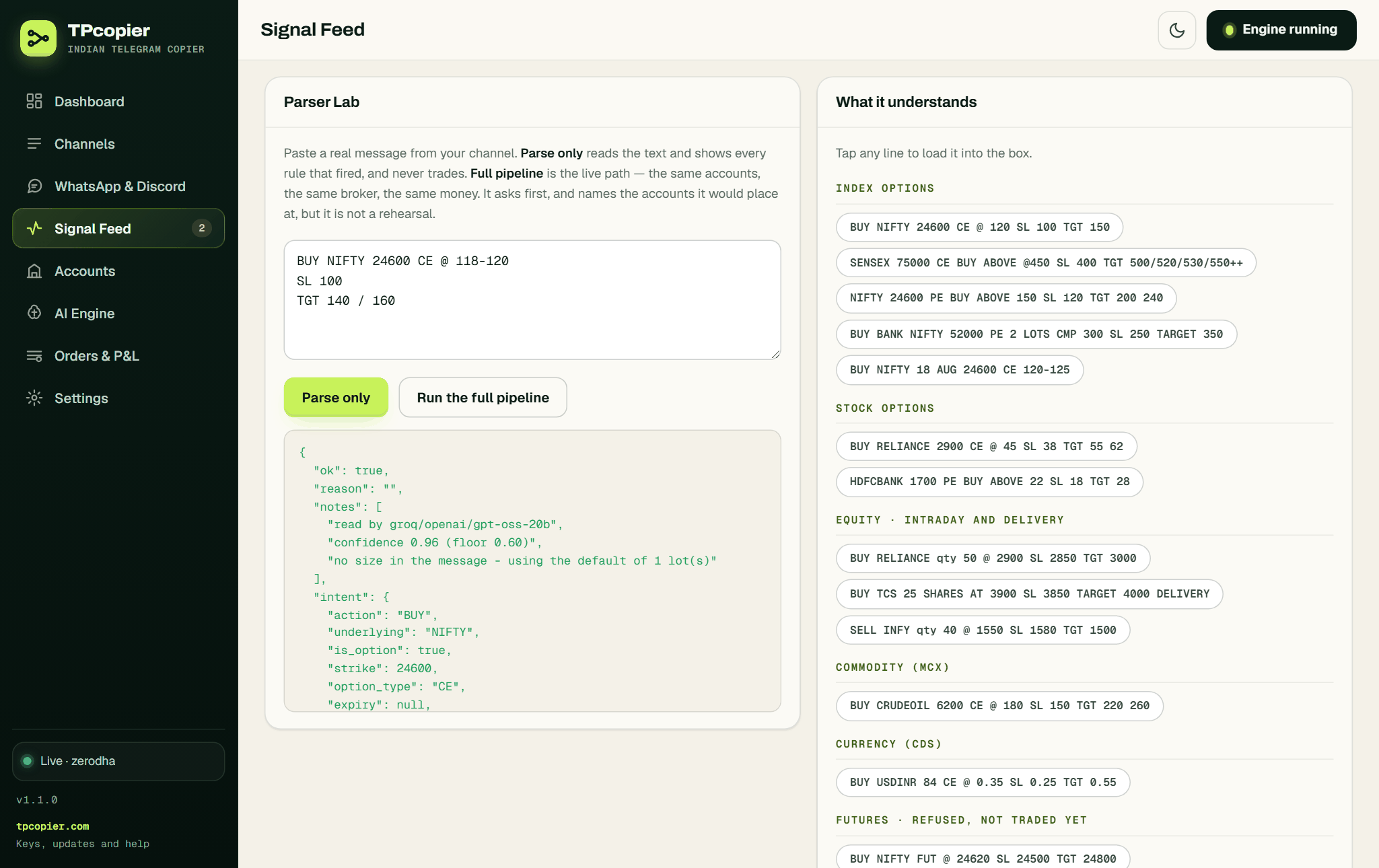 Parse only reads a NIFTY call (example), notes a confidence of 0.96 and places nothing.
Then switch the Groww account off and press Start engine. The app keeps reading and logging every call, yet sends nothing. Once a full session matches what you'd have done by hand, switch Groww back on with a small share and a low Most orders in a day.
What Groww actually receives
Groww's API keeps exchange and segment apart. So a NIFTY option goes as exchange NSE plus segment FNO, never as "NFO". The app reads both from Groww's instrument file and fetches a fresh copy once it's six hours old. It also remembers each order's segment, because Groww wants it again to change or cancel an order, and moving a stop counts as a change.
| In the app | What Groww gets |
|---|---|
| Product: Intraday (the default) | MIS |
| Product: Delivery / carry, on an option | NRML |
| Product: Delivery / carry, on a stock | CNC |
| A call that names a price | LIMIT at that price |
| Kind of stop | SL, or SL_M |
| Where contracts come from | CASH, FNO and COMMODITY |
Two Groww habits need care. First, the app gives every order its own reference. Groww rejects a repeat with "GA007 Duplicate order reference id", and a shared reference would bounce the stop behind an entry. Second, Groww can report a delivery buy as DELIVERY_AWAITED, which the app treats as filled, so the stop still goes out.
A call with no price is where Convert market signals into protective limits earns its place, and it starts ticked. First the app reads Groww's last traded price. Then it sends a limit 0.5% through it, or whatever Limit buffer through the touch says, on the contract's tick. Only when Groww returns no price does the order go as MARKET.
An example call, read line by line
Here's an example of a Hinglish call, made up for this page:
BANKNIFTY 52300 PE lelo 210-215
SL 180
TGT 250 / 280
The app reads a buy of BANKNIFTY 52300 PE with two entry levels, a stop at 180 and targets at 250 and 280. BANKNIFTY strikes step in 100, so 52300 passes. With no expiry in the text, it takes the nearest one Groww lists for that strike. An account enters at the first level unless you set it to take the second, one order at each, or the average.
No size in the message means the default, one lot. The app would refuse a NIFTY strike like 24640 rather than round it, because NIFTY moves in 50s.
Stops need one tick. Until you turn on Send the stop loss as a real order, the app only records the stop from the message. With it on, the stop goes to Groww once the entry has filled, and breakeven or trailing only ever move it in your favour.
WhatsApp and Discord calls to Groww
This app reads Telegram channels only. Its WhatsApp and Discord relay was removed on 22 October 2026, so a tipster who posts only in a WhatsApp group or a Discord channel can't be copied to Groww. WhatsApp to Groww lists the routes that do work.
FAQ
Is Telegram to Groww copying allowed?
Yes, when it works the way SEBI's April 2026 framework asks: API orders from a static IP registered to you. Below 10 orders a second, you need no strategy registration. Whether a channel deserves your money is another matter, because a copier repeats bad calls as faithfully as good ones.
How often do I paste a new Groww token?
Whenever the old one runs out. Groww's tokens are short-lived and the app can't renew them, so test the connection each morning. "token accepted" means today's token works.
Does Telegram to Groww trade futures?
No. The app reads a futures call and refuses it, and the Signal Feed says "futures are not supported yet". It trades index and stock options and NSE cash equity, plus MCX options where Groww's file lists them.
What do the demo and the licence cost?
The demo is free for two days from activation, with up to 10 signals a day. The lifetime licence costs $150 once, for one computer, and your demo key turns into it when you buy. Check pricing for the current figure, since all sales are final.
Can one call go to Groww and another broker together?
Yes. Every account that's switched on gets each call at the same moment. The size is the channel's size times the account's share, and you can pin a channel to some accounts only.
Start with the demo and the account off
Let the demo read your channel for one session with Groww switched off, then go live at one lot. That's a sensible start to Telegram to Groww.
Sign up or read the Indian Copier page first. Telegram and TradingView to Indian brokers compares all ten brokers. If your calls come from TradingView alerts, read TradingView to Groww instead. The Telegram copier app for Indian brokers page explains why no bot has to join the channel.
TPcopier is not affiliated with Groww. Broker names are trademarks of their owners.
Risk warning: trading options and shares carries a high risk of losing money and is not suitable for everyone. Nothing here is investment advice.