Telegram to Dhan Signal Copier: Simple Setup in 8 Steps
You trade options at Dhan and take ideas from a Telegram channel. Copying each call by hand is slow, though, and a slow fill on a fast option costs real money. Telegram to Dhan copying does the typing for you. The Indian TeleCopier reads the channel with your own Telegram login and places each call through DhanHQ, Dhan's trading API.
SEBI's retail algo framework, live since 1 April 2026, ties every API order to a static IP that the client has registered. So the copier runs as Windows software on your own PC or VPS, not in anyone's cloud. Our Indian Telegram copier page explains that rule in more detail. Dhan is among the easier brokers to connect, with just two values to paste. It also has one quirk that matters for safety, and the sections below cover it along with the DH codes the app translates.
What Telegram to Dhan copying needs from Dhan
In the app, a Dhan (DhanHQ) account has two boxes, and the hints tell you where each one lives:
- Access token - from the DhanHQ dashboard, under Profile → DhanHQ Trading API.
- Client id - your Dhan client number, shown beside your name.
The token lasts until it expires, and the app tells you on the Accounts page when that happens. Dhan's DhanHQ documentation explains how long a token lives and how to make a new one. The two values also belong together. A token from one Dhan account with another account's client id fails exactly like an expired one.
Test the connection does a little more at Dhan. It reads your funds, so a good answer looks like "connected - ₹… available" with your balance. A refusal says "Dhan refused the access token - it has expired or belongs to a different client id". If a proxy or a Wi-Fi login page answers instead of Dhan, the app says so rather than showing a healthy account.
Why protective limits matter more at Dhan
Dhan's order API has no market-protection field. Zerodha and Upstox let the app attach a band to a market order, but Dhan takes none, so a market order there is a plain market order.
In Telegram to Dhan copying, that makes one switch on each account important: Convert market signals into protective limits. It's on by default, and you should leave it on. With it, a call that names no price goes as a limit 0.5% through the last traded price. In a liquid contract, that fills like a market order. In a thin one, it won't fill at an absurd price, and that's exactly when a bare market order hurts.
Telegram to Dhan in 8 steps
Before the app opens
-
Take a key and the download. Open a TPcopier account and go to the Indian Copier page. Get my free demo key gives you a key for two days from activation, good for up to 10 signals a day, and Download for Windows gives you the app. If you start with the demo and buy later, the demo key becomes the lifetime key.
-
Get Dhan ready. At Dhan, register the static IP of the PC or VPS that will run the app. Then open the DhanHQ dashboard, go to Profile → DhanHQ Trading API and make an access token. Note your client id too. Not sure which IP to register? Once the app runs, its Dashboard shows the address in a Static IP band with a Copy button.
Connect Dhan in the app
-
Install, activate, open Accounts. Run the download on that machine, paste your key on the licence screen and press Activate. Then open Accounts, where each account gets a row with its own switch. Press + Connect a broker and choose Dhan (DhanHQ).
 The Accounts list, each account with its own switch, and + Connect a broker at the top right (example accounts).
-
Fill the two boxes. Paste the Access token and the Client id, press Save this account, then Test the connection. Look for "connected - ₹… available" with your balance.
 A new Dhan account with just two keys, the access token and the client id (example).
-
Keep protective limits on. Scroll to What this account does with an order. Convert market signals into protective limits should stay ticked, with Limit buffer through the touch at 0.5. Under the ceilings, Most lots in one order starts at 1, so raise it only when you mean to.
 One account's order rules, with protective limits ticked and a 0.5 per cent buffer (example values).
Telegram, the reader and a test run
-
Sign in to Telegram and pick channels. In Settings → Telegram, fill API ID and API hash if the tab asks for them. They're free at my.telegram.org under API development tools. Press Save everything, then Sign in to Telegram. Your number goes in international format, and the code shows up in the Telegram app rather than as an SMS. After Verify and any two-step password, open Channels, press Refresh from Telegram and switch on the channels to copy.
 The sign-in card: your number in international format, then Send login code.
-
Choose the AI engine. On AI Engine, pick Groq, OpenAI or DeepSeek, paste your own key and press Use this engine. The same page sets how often to retry a model that doesn't answer, and it names the provider that stands by after that.
 Groq active, three retries and openai on standby, with each provider's key and model below (example set-up).
-
Test with the Parser Lab, then go live. Paste a few real posts into the Parser Lab at the foot of the Signal Feed and press Parse only, which never trades. Next, press Start engine and run a session with the Dhan account switched off while the Signal Feed logs each call. When the reading is right, switch the account on with a small share.
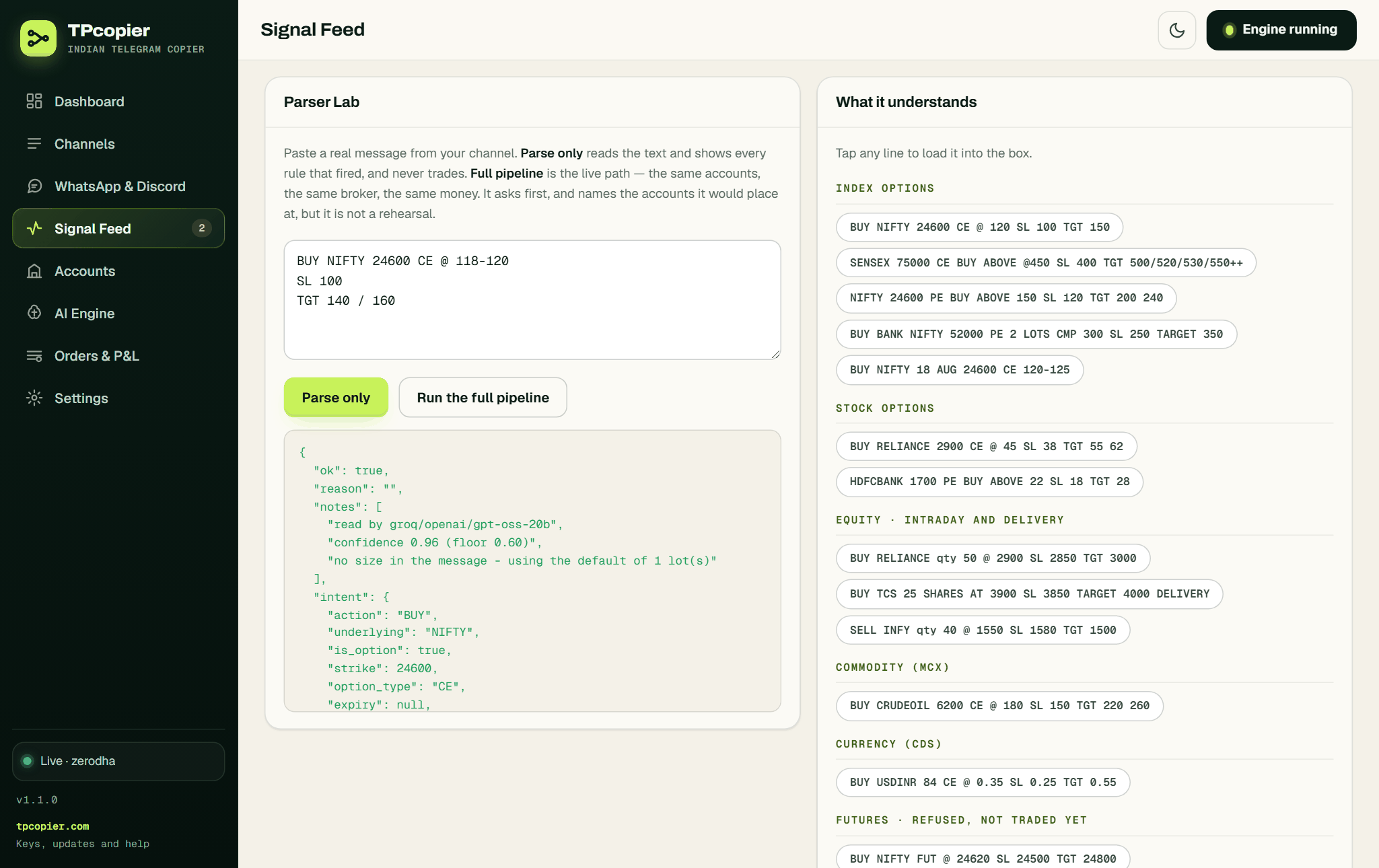 Parse only on an example call: the model, its confidence, the default lot and what it understood, with nothing sent.
A Telegram to Dhan SENSEX call, step by step
Here's the sort of call a SENSEX channel posts. It's an example, not a real signal:
SENSEX 82300 PE BUY ABOVE 275
SL 240
TGT 320/360
The model reads a buy of SENSEX 82300 PE, entry 275, stop 240, targets 320 and 360. SENSEX strikes move in 100s, so 82300 passes the app's check. Then the Dhan part begins:
- Security id and segment. Dhan names nothing by symbol. Every order carries a numeric security id plus a segment, and SENSEX options live in
BSE_FNO. The app reads both from Dhan's own scrip master, looking columns up by name. If Dhan ever changes that file's format, the app refuses to guess. - Price. The post names 275, so the order goes as a LIMIT at 275.
- Product. Intraday goes as INTRADAY. For delivery or carry, an option goes as MARGIN and an NSE share as CNC.
- Stops. The app uses Dhan's own words, STOP_LOSS and STOP_LOSS_MARKET. It places a stop only after the entry fills, and only once you've switched on Send the stop loss as a real order.
- Reference. Each order carries a correlation id of up to 25 characters that starts with
telebridge.
Dhan allows one quote request a second. So for trailing stops, the app asks for every price in a single call, grouped by segment.
Big orders and the freeze quantity
Dhan refuses a single F&O order above the exchange freeze quantity. It also offers a slicing address that splits such an order into legal pieces. The app uses that address only after Dhan has refused the whole order for that reason. It never retries after a timeout, because the first order may already sit at the exchange. When the split works, the journal adds "over the exchange freeze quantity, so Dhan split it".
Rejected, even with an order id
Dhan can answer "200 OK" with an order id and a status of REJECTED. So the app doesn't trust the id alone. REJECTED, CANCELLED and EXPIRED all count as failures, and the journal shows "Dhan refused the order" with Dhan's reason. That matters most for stops, since a rejected stop never counts as protection.
The nine DH codes, in plain words
Dhan answers errors with a code, and the app adds the meaning in brackets:
| Code | What the app tells you |
|---|---|
| DH-901 | The access token is invalid or has expired - make a new one and paste it on Accounts |
| DH-902 | This token may not do that - check API access and the segments enabled on the account |
| DH-903 | The Dhan account itself is blocked or not activated for trading |
| DH-904 | Dhan is rate limiting this account; it clears by itself in a second |
| DH-905 | Dhan refused the values in the request |
| DH-906 | Dhan refused the order itself - margin, price band, or a contract not tradable now |
| DH-907 | Dhan could not serve market data for this instrument |
| DH-908 | Dhan had an internal error; nothing was wrong with the request |
| DH-909 | Dhan could not be reached |
DH-904 and DH-901 ask opposite things of you. The first means wait a second, while the second means paste a new token, and that difference is why the app spells them out.
Calls from WhatsApp and Discord
This app reads Telegram channels only. Its WhatsApp and Discord relay was removed on 22 October 2026, so a tipster who posts only in a WhatsApp group or a Discord channel can't be copied to Dhan. WhatsApp to Dhan lists the routes that do work.
Limits worth knowing
A new account starts on Paper trading, so nothing reaches Dhan until you switch it to real. A futures call never reaches Dhan either, because the Signal Feed shows "futures are not supported yet" instead. What it does trade is options and NSE cash equity, plus MCX or currency options where Dhan lists them. It works only while your PC runs, between 09:15 and 15:15 by default.
FAQ
Is Telegram to Dhan copying allowed?
The orders go through DhanHQ, Dhan's own API, from a static IP registered to you. That's what SEBI has asked for since 1 April 2026. A copier also stays far below 10 orders a second, where the exchange starts wanting a registered strategy.
How often do I paste a new Dhan token?
Whenever your token expires. Dhan's documentation explains its lifetime, and the app tells you on the Accounts page once Dhan refuses it.
Why does Test the connection show my balance?
The app checks the account by reading your funds from Dhan. A balance in the answer shows that Dhan accepted your token and client id together.
What does DH-904 mean?
Dhan is rate limiting the account, so it didn't answer that call. It clears by itself within a second, and your token is fine.
What does the Dhan copier cost?
There's a free two-day demo with up to 10 signals a day. The lifetime licence costs $150 once for one computer, and sales are final. See pricing before you buy, since the figure can change.
Try one channel first
Take the free demo, add your Dhan account and watch one channel with the account switched off. When the Signal Feed reads every call the way you would, switch on with a small share and a low daily cap. That's a calm start to Telegram to Dhan copying. Signals from charts? Read TradingView to Dhan. For a broker that logs itself in, see Telegram to Angel One.
Risk warning: trading options and shares carries a high risk of losing money and is not suitable for everyone. Nothing here is investment advice.